
• After 15+ years, we've made a big change: Android Forums is now Early Bird Club. Learn more here.

Clear your Cache!

Thanks. I'm already enjoying the experience and look forward to learning more about my device and chillin with ya'll!
Glad you are having fun with us! :)

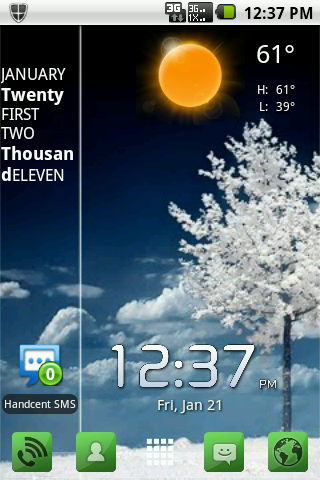
Here's a shot of my latest desktop:

whitetreescreenshot1.png


I created a new thread where we can share our desktop screenshots:

http://androidforums.com/huawei-ascend/263144-share-your-huawei-ascend-desktop.html
 
What's wrong with task killer's.. I'm new to the Android thing but I thought they killed running apps in the background so your phone would run faster and free up space... PLEASE HELP
 
Recreated with the help of my friends here in this thread! Thank you all for your contributions!

Clearing your Cache

Clearing the cache on your Android is a necessary thing to keep it running fast and smoothly. Just as it is with your PC, so it is with your phone.

When your phone gets cluttered with temporary files it will lag and perform poorly. Simply clearing the cache can free up space and eliminate lag.

There are several ways to do this and some depend on if your phone is rooted or not.

Normally, on an unrooted Android, you can go to Applications and sort by size and then clear the cache of all that need clearing, e.g.: Photo Album, browser, the market, etc. It is also helpful to clear your call history now and then - Click phone, menu, call history, menu and delete all.

If you keep your cache clear it will also help to alleviate a lot of the problems you experience that make you think your phone is malfunctioning.

There are some also some very good Cache Cleaners available at The Market.

For rooted users Cache Mate for Root (attribute: KOLIO) has been highly recommended. I can concur with that! It's available free at the Market.

Also, Cache Cleaner NG (attribute: ROB281) has been said to work well in conjunction with Cache Mate. This is also only for rooted phones and is free at the market.

It has also been suggested (attribute: NY11725) that disabling Wallpaper Scrolling can create an increase in home screen speed: go to menu/preferences/appearance settings, disable wallpaper scrolling.

outstanding. Also to add to the mix launcher pro is also a good canvas for better performance and as like you mention disable the wallpaper scrolling. You will find it to run very smooth.
 
when i so to menu,settings,sd card & phone storage then software upgrade, i can tap on upgrade via sd card...1, should i do this and 2, what does this mean, what kind of an upgrade is this and how often should i check for upgrade by doing this....i am a tool when it comes to stuff like this i am used to the plan old simple phones of just pressing numbers to dial a person...lol
 
when i so to menu,settings,sd card & phone storage then software upgrade, i can tap on upgrade via sd card...1, should i do this and 2, what does this mean, what kind of an upgrade is this and how often should i check for upgrade by doing this....i am a tool when it comes to stuff like this i am used to the plan old simple phones of just pressing numbers to dial a person...lol

No you do not want to do that now. There is no upgrade yet. When Froyo 2.2 is released there will be plenty of support here to help you upgrade your phone.

No worries! If you go to - settings - about phone - online update - it will tell you your phone is up to date.

Because it is...

:)
 
i just perm. rooted my ascend and installed cache cleaner NG, i instantly noticed my phone is snappier! it scrolls smoothly without sticking and when i added a app shortcut to my homescreen the app list loaded instantly, i used to have to wait 30 secs for it to load
 
The reason why we use cache cleaners, task killers, and whatever, has to do with saving the battery. Someone should make a post on just powersaving, I'm not good at that, I hope someone will make one.
 
I think the less your phone has to work, (running programs, loaded apps, even if they're not loaded,cache filled), the less electricity your battery will use. And don't forget about the heat factor, that will diminish any battery.
 
Yep Reg! Totally agree. This is why I don't even use a battery defender, antivirus....nothing that is going to slow me down or is too invasive.

I don't want anything working unless I WANT it working!

I'm the same with my computer. When I turn it on the ONLY thing that comes on is my antivirus and it's the least invasive one I could find.

;)
 
I wonder if the froyo update will make the ascend run more efficiently? Will the memory management be better?
 
Everything (just about) will be better. But you can only expect so much as it wasn't built to perform like a Samsung Fascinate or Nexus S...regardless of the OS. The hardware is still the same.

But it will be much better. :)
 
The ascend is not a bad phone for the price,(coming from a tracfone). This is my first "good phone", and in the month and a half that I've had it, I'm impressed. Technology has advanced so far since my first 'homebuilt" computer, but the biggest roadblock is powersaving. Too many things that are on, for any reason, when they should'nt be (running, loaded, or visible) waste power. I am with everybody else when it comes to running processes, don't! I want a phone that can run all day on a single charge, regardless what I do, but that's a pipe dream right now. the only prob that I have with my phone is battery life, and there should be a forum dedicated to just that. Is there anybody that can start one, I could use some purely technical advice, too many apps for a problem that the os should handle better.
 
We can start a thread called How to conserve the Battery - Huawei Ascend.

Even the manual has a lot of very good tips that I think most just ignore.

I'll get to work on some things to add. Do you want to create the thread?
 
I think, that I turned my tracfone on five times since I got the ascend, used it for half a day one time, and it's still showing that the battery's full, I want my ascend to get at least 10 hrs, regardless how I use it (another pipe dream). I heard something about a 3000mh battery that the ascend can use somewhere else, I would get one in a second, and put tape on the back, I'm that serious!
 
Not really good at the social thing, this is about most I ever did, but i see that there are some bright people here that can take up the cause. That NY guy seems to have good answers, and joser too.
 
I've learned everything about computers on my own, even delved into the registry, and eradicated some pesky malware, that the antivirus apps couldn't get rid of, and learned different distros of linux. This is a new challenge to me, and I must learn, this is how I learn. By listening to others who already know.
 
rooted with z4, using titanium backup, superuser, juicedefender free, app freezer for root,cache mate for root users, juiceplotter, and netqin antivirus. as you can see, I love tools. I have all of these in a GoLauncher folder. I need to get a fast 16gb micro sd now.
 
Back
Top Bottom