• After 15+ years, we've made a big change: Android Forums is now Early Bird Club. Learn more here.

Root CM9 / MIUI Alphas (updated 03/20)

i have a full list of things i have found hroark..if youd like me to post it?


only if they are issues in alpha 2

i am uploading the MIUI alpa 2 now


be specific, and explain how I can re-produce the problems

and If you have installed any tweak scripts or mods that change the the way the ROM works, I am not interested in the issues
 
Its popping up encryption unsuccessful n I did a wipe of factory n dalvik n cache n it still says it.please help
 
havent dl alpha 2 yett..soon as i get home from work..these were just normal observations from alpha 1..no tweaks or mods..i tried adding a few scripts to alpha 1..hoping they would help with the overall jitters of the rom..but they didnt so i deleted them from init.d
 
When i try to download CM9 alpha 2 i get sent to a page that says "oppps" after I click the "download" box/button.
It worked fine this morning on my Prevail.
And the MIUI alpha 2 link works fine.
 
Hi im new here... but the answer to that is you need to have an sd EXT for it to work. i don't know if someone already posted that thats the problem.


hmm. I did not know that


I will need to test this

thank you
 
When i try to download CM9 alpha 2 i get sent to a page that says "oppps" after I click the "download" box/button.
It worked fine this morning on my Prevail.
And the MIUI alpha 2 link works fine.


its working for me on 2 different computers

maybe try a different browser
 
okay, the glitching on cm9 could be fixed.. atleast i fixed it on my prevail... steps:

enable z ram at 18 % default

allow purging of assets
enable surface dithering
and enable 16bit transparency...

the little flickering that remained went away completely ..
 
okay, the glitching on cm9 could be fixed.. atleast i fixed it on my prevail... steps:

enable z ram at 18 % default

allow purging of assets
enable surface dithering
and enable 16bit transparency...

the little flickering that remained went away completely ..

it didn't help mine at all, may even be worse.
 
Hi im new here... but the answer to that is you need to have an sd EXT for it to work. i dont know if someone already posted that thats the problem.


Oh and by the way, welcome to Android Forums

I am glad to see that your first post on this forum, is one that provides helpful info for people
 
Hroark is this legit?


i pretty much took the service.jar file from the frameworks and uploaded it to that site. i just flashed it on my phone and it didnt boot loop or have any bad side effects...

when i firt ran the v6 turbo charger i got alot of errros but after applying the patch it when through. if you where to run the script without this patch , it will stay stuck on the android splash screen. before the installation i had about 4 mb of true free space, and after i have 75 tmb true .

ics wont load values from a prop file, but the other services SHOULD still work ex; 3g sc nitro lag null, bulletproof apps, etcc..

im still fiddleing with this but so far im loading everything and all seems to be running fine.

th OOM fixes is cwm flashable... trust.. i wouldnt have posted it if it had messed my phone up./... im having a hard time trying to find the launcher through the script itself... i see it show up but when i try to verify the vr00M or z00M stcik it wont show upp..
 
i pretty much took the service.jar file from the frameworks and uploaded it to that site. i just flashed it on my phone and it didnt boot loop or have any bad side effects...

when i firt ran the v6 turbo charger i got alot of errros but after applying the patch it when through. if you where to run the script without this patch , it will stay stuck on the android splash screen. before the installation i had about 4 mb of true free space, and after i have 75 tmb true .

ics wont load values from a prop file, but the other services SHOULD still work ex; 3g sc nitro lag null, bulletproof apps, etcc..

im still fiddleing with this but so far im loading everything and all seems to be running fine.

th OOM fixes is cwm flashable... trust.. i wouldnt have posted it if it had messed my phone up./... im having a hard time trying to find the launcher through the script itself... i see it show up but when i try to verify the vr00M or z00M stcik it wont show upp..

You need to fix the .zip then because it is set up like...
flash.zip -> framework -> services.jar
instead of...
flash.zip -> system -> framework -> services.jar
unless its set up like above (^) it wont work
 
Did that work to load the rom up without a problem?

Tested it and yes it's the only way to load up CM9 without a problem. Prior to that I never partitioned my SD-card. It basically gives that "encryption unsuccessful" error messasge screen if you don't. The phone will attempt to do a factory reset(to fix the encryption), but the system will just reset. I had to go into CWM and partition my SD card(which went fine). Didn't mind it wiping everything since I already copied my latest backup to my PC. After it does an initial setup, it loads up fine.
 
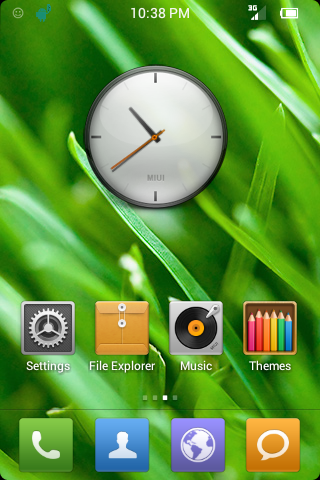
MIUIv4PrevailAlpha2b.zip

added some missing MIUI apps and files
removed a few useless files
couple of build.prop edits
replaced keyboard with one from cm9
fixed the built in superuser
themes chooser should work now i think
optimized some files
switched the host file to block ad's
fixed some random stuff that was still hdpi
probably some other stuff i can't remember

MIUIalpha2b.png
 
MIUIv4PrevailAlpha2b.zip

added some missing MIUI apps and files
removed a few useless files
couple of build.prop edits
replaced keyboard with one from cm9
fixed the built in superuser
themes chooser should work now i think
optimized some files
switched the host file to block ad's
fixed some random stuff that was still hdpi
probably some other stuff i can't remember

nice, thanks Blood,

I will add a link in the OP
 
Hello, I've been following your work and installed the CM9 alpha. Signed up just to tell you this, I managed to fix the broken "home" key.
1. Get ES explorer or root explorer
2. Modify the generic.kl in /system/usr/keylayout
3. It has an typo at button 102: the MOVE_HOME should just say HOME
4. Reboot and you're good to go. :)
 
Hello, I've been following your work and installed the CM9 alpha. Signed up just to tell you this, I managed to fix the broken "home" key.
1. Get ES explorer or root explorer
2. Modify the generic.kl in /system/usr/keylayout
3. It has an typo at button 102: the MOVE_HOME should just say HOME
4. Reboot and you're good to go. :)

thank you so much

this should apply to the CM9 and MIUI

i will make an update file for this
 
Hello, I've been following your work and installed the CM9 alpha. Signed up just to tell you this, I managed to fix the broken "home" key.
1. Get ES explorer or root explorer
2. Modify the generic.kl in /system/usr/keylayout
3. It has an typo at button 102: the MOVE_HOME should just say HOME
4. Reboot and you're good to go. :)


Welcome to Android Forums
 
Back
Top Bottom