• After 15+ years, we've made a big change: Android Forums is now Early Bird Club. Learn more here.

Root Fission 2.1 final

Hey guys, could someone try realHDMI out and see if it works? Also, i assume the droid 2 gallery will apply just fine if we want the blur gallery, but obviously no HDMI out option there...lack of HDMI is the only thing preventing me from switching to fission.
 
Yeah, they look all white still.....but you can change them. I changed them to look like the ApeX settings icons, but I was getting force close issues...I am going to see if I can figure it out later on today when I get home.

Right now I have a mixture of Kang, ApeX, and a third theme....I can't remember which right now.

I can post it if you guys want to try it out....it's working pretty good for me so far.
http://androidforums.com/1883646-post28.html
may help?
 
From Angdroid at XDA:
Just a note to people who have donated in the past...

You guys should be getting Fission 2.2.1 RC1 tomorrow or Wednesday. Please look at first post for more info.
 
Any idea how to get BackupAssistance working again. I only have 2 contacts showing up.

I copied this files to system/app and rebooted and nothing:

BackupAssistanceClient.apk
BackupAssistanceClient.odex
BuaContactAdapter.apk
BuaContactAdapter.odex


Any idea how to get BackupAssistance working again. I only have 2 contacts showing up.

I copied this files to system/app and rebooted and nothing:

BackupAssistanceClient.apk
BackupAssistanceClient.odex
BuaContactAdapter.apk
BuaContactAdapter.odex


Did you change the permissions? You may not need the odex files but I'm not 100% sure on that.
 
Lol. I guess it was a mistake to use the additional charging .pngs. Everyone uses 6 but I just HAD to be fancy and put 20 of them in. :rolleyes:

Now that everyone's implementing the 10% hack, my method isn't really needed any more. Nevertheless, I'll condense and simplify the instructions in case someone needs it.

I still use your method, it's more accurate visually at least since there are more .pngs.

battery charge pngs 0,5,10,15,20,30,40,50,60,70,80,90,100 and charge pngs anim0 through anim20.


man, i love it!....maybe you can fix that white pop up menu bar....(its been whooping my arse....)....
love the battery icon!:)

What white pop menu bar is that? You mean the "Settings" menu?
 
Gosh with all you guys talking about this ROM, I may just have to try it!

I know blur is removed (cool deal). But is there any way at all that I can use the stock Droid X keyboard with this ROM?

So the install instructions are on XDA forums yes?

Thanks!
 
Gosh with all you guys talking about this ROM, I may just have to try it!

I know blur is removed (cool deal). But is there any way at all that I can use the stock Droid X keyboard with this ROM?

So the install instructions are on XDA forums yes?

Thanks!

There is a add on "fission" folder that will be on your sdcard after you do the install and the stock DX keyboard is in there. You just install like any zip using recovery, just be sure to press "mount system" prior to installing the keyboard.

I followed the install instructions that are on the site where you get the download from which is HERE.
 
Are there any different colored icons for the circle battery besides these white ones? Or even better, I would love to see a dark gray out black bar theme.
 
Are there any different colored icons for the circle battery besides these white ones? Or even better, I would love to see a dark gray out black bar theme.

I took the battery icons and opened one in photoshop but the quality went to crap. I dunno what happened. I went ahead and changed it to a cyan color and put it on my phone hoping the smaller image might look better but it didn't. If anyone has any ideas LMK.
 
Are there any different colored icons for the circle battery besides these white ones? Or even better, I would love to see a dark gray out black bar theme.

I took the battery icons and opened one in photoshop but the quality went to crap. I dunno what happened. I went ahead and changed it to a cyan color and put it on my phone hoping the smaller image might look better but it didn't. If anyone has any ideas LMK.


There is a site that you can use to create your own icons, I'll find it and post a link.

Edit: HERE is a link to a post on xda about the circle icons, there are a lot of them there and the link to the site to create your own is on the first page.
 
Are there any different colored icons for the circle battery besides these white ones? Or even better, I would love to see a dark gray out black bar theme.

If you go to droidpirate.com they have a bunch of batt icons and all sorts of other notification icons and goodies
 
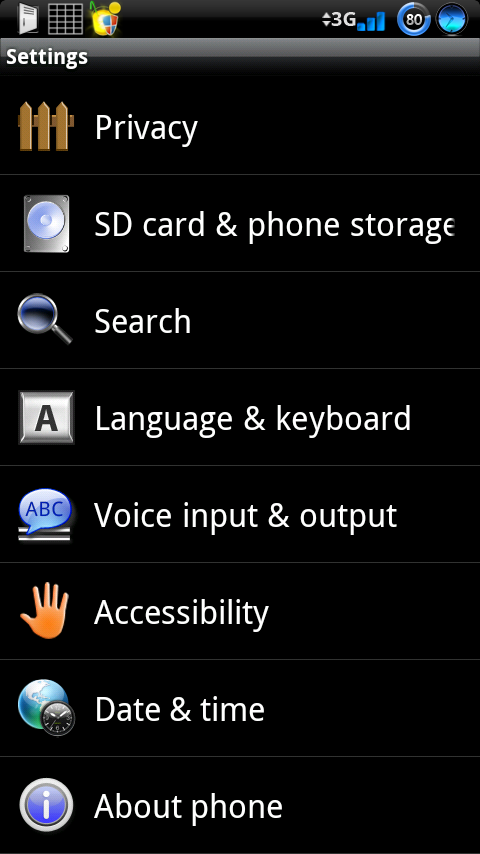
I finally had time today to get settings working without force closing on me (There's a couple of green icons though; I will see if I can find some blue ones, or maybe modify the pngs, haven't decided yet, because it might take too long.....unless someone has a blue cogwheel png they can pass on to me :p). The power control widget looks nice too.
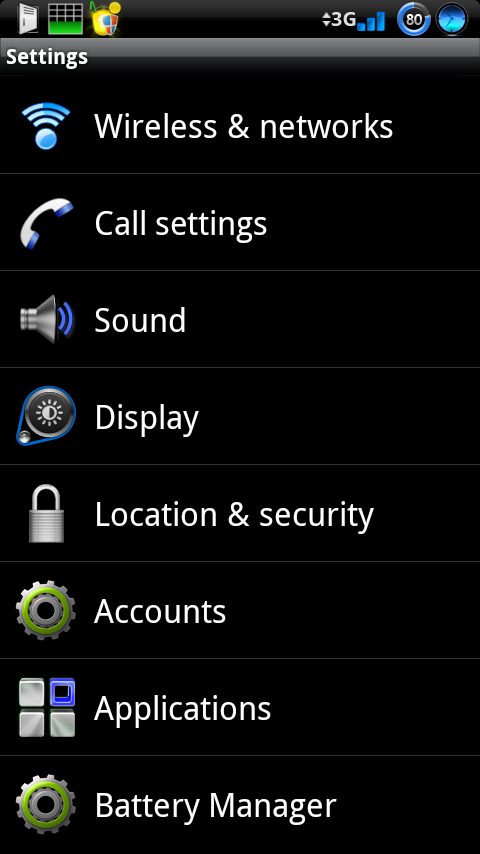
snap20101116_130821.png


snap20101116_130832.png


snap20101116_131142.png
 
Hey guys,

Got it installed today! Running sweet so far, but still installing apps and tweaking as I go.

Question:

I would like to have a black status bar, and also get a black themed sms/sms gui if you will. I don't care for the white and aqua colored threads.

What theme could I install with this ROM to accomplish this?

Thanks!

P.S. Also, do I need to use Autokiller with this ROM? Or does it have memory management built in?
 
The Fission Blackout theme will give you a black status bar and black sms gui. I don't think there is any memory management built in, I don't see any at least.
 
The Fission Blackout theme will give you a black status bar and black sms gui. I don't think there is any memory management built in, I don't see any at least.

Thanks again you are the man!

OK will Google the The Fission Blackout theme. I'm hoping it does not change the lock sliders.

I will install AutoKiller and will post back if I have any negative effects.
 
Thanks again you are the man!

OK will Google the The Fission Blackout theme. I'm hoping it does not change the lock sliders.

I will install AutoKiller and will post back if I have any negative effects.


HERE ya go...download the Current Version and be sure to press mount system before installing...and the lock slide will stay the same.
 
Thanks again you are the man!

OK will Google the The Fission Blackout theme. I'm hoping it does not change the lock sliders.

I will install AutoKiller and will post back if I have any negative effects.

i am running autokiller on aggressive with no problems.
also if you want the circle battery mod on the blackout theme here is preview3 with the battery mod.
CirBatModDX_BlackOut3_1.zip
 

Attachments

  • CAP201011161944.jpg
    CAP201011161944.jpg
    237.6 KB · Views: 73
It took me a few hours to find some decent pngs to replace some of the settings' pngs with, but here it is now, I think I am ok with it now.

snap20101116_170146.png


snap20101116_170155.png
 
Back
Top Bottom