
• After 15+ years, we've made a big change: Android Forums is now Early Bird Club. Learn more here.

Root GB OTA has started if you are rooted stock please read this

I did the following:
Rooted with revolutionary
Downloaded zip to root of sd card
Got into clockwork and make backup
Wipe data/cache/dalvik
Apply zip from sd
Goes thru the loading process
When finished I choose reboot phone
Has been hanging at splash screen anywhere from 15 -30 minutes on three different tries.
 
reading thru the rootz thread,you may well NEED to format /system since this is just a stock rom. looks like several are having the same prollem,one person he just donwnloaded from somewhere else.

i would try what you did above,and this time look for an option to wipe or format /system in clockwork,in addition to wiping data/cache/dalvik. they are also saying it takes a long time to boot,so id keep giving it at least the 15 minutes you have been.

if it still hangs after a /system wipe,we might need to try and find another download.
 
Im sorry guys im not tech savy, i think im n kinda the same boat, i rooted with revoery last weekend n i guess n the middle of the night the OTA cam thru, so now my screen is at the triangle with the blue android man, i wiped the dalvic and the cache but iam totally lost now n dont want to ruin my phone.
 
reading thru the rootz thread,you may well NEED to format /system since this is just a stock rom. looks like several are having the same prollem,one person he just donwnloaded from somewhere else.

i would try what you did above,and this time look for an option to wipe or format /system in clockwork,in addition to wiping data/cache/dalvik. they are also saying it takes a long time to boot,so id keep giving it at least the 15 minutes you have been.

if it still hangs after a /system wipe,we might need to try and find another download.


Format system did the trick. Worked perfectly. Thanks again for all the help!
 
Hey guys,

Thanks for the info. I'm still having issues though. Here's what I did:

- Revolutionary rooted a few weeks ago.
- Got the OTA a 4AM last night which put me into a reboot loop. I found Yeahha's other post on clearing cache that saved me from that. Thanks!
- Today I followed scotty85's instructions and flashed my recovery with 2.11.605.3. Everything's great.
- I tried the OTA again and I get about 20% through and get the triangle ! image.
- I can remove the battery and boot up but I've done this three times now and no love.

Any ideas?

Thanks,
Marc
 
Hey guys,

Thanks for the info. I'm still having issues though. Here's what I did:

- Revolutionary rooted a few weeks ago.
- Got the OTA a 4AM last night which put me into a reboot loop. I found Yeahha's other post on clearing cache that saved me from that. Thanks!
- Today I followed scotty85's instructions and flashed my recovery with 2.11.605.3. Everything's great.
- I tried the OTA again and I get about 20% through and get the triangle ! image.
- I can remove the battery and boot up but I've done this three times now and no love.

Any ideas?

Thanks,
Marc
wiping the caches unfortunately wiped the update from your phones memory. you can go to settings/manage apps/all/updater and clear data. maybe that will jumpstart the download again. if not,you may just have to wait it out,or flash the rom in recovery(see post#36)
I followed the instructions now I get a whole bunch of endless forced closes.
What did I do wrong?

what instructions?

if you flashed a stock recovery and accepted the OTA,then you may be getting FCs on things that require root access. youll have to flash a custom recovery,then flash superuser again for things to work

if you mean you flashed the rooted rom,then it could be a bad download,or you dint wipe correctly.

more info on what you did and what is FCing may help us help you
 
Many Thanks for assisting all of us noobs. I spent 4 hours sifting through loads of older junk before finding this one. All the while, I was rebooting and trying everything under the sun to get my TB to stop rebooting itself 20 sec after booting. It was trying to install the OTA, which resulted in an !-Triangle error... I am using Revolutionary, and installed the 1 zip you recommended that matched my firmware. Boom... it worked. The OTA erased almost all apps and lost all my email so far... Hopping google sync will recover them after I get accounts set back up. I still need to re-root.

Now, for the difficult part... Those of you trying to do this during a 20 sec boot-up: You must turn on Disk Drive under Settings/Connect-To-PC/Default-Connection-Type... Then reboot TB and plug in the usb just after it boots up, so that you can copy the Zip file to the root directory of the TB's OS, and NOT to the Images disk drive that also hooks in Windows Explorer.

I suspect that I have pulled the battery and booted no less than 100 times today. A hard lesson to learn, even for a patient person... The only real thing that I did to prevent the OTA from hanging during install was to flash the zip related to my firmware above.

GL All!
 
thanks for sharing your experineces. sounds like another good reason to have a card reader around ;)

you could place the sd card into a card reader,then into the pc. place the recovery PG05IMG onto it. pop it into the TB,flash the recovery,then select fastboot,then power off with the volume rocker and power button. put the sd back into the cardreader to remove PG05IMG.

what im really curious about,is why the OTA erased your data. :confused: typically an OTA does NOT do this,wich is the one and only reason ive thrown out the "put stock recovery back and let it OTA" option. if losing data was common place,id be strongly reccomending to just flash the rom in recovery.
ive personally OTAed a few times with the revolutionary hboot,and not ever had it erase any data. earlier today i finally got my phone to accept the GB ota,and again,it worked just fine,all my apps and data intact.

a friend got the OTA last week on her stock,unrooted TB and had the same thing happen. doesnt bring your data back,but might make you feel a lil better that it likely had nothing to do with the fact that you were rooted.
 
Hi Scotty,

A coworker wants to root his TB and since I have more experience with this, I'm helping him. Is there a root method if he updates to GB first?
 
I'm not Scotty but revolutionary works on the GB OTA if he hasn't already I would suggest getting the upgrade before rooting to avoid any issues
 
wiping the caches unfortunately wiped the update from your phones memory. you can go to settings/manage apps/all/updater and clear data. maybe that will jumpstart the download again. if not,you may just have to wait it out,or flash the rom in recovery(see post#36)

I have no problem getting the update to start. My issue is that it never finishes. I can go to Setting > Software update and hit Check new and it will run. The OTA downloads every time, reboots, and then hangs at about 20% on the progress meter and I get the red triangle ! in the middle of my screen. I've probably tried it half a dozen times now...
 
I have no problem getting the update to start. My issue is that it never finishes. I can go to Setting > Software update and hit Check new and it will run. The OTA downloads every time, reboots, and then hangs at about 20% on the progress meter and I get the red triangle ! in the middle of my screen. I've probably tried it half a dozen times now...

when you check it,it jumps to a screen that may look like its downloading the firmware,but its not... its just prepairing itself to flash. the rom its expecting to be there is missing,so it fails.

if you are 100% sure that it is actually re-downloading each time you check new,then im not sure what the prollem could be... as long as you matched the recovery to the firmware youre running,it should not be a prollem.

are you downloading the update in wifi,3g or 4g? maybe make sure youre in a strong data(id want to be in 4g,its a big file) or strong wifi signal. set your phone to sleep never while it downloads,and refrain from doing other things while its downloading.

could be youre just not getting a complete,or somehow corrupt download?

did you try clearing the data as i suggested?

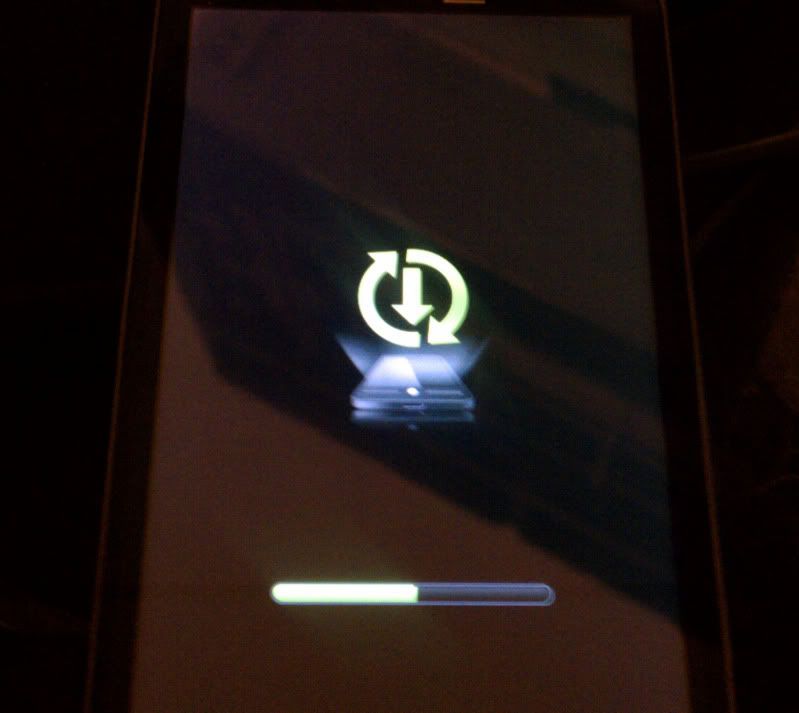
edit: the screen below,is not downloading,its getting ready to flash. if its failing here,it prolly is because your previous download is gone from the phones memory.

IMAG0021.jpg
 
Hi Scotty,

A coworker wants to root his TB and since I have more experience with this, I'm helping him. Is there a root method if he updates to GB first?

sorry bro,i forgot to reply to this,dint mean to ignore ya :o

as yeahha said,revolutionary works fine with 1.04.0000 and 1.05.0000 hboots,and if he wants to just run rooted stock software,i agree completely let it OTA first for least amount of headache.

give me a holler if you got any other TB questions :D
 
when you check it,it jumps to a screen that may look like its downloading the firmware,but its not... its just prepairing itself to flash. the rom its expecting to be there is missing,so it fails.

if you are 100% sure that it is actually re-downloading each time you check new,then im not sure what the prollem could be... as long as you matched the recovery to the firmware youre running,it should not be a prollem.

are you downloading the update in wifi,3g or 4g? maybe make sure youre in a strong data(id want to be in 4g,its a big file) or strong wifi signal. set your phone to sleep never while it downloads,and refrain from doing other things while its downloading.

I get to the screen you posted and then get the red triangle !. I have to pull the battery to reset.

I'm sure it's downloading something prior to rebooting into the update screen you posted. It always downloads over the cell radio, although I'm always on wifi when I try. I've never seen a VZW update or even check over anything but their network.

I was thinking maybe if I could flash my old recovery image over again maybe it would do something. I have no reason to believe that it's any different from the stock image you posted but, at this point I'm grasping at straws. Does CWM back this up when you do a ROM backup? If so I might try to restore that as I have backups from before I rooted.

Thanks again for all your help.

Oh, I did try clearing the updater as you suggested. No effect.
 
heres how mine just updated:
1)notification. box poped up,new software available,blah blah. will start automatically in: x:xx (why people are getting it that dont appeove it :eek: )
2)after it times out,or you select ok,it downloads. you see progress in the status bar/pull down.
3)another box pops up asking to apply,with another timeout,explaining you cant make calls,etc.
4)hit ok or time out,the phone powers off after a couple minutes. it comes back on in the screen i pictured.
5)green bar goes all the way across. phone goes into a mode like the one pictured,but with no green status bar(i believe this is actually flashing the new firmware)
6) after a few minutes,it powers off,then back on,and powers up into no OS.

i still believe that your update is failing because you have cleared the caches,and the phone is not redownloading the firmware. reinstalling clockwork will not do anyting for you,accept dangerously loop if it happens when youre not watching.

you need to somehow trick the phone into thinking the update hasnt been downloaded yet,so it will re-download.im not sure how to do this. maybe making yourseld up a PG05IMG with nothing but the system and boot images,and flashing that would re-set everything while preserving your data.

unless we can figure out how to make the phone re-download the OTA,i think your best option is to just re-install clockwork,and flash the rom in recovery in the first post as yeahha reccomends. it will be an inconvenience to have to reset up yuor data,but its prolly the safest and fastest way. not to mention that from what weve seen,the OTA may wipe your data anyway :eek:
 
heres how mine just updated:
1)notification. box poped up,new software available,blah blah. will start automatically in: x:xx (why people are getting it that dont appeove it :eek: )
2)after it times out,or you select ok,it downloads. you see progress in the status bar/pull down.
3)another box pops up asking to apply,with another timeout,explaining you cant make calls,etc.
4)hit ok or time out,the phone powers off after a couple minutes. it comes back on in the screen i pictured.
5)green bar goes all the way across. phone goes into a mode like the one pictured,but with no green status bar(i believe this is actually flashing the new firmware)
6) after a few minutes,it powers off,then back on,and powers up into no OS.

I'm getting to step 5 but the green bar is only going about 20% and then I get the error screen.

Your theory makes sense. I'm sure it's downloading something though.

I'm starting to think that CM7 or Liquid is looking like a good option... :D
 
just wondering guys , if i install this update from the sd card through the rom manager will it work just as good ?

thanks ,
daniel
 
Back
Top Bottom