• After 15+ years, we've made a big change: Android Forums is now Early Bird Club. Learn more here.

Root [GUIDE] Change the CARRIER text

V SuperUser V

Android Expert
This Guide will show those who would like to and still have the Carrier text on the pull down notification bar where usually our service provider's name is (MetroPCS) how to change it.

-Download and unzip the eri.zip.(http://dl.dropbox.com/u/51753039/eri.zip)
-Open the eri.xml with Notepad++ (Notepad++ Home)
-Ctrl + f your text here.
-Replace all three with your text. Make sure all three of you texts are EXACTLY the same and do not use any symbols.
<EriFile VersionNumber="1357" NumberOfEriEntries="3" EriFileType="1">

<CallPromptId Id="0" CallPromptText="CallPromptId0"/>

<CallPromptId Id="1" CallPromptText="CallPromptId1"/>

<CallPromptId Id="2" CallPromptText="CallPromptId2"/>

<EriInfo RoamingIndicator="1" IconIndex="1" IconMode="0" EriText="your text here" CallPromptId="0" AlertId="0" /><EriInfo RoamingIndicator="99" IconIndex="1" IconMode="0" EriText="your text here" CallPromptId="0" AlertId="0" /><EriInfo RoamingIndicator="123" IconIndex="1" IconMode="0" EriText="your text here" CallPromptId="0" AlertId="0" />
</EriFile>
-Save and Exit
-Push the eri.xml inside /data/
-Reboot and done.:cool:

This is what it could look like
screenshot-1333938859805.png


Would you like to learn how to change text that shows on your lock screen? By popular demand i will release a "small" guide showing how to do this as well.
 
This Guide will show those who would like to how to change the Carrier text on the pull down notification bar where usually our service provider's name is (MetroPCS)

-Download and unzip the eri.zip.(http://dl.dropbox.com/u/51753039/eri.zip)
-Open the eri.xml with Notepad++ (Notepad++ Home)
-Ctrl + f your text here.
-Replace all three with your text. Make sure all three of you texts are EXACTLY the same and do not use any symbols.
-Save and Exit
-Push the eri.xml inside /data/
-Reboot and done.:cool:

This is what it could look like
screenshot-1333938859805.png


Would you like to learn how to change text that shows on your lock screen? Pm me for a private tutorial :p. I respect Devs' work so i won't make a guide about it.

This is cool.

or..

You can use Broken Out 1.1 by mtmichaelson and get rid of that bar altogether. It's so much better without anything there since it gives more room for notifications. I have Juice Defender and SetCPU profiles running all the time, so the extra real estate is great.
 
This is cool.

or..

You can use Broken Out 1.1 by mtmichaelson and get rid of that bar altogether. It's so much better without anything there since it gives more room for notifications. I have Juice Defender and SetCPU profiles running all the time, so the extra real estate is great.

True, i will update the OP stating this applies to those who still have the bar with the Carrier banner/text :cool:
 
This Guide will show those who would like to and still have the Carrier text on the pull down notification bar where usually our service provider's name is (MetroPCS) how to change it.

-Download and unzip the eri.zip.(http://dl.dropbox.com/u/51753039/eri.zip)
-Open the eri.xml with Notepad++ (Notepad++ Home)
-Ctrl + f your text here.
-Replace all three with your text. Make sure all three of you texts are EXACTLY the same and do not use any symbols.
-Save and Exit
-Push the eri.xml inside /data/
-Reboot and done.:cool:

This is what it could look like
screenshot-1333938859805.png


Would you like to learn how to change text that shows on your lock screen? Pm me for a private tutorial :p. I respect Devs' work so i won't make a guide about it.


Nice work dude.

Im glad you are taking part in my motto "Give back as much as you take".

If we didn't have people like us and the Dev's we wouldn't have any of the cool shit we do for our phone. Keep it up dude :D
 
This Guide will show those who would like to and still have the Carrier text on the pull down notification bar where usually our service provider's name is (MetroPCS) how to change it.

-Download and unzip the eri.zip.(http://dl.dropbox.com/u/51753039/eri.zip)
-Open the eri.xml with Notepad++ (Notepad++ Home)
-Ctrl + f your text here.
-Replace all three with your text. Make sure all three of you texts are EXACTLY the same and do not use any symbols.
-Save and Exit
-Push the eri.xml inside /data/
-Reboot and done.:cool:

This is what it could look like
screenshot-1333938859805.png


Would you like to learn how to change text that shows on your lock screen? Pm me for a private tutorial :p. I respect Devs' work so i won't make a guide about it.

What launcher are you using in your screenshot?
 
This Guide will show those who would like to and still have the Carrier text on the pull down notification bar where usually our service provider's name is (MetroPCS) how to change it.

-Download and unzip the eri.zip.(http://dl.dropbox.com/u/51753039/eri.zip)
-Open the eri.xml with Notepad++ (Notepad++ Home)
-Ctrl + f your text here.
-Replace all three with your text. Make sure all three of you texts are EXACTLY the same and do not use any symbols.
-Save and Exit
-Push the eri.xml inside /data/
-Reboot and done.:cool:

This is what it could look like
screenshot-1333938859805.png


Would you like to learn how to change text that shows on your lock screen? By popular demand i will release a "small" guide showing how to do this as well.

when you say Push the eri.xml inside /data/ do you use root explorer??

i have to try this
 
im dont really know what andriod commander is... and in root explorer i cannot find the the location of the file can you tell me if you know
 
I made a post with everything you need about Android commander. It might be on the 2nd page.

A must have tool for anyone that is looking to get into playing around with system files or any files for that matter, inside your phone.


Here it is.

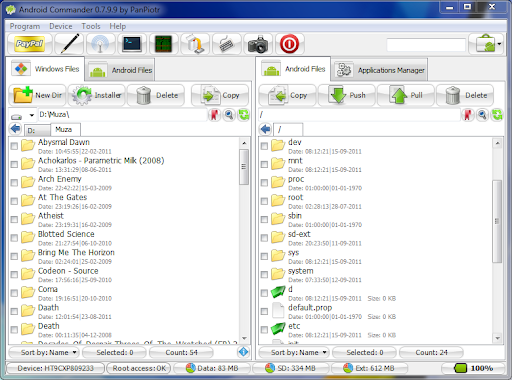
I'm sure this has been posted before and I'm sure a lot of people on here know about this program. But I wanted to bring it back up again for all the "NEW" people here because I think this is an AMAZING program that does it's job and does it well.

I never really got much into the push/pull method of transferring files until this weekend. I've been trying to implement the "stock" lock screen into ICK-GSE. I didn't think it would be nearly as bad as it was BUT I finally got everything working right and it's all because of this program.

Basically this program allows you to control your system files from your computer instead of your phone. Thus making it easier to transfer files that are more than likely on your PC to begin with and doing so all in one place. I also learned that PUSH/PULL is MUCH EASIER than creating a zip, transferring it to your SD, booting into recovery, installing it and then rebooting only to find it isn't right. That shit got old quick BUT that's all I knew. I didn't know about the PUSH/PULL method really and what I could do with it.

So that's why I'm sharing this even though I'm sure it's been brought up a million times before, I've never noticed anything about it in my short time here though. By doing so, maybe someone can learn this method of transferring and switching out system files instead of the other way. And using this program makes it SO much easier.

Android Commander

1.PNG


Another reason why I'm sharing this is because I've learned a wealth of knowledge this weekend just by editing the lock screen for that theme. I learned what files are in the framework.res, systemui, REScapp..., etc.....and what each apk does and it's purpose it serves in the operation of the phone. I feel very privledged to have learned everything I have this weekend from which I feel like I've gained a much greater insight as to how a phone works and the different ways of modding it.


***(Like I said I'm sure it's been posted before but being that I personally haven't seen anything about in my time I here, I felt I should post it up again for the NEWER people that might not know about it. So please keep your negative "REPOST" comments to yourself. I've gained a HUGE WEALTH of knowledge and I want others to do the same)***


*Sent from your moms house.*

*Sent from your moms house.*
 
The moment you open root explorer youll see a data folder, drop it in there

still not poping up then again there wasn't any txt there to begain with maybe cuz it was remove ? i'm using broken out 1.1 ldk ick broken out..

then again no big deal tks anyway :p
 
still not poping up then again there wasn't any txt there to begain with maybe cuz it was remove ? i'm using broken out 1.1 ldk ick broken out..

then again no big deal tks anyway :p

I don't understand exactly what you're saying but from what i can gather you're looking for a text file inside /data but there won't be any. You're the one that needs to drop the eri.xml in it
 
Back
Top Bottom