

carmendiva
Android Expert
post #5 explains it
http://androidforums.com/187889-post5.html
ooh thanks and seems complicated.
Follow along with the video below to see how to install our site as a web app on your home screen.
Note: This feature may not be available in some browsers.
post #5 explains it
http://androidforums.com/187889-post5.html

ooh thanks and seems complicated.

a little off topic, but...
@twynn373 are you drinking out of cups?

It isn't really. The simple steps that apply to most users:
- Download the Android SDK here: Android SDK | Android Developers
- Run 'SDK Setup.exe' and install the Android 1.5 package and USB driver package
- Enable USB Debugging on your phone: Settings > Applications > Development
- Run ddms.bat in the /tools/ directory of the Android SDK with your phone plugged in
- Select your phone from the list on the top left of the window
- Go to Device > Screen Capture to capture and save screen shots
The biggest part to this is the install of the Android 1.5 and USB driver packages. That can take some time.
yeah looks more complicated then it really is in my opinion

davros... are u using lockbot pro as your lockscreen??

a little off topic, but...
@twynn373 are you drinking out of cups?


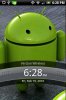 It's the stock home screen. I was sick of the lag created by Sense.
 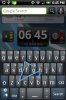 Swype is awesome.
yeah looks more complicated then it really is in my opinion

Its not simple if you have Windows 7 ... I run Windows 7 64-bit and it isnt supported ... it is currently impossible for me to take a screen shot.
I have Windows 7 64-bit, and was able to get it to work. Make sure you update your JDK to the Windows 7 64-bit version.
Java SE Downloads - Sun Developer Network (SDN)
Thanks man ... I got ddms open for the first time. Only problem now is that my phone doesnt show up
Did you use the USB driver that was downloaded to install the USB driver in Windows Device Manager?


Lock Screen
From far left to far right:
Calendar
Often used apps
Settings
Home
Contacts/Web
Bookmarks
Music/Video

how did you get the picture of your little boy(Adorable) as the picture on your lock screen?

Settings--> Personalize--> Lockscreen Wallpaper


got one of those for Ohio State

Sorry, I havent had a lot of time to do graphics ... got it done now though ...


Thetomlin~which Calendar are you using? I love how it displays the next few events...

It really is easy.
I should also clarify that the time part I was talking about is just waiting for the download and install. Not anything a user has to actually do.