
• After 15+ years, we've made a big change: Android Forums is now Early Bird Club. Learn more here.

Root [MOD] Apex V1.4 Circle Battery

ECFfighter7232

Android Expert
I plan on putting together a couple different ones for apex 1.4 and post them all into this one thread.

First one I have (because it was the first one asked for) is Green
it changes to yellow and red below 40%
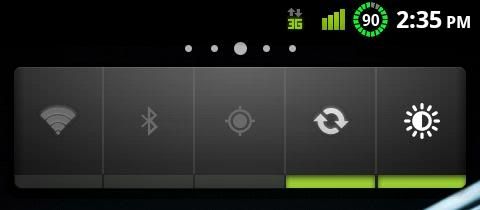
CAP201102151435.jpg


Second one for those who would like it.
100%-80% is Blue
70%-60% is Green
50%-40% is Yellow
30%-20% is Orange
15%-0% is Red

You can get it HERE
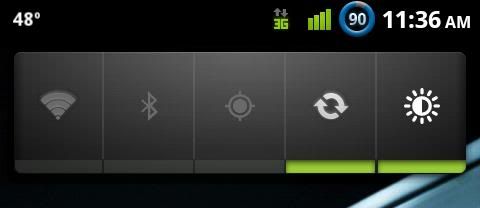
CAP201102161136.jpg


MAKE A BACKUP FIRST
install through bootstrap like normal
 
This is going to sound nitpicky, but are those images editable? I'd like to make the green match the rest of the green items. Maybe I need to look into some tutorials on how to make these icons. I'm a stickler for consistency. Thanks for the post!
 
This is going to sound nitpicky, but are those images editable? I'd like to make the green match the rest of the green items. Maybe I need to look into some tutorials on how to make these icons. I'm a stickler for consistency. Thanks for the post!
Beat me to the question, glad you sounded like the nitpicker and not me :)
 
This is going to sound nitpicky, but are those images editable? I'd like to make the green match the rest of the green items. Maybe I need to look into some tutorials on how to make these icons. I'm a stickler for consistency. Thanks for the post!


Yes they are...as those files are .png format...

You can edit the colors using PS or any other software
 
Beat me to the question, glad you sounded like the nitpicker and not me :)

Trust me... my nitpickiness is DEFINITELY a problem. I'd like to figure out a way to make everything orange but that's probably biting off more than I can chew. If / when I figure it out I'll be sure to post an updated set of images.
 
Yes they are...as those files are .png format...

You can edit the colors using PS or any other software

Am I missing something because I downloaded the .zip and I don't see any PNGs in there. I'm comfortable with the editing part if I could just find the source files. Thanks in advance for the info!
 
yes they are editable. youd have to use 7zip (or a similar program) for extracting them.
yes the green is different, I just put this out for people today, but I will be working on colors
 
Am I missing something because I downloaded the .zip and I don't see any PNGs in there. I'm comfortable with the editing part if I could just find the source files. Thanks in advance for the info!


You need to open the file using zip or rar then look for the folder, framerwork, res. etc

:D I done this but to change my 3G to 4G :o
 
yes they are editable. youd have to use 7zip (or a similar program) for extracting them.
yes the green is different, I just put this out for people today, but I will be working on colors

OK, I see the framework-res.apk in the .zip file you've uploaded. I'm guessing the images are in there somewhere? And, I'm not knocking you for the green being a different color, I'm just excited to get something like this in place of the standard icon. Your post is VERY much appreciated!

EDIT:
I think I'm onto something. I changed the extension of the .apk to .zip and I can now navigate through the files. Hopefully they'll be easy to find as there are a lot of directories in here.
 
OK, I see the framework-res.apk in the .zip file you've uploaded. I'm guessing the images are in there somewhere? And, I'm not knocking you for the green being a different color, I'm just excited to get something like this in place of the standard icon. Your post is VERY much appreciated!

oh, no your fine. these images are not mine. they were used in the revo theme from apex 1.3.1. i just moved them into the new framework.
and yeah if you use 7zip to open my zip and double click on framework-res.apk then go to drawable-hdpi
 
battery_scheme.png


I just came up with these. What do you guys think? I'm going to try and get them into the OP's file shortly to see how they work out.
 
Will applying this mod change the services.jar file, specifically the Data Throttling files? Or should I reapply the Data Throttling hack after applying this mod, just to be safe?
 
Here's a screenshot of the battery icons I just made in action. Thanks again to all who contributed to this thread. I'm scared of what I'll find myself trying next.

Hey man. Can you patch it up into a zip for us to install? I really like what you've done. I wanna put that on mine!
 
here's a screenshot of the battery icons i just made in action. Thanks again to all who contributed to this thread. I'm scared of what i'll find myself trying next.


welcome to the matrix!! :d

now you are one of us and there is not way back....
 
This is going to sound nitpicky, but are those images editable? I'd like to make the green match the rest of the green items. Maybe I need to look into some tutorials on how to make these icons. I'm a stickler for consistency. Thanks for the post!

For someone who is "nitpicky", doesn't the fact that the circular icons don't accurately reflect the percentage of charge left bother you? The images for 80, 90, and 100% are all the same, as are the 60, and 70% icons. :p
 
For someone who is "nitpicky", doesn't the fact that the circular icons don't accurately reflect the percentage of charge left bother you? The images for 80, 90, and 100% are all the same, as are the 60, and 70% icons. :p

What can I say... I made them quickly. I can revise them if you like. It's definitely not "accurate" but it gets the job done. I get where you're coming from though. I'll see what I can do about it. :D

EDIT: Actually, you just gave me an idea. More to come later.
 
I think it is fine as long as the number changes, but really to each their own.

I wish I was better at modifying images.
 
What can I say... I made them quickly. I can revise them if you like. It's definitely not "accurate" but it gets the job done. I get where you're coming from though. I'll see what I can do about it. :D

Everyone likes those circles, I am wondering what an octagon would look like...

You could just take away 1/8 of the circle, etc. That seems to be what most people do.

But it is always nice to have choices.
 
Back
Top Bottom