• After 15+ years, we've made a big change: Android Forums is now Early Bird Club. Learn more here.

Root [MOD] CWM touch 6.0.1.1 Install

So I just opened up Rom Manger and got a window prompt on the main screen talking about how touch was available for my phone now. Havent seen this prompt until now and I dont think ive installed a RM update.

So Im flashing the previous 5.0.2.8 build and then Im going to flash the touch 6.0.1.1 through ROM manager to see if its actually working now.

Let yall know.


Failed. again. Wrote them a message on FB but from the looks of it they DONT answer nobody on there. Dont know of any other ways to contact them.
 
So I just opened up Rom Manger and got a window prompt on the main screen talking about how touch was available for my phone now. Havent seen this prompt until now and I dont think ive installed a RM update.QUOTE]

its funny that you said that because it said the same thing to me . then when i rebooted after i flashed it. went back to RM and it said a recovery isnt available for my device yet . lol weirdd.
 
So im testing a theory.

i think backups made with 6.1 WONT work with 5.0.2.8

Ill report back cause this could be crucial info.
 
OOOO SO SESSSIII .! lol just installed it the Fuzz way. no problems here. doin a nice little backup now. no more disabling or enabling back button thingy. works great .!
 
As far as i know backups made with touch can't be restored using 5.0.2.8. Which is what everybody had before touch. Goona double check this but I'm pretty sure. Vice versa works though.
 
Hey guys. ROM manger sent out an update yesterday. Does some one wanna see if touch will install normal now through ROM manager?


If you have touch installed now flash the old one first at the top, choose lg esteem and then flash touch.
 
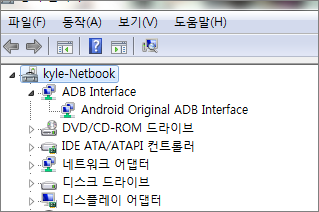
For those who have trouble with installing CWM from the computer, make sure you have 'good' connection between PC and Phone.

Open up Device Manager and make sure there's no unknown device or warning sign.


cwm_install01.PNG


This is a bad example from my PC. My Lg Esteem is shown as unknown device.

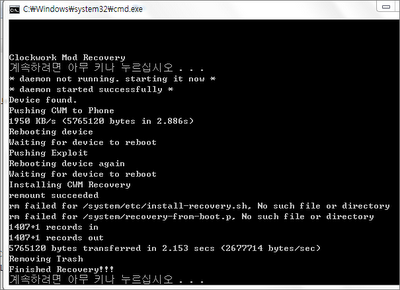
CWM installing will fail or hang after '* daemon started successfully *' message.


cwm_install04.PNG


cwm_install05.PNG


This is good example from my netbook (eh... my netbook has Korean Windows...)

As you can see there's no unknown device or warning sign on Device Manager. It's all clean connection PC recognized the phone correctly.


There are multiple causes on bad connection so try combination of below to clear device setting.


1) PC Driver Issues

  • Download/update latest USB driver
  • Download/update latest Chipset Driver

2) Phone Driver Issues

  • Download correct LG Modem Driver
  • Make sure you have internet connection mode on instead of Charge Mode or Mass Storage Mode
  • Try to turn on/off USB Debugging
  • Reboot phone
  • Try to use original/different usb cable


cwm_install03.PNG


Once you have correct connection, CWM install will be done in a minute. There should be no hang during install.
Are you asian? 2nd time ive seen asian letters on your screenshots, just wondering :D
 
To hell with the extra details, give me the option of performance lol :D


hahaha.

Also, you can't use backups made from newer versions with older versions because of this, I think. It does some type of cleaning or something. Not entirely sure and the people from ROM Manager and CWM are hard to get a hold of and wont answer anything on facebook.
 
ok, so installed cwm touch 6.0.1.1,
deleted the blobs folder,
did a backup,
took 23 minutes,
did another backup and it froze at 'freeing space',
pulled the battery at the 25min mark (i thought 2nd backups and forth were quicker, 3mins fuzzy? lol),
manually booted into recovery,
went to 'backup and restore' and under 'delete' i found that even though it had froze at 'freeing space' it did do a backup,
went back and change the default backup format to 'tar' (which is like a normal back up due to its size 600mb+)
backed up again,
it took under 4 mins.

long story short (<--really?) i dont know what the......is going on, i will leave it alone for now, i dont even do backups that often anyway. the .nomedia file disappeared o.O, i dont know what i did, its just gone (yes, i did deleted before, but came back after each reboot) now its simply gone.

 
ok, so installed cwm touch 6.0.1.1,
deleted the blobs folder,
did a backup,
took 23 minutes,
did another backup and it froze at 'freeing space',
pulled the battery at the 25min mark (i thought 2nd backups and forth were quicker, 3mins fuzzy? lol),
manually booted into recovery,
went to 'backup and restore' and under 'delete' i found that even though it had froze at 'freeing space' it did do a backup,
went back and change the default backup format to 'tar' (which is like a normal back up due to its size 600mb+)
backed up again,
it took under 4 mins.

long story short (<--really?) i dont know what the......is going on, i will leave it alone for now, i dont even do backups that often anyway. the .nomedia file disappeared o.O, i dont know what i did, its just gone (yes, i did deleted before, but came back after each reboot) now its simply gone.


23 minutes to do a backup? no freaking way. lol Wow.
 
Yes, I am a Korean :)

Cool I like that we have all type of people in here from all over the world I might have to message u one day to learn how to say my name in Korean and make fun of fuzzy without him knowing what I'm saying :D
 
Cool I like that we have all type of people in here from all over the world I might have to message u one day to learn how to say my name in Korean and make fun of fuzzy without him knowing what I'm saying :D

Until i Google translate your ass. Haha
 
Back
Top Bottom