
Install the app
How to install the app on iOS
Follow along with the video below to see how to install our site as a web app on your home screen.
Note: This feature may not be available in some browsers.
-
After 15+ years, we've made a big change: Android Forums is now Early Bird Club. Learn more here.
You are using an out of date browser. It may not display this or other websites correctly.
You should upgrade or use an alternative browser.
You should upgrade or use an alternative browser.
Root please someone help me
- Thread starter junebogey
- Start date
-
- Tags
- htc evo 4g

Try running it a couple more times. Sometimes it doesn't work on the first shot.
Ill report back tomorrow. Is the wimax code still there or is it truly missing the RSA KEY?
Not sure. For one, if your backup was corrupt, I can see it causing a problem, BUT you said it didn't include the wimax partition, so I can't see how it would have touched it. From the output in the terminal emulator, everything looks ok. I think the wimax key checker is confused for some reason. If you have time, my suggestion would be to make a nandroid backup of what you've got now (include wimax this time), then wipe data, cache, and dalvik, and flash a stock ROM. What is your current baseband radio version?
Not sure. For one, if your backup was corrupt, I can see it causing a problem, BUT you said it didn't include the wimax partition, so I can't see how it would have touched it. From the output in the terminal emulator, everything looks ok. I think the wimax key checker is confused for some reason. If you have time, my suggestion would be to make a nandroid backup of what you've got now (include wimax this time), then wipe data, cache, and dalvik, and flash a stock ROM. What is your current baseband radio version?
current baseband radio
2.15.00.11.19
Okay. Make a nandroid backup of your current ROM (including wimax), wipe all data, and flash this ROM. Once you do that, check for your wimax keys again and test 4g.
I give up

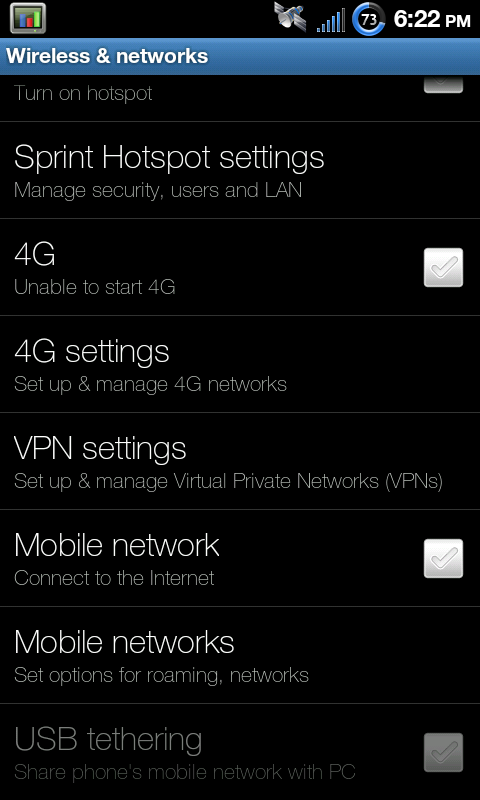
Have you tried running wimax_mtd a few more times? There are other ways to get your current mac, but it's kind of a pain. Basically, I want to see if the mac address your phone reports is the same as what it says under the battery. That will cause problems, too. It's just odd that the key checker says you don't have your keys, when the terminal show what it should. Could be that checking through the terminal isn't the best way to check. I just don't know what method the key checker uses.
Yea I'm unsure of how it checks also, but it seems correct. I might just have to get a new phone or wait for a key fix. I'm unsure of what you mean by wimax_mtdHave you tried running wimax_mtd a few more times? There are other ways to get your current mac, but it's kind of a pain. Basically, I want to see if the mac address your phone reports is the same as what it says under the battery. That will cause problems, too. It's just odd that the key checker says you don't have your keys, when the terminal show what it should. Could be that checking through the terminal isn't the best way to check. I just don't know what method the key checker uses.
http://androidforums.com/2305805-post24.html  . I just want to see if you can get the MAC address your phone thinks is correct and match it with what is under the battery. Did you ever try on another ROM?
. I just want to see if you can get the MAC address your phone thinks is correct and match it with what is under the battery. Did you ever try on another ROM?http://androidforums.com/2305805-post24.html
Yea I tried 3 other roms Fresh, Stock, Sprint lovers

What is your hboot version? There is some stuff you can do through fastboot, but it will require the eng bootloader, which you might or might not be able to get. Of course, if you have lost your keys, there is nothing we can do, but I suspect something else might be going on.
WTF I dunno whats up. I went to dinner with a friend and I had 4gWhat is your hboot version? There is some stuff you can do through fastboot, but it will require the eng bootloader, which you might or might not be able to get. Of course, if you have lost your keys, there is nothing we can do, but I suspect something else might be going on.


evomattnc
Android Expert
Everyone losing their keys is making me paranoid lol. stop losing your keys people you are making me more cautious and worrisome.
So i have cw 2.5.0.7, apparently this isnt backing up my wimax? I however have only made one back up with 2.5.0.7. I started with 3.0.0.something and have 3 back ups from that version. I switched because of the whole amend scripting thing and not being able to flash some roms i wanted to try with 3.0.0.5.
So as I understand it, if something were to happen i could not fix it by flashing back to my latest made on 2.5.0.7, i would have to flash back to one that was made with 3.0.0.5?
So i have cw 2.5.0.7, apparently this isnt backing up my wimax? I however have only made one back up with 2.5.0.7. I started with 3.0.0.something and have 3 back ups from that version. I switched because of the whole amend scripting thing and not being able to flash some roms i wanted to try with 3.0.0.5.
So as I understand it, if something were to happen i could not fix it by flashing back to my latest made on 2.5.0.7, i would have to flash back to one that was made with 3.0.0.5?
Everyone losing their keys is making me paranoid lol. stop losing your keys people you are making me more cautious and worrisome.
So i have cw 2.5.0.7, apparently this isnt backing up my wimax? I however have only made one back up with 2.5.0.7. I started with 3.0.0.something and have 3 back ups from that version. I switched because of the whole amend scripting thing and not being able to flash some roms i wanted to try with 3.0.0.5.
So as I understand it, if something were to happen i could not fix it by flashing back to my latest made on 2.5.0.7, i would have to flash back to one that was made with 3.0.0.5?
Lol, there's nothing wrong with being more cautious. You should always be careful. You are correct that CW 2.5.0.x does not backup wimax. It's a deprecated version, in fact. To use the most updated CW that supports both amend and edify AND backs up your wimax keys, you must use CW 2.6.0.1. You can update via PC36IMG.zip or from ROM Manager (which should still have it available). You are correct, though, that if you lost your wimax keys, you'd have to restore a backup made in a CW version that backed up wimax. What you would *not* want to do is restore a backup made in 2.5.0.x in 2.6.0.1 or 3.0.0.5. Avoid any more issues, and update to 2.6.0.1.
evomattnc
Android Expert
Lol, there's nothing wrong with being more cautious. You should always be careful. You are correct that CW 2.5.0.x does not backup wimax. It's a deprecated version, in fact. To use the most updated CW that supports both amend and edify AND backs up your wimax keys, you must use CW 2.6.0.1. You can update via PC36IMG.zip or from ROM Manager (which should still have it available). You are correct, though, that if you lost your wimax keys, you'd have to restore a backup made in a CW version that backed up wimax. What you would *not* want to do is restore a backup made in 2.5.0.x in 2.6.0.1 or 3.0.0.5. Avoid any more issues, and update to 2.6.0.1.
Rom manager does not offer 2.6.0.1 any longer, only 2.5.0.7 and 3.0.0.1-5. Where can i get the PC36IMG to flash 2.6.0.1?
Edit: Well the .zip file with cw 2.6.0.1, i would name it PC36IMG.zip myself...
Edit 2: lol can i just click on your signature? is that what that is?

your welcome,
for me i never used rom manager. i do everything manually. i like amon ra personally. just remember if you use it to have at least one backup with wimax keys just in case you loose those somehow. otherwise they would be lost for good.
for me i never used rom manager. i do everything manually. i like amon ra personally. just remember if you use it to have at least one backup with wimax keys just in case you loose those somehow. otherwise they would be lost for good.