• After 15+ years, we've made a big change: Android Forums is now Early Bird Club. Learn more here.

Help Possible Battery Fix from HTC

I wish my phone was originally set to GSM Auto PRL so I could feel like I did something to improve battery life :D. But I did flash to the Fresh 0.2 ROM and am trying that one on for size. Seems super clean and fast, and best of all I don't have all the nasty bloatware anymore. This is what having an open source phone is all about....

 
Looking at what appeared to be using up my power, it seems as if there was a constant data connection. Not entirely sure why, but when I disabled Mobile Network, my power didn't drop like it had before. I also had a lot of awake time.

I went into the Friendstream program and disabled the syncing for Peep and Facebook for HTC Sense. Friendstream>Menu>Settings>Accounts & Sync>Facebook and I disabled Sync Live Feed, Sync Contacts, and I changed my Sync Frequency to once per day. Then I went back to Twitter and disabled Sync Peep, Sync Friend, and changed the Update Schedule in Account Settings>Send & Receive.

Even with these changes, I am able to use Friendstream to post status updates to Facebook and Twitter, but I cannot view the actual Friendstream anymore. No big deal for me.

I'll have to give it a day or two to see if that was my issue, but I think it's worth noting because since doing that (four hours ago), my battery isn't depleting like mad even with heavy usage.
 
If you disable "Sync Contacts" in Friend Stream, will it still prompt you if there is a potential link for new contacts that you add to "people"? I hope that makes sense what I am asking.
 
Is there an app that assists with auto-connecting to known wifi networks automatically without having to have the radio on at all times? The stock android app connects automatically if I have the wifi radio on, but I feel like if I leave the wifi range it's going to keep seeking other networks thus draining my battery fast. Any input on this? This thread is amazing btw.

Download an app called "Y5 Battery Saver". It will "remember" what WiFi connections you use and turn WiFi on when you are in range and back off when you get out of range. The only time you have to manually turn WiFi on/off is when you are in a new area and want to scan for networks there. For me, it turns WiFi on at home, then off when I leave, then back on when I get to work. Same holds true for a handful of other places I have connected (my buddies' places, a couple restaurants, etc.) Good app.
 
Has anyone tried this??


Last Updated: Jun 09, 2010

Also need to calibrate the battery...
With the phone in the on position.

Fully charge the battery with the phone on... (until the led turns green.)

Once the led turns green, unplug the charger until the led goes off.

After the led goes off, plug the charger back in. When the led turns green , power off the phone.

now.... with the phone fully powered off...

1. Unplug the charger.

2. Wait until led goes off.

3. Plug charger back in until the led turns green. When it turns green, unplug the charger again and go to step 1.

4. repeat steps 1 and 3, 10 times. This may take anywhere from 30 seconds to 30 mins per cycle. Typically only about 1 minute. though.
 
If you disable "Sync Contacts" in Friend Stream, will it still prompt you if there is a potential link for new contacts that you add to "people"? I hope that makes sense what I am asking.

That's an excellent question, and I haven't a clue.

After 12 hours, I had a full charge at 7:30 AM and now, about four hours later, I have 88% battery life, which is much, much better than before!

EDIT: I just added a new Gmail contact, and the Facebook profile was recognized, but he was an existing Facebook friend BEFORE I made him a Gmail contact as well.
 
Download an app called "Y5 Battery Saver". It will "remember" what WiFi connections you use and turn WiFi on when you are in range and back off when you get out of range.

Hey thanks a lot for the recommendation! That program works wonders, and in conjunction with the Fresh 0.2 ROM, I'm getting 18 hrs off my full charge. So much better. And I have everything syncing when I want it to, nothing is turned off. WiFi FTW over 3G whenever possible.
 
Has anyone turned everything off and just let the phone operate as a phone to get a comparison of Evo vs regular phone or other smartphone? Factoring in the extra power draw for the screen, I'd expect Evo compares reasonably well. I had to charge my non-smartphones at least every couple days if I just left them on and had no calls or other use. I had to charge them daily when moderately used, and at least twice a day when heavily used. Evo doesn't seem any different than that.
 
I've read over in the HTC forums that its been suggested to leave your phone plugged in about an hour after the battery light indicator turns green. Some have noticed a difference doing that. I have yet to try it though.

TS
 
I was having issues to where I could not get over 5-1/2hrs on a 100% charge. I tried and did everything! Over a week dealing with this I went to the market a bought SystemPanel (same app in the screen shot above). I started monitoring and discovered the file "com.htc.bgp" was using around 74-100% processor the whole time my phone was awake. After finding out what this file was, it turned out to be an issue with Google Calendar sync hung in the background. The sync icon was not displayed in the notification bar so I never thought it was that. Now I am getting 12+hrs. This app "SystemPanel" the best app I've ever bought for my phone. I highly recommend it.
 
I totally feel ya man! Last night I did some experimenting... and I truly do believe the 3G radio being on all the time drains the hell outta the phone awake or asleep. I connected to my wifi network at home for the whole night (with a full charge) till I woke up at 9am. I had 75% battery left over for my day and it is now 11:09am and I have 56% left. I'm on wifi at work as well. I have all my apps syncing whenever I want them too, Gtalk is running and signed in, and I lowered the screen brightness down to like 20% while I am indoors. I'm not getting excellent battery life still but it's much better then it was when no wifi was on.

Is there an app that assists with auto-connecting to known wifi networks automatically without having to have the radio on at all times? The stock android app connects automatically if I have the wifi radio on, but I feel like if I leave the wifi range it's going to keep seeking other networks thus draining my battery fast. Any input on this? This thread is amazing btw.


The app Y5 will manage your wifi status based on your location and remembered networks.
 
I have unchecked my google talk sign in but whenever i shut down my phone or change scenes and go back to my original screen and check the running services, it's back listed as a running service. i shut it down and the next time, it's back on. I also noticed Sprint Zone also comes back after I shut it down also. It says "started by service" in the "running services" program. My battery. I don't use Google Talk at all but I understand I can't uninstall it from the phone. How can I get it to quit coming back on?
BTW this thread is great, really helpful to us noobes:)

any ideas on this one, guys? Can't seem to find any other info?
 
As far as I know, the only way to keep sprintzone and other pre-installed crap the noone uses is to flash a custom ROM that has the software removed.
 
I just signed up for this forum because I needed to announce that I've resolved MY personal battery crisis and I wanted to explain how.

I got the Evo the day it came out and that was my first smartphone. I'm a techy so I got excited by its potential and immediately downloaded every app that seemed even remotely useful or interesting. I thought nothing of this because I figured that's why you get a phone like this, right? To do everything you ever wanted your computer for, but in your pocket. I then never knew a day that my battery wasn't dying within 8 hours (or less) of standby. I had read this whole forum and many others and tried every trick and they all helped... a little. But not enough to fix the problem.

I got frustrated and decided to factory reset the phone and then go back through and do all these power saving techniques in this forum and NOT download any apps. Now my battery is at 95% and I unplugged it at 9am.

I haven't really used the phone today, but the fact that it can sit there for 8 hours without dying is a miracle. So, just consider that the problem may NOT be with the phone, but rather with the apps you've decided to download.

This may not fix everyone's issue as some people really want specific apps, but I'm going to try to use the bare minimum and download apps on an AS NEEDED basis.


Hope this helps!
-Andrew
 
I thought i would chime in with my battery fix like TheseHandsPlayChords did. I bought the phone a week after it came out and noticed all the battery problems everyone else had. After all the tweaking (turning everything off, dimming backlight, un-syncing, etc) , and is still only managed to get it to about 8-10 hours depending on barely moderate useage usage but far better then the 5 hours i was getting the first couple of days.

So I got a little widget called network switched over to CDMA PRL, then and I think this was the kicker, I TURNED MY PHONE OFF and charged to full. Edit: If you turn the phone off to charge to full and when you unplug the phone, the battery percentage goes down, turn off the phone and charge it until the light is green again. Keep doing this until it stays at 100%.

Anyhoo, I unplugged the phone at like 2am and left it in sleep. right now its about 2:50 where I am and I am currently at 67%. I have an awayke time of 11 hr. 54 min. with an awak time of 1 hr. 20 min. I don't know if thats alot for usage but a large portion of that time was spent on the interenet, i have made several calls and have been texting all afternoon.

If your hesitant about the rooting thing, give the battery charge thing a go.

Edit: I also have background data and GPS on.
 
With the most recent PRL update, is it still necessary to do the CDMA trick after every reboot?

I'm still doing it.. going to networks/manage radio band.. getting the force close.. manually changing to CDMA

is this still necessary?

when i open it up, it does show CDMA.. but after the settings and force close it shows GSM..
 
I downloaded an app called Network. You're able to change to CDMA with just a click. I actually changed it yesterday mid-day and didn't see that much of a change. I did the battery charge thing last night. I will check tomorrow to see if it switched back.
 
Hmmmm interesting....
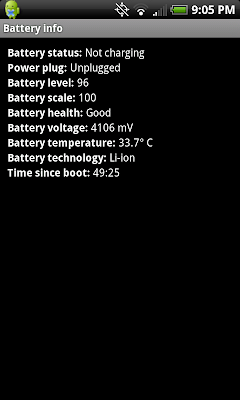
snap20100617_210542.png


So at this rate my battery should last about 15 hours. I'll leave it off the charger tonight and check in the AM.
 
Hopefully you hit that figure. My phone just hit 13% after 16:38 up time and 2:53 awake time. I can't get to the 20, 30, 0r 40+ hours as some of the people on the various forums are getting, but 16+ hours is more then enough for me.
 
Also need to calibrate the battery...
With the phone in the on position.

Fully charge the battery with the phone on... (until the led turns green.)

Once the led turns green, unplug the charger until the led goes off.

After the led goes off, plug the charger back in. When the led turns green , power off the phone.

now.... with the phone fully powered off...

1. Unplug the charger.

2. Wait until led goes off.

3. Plug charger back in until the led turns green. When it turns green, unplug the charger again and go to step 1.

4. repeat steps 1 and 3, 10 times. This may take anywhere from 30 seconds to 30 mins per cycle. Typically only about 1 minute. though.

this part helped me fix the instant 10% battery loss after unplugging!! thanks for this!!!! :cool:
 
Back
Top Bottom