
• After 15+ years, we've made a big change: Android Forums is now Early Bird Club. Learn more here.

Root [Release] Update to Baseband C_01.3E.03P

Fabolous

Superuser
UPDATE - The file can now be found here:

http://mydroidfiles.com/downloads/basebandupdate.zip

OP
-----------------------------
That's right folks,

This was the goodie that I wanted from the OTA update the most, and now, thanks to t3hSteve at Alldroid, it is available to us in update.zip form. Confirmed success with Clockwork recovery, and I have done it as well with SPRecovery 0.99.3b.

You WILL be prompted to reactivate your phone, and also, re-enter your Google password.

Link:

Baseband results anyone? Bueller?

Screenshot:
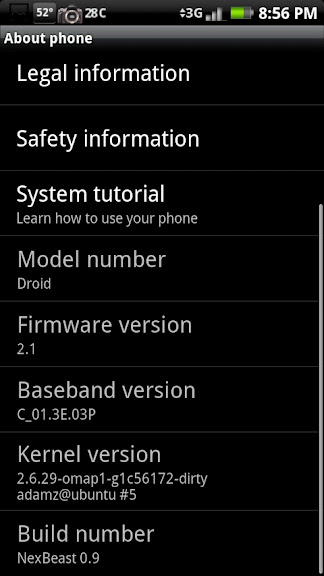
CAP2010033020561.jpg


Additionally, I would suggest you reenter your programming menu (dial ##PROGRAM) to change your vocode to EVRC-B.

The SPC password is 000000
 
what does it do and i am guessing that since it am reactivating my phone i lose all my apps and my home setting
 
what does it do and i am guessing that since it am reactivating my phone i lose all my apps and my home setting

It's a newer radio firmware. Should improve battery life, reception, fewer dropped calls, etc.

YMMV

You need to reactivate with Verizon and re-sign into Google, but you will not lose any apps, settings, contacts, homescreens, etc.
 
first program attempt failed. *got scared*
dialed *228 again and waited...... BAM programed successfully!
*22899 updaed PRL
Signed into google. and good to go. i hope this is a good radio upgrade. :)
 
i have a question, if i was to install another rom, would this still be there or would it be over written?

ROMs don't touch the baseband. It should stay there regardless of which ROM you install.

i think its there no matter what. its an sbf update i hear

It's just an update.zip file, but it modifies the radio firmware, which is something most update.zip's do not.

should CDMA roaming network be set to home only or automatic?

Shouldn't really matter. I have mine set to home only.
 
Saw people on alldroid worried about problems.

Running Cyanogen 5.0.5.4 and flashed this just fine with CW recovery 1.7.8.9
 
so download update.zip file to sd card....reboot into Clockwork and install said zip file from sd card?

so simple even a caveman can do it....;)
 
Boot into Recovery and "install" update.zip (from download link). File will be blocked. Choose "allow," right?

Already ran a backup.
 
worked through clockwork so i should roam less with this you say? have more bars basically?

I don't know the exact changes implemented in this baseband, but users who flashed the ESE53 .sbf have reported better reception, faster call connection, bettery battery life, etc.

Give it a few days and see if you see any improvements from before.

What if one wants to back this out? Possible to revert?

I'm guessing an update.zip could be made for the old baseband as well, but currently, the only way would be by flashing the 2.0.1 .SBF file.
 
I should note that I had already set my Vocode to "EVRC-B" before this and the update set it back to default. So resetting it is mandatory unless you want it back to default.
 
Not seeing any better reception right now. Running DM1.0. Waiting the obligatory 15 minutes after activation and updated roaming capabilities.
 
Not seeing any better reception right now. Running DM1.0. Waiting the obligatory 15 minutes after activation and updated roaming capabilities.

Are you in a bad reception area to begin with?

I usually get like -65dB signal where I live, so I don't think I can get much better than that. I'm just looking for the (hopefully) better battery life.
 
Yes to both. Clockwork does not require you to "allow", while SPRecovery does.

thanks Fab! gonna give this a try....this file can be renamed to anything.zip since I'm installing thru Clockwork recovery ....doesn't have to be update.zip correct?

for some reason I'm always a little antsy about installing anything named "update"..not sure why....:confused:
 
Back
Top Bottom