• After 15+ years, we've made a big change: Android Forums is now Early Bird Club. Learn more here.

Root [ROM]Black Plague w/ Plague kernel

It's a known issue.
I wouldn't bother with BP right now
Its a GREAT rom but a battery sucker.

Try "Number 2 (#2)"
Ive had that and it's great!
No problems whatsoever!

Thanks for the reply. What a shitty ROM to have that always reboots on you? I couldn't find much info on that Number 2 ROM. Do you know where I can see screen shots and the such? Thanks.
 
Thanks for the reply. What a shitty ROM to have that always reboots on you? I couldn't find much info on that Number 2 ROM. Do you know where I can see screen shots and the such? Thanks.


Did u maybe have a bad dl or maybe u didn't wipe data,catch,&davlink be u installed it and re-wipe the catch & davlink again after install. Sometimes u have to let a rom settle in on the phone and it will stop random rebooting so much (at least for me and my phone that's what I had to do) and sometimes it won't, it could just b the phone that doesn't like the rom. Also if u read through this thread or any other thread and or search for ur question using the search bar, u might find the answers to the questions u have sometimes. that way u don't have to post the same question in different threads. Just tring to help u help ur self and save urself some time so u won't always have to wait for a response if ur question has already been asked and answered, u know.
 
Thanks for the reply. What a shitty ROM to have that always reboots on you? I couldn't find much info on that Number 2 ROM. Do you know where I can see screen shots and the such? Thanks.
just because it reboots on your connect doesnt mean its the roms fault. Myself and others have ran it with no real problems other than known bugs like bluetooth.

So please chill with the name calling.. unless you can do better. ;)
 
My wife and I had trouble with the random reboots as well. The problem was that the ROM was overclocked by default. We first used no-frills CPU and that stored the majority of the reboots, but we then found the fix to make the governors stick. When we did that we were able to get the clock back to stock and no more reboots.
Her connect just couldn't handle the overclock.
 
Hi all I am posting pictures of the real dark colored font that needs to be lightened about 30% so we can read it and I am also posting pictures of the sliders that I want to replace with the ones from the stock LG ROM from the LG Connect Stock ROM. If someone could make a zip file that I can use and flash it through CWM that would be absolutely great!

Thanks all!

Hi, I was hoping someone would make a .zip file for each of these things (Dark Font and the Sliders) but no luck yet huh? I have also found a bug. The battery Icon will sometimes change from being vertical to being horizontal. I am trying to catch a screenshot of it so I can post it on here. I have not themed BP or nothing cause ROM Toolbox keeps telling me that it's not Deoxed so I am cautious, that is what fried my "Number Two" ROM (I replaced the boot animations and when I rebooted it got stuck in a loop so I then just went with BP) and then I went to BP ROM. Anyway If someone gets some free time do you think you can do a .zip file for the Font thing and the Answer Phone Sliders? Two .zip files would be the BOMB!

TIA!

Oh yea, the pics are in post # 463
 
i use the broken out rom that comes with the blitzkrieg kernel then just flashed it over to the plague kernel from cwm(just the kernel and not the rom). i think, if i remember right, the rom was made by ldrifta and friends. i highly recommend that rom with PG's kernel and no frills cpu. just make sure you have your apps and settings set up to reduce battery drain. otherwise you both have crappy battery but also overheat problems too. but the way i have it now is amazing.
 
i use the broken out rom that comes with the blitzkrieg kernel then just flashed it over to the plague kernel from cwm(just the kernel and not the rom). i think, if i remember right, the rom was made by ldrifta and friends. i highly recommend that rom with PG's kernel and no frills cpu. just make sure you have your apps and settings set up to reduce battery drain. otherwise you both have crappy battery but also overheat problems too. but the way i have it now is amazing.
BrokenOut and Blitzkrieg are by mtmichealson. ;)

noFrills sux imo. On my wifes Connect we noticed when she installed ADW EX the random rebooting stopped. So everyone with that issue may want to check there launcher out ;)
 
Every time I try to install something of Google store it goes through the green numbers thing and never install anything... what can I do to fix this problem?
 
I still have reboots, tried everything. I have now changed the io to cfg like in post #470.... let's see what happens. If that doesn't work I might go back to version 2 rom and change the launcher to Holo . Has anyone done that? What's the full name of the launcher you were talking about in post #481? Also what is the best way to replace the launcher?
 
Ambox_speedy_deletion.png

DISCLAIMER: This is a MODDED' ROM! Use at YOUR OWN RISK!!! By using this ROM, you understand that that I am not liable for any or all consequences of using this ROM. If you don't know what you're doing, DON'T TRY IT. Use at your own risk!
Here ya go folks, Black Plague is built from ZVA!!! It has been debloated, deodexed, and tweaked for better performance and speed.

  • Version: 1.0
  • Developer: PlayfulGod
  • Description: Modified Stock ROM for the LG Connect 4G

Black Plague w/ Plague Kernel

People to Thank


  • mtmichealson - for his help any time I need it and for code/files and tweaks used.
  • Shinyside - for his themed Mms.apk!
  • XDieAndGoX - for use of his modded Browser.apk.
What doesn't work

What is this?

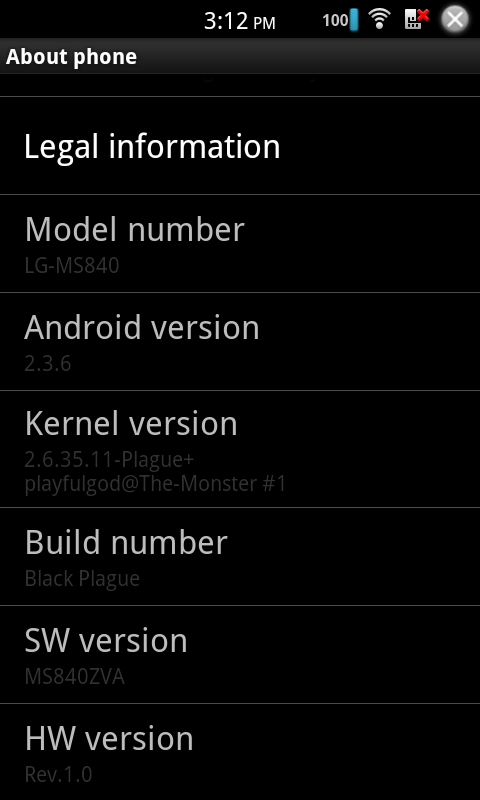
This is a modded stock ROM built both for speed and stability. This ROM is based off of the LG's ZVA update. It is fully deodexed, and debloated.
Changelog


  • v. 1.0 Initial Release
  • Based Off of ZVA Gingerbread
  • Deodexed
  • Zipaligned
  • Debloated
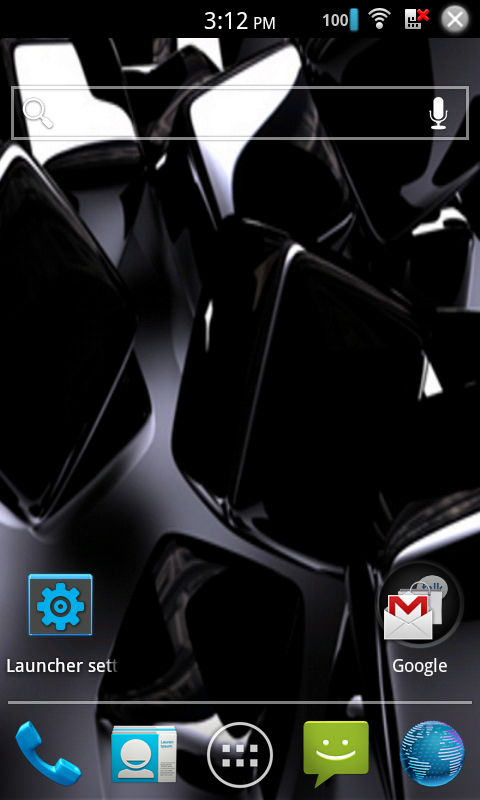
  • Holo Launcher
  • Custom Boot Animation
  • AOSP Lockscreen
  • Accurate Battery Mod
  • Center Clock Mod
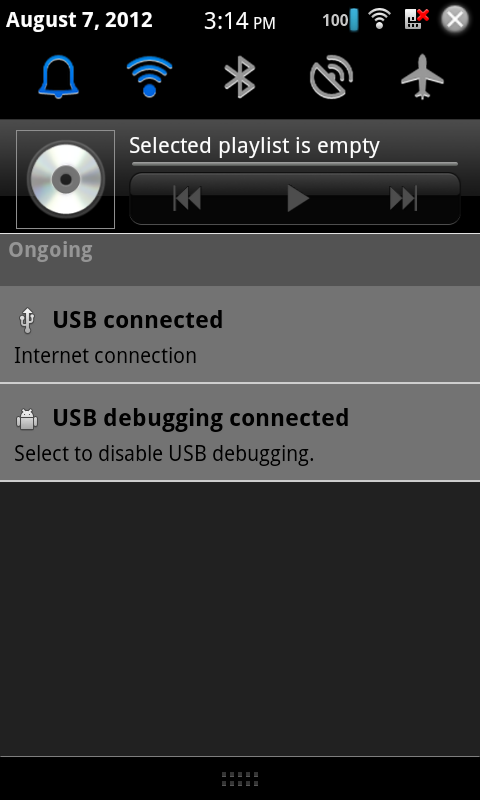
  • Cleaned Up Status Bar
  • Cleaned Up Notification Pull Down
  • Changed Low Battery Pop Up to 1%
  • CRT Screen Shut Off
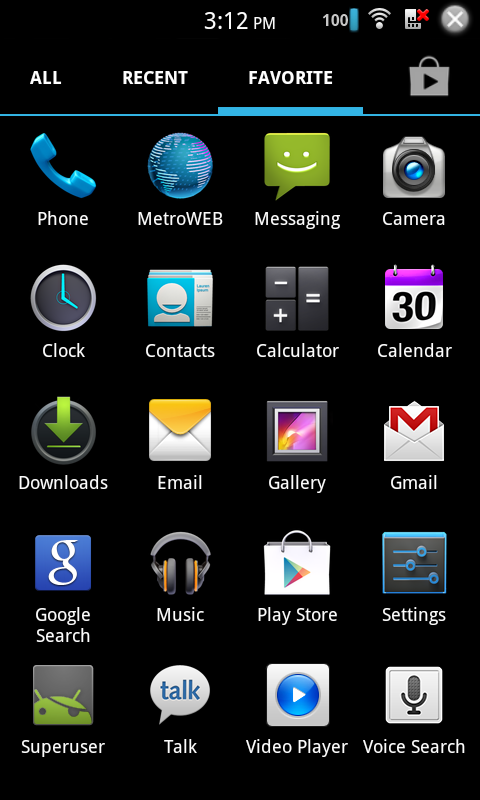
  • Added ICS Style Settings Menu
  • Added ICS statusbar icons
  • Build.prop Tweaks
  • Init.d Tweaks Including Scripts for Setting Governor and CPU Frequencies
  • Loopy Smoothness Tweak
  • Added Sony Bravia Engine
  • Added Xloud Driver
  • Block Ads Host file
  • Added Google Voice
  • Added Terminal Emulator
  • Updated All System Apps Including Google Play
Plague Kernel


  • v. 1.2
  • Overclock CPU to 1.8ghz
  • First Boot is Set at 1.5ghz
  • Undervolted
  • Added Smartass2, Interactive, and Lagfree Governors
  • Added BFQ and VR I/O Schedulers
  • Added SLQB Allocator
  • Changed From JHash2 to JHash3
  • Added ZRAM Swap (To Turn on Use Terminal Emulator Type "su" to Gain Root Access, Then Type "zram enable" )
  • Added CleanCache
  • Added Frontswap
  • Added zcache
  • Added xz Decompressor
  • Included tun.ko
  • Upped Charge Speed
  • Other Memory and Performance Edits
  • Lowered WiFi Voltages
  • I/O Tweaks
  • Audio Tweaks
Screenshots
2012-08-07151429.png
2012-08-07151232.png
2012-08-07151223.png

2012-08-07151201.png


How do I install this?


  1. Download the .zip & copy to phone or sdcard (make sure 4g or wifi is enabled if dl'd from phone).
  2. Zip can be installed from CWM
  3. MAKE A BACKUP
  4. Go to install zip from sdcard
  5. Select zip from sdcard
  6. Select Black-Plague_Connect-signed.zip
  7. Confirm selection
  8. Reboot
  9. Enjoy!!! ;)
Downloads

Black Plague
having some problems with black plague 1.2. love the way it looks and speeded up my phone. but i cant install anything without it rebooting and then saying there was an error and i cant update or install any of my apps. any idea on whats wrong?
 
having some problems with black plague 1.2. love the way it looks and speeded up my phone. but i cant install anything without it rebooting and then saying there was an error and i cant update or install any of my apps. any idea on whats wrong?


I believe if you clear the cache and data on the Play Store app and then restart the phone, the problem should be solved... i think i remember reading that somewhere :p anyways, it wouldnt hurt to try =)
 
I've had an ongoing issue with my phone and the Black Plague ROM... when I'm on my phone and I take the phone away from my ear, the screen will not light back up... it stays off, even after the phone call ends and the other person hangs up, I have to pull the battery out and turn the phone back on...

Is anyone else having this problem?
 
I've had an ongoing issue with my phone and the Black Plague ROM... when I'm on my phone and I take the phone away from my ear, the screen will not light back up... it stays off, even after the phone call ends and the other person hangs up, I have to pull the battery out and turn the phone back on...

Is anyone else having this problem?

No, I can't say that I've ever had that issue.
 
If u press the power button like ur locking ur screen the phone should light back up. Thats what usually works for me
 
I've been running this ROM for months now, and there are times when it goes weeks just fine, but then once in a while it really flakes out. Back in about September-October someone sent me the modified init file to get the cpu settings to stick. And that worked great, but for some reason last month when using ROM Toolbox, the CPU started defaulting to 1800 MHZ so i uninstalled ROM Toolbox and started using Antutu and the settings were working/sticking until last night. I let the battery drain completely and when i popped in the new battery the phone kept rebooting every few minutes, and when i finally checked the CPU settings they had defaulted to 1800Mhz again, but even after setting down to a reasonable amount, about 1200Mhz, the phone continued rebooting, so i swapped back to my other battery and same problem. Odd thing is i didn't make any changes to the phone, the only difference between the last few weeks and yesterday is that this is the first time i let the battery completely drain. Is the ROM effected by the battery stats perhaps? and would clearing the battery stats via Clockwork Mod alleviate the problem you think?
 
I've been running this ROM for months now, and there are times when it goes weeks just fine, but then once in a while it really flakes out. Back in about September-October someone sent me the modified init file to get the cpu settings to stick. And that worked great, but for some reason last month when using ROM Toolbox, the CPU started defaulting to 1800 MHZ so i uninstalled ROM Toolbox and started using Antutu and the settings were working/sticking until last night. I let the battery drain completely and when i popped in the new battery the phone kept rebooting every few minutes, and when i finally checked the CPU settings they had defaulted to 1800Mhz again, but even after setting down to a reasonable amount, about 1200Mhz, the phone continued rebooting, so i swapped back to my other battery and same problem. Odd thing is i didn't make any changes to the phone, the only difference between the last few weeks and yesterday is that this is the first time i let the battery completely drain. Is the ROM effected by the battery stats perhaps? and would clearing the battery stats via Clockwork Mod alleviate the problem you think?

I tried clearing battery stats, fix permissions, clear cache, and clear davlik, and phone still kept rebooting. I ended up doing a restore from a couple weeks back, and the phone is working now.

A friend told me he read somewhere that letting the battery completely drain effects something in the OS. And that seemed to be the case with my phone because as i said above, i didn't make any changes, I simply let the phone drain completely. But i have no issues if i swap batteries before it drains completely.

Still the cpu settings seem to be the main culprit, because everytime i have issues it's because the ROM takes a notion to start defaulting the cpu to 1800Mhz, happened on ROM Toolbox and now Antutu Cpu Master, so that points to the kernel IMO, or maybe it's the modified boot.init file i received.
 
PG, I've recently gone back to ZVA just to see if it would fix my proximity sensor issue and to pair my phone with the bt in my new car, probably going to sell it and upgrade to a Galax S3 in the near future, but in the meantime could I trouble you to post just your Kernel so I can run it and still overclock in ZVA as well as use DHD Proximity Sensor Recalibrator?

Thanks!
Travis
 
PG, I've recently gone back to ZVA just to see if it would fix my proximity sensor issue and to pair my phone with the bt in my new car, probably going to sell it and upgrade to a Galax S3 in the near future, but in the meantime could I trouble you to post just your Kernel so I can run it and still overclock in ZVA as well as use DHD Proximity Sensor Recalibrator?

Thanks!
Travis

You can look through goo.im and look for Dev the playfulgod and so on
 
Hey I was wondering if anyone or the dev has a suggestion for a Kernel with a bit more battery life.

Also is it just my Connect or it gets very warm sometimes...Ive wiped a bunch of times and still the same issue...First ROM I put on it too..Just bought it yesterday...

Oh by the way love the ROM great work....Thanks

this is my specialty :) if you're building a kernel, make sure to enable the lowest possible power states for all hardware modules. eg. sleep state C4 etc... they're hidden all over the place, well usually one or two. the cpu has some settings like that too in the config, but u gotta know what they are. I looked at snapdragon power states etc... in some documents from qualcomm when i did the homeless kernel on the esteem. If you got a buildable source tree, just zip it up, upload it and i'll take a look. In the end it's all about testing though. I tested each change for about a day and wrote down all results like researchers do. Funny thing is, I saw a lot of my setting changes make it into the kernel source of the connect, I found that kinda bizarre and funny.

The next most important part is for dual cores, always make both core's minimum speed 172000.
 
this is my specialty :) if you're building a kernel, make sure to enable the lowest possible power states for all hardware modules. eg. sleep state C4 etc... they're hidden all over the place, well usually one or two. the cpu has some settings like that too in the config, but u gotta know what they are. I looked at snapdragon power states etc... in some documents from qualcomm when i did the homeless kernel on the esteem. If you got a buildable source tree, just zip it up, upload it and i'll take a look. In the end it's all about testing though. I tested each change for about a day and wrote down all results like researchers do. Funny thing is, I saw a lot of my setting changes make it into the kernel source of the connect, I found that kinda bizarre and funny.

The next most important part is for dual cores, always make both core's minimum speed 172000.

If power consumption is your specialty, would you mind looking at https://www.github.com/stcarlso/lge-kernel-iproj (the LG Lucid kernel) if you have time and seeing if you can wring any more speed or battery life out of it? It's already booting and has most drivers working.
 
Back
Top Bottom