• After 15+ years, we've made a big change: Android Forums is now Early Bird Club. Learn more here.

Root uggh!!! Need help!!

Makes me glad I'm not as good as akaza yet lol!
oh you are getting a solid slap on the ass :cool:

btw totally screwin around with both of you. Not that there is anything wrong with mouth kissing or man or slapping a stranger on the ass, or anything. Im just really not into it. :eek:


backs away slowly...
 
Lol, it's okay, we know you're joking...right?

Anyway, if this all works from start to finish, it will be a nice confirmation that this works with CW backups as well. I see no reason why it wouldn't, but I only ever tested it with RA backups. They should work just fine, though.
 
Haha, yes, you want data only. press 8, then press d when prompted. It will take a good 2 or 3 minutes, so just let it go. You will see a message when it's done. Let me know when you get to that point.
it only took a hot second. I assume thats not good? should I maybe pick another backup?

edit

tried 1 other and got a super quick DONE! tried a 3rd and finally its taking some time to extract, so I guess we go for that 1
 
ok the only 1 that took a min or 2 to extract is done. now what?

I used astro to navigate to the folder for the 1st 1 I selected and it was there, but empty.
 
You didn't want 8, that pulled data from your current rom, or didn't lol...use like 6 or 7 one of the old cw back ups with all your contacts

Edit reverse order...would've tried 3 or 4
 
What was the output from unandroid before you pressed d? Did it say what images it found? It will tell you if it found a system.img, data.img or both. If it found only a system.img and select d, it should just error out. As for the one that worked, do you know that it has your contacts? Let's get your contacts, then we can go back to this, and figure out why it didn't work with the others.
 
You didn't want 8, that pulled data from your current rom, or didn't lol...use like 6 or 7 one of the old cw back ups with all your contacts

Edit reverse order...would've tried 3 or 4
no #8 I made before I flashed any ROMs and the downward slide started. That is why its named use_this_rom_

I ended up extracting #3 but not sure if that is going to help me. I dont recall when that backup was made. I tried #2 and that folder is there but empty too.
 
What was the output from unandroid before you pressed d? Did it say what images it found? It will tell you if it found a system.img, data.img or both. If it found only a system.img and select d, it should just error out. As for the one that worked, do you know that it has your contacts? Let's get your contacts, then we can go back to this, and figure out why it didn't work with the others.
it found system & data both.
 
no #8 I made before I flashed any ROMs and the downward slide started. That is why its named use_this_rom_

I ended up extracting #3 but not sure if that is going to help me. I dont recall when that backup was made. I tried #2 and that folder is there but empty too.


Oh drastic name change on 8...3 was made april 29 around 4 :)
 
no #8 I made before I flashed any ROMs and the downward slide started. That is why its named use_this_rom_

I ended up extracting #3 but not sure if that is going to help me. I dont recall when that backup was made. I tried #2 and that folder is there but empty too.

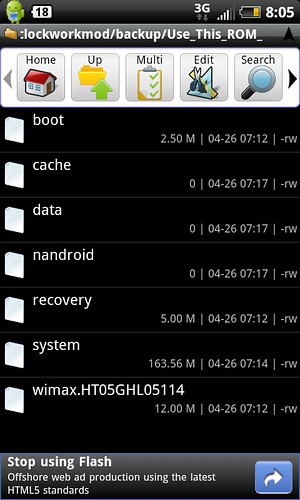
Okay, go to /sdcard/clockworkmod/backups, then go to that one backup named use_this_rom. What files do you see inside?

After that, go to /sdcard/nandroid_tmp/nameofbackup, where nameofbackup is the backup that worked. Go to the data.img/ directory, and you should see some files and directories. Let me know if you don't. Otherwise, let me know when you're there. You can use a file manager at this point, btw.
 
Despite the drastic name change, it should still work. If CW didn't like it, it would likely fail immediately. As for the output, I need to know what it says *after* you press the number for the backup, but before you press d.
 
Despite the drastic name change, it should still work. If CW didn't like it, it would likely fail immediately. As for the output, I need to know what it says *after* you press the number for the backup, but before you press d.


Yeah I don't really see a problem with the name just threw me off cuz I haven't run unandroid yet :)
 
Okay, go to /sdcard/clockworkmod/backups, then go to that one backup named use_this_rom. What files do you see inside?

After that, go to /sdcard/nandroid_tmp/nameofbackup, where nameofbackup is the backup that worked. Go to the data.img/ directory, and you should see some files and directories. Let me know if you don't. Otherwise, let me know when you're there. You can use a file manager at this point, btw.
5678247262_d66a24f9e8.jpg


data.img folder in nandroid is emtpy :(
 
Despite the drastic name change, it should still work. If CW didn't like it, it would likely fail immediately. As for the output, I need to know what it says *after* you press the number for the backup, but before you press d.
I chose the backup I wanted, the renamed "file" (btw I renamed it at time of backup in the ROM Manager GUI)

it said it had a system.img & a data.img I chose data only
 
Yeah I don't really see a problem with the name just threw me off cuz I haven't run unandroid yet :)

Hehe, yeah, I see what you mean. Basically, it does this:

1) Look in /sdcard/nandroid/(serial number)/
2) Make a list of what directories are found there
3) Look in /sdcard/clockworkmod/backup/
4) Make a list of what directories are found there
5) List all directories found in the first location, alphabetically, then list all directories in the second location, alphabetically, and prompt the user to pick one.
6) Search in the directory that the user picked for a system.img and/or data.img, and prompt the user to pick one. It will just loop back and tell you to pick again if you pick an image that doesn't exist.
 
That looks like an empty data.img you've got there. Did ROM manager prompt you to pick what to backup? I don't recall it doing that. In any case, you have a data.img, but nothing to extract from it. It *should* allow you to still restore it, though, but you'd have no data. In the even that CW ignores the empty file, and leaves data alone, that could explain why it won't boot. It would use current data (if you didn't wipe). That doesn't make much sense , though. You said you restored this before? Because what I see from that screenshot is an empty data.img.

Anyway, go to the directory for the backup that *did* work (in /sdcard/nandroid_tmp) and let's see what'd in there.

 
That looks like an empty data.img you've got there. Did ROM manager prompt you to pick what to backup? I don't recall it doing that. In any case, you have a data.img, but nothing to extract from it. It *should* allow you to still restore it, though, but you'd have no data. In the even that CW ignores the empty file, and leaves data alone, that could explain why it won't boot. It would use current data (if you didn't wipe). That doesn't make much sense , though. You said you restored this before? Because what I see from that screenshot is an empty data.img.

Anyway, go to the directory for the backup that *did* work (in /sdcard/nandroid_tmp) and let's see what'd in there.
I thought that I had restored to it. Its empty in nandriod but in CWM it does have a system file inside data.img folder that is like 150M
here is the nandroid folder for the 1 that did extract.
5678519576_f9c50e3cf7.jpg
 
I thought that I had restored to it. Its empty in nandriod but in CWM it does have a system file inside data.img folder that is like 150M
here is the nandroid folder for the 1 that did extract.
5678519576_f9c50e3cf7.jpg

Something is definitely weird here. It looks like CW backups are organized a little differently than I thought. What is that a screenshot of? Is that the one that took a few minutes to extract? I don't see a data directory in there. Is it outside of the shot somewhere? Also, what exactly do you mean that there is a system file in the data.img folder? Which one is that?
 
that image is a screen of nandriod tmp>backup file that extracted properly>data.img> there is more that is not in the screen shot, but there is no data folder.

in CW go into backups then select the backup I want "use_this_rom" and it has a system file listed at 163 M
5678247262_d66a24f9e8.jpg
 
Oh, sorry, I misunderstood you. Yes, there is a system.img file there. That is the contents of /system for that backup. All you *need* is boot.img and system.img, but it will not have any data. Anyway, can you please run this command:

du -sh /sdcard/nandroid_tmp/*

EDIT: And also:

ls -al /sdcard/nandroid_tmp/(name of good backup)
 
Oh, sorry, I misunderstood you. Yes, there is a system.img file there. That is the contents of /system for that backup. All you *need* is boot.img and system.img, but it will not have any data. Anyway, can you please run this command:

du -sh /sdcard/nandroid_tmp/*

EDIT: And also:

ls -al /sdcard/nandroid_tmp/(name of good backup)
5678613890_25d4cf4952.jpg


5678055295_f83931c831.jpg
 
Hmm, it says it's a broken image. And that is kind of small for a data.img. Without using a2sd, a typical data.img is probably more like 200-300 MB. Also, I gave you a command that busybox doesn't seem to understand. Try "ls -a -l" instead. Have you tried with any other backups? It looks like this one is corrupt, somehow.
 
I gave you a command that busybox doesn't seem to understand. Try "ls -a -l" instead. Have you tried with any other backups? It looks like this one is corrupt, somehow.
5678656010_58bb79503e.jpg


I havent run your commands on any other backups, no. I guess I could try on the RA backup I just created?
 
Sorry, do that one command again, but put a / at the very end of it. Maybe try unandroid on another one of your CW backups. We don't really need anything out of the RA backup.
 
Back
Top Bottom