• After 15+ years, we've made a big change: Android Forums is now Early Bird Club. Learn more here.

Root uggh!!! Need help!!

Sorry, do that one command again, but put a / at the very end of it. Maybe try unandroid on another one of your CW backups. We don't really need anything out of the RA backup.
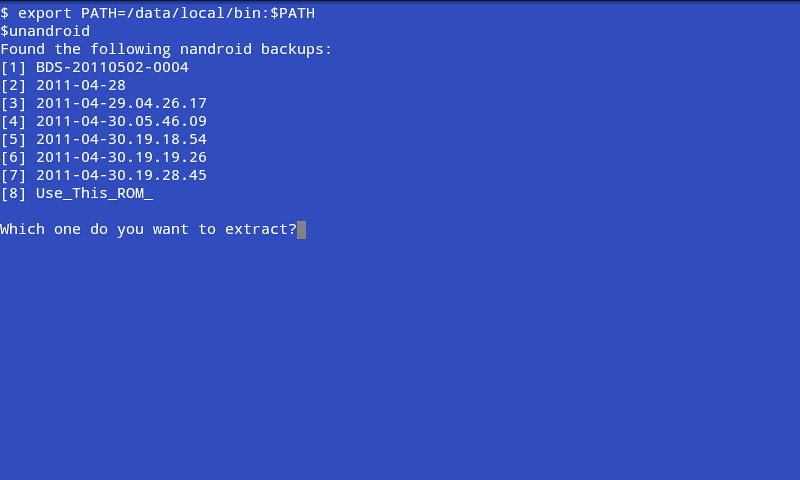
ran unandriod on all backups it lists. Only 1 extracted anything. that 1 is named 2011-04-29.04.26.17
 
5678715912_af06c64011.jpg


that file named com.android.providers.contacts 20110429-065856 is listed as 1.54MB in properties for that file. perhaps here? this is a titanium backup file.
 
Oh, sorry, I'm not paying attention. Add data.img/ to the end of that.

EDIT: ah, ok, yeah, that might be it. Can you get the full name of those files?
 
Im done for the day & night guys. I cant thank you enough for the effort. I will check in again tomorrow. If you want to post any instructions or suggestions for me, please go ahead. I will follow them and post back here.

thanks again!
 
There are two files there for contacts? What's the other one? Is it .tar? If so, we can probably use that easily enough. How old is this tb backup? Did you make it on a ROM that still had your contacts?

As for the data.img, it doesn't look complete. Unandroid even had that error about the img file. Likely, there is some corruption there somehow.
 
Yes the other file is a .tar file. It was made via TB before I flashed any ROMs or had any backup issues.
 
Yes the other file is a .tar file. It was made via TB before I flashed any ROMs or had any backup issues.

I don't know exactly what the entry is called in tb for contacts, but if you know that is the right one, it's easy to grab it from the command line. Do this:

1) Open the terminal emulator and type this:

mkdir /sdcard/contactsdb
cd /sdcard/contactsdb

2) Copy the tar file to /sdcard/contactsdb

cp /path/to/tarfile /sdcard/contactsdb

3) untar the file where you're at

tar xvf filename.tar

Let me know when you get there. Of course, if this is either a backup that is too old, or a backup that you made after you lost your contacts, then this is a waste of time.
 
I don't know exactly what the entry is called in tb for contacts, but if you know that is the right one, it's easy to grab it from the command line. Do this:

1) Open the terminal emulator and type this:

mkdir /sdcard/contactsdb
cd /sdcard/contactsdb

2) Copy the tar file to /sdcard/contactsdb

cp /path/to/tarfile /sdcard/contactsdb

3) untar the file where you're at

tar xvf filename.tar

Let me know when you get there. Of course, if this is either a backup that is too old, or a backup that you made after you lost your contacts, then this is a waste of time.
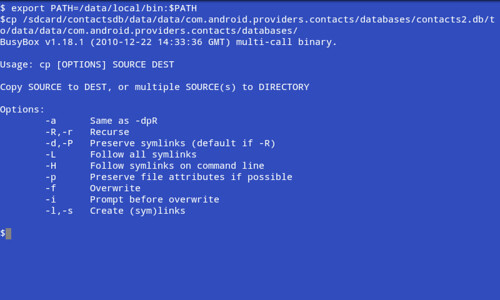
ok figured out exactly what that meant & how to type it all out. couple of times I forgot to add on the destination of the copied file. & it would ask me where to copy to, dest. I would then type in the full destination which is \mnt\sdcard\contactsdb I would get permission denied. Then I started from scratch again, minus creating folder, and included the destination at the end of the string. This is what I got:

5683011424_5947b5e0b8.jpg


I did however go into Astro and was able to copy the file & paste it in the contacts db folder u had me create. Will that work? or do I have to copy & paste in emulator in order to extract the .tar file?
 
You can copy it with any method you like. Those first few commands, there, didn't work because they aren't commands. Just typing the path to a directory with no actual command will not do anything. Anyway, now that I can see the whole name of the file, I forgot that TB gzips the files, too, so there's one extra step. Now that the file is copied, just do this:

cd /sdcard/contactsdb
gunzip nameoffile.tar.gz (I'm too lazy to write it all out :p)
tar xvf nameoffile.tar

Of course, Astro might actually have the ability to both unzip gz files and untar tar files, so you're welcome to try that, first, if you're getting tired of the command line. It's up to you. Or, you can browse through TB and try to find the actual entry in there for it, which will automatically restore it. I'm sure it's there somewhere.

 
You can copy it with any method you like. Those first few commands, there, didn't work because they aren't commands. Just typing the path to a directory with no actual command will not do anything. Anyway, now that I can see the whole name of the file, I forgot that TB gzips the files, too, so there's one extra step. Now that the file is copied, just do this:

cd /sdcard/contactsdb
gunzip nameoffile.tar.gz (I'm too lazy to write it all out :p)
tar xvf nameoffile.tar

Of course, Astro might actually have the ability to both unzip gz files and untar tar files, so you're welcome to try that, first, if you're getting tired of the command line. It's up to you. Or, you can browse through TB and try to find the actual entry in there for it, which will automatically restore it. I'm sure it's there somewhere.

Astro was able to unzip it. I copied it to the contactsdb folder I created & unzipped there. It created a few folders, 1 that has a contacts db file. What do I do with that? I assume that has the info I want?

Also I wasnt able to locate throuh TB the .tar file I found in Astro, wierd?
 
Astro was able to unzip it. I copied it to the contactsdb folder I created & unzipped there. It created a few folders, 1 that has a contacts db file. What do I do with that? I assume that has the info I want?

Also I wasnt able to locate throuh TB the .tar file I found in Astro, wierd?

Well, the entry in TB is probably called something else. It's not always obvious, and trying to go through everything to restore one thing in TB is a pain. What files did you get, and what is the exact name of the db file?
 
Well, the entry in TB is probably called something else. It's not always obvious, and trying to go through everything to restore one thing in TB is a pain. What files did you get, and what is the exact name of the db file?
5684778015_8c209e5b1c.jpg

and the below file is in the folder named databases
5684557176_c721714063.jpg
 
Yep, that's it. Not sure why it's named contacts2.db. Let's go ahead and try it, and see what breaks. Make a nandroid backup if you've made any changes since the last one, then use whatever file manager you want to copy that db file to:

/data/data/com.android.providers.contacts/databases/

If a contacts2.db already exists, it would do you well to back it up, first. Just rename it with a .bak extension. Reboot (for good measure), and see if you have your contacts. It may or may not be that simple. If it is, cool. If not, let me know how it didn't work, and we can take it from there.
 
Yep, that's it. Not sure why it's named contacts2.db. Let's go ahead and try it, and see what breaks. Make a nandroid backup if you've made any changes since the last one, then use whatever file manager you want to copy that db file to:

/data/data/com.android.providers.contacts/databases/

If a contacts2.db already exists, it would do you well to back it up, first. Just rename it with a .bak extension. Reboot (for good measure), and see if you have your contacts. It may or may not be that simple. If it is, cool. If not, let me know how it didn't work, and we can take it from there.


What permissions does a db need? Just make sure it matches the others in there
 
Im not familiar with how to check and change permissions.

Almost every file explorer for Android should have the ability to check. I'm not particularly sure where the option is in Astro, but if you long press on a db file that is already there, or anywhere in /data/data, you should have some option there for permissions. Let me know if you don't, and I'll show you how to do it with the command line.
 
how do I get here? this is 1 step up from the sdcard right? Where the system folder also resides? I have a data folder there, but there is nothing inside it, it says.


Yes its located on the same level as system not inside of system. There should be plenty in there...if not you'll have to talk to akaza cuz that is new to me...might explain why all your back ups were missing data...?
 
5685247859_cb740650a9.jpg

what does this mean? How do I know I am successful when attempting to copy & paste in terminal? I was trying to copy the file from sdcard & map it to the phones memory to the path you told me to save to.
 
Yes its located on the same level as system not inside of system. There should be plenty in there...if not you'll have to talk to akaza cuz that is new to me...might explain why all your back ups were missing data...?

soooo, this isnt good then?

5685824774_7a9d11028e.jpg

then open data to find this, note the path at the top.

5685825036_3246188540.jpg
 
Back
Top Bottom