
Install the app
How to install the app on iOS
Follow along with the video below to see how to install our site as a web app on your home screen.
Note: This feature may not be available in some browsers.
-
After 15+ years, we've made a big change: Android Forums is now Early Bird Club. Learn more here.
You are using an out of date browser. It may not display this or other websites correctly.
You should upgrade or use an alternative browser.
You should upgrade or use an alternative browser.
[Verizon] Kepp getting red exclamation mark.
- Thread starter Codec
- Start date
-
- Tags
- galaxy nexus

Codec
Android Enthusiast
Should I just wait and maybe it will boot into JB?If you have the drivers set up, it can use fastboot on the command line to flash cwm. Once it does that, you should be able to get into cwm to flash your rom.
sdrawkcab25
Extreme Android User
Yes... How long are you waiting?.. It can take 10 minutes or more to boot.Should I just wait and maybe it will boot into JB?
Codec
Android Enthusiast
I think it's been over 10 mins, I am trying that program u said, nexus root toolkit and selected flash stock +unroot, to try and get it to work but since it will unroot me, how do I root using JB rom?Yes... How long are you waiting?.. It can take 10 minutes or more to boot.
Codec
Android Enthusiast
Ok from this site I installed the these zip files.
jellybean-kernel_stock.zip, gapps-jb-20121202.zip.
Is there any other files I need to download?
/toro/jellybelly/
jellybean-kernel_stock.zip, gapps-jb-20121202.zip.
Is there any other files I need to download?
/toro/jellybelly/
sdrawkcab25
Extreme Android User
How can I download all the drivers if I can't get past the google logo screen?
The drivers install to your PC, not your phone...
Ok from this site I installed the these zip files.
jellybean-kernel_stock.zip, gapps-jb-20121202.zip.
Is there any other files I need to download?
/toro/jellybelly/
Verizon is your carrier?
Codec
Android Enthusiast
Of of curse lol but they wont all install and yes verizon.The drivers install to your PC, not your phone...
Verizon is your carrier?

Hey all, just a quick heads-up that I've moved this thread to the VZW all-things-root sub-forum for you.
The OP looks like he's in good hands in trying to figure-out what is going on and an eventual resolution.
I would add that it would be helpful if the OP (Codec) could post a little background / details about how the details you encountered on your root journey. I.e., how did you root, unlock your bootloader, which threads / links / references re. this, etc.? (any other relevant information? -- more information is better than too little
 ).
).
The reason I say / ask this is that it will give us an idea about your familiarity with various tools and concepts that will help mold what actions might be suggested for you to try.
Cheers!
The OP looks like he's in good hands in trying to figure-out what is going on and an eventual resolution.
I would add that it would be helpful if the OP (Codec) could post a little background / details about how the details you encountered on your root journey. I.e., how did you root, unlock your bootloader, which threads / links / references re. this, etc.? (any other relevant information? -- more information is better than too little
).The reason I say / ask this is that it will give us an idea about your familiarity with various tools and concepts that will help mold what actions might be suggested for you to try.
Cheers!
sdrawkcab25
Extreme Android User
All the info you need is here:I really don't remember how I did it all, just used the guides on this site.
http://androidforums.com/verizon-ga...gs-root-samsung-galaxy-nexus.html#post3736589
First, you need to get the drivers working on your pc, then you can go ahead and install a custom recovery via fastboot, from there you would then proceed to install a working ROM.
How to do all those things is very neatly explained by Scary Alien in the thread linked above. However, Wug's root toolkit does very easily automate those things for you, but you really need the drivers working first. Let us know if you run into any problems getting them installed. I know I originally had a problem with them but a simple reboot of my pc fixed it
 .
.Also remember to stay calm and take your time (easier said than done). But your phone is really fine, just need to get things in order to be able to boot up again.

jhawkkw
Chinchillin'
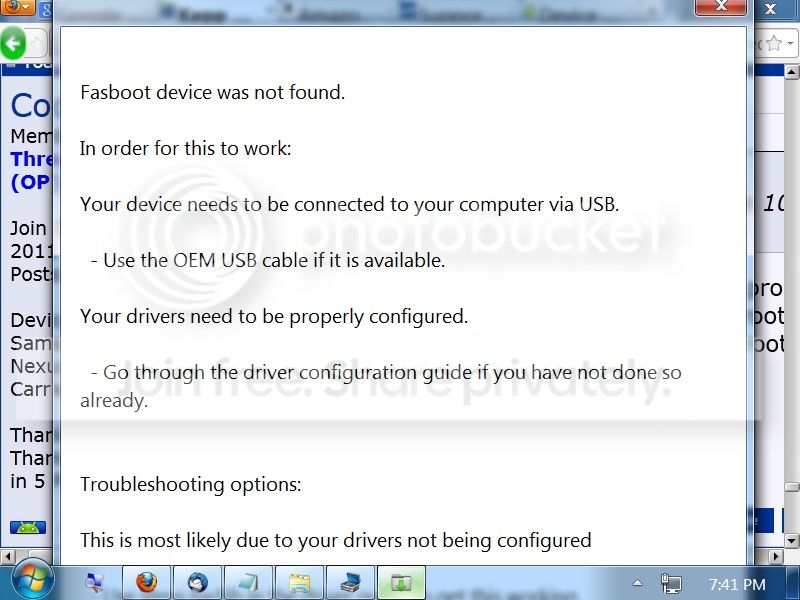
Upon further review of the tread, it looks like you you didn't try to install jellybean, only the kernel which is only a part of the whole package. The easiest solution to me is to factory restore you using the jellybean factory image provided by the toolkit. Based on the earlier picture, it appears as though the fastboot drivers are not installed.
1) Use the toolkit to install the samsung usb drivers. Once they are installed, boot the device into fastboot mode by pressing both volume keys and the power key while off and then plug it into the computer. The toolkit should have instructions for installing the fastboot drivers, but to do so, open up the device manager and you should see the nexus listed under unknown devices. You will right click the driver and click update driver software. Choose the option to install from location. it should provide you with a list of drivers, you want something with ADB Android Development Bridge in the name.
2)Once that is set up, on the main menu of the toolkit, check device bootlooped, and click that restore factory/unroot. Select the 4.1.1 verizon(toro) image file and it should proceed. It should work by itself and should take about 15 minutes.
1) Use the toolkit to install the samsung usb drivers. Once they are installed, boot the device into fastboot mode by pressing both volume keys and the power key while off and then plug it into the computer. The toolkit should have instructions for installing the fastboot drivers, but to do so, open up the device manager and you should see the nexus listed under unknown devices. You will right click the driver and click update driver software. Choose the option to install from location. it should provide you with a list of drivers, you want something with ADB Android Development Bridge in the name.
2)Once that is set up, on the main menu of the toolkit, check device bootlooped, and click that restore factory/unroot. Select the 4.1.1 verizon(toro) image file and it should proceed. It should work by itself and should take about 15 minutes.
Codec
Android Enthusiast
That's why I asked u eairler if I had all the files I needed, and which toolkit are u talking about? We have talked about two different kinds here.Upon further review of the tread, it looks like you you didn't try to install jellybean, only the kernel which is only a part of the whole package. The easiest solution to me is to factory restore you using the jellybean factory image provided by the toolkit. Based on the earlier picture, it appears as though the fastboot drivers are not installed.
1) Use the toolkit to install the samsung usb drivers. Once they are installed, boot the device into fastboot mode by pressing both volume keys and the power key while off and then plug it into the computer. The toolkit should have instructions for installing the fastboot drivers, but to do so, open up the device manager and you should see the nexus listed under unknown devices. You will right click the driver and click update driver software. Choose the option to install from location. it should provide you with a list of drivers, you want something with ADB Android Development Bridge in the name.
2)Once that is set up, on the main menu of the toolkit, check device bootlooped, and click that restore factory/unroot. Select the 4.1.1 verizon(toro) image file and it should proceed. It should work by itself and should take about 15 minutes.
jhawkkw
Chinchillin'
I was away and using tapatalk earlier and misread the first file. I'm back on a computer now so much more capable. The toolkit is the wugs toolkit that I gave the link to earlier. That is generally the go to application to get anything done quickly on a nexus device. It also includes all the factory images and drivers available at the time of the download so it can literally take care of everything.
Codec
Android Enthusiast
So how do I use this program to install jelly bean and install drivers?I was away and using tapatalk earlier and misread the first file. I'm back on a computer now so much more capable. The toolkit is the wugs toolkit that I gave the link to earlier. That is generally the go to application to get anything done quickly on a nexus device. It also includes all the factory images and drivers available at the time of the download so it can literally take care of everything.
jhawkkw
Chinchillin'
So how do I use this program to install jelly bean and install drivers?
Essentially wugs acts as a helper to run commands through the command prompt so that you don't have to. Once you have the program downloaded and installed, which it seem you do, the top middle option will install the drivers. Since the device is bootlooped, skip over the adb (first set) driver installation and only worry about the fastboot (second set) installation. Before the process, it will give you 3 choices for packages to install. I recommend using the Samsung Usb drivers as they tend to be the most reliable. The toolkit should provide a step by step procedure with pictures on how to set up the drivers. Chances are it will fail the test because the toolkit is programmed to test with a full functional device which yours isn't currently. Once you go through the driver set up, let me know and we'll continue from there. This is usually the hardest part. After this it's all downhill.