

BabyBlues
Trouble Just Finds Me!
Well I have him dialed in on Google +, hope he sticks around a little longer...
That's two of us!
Follow along with the video below to see how to install our site as a web app on your home screen.
Note: This feature may not be available in some browsers.
Well I have him dialed in on Google +, hope he sticks around a little longer...
I just tried adding my other Gmail account into the Email app and it worked fine. I'm on Xenon 6.0 but I don't see why it wouldn't work on Codename. Just out of curiosity, why didn't you just clean flash?

Xenon 6.0 is another ROM. I did not clean flash because I was told on this forum by "Colchiro" to do a dirty flash (Wipe cache, flash ROM/GApps). Anyone else on here know what's going on with the issue that I am facing with the "email" application?
I wipe cache/dalvik cache/system when I dirty flash. If you have issues, go back into recovery, wipe cache/dalvik cache. Still having issues, wipe cache/dalvik cache/system, reflash ROM & gapps. If STILL having issues, clean flash. STILL having issues after all that? Then whatever ROM you're trying to flash, it's just not that into you.
Whenever I've had issues with a ROM, a clean flash always fixes it. To each their own, but I flashed Codename last night and my other email addresses loaded fine no problem.
Hi,
I will clean flash later on. So, you used the email application where you can punch in numerous emails? How come it is working for you but not for me? I just wiped cache/dalvik cache/battery stats/formatted system/re-flashed Codename ROM & it's GApps.
That's two of us!
So something was up with the built in Faux kernel not working on my phone. All kinds of waking up when the screen is off. Flashed over to Franco 230 and you can see the difference before and the after the flash (the restart)
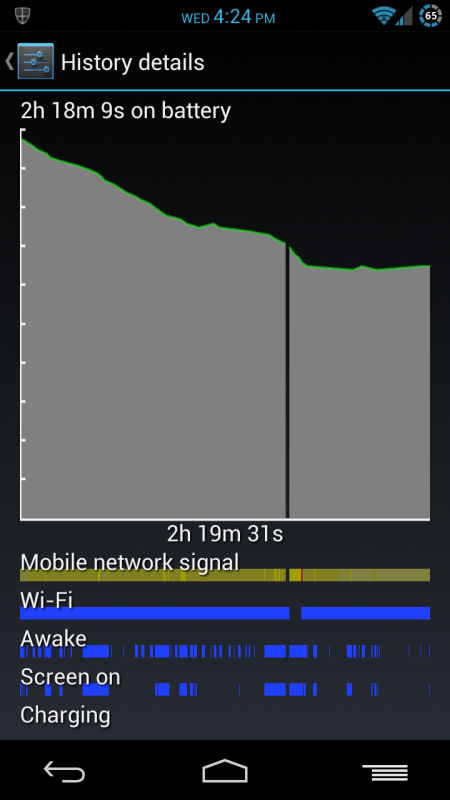


I'm still pi**ed the reflective icons are gone. Those were nicer than any other I've seen.

I had some major issues with my gallery. It showed up and showed the thumbnail slots BUT they were all black. Even when I pulled up a single pic, it was black. I tried a clean flash as well and same thing. I had to go back to my Xenon update until I can figure out why I don't have gallery.
When I flashed from Xenon last night, I did Factory Reset, Wiped Cache, and Wiped Dalvik Cache before flashing Codename and the Codename Gapps. Everyone's phone is different so it could just be that this ROM doesn't work well with yours.

Next step, I need to figure out how to use My Verizon Mobile as it is important that I control my talk/data limits.

Why not use the data used app built into JB? (in settings). As long as you don't wipe data, it should be accurate after this month.
WOW, Doc, you've got some bizarre issues over there. My Nexus isn't experiencing any of it. I have to wonder if maybe it's the kernel that your phone doesn't like. Have you tried a different kernel?
It seems like if the mods over at RootzWiki have their way, CNA won't be allowed to post there and host their ROM anymore. They've done some pretty bad things in the past that have gone unanswered for...
 - xda-developers
Hi,
Are you running Codename Android? I clean flashed it last night and decided to give it 48 hours to settle in before I jump onto a different kernel instead of the stock kernel I am running currently that comes with Codename Android Jelly Bean.
How would the kernel have an effect on the call quality?
Hi,
I just read on another website about Codename Android doing harm just as you mentioned on this thread. However, I could not find details on what the harm was? Is it something important that we should be aware of before flashing Codename Android Jelly Bean ROM?
Sorry, I am a beginner to Android and not sure of the past.
