
Install the app
How to install the app on iOS
Follow along with the video below to see how to install our site as a web app on your home screen.
Note: This feature may not be available in some browsers.
-
After 15+ years, we've made a big change: Android Forums is now Early Bird Club. Learn more here.
You are using an out of date browser. It may not display this or other websites correctly.
You should upgrade or use an alternative browser.
You should upgrade or use an alternative browser.
Root [Virgin Mobile] Firmware Update
- Thread starter kwknott
- Start date

Madbat
Android Expert
Yep, those are both there. Nothing else though. recovery has two files in it - last_install and last_log.
Hmm. Maybe you did delete it when you cleared cache.
JerryScript
Android Expert
If you have a custom recovery, it most likely won't update automatically, but you can try. As always MAKE A BACKUP FIRST!!! And I mean a nandroid backup in recovery before you attempt to install the update!Sorry guys, I tried to follow the threads but I got lost at some point...
My phone is rooted and I forget which recovery I have installed. Am I OK with allowing the phone to update itself?
JerryScript
Android Expert
Good News!!!
I finally got the time to fix the update!
Working:
I booted into TWRP and made a backup, then I restored the stock backup from g60madman, then rebooted into the system and did all updates.
I booted into TWRP again, and installed my modified MC1-MG5-no-props.zip, install went flawlessly, no errors, takes about 5 minutes.
I rebooted into the system, and did all updates again, tested everything, then booted back into recovery to make a new backup.
I am now rebuilding Victorious from this update.
Steps to update safely:
Note : I've pulled a backup after installing this, and I'm now working on rebuilding Victorious from it.
I finally got the time to fix the update!
Working:
- Phone
- SMS
- MMS
- PRL update
- Profile update
- Samsung software update
- Firmware update (just checks of course)
- 3G
- 4G
- Samsung apps
- Virgin Mobile apps
- Camera & Video Recorder
- Gallery & Video Player
- Haven't tested NFC yet
I booted into TWRP and made a backup, then I restored the stock backup from g60madman, then rebooted into the system and did all updates.
I booted into TWRP again, and installed my modified MC1-MG5-no-props.zip, install went flawlessly, no errors, takes about 5 minutes.
I rebooted into the system, and did all updates again, tested everything, then booted back into recovery to make a new backup.
I am now rebuilding Victorious from this update.
Steps to update safely:
- Download g60madmans's TWRP backup unzip it, and put the date/timestamp folder on your sdcard in the TWRP/BACKUPS/<random-number> folder
- Download update_SPH-L300_MC1_to_MG5-no-props.zip and put on your sdcard
- Backup all your apps with TitaniumBackup (just in case)
- Boot into recovery
- Make a backup (this one is more important!)
- Restore g60madman's TWRP backup
- Reboot into the system and do updates in settings
- Boot into recovery again
- Install the update_SPH-L300_MC1_to_MG5-no-props.zip
- Wipe cache and dalvik cache
- Reboot system
- Say yes if prompted to fix root
- Update everything in settings again
Note : I've pulled a backup after installing this, and I'm now working on rebuilding Victorious from it.
HallOfPromise
Well-Known Member
This didn't work for me either. I deleted the ota zip thing and moved the update zip out of cache to my ext sd and still get the prompts to update. I think it's draining my battery simply because it keeps turning on my screen, not to mention it is very annoying to see it when I unlock just about each time.Didn't work. So what did I delete? Guess I should have saved it somewhere.
I am not even sure I care about the update as much as I am more willing just to get rid of the prompt! Silly, really lol
JerryScript
Android Expert
Just do the update, it will fail if you don't use my modified zip, but it should make the prompt go away even though it fails.This didn't work for me either. I deleted the ota zip thing and moved the update zip out of cache to my ext sd and still get the prompts to update. I think it's draining my battery simply because it keeps turning on my screen, not to mention it is very annoying to see it when I unlock just about each time.
I am not even sure I care about the update as much as I am more willing just to get rid of the prompt! Silly, really lol

zacharynasty
Well-Known Member
Just do the update, it will fail if you don't use my modified zip, but it should make the prompt go away even though it fails.
Jerry are u doin another victorious rom, with all this included, like the new update, so we can just flash and be good, I got the update but I deckined it and it hasn't popped up again loll, but I was just wondering if you will have a new victorious
HallOfPromise
Well-Known Member
Genius! I will do that next prompt and then start getting everything ready for your method. I'm still nervous every time I flash so I like to take my time.Just do the update, it will fail if you don't use my modified zip, but it should make the prompt go away even though it fails.


SteboMT
Member
Good News!!!
I finally got the time to fix the update!
Working:
I finally got the update on my phone (wanted an original copy). I changed the updater-script to not check the props, but did leave the assert patch checks, and changed install-recovery.sh to run init.d instead.
- Phone
- SMS
- MMS
- PRL update
- Profile update
- Samsung software update
- Firmware update (just checks of course)
- 3G
- 4G
- Samsung apps
- Virgin Mobile apps
- Camera & Video Recorder
- Gallery & Video Player
- Haven't tested NFC yet
I booted into TWRP and made a backup, then I restored the stock backup from g60madman, then rebooted into the system and did all updates.
I booted into TWRP again, and installed my modified MC1-MG5-no-props.zip, install went flawlessly, no errors, takes about 5 minutes.
I rebooted into the system, and did all updates again, tested everything, then booted back into recovery to make a new backup.
I am now rebuilding Victorious from this update.
Steps to update safely:
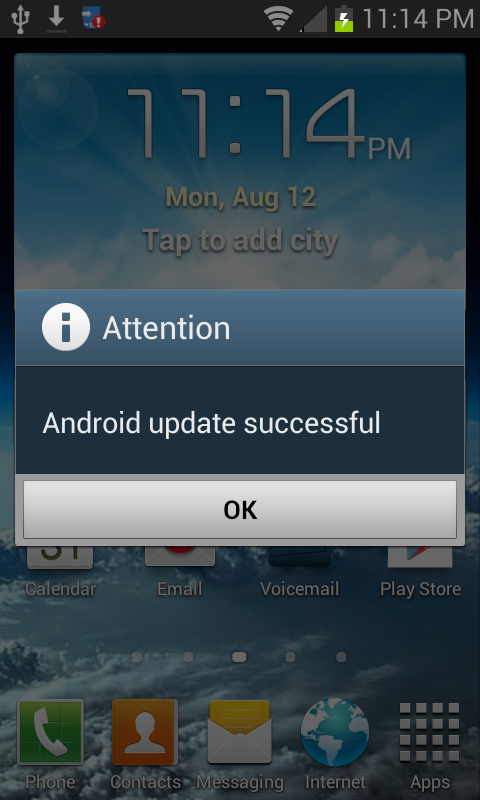
After a few minutes, you should get a popup saying your install was succesful:
- Download g60madmans's TWRP backup unzip it, and put the date/timestamp folder on your sdcard in the TWRP/BACKUPS/<random-number> folder
- Download update_SPH-L300_MC1_to_MG5-no-props.zip and put on your sdcard
- Backup all your apps with TitaniumBackup (just in case)
- Boot into recovery
- Make a backup (this one is more important!)
- Restore g60madman's TWRP backup
- Reboot into the system and do updates in settings
- Boot into recovery again
- Install the update_SPH-L300_MC1_to_MG5-no-props.zip
- Wipe cache and dalvik cache
- Reboot system
- Say yes if prompted to fix root
- Update everything in settings again
Note : I've pulled a backup after installing this, and I'm now working on rebuilding Victorious from it.
I did ONLY the MC5 update Jerry and it worked! Thanks much friend! My phone was already rooted with tethering and TWRP 2.5... I really regret installing TWRP and wish I would never have done it...
The Trevor tethering mod drops out when you have low signal and a network change switches from 4g to 3g... However I really don't need the tethering for my iPad anymore... So wishing I could return the phone to stock with NO TWRP dammit!
JerryScript
Android Expert
Not sure why you want to get rid of TWRP, but you can install CWM or the stock recovery. I just posted a thread with the stock recovery yeseterday.I did ONLY the MC5 update Jerry and it worked! Thanks much friend! My phone was already rooted with tethering and TWRP 2.5... I really regret installing TWRP and wish I would never have done it...
The Trevor tethering mod drops out when you have low signal and a network change switches from 4g to 3g... However I really don't need the tethering for my iPad anymore... So wishing I could return the phone to stock with NO TWRP dammit!
http://androidforums.com/virgin-mob...2816-recovery-stock-goghvmu-mg5-recovery.html

SuppliedRelic
Member
Good News!!!
I finally got the time to fix the update!
Working:
I finally got the update on my phone (wanted an original copy). I changed the updater-script to not check the props, but did leave the assert patch checks, and changed install-recovery.sh to run init.d instead.
- Phone
- SMS
- MMS
- PRL update
- Profile update
- Samsung software update
- Firmware update (just checks of course)
- 3G
- 4G
- Samsung apps
- Virgin Mobile apps
- Camera & Video Recorder
- Gallery & Video Player
- Haven't tested NFC yet
I booted into TWRP and made a backup, then I restored the stock backup from g60madman, then rebooted into the system and did all updates.
I booted into TWRP again, and installed my modified MC1-MG5-no-props.zip, install went flawlessly, no errors, takes about 5 minutes.
I rebooted into the system, and did all updates again, tested everything, then booted back into recovery to make a new backup.
I am now rebuilding Victorious from this update.
Steps to update safely:
After a few minutes, you should get a popup saying your install was succesful:
- Download g60madmans's TWRP backup unzip it, and put the date/timestamp folder on your sdcard in the TWRP/BACKUPS/<random-number> folder
- Download update_SPH-L300_MC1_to_MG5-no-props.zip and put on your sdcard
- Backup all your apps with TitaniumBackup (just in case)
- Boot into recovery
- Make a backup (this one is more important!)
- Restore g60madman's TWRP backup
- Reboot into the system and do updates in settings
- Boot into recovery again
- Install the update_SPH-L300_MC1_to_MG5-no-props.zip
- Wipe cache and dalvik cache
- Reboot system
- Say yes if prompted to fix root
- Update everything in settings again
Note : I've pulled a backup after installing this, and I'm now working on rebuilding Victorious from it.
What do you mean by reboot into system and do updates in step 7? You don't mean install the update from the update manager do you?
JerryScript
Android Expert
Settings >> System Update >>What do you mean by reboot into system and do updates in step 7? You don't mean install the update from the update manager do you?
Update PRL
Update Profile
Update Samsung Softare
Update Firmware
zacharynasty
Well-Known Member
Genius! I will do that next prompt and then start getting everything ready for your method. I'm still nervous every time I flash so I like to take my time.
Ima try to get this update off now, still dnt thibk I need too haha
zacharynasty
Well-Known Member
What do you mean by reboot into system and do updates in step 7? You don't mean install the update from the update manager do you?
Since ur rebuilding victorious from this, I dnt really need to do all of this, I can just wait..right?
zacharynasty
Well-Known Member
Good News!!!
I finally got the time to fix the update!
Working:
I finally got the update on my phone (wanted an original copy). I changed the updater-script to not check the props, but did leave the assert patch checks, and changed install-recovery.sh to run init.d instead.
- Phone
- SMS
- MMS
- PRL update
- Profile update
- Samsung software update
- Firmware update (just checks of course)
- 3G
- 4G
- Samsung apps
- Virgin Mobile apps
- Camera & Video Recorder
- Gallery & Video Player
- Haven't tested NFC yet
I booted into TWRP and made a backup, then I restored the stock backup from g60madman, then rebooted into the system and did all updates.
I booted into TWRP again, and installed my modified MC1-MG5-no-props.zip, install went flawlessly, no errors, takes about 5 minutes.
I rebooted into the system, and did all updates again, tested everything, then booted back into recovery to make a new backup.
I am now rebuilding Victorious from this update.
Steps to update safely:
After a few minutes, you should get a popup saying your install was succesful:
- Download g60madmans's TWRP backup unzip it, and put the date/timestamp folder on your sdcard in the TWRP/BACKUPS/<random-number> folder
- Download update_SPH-L300_MC1_to_MG5-no-props.zip and put on your sdcard
- Backup all your apps with TitaniumBackup (just in case)
- Boot into recovery
- Make a backup (this one is more important!)
- Restore g60madman's TWRP backup
- Reboot into the system and do updates in settings
- Boot into recovery again
- Install the update_SPH-L300_MC1_to_MG5-no-props.zip
- Wipe cache and dalvik cache
- Reboot system
- Say yes if prompted to fix root
- Update everything in settings again
Note : I've pulled a backup after installing this, and I'm now working on rebuilding Victorious from it.
Since ur rebuilding victorious from this, I dnt really need to do all of this update stuff, I can just wait..right?
zacharynasty
Well-Known Member
He's got a new version in the works based on update. I flashed update so I'm just waiting on it instead of flashing back to older version of Victorious
I'm guna wait too, I dnt feel like goin thru all tht stuff hah
zacharynasty
Well-Known Member
Yes you will still need the update, victorious will just be based on the update. As of right now victorious is based on the old firmware.
So ur telling me that I HAVE to go back to stock and do all that stuff.. regardless, I can't just wsit for the new victorious and use that, like that update is that important ?