
JerryScript
Android Expert
Try flashing this in recovery to enable the sdcard swap and 2nd ext4 partition support:
View attachment enable_ext2int_and_2nd-partition.zip
View attachment enable_ext2int_and_2nd-partition.zip
Follow along with the video below to see how to install our site as a web app on your home screen.
Note: This feature may not be available in some browsers.


Hmmm, videoplayer crashes on me now too, but it worked fine when I originally did the update before doing setting's updates, so that must be what borks it. Put these two files in /system/lib and set their permissions to the same as the other lib files in there:
View attachment 59718
Note- this one is not a flashable fix, you have to extract the two lib files. Fixed it for me
Try flashing this in recovery to enable the sdcard swap and 2nd ext4 partition support:
View attachment 59717
Try flashing this in recovery to enable the sdcard swap and 2nd ext4 partition support:
View attachment 59717
Hmmm, videoplayer crashes on me now too, but it worked fine when I originally did the update before doing setting's updates, so that must be what borks it. Put these two files in /system/lib and set their permissions to the same as the other lib files in there:
View attachment 59718
Note- this one is not a flashable fix, you have to extract the two lib files. Fixed it for me
Patiently gonna wait until this weekends update. The only issue I have is not receiving MMS, and that's not a big deal, just missing pictures sent by a friend of mine of his grill and everything he drills and makes me hungry as heck

I made a zip you can flash in recovery of the internal to external swap if anyone thats going back to stock for the update wants it (removed)
Try flashing this in recovery to enable the sdcard swap and 2nd ext4 partition support:
View attachment 59717
Hmmm, videoplayer crashes on me now too, but it worked fine when I originally did the update before doing setting's updates, so that must be what borks it. Put these two files in /system/lib and set their permissions to the same as the other lib files in there:
View attachment 59718
Note- this one is not a flashable fix, you have to extract the two lib files. Fixed it for me


Edit: See below for original post, the following has been added:
Good News!!!
I finally got the time to fix the update!
Working:
I finally got the update on my phone (wanted an original copy). I changed the updater-script to not check the props, but did leave the assert patch checks, and changed install-recovery.sh to run init.d instead.
- Phone
- SMS
- MMS
- PRL update
- Profile update
- Samsung software update
- Firmware update (just checks of course)
- 3G
- 4G
- Samsung apps
- Virgin Mobile apps
- Camera & Video Recorder
- Gallery & Video Player
- Haven't tested NFC yet
I booted into TWRP and made a backup, then I restored the stock backup from g60madman, then rebooted into the system and did all updates.
I booted into TWRP again, and installed my modified MC1-MG5-no-props.zip, install went flawlessly, no errors, takes about 5 minutes.
I rebooted into the system, and did all updates again, tested everything, then booted back into recovery to make a new backup.
I am now rebuilding Victorious from this update.
Steps to update safely (Note-- If you are already running stock, no need to restore g60madmans backup, but you MUST BE RUNNING STOCK FOR THE PATCH CHECKS TO WORK, INCLUDING THE KERNEL!!!):
After a few minutes, you should get a popup saying your install was succesful:
- Download g60madmans's TWRP backup unzip it, and put the date/timestamp folder on your sdcard in the TWRP/BACKUPS/<random-number> folder
- Download update_SPH-L300_MC1_to_MG5-no-props.zip and put on your sdcard
- Backup all your apps with TitaniumBackup (just in case)
- Boot into recovery
- Make a backup (this one is more important!)
- Restore g60madman's TWRP backup
- Reboot into the system and do updates in settings
- Boot into recovery again
- Install the update_SPH-L300_MC1_to_MG5-no-props.zip
- Wipe cache and dalvik cache
- Optional - Install VaeVictus-MG5-OC-Rv3 kernel
- Reboot system
- Say yes if prompted to fix root
- Update everything in settings again
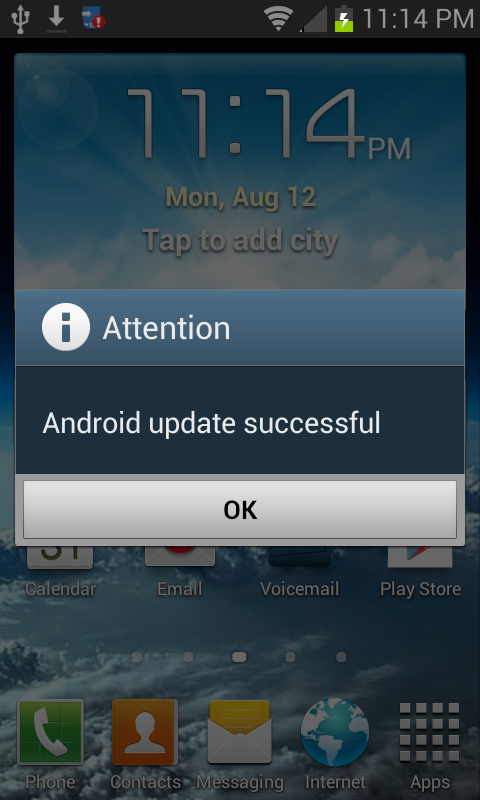
Note : I've pulled a backup after installing this, and I'm now working on rebuilding Victorious from it.
Original Post:
Be sure the permissions on both files and the folder init.d are set to rwxr-xr-x.Did not work. Could it be because I deleted the other files that came in the last external2intenal zip??
A bit more information:
This update only does one thing when all is said and done, installs KVM (google KVM android). KVM is not necessary to have a fully functional phone, so this update is not a "must have." KVM is a virtualization machine that will help our phones run a bit smoother and have a bit more battery life, but it will not make drastically noticeable differences. It also gives the carriers the ability to use the same kernel/firmware across multiple networks, and even with multiple phone numbers on the same phone (say goodbye to sim cards).
Those who were running Victorious and attempted to flash the update posted here for the new firmware had issues at first because that update overwrote one of my scripts used to enable the sdcard swapping and use of the 2nd ext4 partition on your sdcard. You can easily fix this by copying the /system/etc/install-recovery.sh from the Victorious zips to the same place on your phone. Be sure to set it's permissions!
Those who have had bootloops with Victorious 0.2.2-r1, it's due to either my updater-script (which was too agressive), or due to the overclock being to high at boot. I will be fixing both of those issues in the next releases.
Those who have had issues with VaeVictus kernel, it may be due to the overclock being too high at boot. This also will be fixed in the next release.
Those who cannot wait till Sunday for my new releases, jump on the dev bandwagon and help out! If you don't feel you can help with coding, you can help by encouraging patience amongst your fellow users.
Anyone who thinks they have bricked their phone, are having trouble with wifi or mms, or are stuck in a bootloop, please restore the stock firmware, then wait till Sunday for some new updates!

Be sure the permissions on both files and the folder init.d are set to rwxr-xr-x.
Be sure the permissions on both files and the folder init.d are set to rwxr-xr-x.

How do I update permissions
Mine reads rwx r-x r-x
You can use a root explorer program. I think the problem though, is that you need busybox! TWRP may fix root for you, but it doesn't seem to do busybox. You can download the busybox free app from google play and then use it to install busybox extensions (remember that you need to be rooted!).
After installing busybox the swap mounted fine, but link2sd scripts seems to be gone so I dug back into init.d - 11ext2intsd file and noticed the link2sd mount scripts missing, so I added them back. I actually stared at these scripts for like 10 minutes before the xbin folder tipped me off and I realized that after all these updates and not flashing back to victorious (waiting for next official -after update- release) we needed to install busybox again.
Here's the fixed flashable file: fixed-enable_ext2int_and_2nd-partition.zip
Just remember to install busybox or it wont work!
Edit: You can search busybox in google play and download the first app "BusyBox" by Stephen (Stericson). Once you run it, let it scan, then do the smart install.
Thanks!!!!!In Vegas, few people have the normal weekend off, and we all refer to our days off as our weekend. I have mon-tues off (when the boss is not out of town), so tues is my sunday!When u say Sunday did u mean the sunday that just past, or this coming sunday the 18th ha
All I did was make a working stock update.OK, I got a bug up my but and followed the instructions in the OP. Everything went according to plan, but now I keep getting a message from Superuser that binary must be updated. I click on install and it goes to "Installing", but that's it. Seems like it's not updating.
All I did was make a working stock update.
Superuser, busybox, all have to be installed manually, they are not part of stock.