• After 15+ years, we've made a big change: Android Forums is now Early Bird Club. Learn more here.

Root [Virgin Mobile] [New Update] Patience Please

In Vegas, few people have the normal weekend off, and we all refer to our days off as our weekend. I have mon-tues off (when the boss is not out of town), so tues is my sunday!

Can I confuse you some more now? ;)

Ok lol, so this new update that people are talking about isent the new victorious ur working on
 
When you restore g60madman's backup, you will be restoring the kernel, it's in the boot.img ;)

You can then flash the latest VaeVictus kernel if you want to overclock. I'll build an uncapped to 1.5ghz kernel from the official Samsung source for those who don't want to overclock soon.

May I ask where I can find this kernel?

Edit: Found my answer in another thread. Will patiently wait for this kernel and ROM update. Will the kernel be available separate from the ROM?

I found mention of it in another thread, but can't find it to ask this in: Is there a package/.zip/what have you with the updated Visual Voice Mall app? I saw that Victorious ROM does not have it packaged into the ROM.
 
May I ask where I can find this kernel?

Edit: Found my answer in another thread. Will patiently wait for this kernel and ROM update. Will the kernel be available separate from the ROM?

I found mention of it in another thread, but can't find it to ask this in: Is there a package/.zip/what have you with the updated Visual Voice Mall app? I saw that Victorious ROM does not have it packaged into the ROM.

#11 in original post :)
 
Ok so this update popped up, but I kno I cnt use it unless I do the method on here, but when I went to open a google app it told me I dident have google play services installed, then I restarted it, now it seems find, just curious to why it could do that , and do I need to use this update, I read that it wasent that big of an update, but to get it to work is just to much, I'd rather just wait until someone makes a new rom with it baked in
 
Ok so this update popped up, but I kno I cnt use it unless I do the method on here, but when I went to open a google app it told me I dident have google play services installed, then I restarted it, now it seems find, just curious to why it could do that , and do I need to use this update, I read that it wasent that big of an update, but to get it to work is just to much, I'd rather just wait until someone makes a new rom with it baked in
This is a system wide update, there may not be a ROM that can apply it.
 
It's relatively painless honestly. Just follow JerryScript's awesome instructions :)
I didn't lose any data.

Just make sure you do a backup just in case. I only made a nandroid beforehand :)

Ok cool ill do it when I get home then, its just everything is working so good I'm afraid to mess something up
 
Edit: See below for original post, the following has been added:

Good News!!!

I finally got the time to fix the update! ;)

Working:

  1. Phone
  2. SMS
  3. MMS
  4. PRL update
  5. Profile update
  6. Samsung software update
  7. Firmware update (just checks of course)
  8. 3G
  9. 4G
  10. Samsung apps
  11. Virgin Mobile apps
  12. Camera & Video Recorder
  13. Gallery & Video Player
  14. Haven't tested NFC yet
I finally got the update on my phone (wanted an original copy). I changed the updater-script to not check the props, but did leave the assert patch checks, and changed install-recovery.sh to run init.d instead.


I booted into TWRP and made a backup, then I restored the stock backup from g60madman, then rebooted into the system and did all updates.


I booted into TWRP again, and installed my modified MC1-MG5-no-props.zip, install went flawlessly, no errors, takes about 5 minutes.


I rebooted into the system, and did all updates again, tested everything, then booted back into recovery to make a new backup.


I am now rebuilding Victorious from this update. ;)


Steps to update safely (Note-- If you are already running stock, no need to restore g60madmans backup, but you MUST BE RUNNING STOCK FOR THE PATCH CHECKS TO WORK, INCLUDING THE KERNEL!!!):

  1. Download g60madmans's TWRP backup unzip it, and put the date/timestamp folder on your sdcard in the TWRP/BACKUPS/<random-number> folder
  2. Download update_SPH-L300_MC1_to_MG5-no-props.zip and put on your sdcard
  3. Backup all your apps with TitaniumBackup (just in case)
  4. Boot into recovery
  5. Make a backup (this one is more important!)
  6. Restore g60madman's TWRP backup
  7. Reboot into the system and do updates in settings
  8. Boot into recovery again
  9. Install the update_SPH-L300_MC1_to_MG5-no-props.zip
  10. Wipe cache and dalvik cache
  11. Optional - Install VaeVictus-MG5-OC-Rv3 kernel
  12. Reboot system
  13. Say yes if prompted to fix root
  14. Update everything in settings again
  15. Install Superuser (Koush's) and Busybox from the Play Store
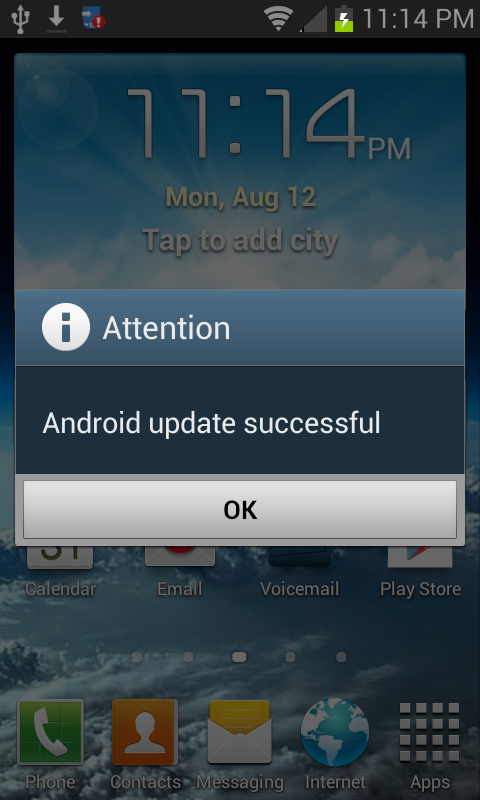
After a few minutes, you should get a popup saying your install was succesful:


Screenshot_2013-08-12-23-14-08_zps212c1f03.png


Note : I've pulled a backup after installing this, and I'm now working on rebuilding Victorious from it. ;)


Original Post:

Ok so if I go thru with tgis will I still have my ext2internal setup still or do I have to do all tht over again, I dnt mind because I'm learning the more I do all of this, I just hate to lose my good set up now, just for this dang update lol
 
Ok so if I go thru with tgis will I still have my ext2internal setup still or do I have to do all tht over again, I dnt mind because I'm learning the more I do all of this, I just hate to lose my good set up now, just for this dang update lol

I done the update everything is working Properly. I got the custom kernel so I'm overclocked, and the sd swap is functioning as well. You will have re flash everything.
 
I used mine. Worked great. Victorious was the first "tweek" I did to this phone so it was pretty pristine as well. Geez I forgot how much bloat you really cleaned out of this thing with victorious. Lol. Time to freeze some stuff. :cool:
 
I can't get Wi-Fi tethering to work for mobile hotspot.. My Wi-Fi automatically comes back on when I start the tether and it and I get a message saying "What the hell your phone take back over Wi-Fi"
 
I haven't been able to get this to work. I flash the TWRP backup like the instructions say then I try to install the zip, but the install still fails. Did I miss something?

Also do I need to install this before installing the latest Victorious?
 
hey Jerry. I hope everything is cool. but i need you help again sadly ;( I've done everything the tutorial. I'm STOCK EVERYTHING including Stock recovery and Kernel, but everytime i try to install the update_SPH-L300_MC1_to_MG5-no-props.zip I get multiple signature verification errors. I have alos tried updating straight through my phone, but every time I press "Install" It counts donw to reboot but never reboots. Anything help would be greatly appreicaited
 
I'm getting that problem too, here's my TWRP log when I try to install the zip:

[HIGH]Installing '/external_sd/update_SPH-L300_MC1_to_MG5-no-props.zip'...
Checking for MD5 file...
I:Cannot find file /external_sd/update_SPH-L300_MC1_to_MG5-no-props.zip.md5
Skipping MD5 check: no MD5 file found.
Register_libbootloader_updater Qcom msm8960
Verifying current system...
failed to stat "EMMC:/dev/block/mmcblk0p1:44369664:e0979eaba9cf4bf677941e5cfed61ac5d46c0f48:44402432:549c6acab7d5fe026fdb1ca2d2700e76a79f75ec": No such file or directory
contents of partition "/dev/block/mmcblk0p1" didn't match EMMC:/dev/block/mmcblk0p1:44369664:e0979eaba9cf4bf677941e5cfed61ac5d46c0f48:44402432:549c6acab7d5fe026fdb1ca2d2700e76a79f75ec
file "EMMC:/dev/block/mmcblk0p1:44369664:e0979eaba9cf4bf677941e5cfed61ac5d46c0f48:44402432:549c6acab7d5fe026fdb1ca2d2700e76a79f75ec" doesn't have any of expected sha1 sums; checking cache
failed to stat "/cache/saved.file": No such file or directory
failed to load cache file
script aborted: assert failed: apply_patch_check("EMMC:/dev/block/mmcblk0p1:44369664:e0979eaba9cf4bf677941e5cfed61ac5d46c0f48:44402432:549c6acab7d5fe026fdb1ca2d2700e76a79f75ec", "549c6acab7d5fe026fdb1ca2d2700e76a79f75ec", "e0979eaba9cf4bf677941e5cfed61ac5d46c0f48")
assert failed: apply_patch_check("EMMC:/dev/block/mmcblk0p1:44369664:e0979eaba9cf4bf677941e5cfed61ac5d46c0f48:44402432:549c6acab7d5fe026fdb1ca2d2700e76a79f75ec", "549c6acab7d5fe026fdb1ca2d2700e76a79f75ec", "e0979eaba9cf4bf677941e5cfed61ac5d46c0f48")
E:Error executing updater binary in zip '/external_sd/update_SPH-L300_MC1_to_MG5-no-props.zip'
Error flashing zip '/external_sd/update_SPH-L300_MC1_to_MG5-no-props.zip'[/HIGH]
 
hey Jerry. I hope everything is cool. but i need you help again sadly ;( I've done everything the tutorial. I'm STOCK EVERYTHING including Stock recovery and Kernel, but everytime i try to install the update_SPH-L300_MC1_to_MG5-no-props.zip I get multiple signature verification errors. I have alos tried updating straight through my phone, but every time I press "Install" It counts donw to reboot but never reboots. Anything help would be greatly appreicaited

You cant flash the zip in stock recovery. You still need root and twrp. Install twrp through odin. And make sure you're rooted with superuser and busybox still intact. Then you can flash the no props.zip. p.s. After the update you will need to reinstall superuser and busybox
 
hey Jerry. I hope everything is cool. but i need you help again sadly ;( I've done everything the tutorial. I'm STOCK EVERYTHING including Stock recovery and Kernel, but everytime i try to install the update_SPH-L300_MC1_to_MG5-no-props.zip I get multiple signature verification errors. I have alos tried updating straight through my phone, but every time I press "Install" It counts donw to reboot but never reboots. Anything help would be greatly appreicaited
Flash it with signature verification turned off. ;)

If you have the stock recovery installed, flash the OTA update package you got on your phone.
 
I'm getting that problem too, here's my TWRP log when I try to install the zip:

[HIGH]Installing '/external_sd/update_SPH-L300_MC1_to_MG5-no-props.zip'...
Checking for MD5 file...
I:Cannot find file /external_sd/update_SPH-L300_MC1_to_MG5-no-props.zip.md5
Skipping MD5 check: no MD5 file found.
Register_libbootloader_updater Qcom msm8960
Verifying current system...
failed to stat "EMMC:/dev/block/mmcblk0p1:44369664:e0979eaba9cf4bf677941e5cfed61ac5d46c0f48:44402432:549c6acab7d5fe026fdb1ca2d2700e76a79f75ec": No such file or directory
contents of partition "/dev/block/mmcblk0p1" didn't match EMMC:/dev/block/mmcblk0p1:44369664:e0979eaba9cf4bf677941e5cfed61ac5d46c0f48:44402432:549c6acab7d5fe026fdb1ca2d2700e76a79f75ec
file "EMMC:/dev/block/mmcblk0p1:44369664:e0979eaba9cf4bf677941e5cfed61ac5d46c0f48:44402432:549c6acab7d5fe026fdb1ca2d2700e76a79f75ec" doesn't have any of expected sha1 sums; checking cache
failed to stat "/cache/saved.file": No such file or directory
failed to load cache file
script aborted: assert failed: apply_patch_check("EMMC:/dev/block/mmcblk0p1:44369664:e0979eaba9cf4bf677941e5cfed61ac5d46c0f48:44402432:549c6acab7d5fe026fdb1ca2d2700e76a79f75ec", "549c6acab7d5fe026fdb1ca2d2700e76a79f75ec", "e0979eaba9cf4bf677941e5cfed61ac5d46c0f48")
assert failed: apply_patch_check("EMMC:/dev/block/mmcblk0p1:44369664:e0979eaba9cf4bf677941e5cfed61ac5d46c0f48:44402432:549c6acab7d5fe026fdb1ca2d2700e76a79f75ec", "549c6acab7d5fe026fdb1ca2d2700e76a79f75ec", "e0979eaba9cf4bf677941e5cfed61ac5d46c0f48")
E:Error executing updater binary in zip '/external_sd/update_SPH-L300_MC1_to_MG5-no-props.zip'
Error flashing zip '/external_sd/update_SPH-L300_MC1_to_MG5-no-props.zip'[/HIGH]
You haven't restored to stock. You have to be stock or the sha1 sums of the apk files don't match.
 
Sorry if this has been asked but I just purchased this phone today, (but it has not shipped yet). So 1. do you think it will come with this update pre-loaded. And 2. will I be able to root, install TWRP and flash Victorious if it does?
 
Back
Top Bottom