
Install the app
How to install the app on iOS
Follow along with the video below to see how to install our site as a web app on your home screen.
Note: This feature may not be available in some browsers.
-
After 15+ years, we've made a big change: Android Forums is now Early Bird Club. Learn more here.
You are using an out of date browser. It may not display this or other websites correctly.
You should upgrade or use an alternative browser.
You should upgrade or use an alternative browser.
Filters
Show only:
Local Hotspot - Personalized and Fixed SSID
- By jesusgcabal
- Android Development
- 0 Replies
Hello everyone. I am quite new in the Apps development. I have been reading so many Q&A, forums, and post from so many people around. I have a question, and I hope someone of you could kindly give me support to clarify my doubts. I would like to enable a local hotspot on a tablet (Huawei Mediapad T5 with Android 8 - Oreo). I am developing an App with different functionalities, but I realized I need to switch between my Wireless connection and to enable my Local Hotspot (One it is already saved and configured on my tablet). And I have managed to do the switch in between the networks. The big problem comes with the SSID. If I enable manually my Local Hotspot, it connects automatically with my other device (Arduino MKR 1010), but if I do it programmatically, the Hotspot that I enable, changes every single time the SSID. Is there any way set a fixed SSID with this methodology? I read in some posts that this is already hardcoded and it is not possible to do as I wish. I hope you can help me to understand it better, clarify or to find a solution. Thank you so much in advance. I post my activity code, and the Logcat with two attempts. 
The Logcat looks as next:
D/WifiManager: LocalOnlyHotspotCallbackProxy: handle message what: 0 msg: { when=-2ms what=0 obj=* ID: -2 SSID: AndroidShare_6018 PROVIDER-NAME: null BSSID: null FQDN: null PRIO: 0 HIDDEN: false
NetworkSelectionStatus NETWORK_SELECTION_ENABLED
hasEverConnected: false
KeyMgmt: WPA2_PSK Protocols:
AuthAlgorithms:
PairwiseCiphers:
GroupCiphers:
PSK: *
Enterprise config:
IP config:
IP assignment: UNASSIGNED
Proxy settings: UNASSIGNED
cuid=-1 luid=-1 lcuid=0 userApproved=USER_UNSPECIFIED noInternetAccessExpected=false roamingFailureBlackListTimeMilli: 1000
target=android.net.wifi.WifiManager$LocalOnlyHotspotCallbackProxy$1 }
================
OR
================
D/WifiManager: LocalOnlyHotspotCallbackProxy: handle message what: 0 msg: { when=0 what=0 obj=* ID: -2 SSID: AndroidShare_6787 PROVIDER-NAME: null BSSID: null FQDN: null PRIO: 0 HIDDEN: false
NetworkSelectionStatus NETWORK_SELECTION_ENABLED
hasEverConnected: false
KeyMgmt: WPA2_PSK Protocols:
AuthAlgorithms:
PairwiseCiphers:
GroupCiphers:
PSK: *
Enterprise config:
IP config:
IP assignment: UNASSIGNED
Proxy settings: UNASSIGNED
cuid=-1 luid=-1 lcuid=0 userApproved=USER_UNSPECIFIED noInternetAccessExpected=false roamingFailureBlackListTimeMilli: 1000
target=android.net.wifi.WifiManager$LocalOnlyHotspotCallbackProxy$1 }
Java:
public class WiFi extends AppCompatActivity {

    private Button on_off_wifi;
    private Button discover_wifi;
    public TextView connectionState_tv;
    private ListView peerListView;

    WifiManager myWifiManager;
    private WifiManager.LocalOnlyHotspotReservation mReservation;
    private boolean isHotspotEnabled = false;
    private final int REQUEST_ENABLE_LOCATION_SYSTEM_SETTINGS = 101;

    public WifiP2pManager myWifiP2PManager;
    public Context context;
    WifiP2pManager.Channel myChannel;

    BroadcastReceiver myReceiver;
    IntentFilter myIntentFilter;

    List<WifiP2pDevice> peers = new ArrayList<WifiP2pDevice>();
    String[] deviceNameArray;
    WifiP2pDevice[] deviceArray;

    @Override
    protected void onCreate(@Nullable Bundle savedInstanceState) {
        super.onCreate(savedInstanceState);
        setContentView(R.layout.activity_wifi);
        initialize();

        on_off_wifi.setOnClickListener(new View.OnClickListener() {
            @RequiresApi(api = Build.VERSION_CODES.O)
            @Override
            public void onClick(View v) {
                if(myWifiManager.isWifiEnabled()){
                    myWifiManager.setWifiEnabled(false);
                    on_off_wifi. setText("WiFi ON");
                    enableLocationSettings();
                }else {
                    turnOffHotspot();
                    myWifiManager.setWifiEnabled(true);
                    on_off_wifi.setText("WiFi OFF");
                }
            }
        });
    }

    @RequiresApi(api = Build.VERSION_CODES.O)
    private void enableLocationSettings() {
        LocationRequest mLocationRequest = new LocationRequest();
        /*mLocationRequest.setInterval(10);
        mLocationRequest.setSmallestDisplacement(10);
        mLocationRequest.setFastestInterval(10);
        mLocationRequest.setPriority(LocationRequest.PRIORITY_HIGH_ACCURACY);*/
        LocationSettingsRequest.Builder builder = new LocationSettingsRequest.Builder();
        builder.addLocationRequest(mLocationRequest)
                .setAlwaysShow(false); // Show dialog

        Task<LocationSettingsResponse> task= LocationServices.getSettingsClient(this).checkLocationSettings(builder.build());

        task.addOnCompleteListener(task1 -> {
            try {
                LocationSettingsResponse response = task1.getResult(ApiException.class);
                // All location settings are satisfied. The client can initialize location
                // requests here.
                toggleHotspot();

            } catch (ApiException exception) {
                switch (exception.getStatusCode()) {
                    case LocationSettingsStatusCodes.RESOLUTION_REQUIRED:
                        // Location settings are not satisfied. But could be fixed by showing the
                        // user a dialog.
                        try {
                            // Cast to a resolvable exception.
                            ResolvableApiException resolvable = (ResolvableApiException) exception;
                            // Show the dialog by calling startResolutionForResult(),
                            // and check the result in onActivityResult().
                            resolvable.startResolutionForResult(WiFi.this, REQUEST_ENABLE_LOCATION_SYSTEM_SETTINGS);
                        } catch (IntentSender.SendIntentException e) {
                            // Ignore the error.
                        } catch (ClassCastException e) {
                            // Ignore, should be an impossible error.
                        }
                        break;
                    case LocationSettingsStatusCodes.SETTINGS_CHANGE_UNAVAILABLE:
                        // Location settings are not satisfied. However, we have no way to fix the
                        // settings so we won't show the dialog.
                        break;
                }
            }
        });
    }
    @RequiresApi(api = Build.VERSION_CODES.O)
    private void toggleHotspot() {
        if(!isHotspotEnabled){
            turnOnHotspot();
        }else {
            turnOffHotspot();
        }
    }

    private boolean isLocationPermissionEnable() {
        if (ActivityCompat.checkSelfPermission(this, Manifest.permission.ACCESS_COARSE_LOCATION) != PackageManager.PERMISSION_GRANTED) {
            ActivityCompat.requestPermissions(this, new String[] {Manifest.permission.ACCESS_COARSE_LOCATION}, 2);
            return false;
        }
        return true;
    }

    @RequiresApi(api = Build.VERSION_CODES.O)
    private void turnOnHotspot() {
        if (!isLocationPermissionEnable()) {
            return;
        }
        WifiManager manager = (WifiManager) getApplicationContext().getSystemService(Context.WIFI_SERVICE);

        if (manager != null) {
            // Don't start when it started (existed)
            manager.startLocalOnlyHotspot(new WifiManager.LocalOnlyHotspotCallback() {

                @Override
                public void onStarted(WifiManager.LocalOnlyHotspotReservation reservation) {
                    super.onStarted(reservation);

                    System.out.println(reservation.getWifiConfiguration() + "*****************************************************");
                    //Log.d(TAG, "Wifi Hotspot is on now");
                    mReservation = reservation;
                    isHotspotEnabled = true;
                }

                @Override
                public void onStopped() {
                    super.onStopped();
                    //Log.d(TAG, "onStopped: ");
                    isHotspotEnabled = false;
                }

                @Override
                public void onFailed(int reason) {
                    super.onFailed(reason);
                    //Log.d(TAG, "onFailed: ");
                    isHotspotEnabled = false;
                }
            }, new Handler());
        }
    }

    @RequiresApi(api = Build.VERSION_CODES.O)
    private void turnOffHotspot() {
        if (!isLocationPermissionEnable()) {
            return;
        }
        if (mReservation != null) {
            mReservation.close();
            isHotspotEnabled = false;
        }
    }

    @RequiresApi(api = Build.VERSION_CODES.O)
    @Override
    protected void onActivityResult(int requestCode, int resultCode, Intent data) {
        super.onActivityResult(requestCode, resultCode, data);
        final LocationSettingsStates states = LocationSettingsStates.fromIntent(data);
        switch (requestCode) {
            case REQUEST_ENABLE_LOCATION_SYSTEM_SETTINGS:
                switch (resultCode) {
                    case Activity.RESULT_OK:
                        // All required changes were successfully made
                        toggleHotspot();
                        Toast.makeText(WiFi.this, states.isLocationPresent() + "", Toast.LENGTH_SHORT).show();
                        break;
                    case Activity.RESULT_CANCELED:
                        // The user was asked to change settings, but chose not to
                        Toast.makeText(WiFi.this, "Canceled", Toast.LENGTH_SHORT).show();
                        break;
                    default:
                        break;
                }
                break;
        }
    }

    private void mylistener() {
        on_off_wifi.setOnClickListener(new View.OnClickListener() {

            @Override
            public void onClick(View v) {
                if(myWifiManager.isWifiEnabled()){
                    myWifiManager.setWifiEnabled(false);
                    on_off_wifi. setText("WiFi ON");
                }else {
                    myWifiManager.setWifiEnabled(true);
                    on_off_wifi.setText("WiFi OFF");
                }
            }
        });

        discover_wifi.setOnClickListener(new View.OnClickListener() {
            @Override
            public void onClick(View v) {
                myWifiP2PManager.discoverPeers(myChannel, new WifiP2pManager.ActionListener() {
                    @Override
                    public void onSuccess() {
                        connectionState_tv.setText("Discovery started");
                    }

                    @Override
                    public void onFailure(int reason) {
                        connectionState_tv.setText("Discovery starting failed");

                    }
                });
            }
        });

        peerListView.setOnItemClickListener(new AdapterView.OnItemClickListener() {
            @Override
            public void onItemClick(AdapterView<?> parent, View view, int position, long id) {

                final WifiP2pDevice device = deviceArray[position];
                WifiP2pConfig config = new WifiP2pConfig();
                config.deviceAddress  = device.deviceAddress;
                myWifiP2PManager.connect(myChannel, config, new WifiP2pManager.ActionListener() {
                    @Override
                    public void onSuccess() {
                        Toast.makeText(getApplicationContext(),"Connectect to "+device.deviceName,Toast.LENGTH_SHORT).show();
                    }

                    @Override
                    public void onFailure(int reason) {
                        Toast.makeText(getApplicationContext(),"Not connectected ",Toast.LENGTH_SHORT).show();
                    }
                });
            }
        });
    }

    private void initialize() {
        on_off_wifi = (Button) findViewById(R.id.on_off);
        discover_wifi = (Button) findViewById(R.id.discover);
        connectionState_tv = (TextView) findViewById(R.id.connectionState);
        peerListView = (ListView) findViewById(R.id.peerListView);

        myWifiManager = (WifiManager) getApplicationContext().getSystemService(Context.WIFI_SERVICE);

        myWifiP2PManager = (WifiP2pManager) getSystemService(Context.WIFI_P2P_SERVICE);
        myChannel = myWifiP2PManager.initialize(this,getMainLooper(),null);

        myReceiver = new recovics.htwk.recovics_exo_hand.WifiDirectBroadcastReceiver(myWifiP2PManager,myChannel, WiFi.this);

        myIntentFilter = new IntentFilter();
        myIntentFilter.addAction(WifiP2pManager.WIFI_P2P_STATE_CHANGED_ACTION);
        myIntentFilter.addAction(WifiP2pManager.WIFI_P2P_PEERS_CHANGED_ACTION);
        myIntentFilter.addAction(WifiP2pManager.WIFI_P2P_CONNECTION_CHANGED_ACTION);
        myIntentFilter.addAction(WifiP2pManager.WIFI_P2P_THIS_DEVICE_CHANGED_ACTION);

    }


    WifiP2pManager.PeerListListener peerListListener = new WifiP2pManager.PeerListListener() {
        @Override
        public void onPeersAvailable(WifiP2pDeviceList peerlist) {
            if(!peerlist.getDeviceList().equals(peers)) {
                peers.clear();
                peers.addAll(peerlist.getDeviceList());

                deviceNameArray =  new String[peerlist.getDeviceList().size()];
                deviceArray = new WifiP2pDevice[peerlist.getDeviceList().size()];
                int index = 0;

                for (WifiP2pDevice device : peerlist.getDeviceList()){
                    deviceNameArray[index]=device.deviceName;
                    deviceArray[index]=device;
                    index++;
                }

                ArrayAdapter<String> adapter = new ArrayAdapter<String>(getApplicationContext(),android.R.layout.simple_list_item_1,deviceNameArray);
                peerListView.setAdapter(adapter);

                if(peers.size()==0){
                    Toast.makeText(getApplicationContext(),"No Devices found",Toast.LENGTH_SHORT).show();
                    return;
                }
            }
        }
    };

    WifiP2pManager.ConnectionInfoListener connectionInfoListener = new WifiP2pManager.ConnectionInfoListener() {
        @Override
        public void onConnectionInfoAvailable(WifiP2pInfo info) {
            final InetAddress groupOwnerAddress = info.groupOwnerAddress;
            if(info.groupFormed && info.isGroupOwner){
                connectionState_tv.setText("host");
            }else if(info.groupFormed){
                connectionState_tv.setText("Client");
            }
        }
    };
    @Override
    protected void onResume() {
        super.onResume();
        registerReceiver(myReceiver,myIntentFilter);
    }

    @Override
    protected void onPause() {
        super.onPause();
        unregisterReceiver(myReceiver);
    }

}
The Logcat looks as next:
D/WifiManager: LocalOnlyHotspotCallbackProxy: handle message what: 0 msg: { when=-2ms what=0 obj=* ID: -2 SSID: AndroidShare_6018 PROVIDER-NAME: null BSSID: null FQDN: null PRIO: 0 HIDDEN: false
NetworkSelectionStatus NETWORK_SELECTION_ENABLED
hasEverConnected: false
KeyMgmt: WPA2_PSK Protocols:
AuthAlgorithms:
PairwiseCiphers:
GroupCiphers:
PSK: *
Enterprise config:
IP config:
IP assignment: UNASSIGNED
Proxy settings: UNASSIGNED
cuid=-1 luid=-1 lcuid=0 userApproved=USER_UNSPECIFIED noInternetAccessExpected=false roamingFailureBlackListTimeMilli: 1000
target=android.net.wifi.WifiManager$LocalOnlyHotspotCallbackProxy$1 }
================
OR
================
D/WifiManager: LocalOnlyHotspotCallbackProxy: handle message what: 0 msg: { when=0 what=0 obj=* ID: -2 SSID: AndroidShare_6787 PROVIDER-NAME: null BSSID: null FQDN: null PRIO: 0 HIDDEN: false
NetworkSelectionStatus NETWORK_SELECTION_ENABLED
hasEverConnected: false
KeyMgmt: WPA2_PSK Protocols:
AuthAlgorithms:
PairwiseCiphers:
GroupCiphers:
PSK: *
Enterprise config:
IP config:
IP assignment: UNASSIGNED
Proxy settings: UNASSIGNED
cuid=-1 luid=-1 lcuid=0 userApproved=USER_UNSPECIFIED noInternetAccessExpected=false roamingFailureBlackListTimeMilli: 1000
target=android.net.wifi.WifiManager$LocalOnlyHotspotCallbackProxy$1 }
Interesting Verizon Visit

- By Bearsyzf
- Smartphones
- 3 Replies
I wasn't even changing providers. I was just changing my Note for the S21 Ultra. My phone was activated and I updated the device info and they confirmed it was all good on their networks through their web pages. The phone has been working flawlessly since. Everything except my recorded voice mails.. I'm paying three bucks a month to have the feature active on two of the four phones on my plan. I wanted it to work.
That's funny that you have a phone older than he is, these Mellinials lol
Anyone using this?

- By codesplice
- Apps & Games
- 5 Replies
Yeah dude, I love this launcher. It's a big departure from the typical Android launcher so I totally get that it won't work for how everyone wants their homescreen to behave - and that's fine, we've got options!I'd like the hear from @codesplice since he's the one that turned me onto this. What are the other cool things this does.
Some of my favorite features/tricks:
- Selected media app(s) automatically jump to the top of the home screen when I connect my headphones, and slick playback controls appear when something's playing.

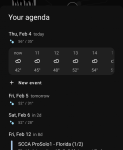
- The minimal Niagara widget shows the current date and weather as well as any upcoming appointments. Tapping it expands a more detailed weather panel as well as the next few days worth of calendar events.
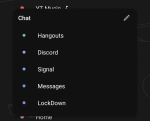
- You can use swipe actions to emulate folders; a single tap on my Chat shortcuts opens chat, while swiping right on that shortcut allows me to pick one of my other messaging apps.
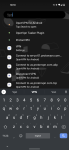
- Niagara integrates with Sesame to provide ultra-fast super-powered search. Just swipe up to instantly search through contacts, apps, settings, shortcuts, playlists, web results, and more.
New app: Send SMS HANDSFREE by Voice: Unlimited message

- By TienDat
- Apps & Games
- 3 Replies
UPDATE: Version 1.0.1
We have just released an update which:
We have just released an update which:
- Fixes the issue on voice recognition library visibility on Android 11 (for those who have experience with Android 11, this library visibility might be no stranger to them)
- Improves the flow between searching contacts and editing message. For example, if the application is currently focusing on the message editing, and you say "Drop all contacts", the application will unselect all selected targeting contacts for you, and also switch the focus to contact autocomplete box.
- Allows users to re-enable the tutorial. It will be useful if you forgot how the application works and want to see the showcases again.
???? - What's so great with this clock.
- Apps & Games
- 2 Replies
Clocks are meant only to tell time, but there are some widgets like my old Moto z2 turbo, does check the weather and battery power.
[New] Sudo Tic Tac Toe-Mind Game, Puzzle
- By ai_masti
- Apps & Games
- 2 Replies
Thanks for creating a channel for my app. Have a nice day.
New Game: Sudo Tic Tac Toe (Version 1.0)
- By App Update
- Apps & Games
- 0 Replies
EXTRA INFO
- Rating: 3.9
- Installs: 100+
- Download Size: 27M
- Version: 1.0
How to optimize your app.

- By Unforgiven
- Android Development
- 1 Replies
I moved this to the development area where I think you will get better feedback. Good luck!!
Is my phone hacked? How can I tell thank you. Stylo 5 user

- By Hadron
- Smartphones
- 1 Replies
How would we know?
What are you seeing that makes you think that your phone might be hacked?
What are you seeing that makes you think that your phone might be hacked?
Help Galaxy M20 screen acting weird

- By Anes08
- Smartphones
- 2 Replies
should i worry ? , do i need a screen replacement ? or ...you know ... i can just raise the brightnessnot much you can do.......sounds like a hardware issue.


Samsung and / or Google News

- By olbriar
- Smartphones
- 1 Replies
I figured out how to fix this. Long pressing the home screen reduces all home screens and then going to the reduced news screen I was able to see and tick Google news vs the Sammy feed.
New App: DiscourseHub (Version 1.6.0)
- By App Update
- Apps & Games
- 0 Replies
EXTRA INFO
- Rating: 2.7
- Installs: 10,000+
- Download Size: 5.0M
- Version: 1.6.0
Load more