• After 15+ years, we've made a big change: Android Forums is now Early Bird Club. Learn more here.

AUB3 update for Global S21 series

If you have the Samsung Galaxy S21 5G or S21+ 5G models, you may want to hold off this AUB3 update with the February Android Security patch.

According to a report from SamMobile...

"All the customer complaints come from people who own the Exynos variant, though it should be stressed that the issue most likely stems from software rather than Samsung’s new hardware. And according to some users, the battery might be draining at an accelerated rate due to an issue with cellular connectivity."

This issue does not appear to affect the Galaxy S21 Ultra according to SamMobile and I can confirm this. from my own experience.

To-date, Samsung has only rolled out this firmware update to their stock, nonicarrier, branded firmwares which could indicate that they may either issue a hotfix or wait until the March Android Security patch.

Here is the SamMobile article in full...

Galaxy S21 February security patch is reportedly causing battery life issues

AUB3 update for Global S21 series

If you have the Samsung Galaxy S21 5G or S21+ 5G models, you may want to hold off this AUB3 update with the February Android Security patch.

According to a report from SamMobile...

"All the customer complaints come from people who own the Exynos variant, though it should be stressed that the issue most likely stems from software rather than Samsung’s new hardware. And according to some users, the battery might be draining at an accelerated rate due to an issue with cellular connectivity."

This issue does not appear to affect the Galaxy S21 Ultra according to SamMobile and I can confirm this. from my own experience.

To-date, Samsung has only rolled out this firmware update to their stock, non-carrier, branded firmwares which could indicate that they may either issue a hotfix or wait until the March Android Security patch.

Here is the SamMobile article in full...

Galaxy S21 February security patch is reportedly causing battery life issues

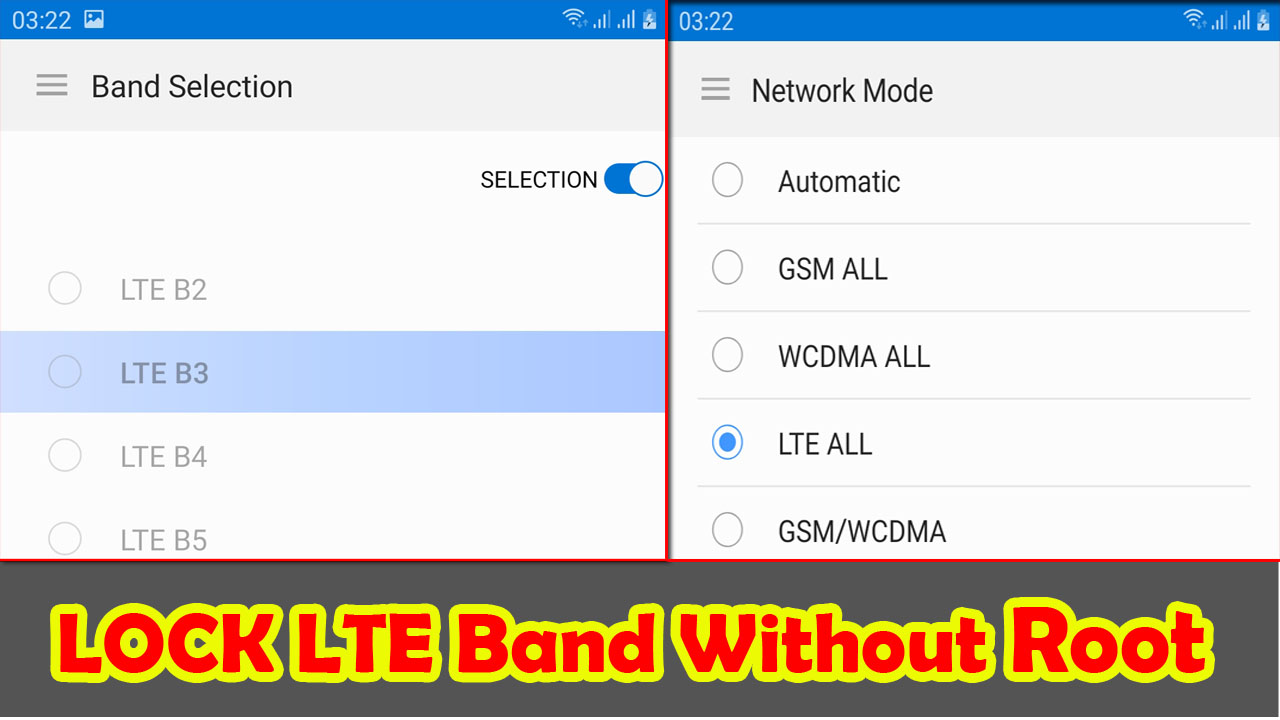
How to Lock LTE Band Selection On Samsung Galaxy Without Root

Hello Everybody ! now i will Share tips how to Lock LTE Band on Samsung Galaxy device. With this tutorial we can lock Frequency of LTE Band frequency networks. so that the connection becomes more stable.


This method is specifically for Samsung Galaxy. Because the default hiddennetwork system application is available. for devices with other brands and types, I haven't tried it.

Please follow the following methods:

1. DOWNLOAD Force 4G LTE Only 2020 Pro application from Google Play

2. Run the Application

3. Select SIM 1 Only menu, then Hidden Activity

4. wait to load until 100%

5. tap the search box type Hiddennetwork

6. In the call setting section, there is a hiddennetwork activity.

7. Long Tap 3 options will appear: Create Shortcut, Launch Activity, Edit Shortcut. I recommend Select Create Shortcut to make it easier for us to enter network activity mode without having to bother opening the Force 4G LTE Only 2020 Pro application.

8. Please select Launch Activity to enter the system Network Mode to select network mode.

9. tap the three-line menu in the left corner. select Band Selection to lock LTE band. please select a frequency band then slide the toggle selection to activate it.

Icons on picture

There is no specific app I am using, just the built in Gallery.
If you'll forgive me for being pedantic, the built-in Gallery is a specific app. And the Gallery is one of the apps that's most likely to vary between devices, since most manufacturers have their own version.

So I'm afraid I can't help as I don't have a Samsung, so have no knowledge of that app. But @ocnbrze does, so I'd follow his suggestion for how to use it.

screen sharpness config ??

There is no general "screen sharpness" setting in Android, though few of us will have any experience with android-based projectors and they may have settings or options that most android devices do not (and may also lack options that other devices have). Also it may depend on what Android version you are running and who the manufacturer is.

Recent Android versions may have a "display size" item in Settings > Display > Advanced, but that basically scales some items on the screen rather than affecting screen resolution. The "developer options" menu, if you can access that(*), usually has a dpi setting (called, unhelpfully, "smallest width" on my device). Again the main effect of that is scaling of UI elements (e.g. if I fiddle with that my wallpaper is unaffected), so it doesn't quite sound like what you see.

If you were rooted and messing with kernel settings that would be different, but we're talking about stuff that is hard-coded there and so not something that can spontaneously change or be altered by the user without root access (and unless this is a very strange device you would know if you were rooted).

(*) To access Developer Options go into your Settings, find the "build number" in the software information, and tap on it repeatedly. It will eventually tell you that you are now a developer. But there are devices which simply don't have this menu/where it has been locked rather than simply hidden behind an Easter Egg, so I can't guarantee that this will work for you.

this device is already rooted from the factory..... yeah I'm talking about core level config, because there nothing even simple screen setting
and also this device has issue in displaying video, seems that the codec config oversharpened the video output which become smudges artefact ...
this is android TV OS (Pie)

Installed wrong recovery

I have an Infinix S2 Pro too!
The phone is not bricked FOREVER... There is always a way to fix it out.
First you will need a tool for your PC. Called SP Flash Tool. Download your firmware. ( https://firmwarepanda.com/infinix-s2-pro-x522-firmware/ in your case ) , and extract the zip file into your PC. Open SP Flash Tool, and enter in the Scatter-loading file and select an .txt document located in the firmware folder of the ROM. After that you should untick all the boxes EXCEPT the one called recovery. Press download. Reboot your phone by touching the power button a few seconds. Then the SP flash tool will start.
After the Tool will show you an Check Mark on the screen, you can unplug your phone, and power it on.
After that operation, your Phone will boot normally.

If you wanted to try rooting, don't make it using TWRP. That is more dangerous than you think... Use SuperSU method instead! ( https://androidbiits.com/root-infinix-s2-pro-x522-easily/ )

Looking for a web browser with a specific feature

Have you noticed whether or not the sites you mention have a mobile version?

I run into your issue sometimes with sites that only have desktop type sites.

Anyway, a usual fix for me is to use landscape mode on the device.

Of course, your keyboard will need adjustment if not set up for this mode.

A browser feature that I think automatically does as you wish (with/without the pinch) is called 'text reflow'.

I can't say that I like it much.

Generally, on a site like that, I can double tap and it will enlarge enough to fill the screen, but not exceed the edges to prevent constant scrolling.

Often enough, I still need to utilize landscape mode AND the doubletap (along with a set of reading glasses).

https://f-droid.org/en/packages/acr.browser.lightning/

https://f-droid.org/en/packages/org.midorinext.android/

Lightning is a superior browser with 'text reflow' as a setting option.

Midori is a version of the same with some nice extras.

There are other versions as well.

Help How to get older versions of YouTube app?

Yeah as I said I can download older version apks, but I can't install any of them that were from before my phone's latest update(which was a couple months ago). So I will just try rooting my phone and completely deleting youtube to reinstall an older version. But I will test it out on an old phone first.

This is because you skipped an important step...

you must first uninstall all updates from your Youtube app.

That means clearing all data from it.
All of your settings for Youtube will return when you log back in.

Then you might need a newer version for it to work, and this version must be compatible with the arm of your device.

Keep in mind that you must leave auto update off in Google Playstore, or else the blasted thing will just update the app for you all over again after you have gone through all of this effort.

Going through this, along with the endless pestering to update from Youtube and Google, and the constant addition/subtraction of features/anti-features is why I just use NewPipe instead.

Filter

Back
Top Bottom