Bonjour à tous,
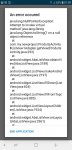
Je suis nouveau dans le fabuleux monde de la création d'application android. Je débute avec SKETCHWARE et après avoir suivi un tuto pour créer une base de données avec firebase, en lançant l'application et en allant sur une des pages de mon Menu, cette erreur apparaît :
" Attempt To invoke vittual method java.lang.string java. lang.toString ()' on Null object reference
At
Com.my.newProject.ProduitsActivity
$listview1Adapter.getView(ProduitsActivity.java:293) "
Je ne trouve pas mon erreur,
Pourriez vous m'apporter vos lumières s'il vous plait . Je n'arrive plus à avancer dans mon projet.
Merci d'avance.
Charly.
voici mon code :
package com.my.newproject;
import android.app.*;
import android.os.*;
import android.view.*;
import android.view.View.*;
import android.widget.*;
import android.content.*;
import android.graphics.*;
import android.media.*;
import android.net.*;
import android.text.*;
import android.util.*;
import android.webkit.*;
import android.animation.*;
import android.view.animation.*;
import java.util.*;
import java.text.*;
import android.support.v7.app.AppCompatActivity;
import android.widget.LinearLayout;
import android.widget.Button;
import java.util.Timer;
import java.util.TimerTask;
import android.content.Intent;
import android.net.Uri;
import android.animation.ObjectAnimator;
import android.view.animation.LinearInterpolator;
import android.view.animation.AccelerateInterpolator;
import android.view.animation.DecelerateInterpolator;
import android.view.animation.AccelerateDecelerateInterpolator;
import android.view.animation.BounceInterpolator;
import android.view.View;
public class MainActivity extends AppCompatActivity {
private Timer _timer = new Timer();
private double rotation = 0;
private double click = 0;
private double xbk = 0;
private LinearLayout linear1;
private LinearLayout linear2;
private Button menu;
private LinearLayout linear3;
private LinearLayout linear4;
private Button button8;
private Button button2;
private Button button3;
private Button button4;
private Button button5;
private Button button6;
private TimerTask timer;
private Intent intent = new Intent();
private ObjectAnimator ani = new ObjectAnimator();
private Intent show = new Intent();
@override
protected void onCreate(Bundle _savedInstanceState) {
super.onCreate(_savedInstanceState);
setContentView(R.layout.main);
initialize(_savedInstanceState);
initializeLogic();
}
private void initialize(Bundle _savedInstanceState) {
linear1 = (LinearLayout) findViewById(R.id.linear1);
linear2 = (LinearLayout) findViewById(R.id.linear2);
menu = (Button) findViewById(R.id.menu);
linear3 = (LinearLayout) findViewById(R.id.linear3);
linear4 = (LinearLayout) findViewById(R.id.linear4);
button8 = (Button) findViewById(R.id.button8);
button2 = (Button) findViewById(R.id.button2);
button3 = (Button) findViewById(R.id.button3);
button4 = (Button) findViewById(R.id.button4);
button5 = (Button) findViewById(R.id.button5);
button6 = (Button) findViewById(R.id.button6);
menu.setOnClickListener(new View.OnClickListener() {
@override
public void onClick(View _view) {
click++;
if (click == 1) {
ani.setTarget(linear4);
ani.setPropertyName("translationX");
ani.setFloatValues((float)(SketchwareUtil.getDip(getApplicationContext(), (int)(-200)) - SketchwareUtil.getDisplayWidthPixels(getApplicationContext())), (float)(0 - SketchwareUtil.getDisplayWidthPixels(getApplicationContext())));
ani.setDuration((int)(500));
ani.setRepeatMode(ValueAnimator.REVERSE);
ani.setRepeatCount((int)(0));
ani.setInterpolator(new AccelerateInterpolator());
ani.start();
}
else {
if (click == 2) {
ani.setTarget(linear4);
ani.setFloatValues((float)(0 - SketchwareUtil.getDisplayWidthPixels(getApplicationContext())), (float)(SketchwareUtil.getDip(getApplicationContext(), (int)(-200)) - SketchwareUtil.getDisplayWidthPixels(getApplicationContext())));
ani.start();
click = 0;
}
}
}
});
button8.setOnClickListener(new View.OnClickListener() {
@override
public void onClick(View _view) {
}
});
button2.setOnClickListener(new View.OnClickListener() {
@override
public void onClick(View _view) {
intent.setClass(getApplicationContext(), DonneesActivity.class);
startActivity(intent);
}
});
button3.setOnClickListener(new View.OnClickListener() {
@override
public void onClick(View _view) {
intent.setClass(getApplicationContext(), ClientsActivity.class);
startActivity(intent);
}
});
button4.setOnClickListener(new View.OnClickListener() {
@override
public void onClick(View _view) {
intent.setClass(getApplicationContext(), ProduitsActivity.class);
startActivity(intent);
}
});
button5.setOnClickListener(new View.OnClickListener() {
@override
public void onClick(View _view) {
intent.setClass(getApplicationContext(), EditionfactdevActivity.class);
startActivity(intent);
}
});
button6.setOnClickListener(new View.OnClickListener() {
@override
public void onClick(View _view) {
intent.setClass(getApplicationContext(), VisuelfactdevActivity.class);
startActivity(intent);
}
});
}
private void initializeLogic() {
click = 0;
}
@override
protected void onActivityResult(int _requestCode, int _resultCode, Intent _data) {
super.onActivityResult(_requestCode, _resultCode, _data);
switch (_requestCode) {
default:
break;
}
}
@override
public void onBackPressed() {
xbk++;
if (xbk == 2) {
xbk = 2;
finish();
}
else {
SketchwareUtil.showMessage(getApplicationContext(), "Presser 2 fois pour quitter !");
}
}
@Deprecated
public void showMessage(String _s) {
Toast.makeText(getApplicationContext(), _s, Toast.LENGTH_SHORT).show();
}
@Deprecated
public int getLocationX(View _v) {
int _location[] = new int[2];
_v.getLocationInWindow(_location);
return _location[0];
}
@Deprecated
public int getLocationY(View _v) {
int _location[] = new int[2];
_v.getLocationInWindow(_location);
return _location[1];
}
@Deprecated
public int getRandom(int _min, int _max) {
Random random = new Random();
return random.nextInt(_max - _min + 1) + _min;
}
@Deprecated
public ArrayList<Double> getCheckedItemPositionsToArray(ListView _list) {
ArrayList<Double> _result = new ArrayList<Double>();
SparseBooleanArray _arr = _list.getCheckedItemPositions();
for (int _iIdx = 0; _iIdx < _arr.size(); _iIdx++) {
if (_arr.valueAt(_iIdx))
_result.add((double)_arr.keyAt(_iIdx));
}
return _result;
}
@Deprecated
public float getDip(int _input){
return TypedValue.applyDimension(TypedValue.COMPLEX_UNIT_DIP, _input, getResources().getDisplayMetrics());
}
@Deprecated
public int getDisplayWidthPixels(){
return getResources().getDisplayMetrics().widthPixels;
}
@Deprecated
public int getDisplayHeightPixels(){
return getResources().getDisplayMetrics().heightPixels;
}
}