• After 15+ years, we've made a big change: Android Forums is now Early Bird Club. Learn more here.

Help Moto E7ipower on Android 10

Switching from an iPhone to an Android phone can be a challenge but a lot of people do it, both ways really, so yeah, setting up something like Notifications can be confusing at first. Once your brain is all comfortable with how to do things the Apple way, now you need to teach yourself to get familiar with Android. A big, big part of switching between different platforms is you do need to reset all your expectations on being able to do things the same way as before. Just generally most smartphones no matter what operating system, tend to have the same overall appearance and we interact with them in a similar way -- there's a flat rectangular slab with a touchscreen that's backlit and we use our fingers to tap on icons and swipe things. So in that aspect there's not a lot of difference between your iPhone and your Moto. The operating systems that run on each phone, on the other hand, are significantly different from each other, and their respective user interfaces are as well. So using one or the other as a day-to-day phone won't be that different, at least until your get your Moto set up properly. That's the major issue you need to address, just getting comfortable with setting up your new phone. Once you do get to the point where its configured the way you want, than you just do what you've always done, just taps on icons and such.

Anyway, a plus point to your Moto E7 Power is Motorola tends to rely upon a more or less clean, unaltered version of Android on its phones. Some manufacturers opt to go a different route and heavily brand their phones with a lot of their own apps added in and their own launchers with changes to the UI itself. Moto phones only have some minor Motorola additions but the Settings menu is basically Android as is, and it's the Settings menu you should need to focus on getting comfortable with to set up your phone the way you want. I'd suggest you don't install a lot of third-party apps and things right now, get familiar with your phone as it is, get it configured to suit your needs, and then you'll want to add stuff you think you'll need. At this point you need to get comfortable with your phone, not your phone and a bunch of apps and utilities too. (note there are countless apps and things to add to your phone in Google's Play Store once you're ready)
So sit down and start digging through the Settings menu. The options and settings in the Settings menu on your phone has been customized to directly relate to your phone's specific hardware specifications and capabilities. Open each one up to get a handle on what your Moto can do and take note of the options that you can manage to suit your preferences. Note that there are often a lot of sub-menus (accessible with a gear icon, or hamburger icon, or three-dot icon) and/or contextual menus (typically accessible by long-pressing). Try to not alter too many things at once, or at least document things you alter or disable -- it could be an instance where you find you've turned off something you do want to use later so you want to just go back to the Settings menu and enable things too. Don't rush things and once you do get comfortable with your phone's Settings menu, that will give you a better sense of your Moto's overall functionality.

Below is a link to the user manual for your model on Motorola's site:
https://help.motorola.com/hc/1776/10/pdf/help-moto-e7-power-10-global-en-us.pdf
And this page is just the hardware specs list you might find worth bookmarking as a reference:
https://www.gsmarena.com/motorola_moto_e7_power-10738.php
Your Moto E7 Power is running Android 10 isn't it? If so, this is a long, very detailed review on 10:
https://arstechnica.com/gadgets/2019/09/android-10-the-ars-technica-review/

This is just a suggestion but you'll probably find it necessary to have good file manager app to copy/move/edit files and folders on your phone, and micro SD card if you've installed one in your phone. Try this Moto File Manager app, it's developed and maintained by Motorola, and it has an intuitive, user-friendly interface:
https://play.google.com/store/apps/details?id=com.lenovo.FileBrowser2&hl=en
It's a capable file manager app that's easy to just use and will be suitable for most people. There are plenty of other file managers too though, with bigger feature sets and more functionality (i.e. inherent networking capability, text editing, etc.)

AiMP pays automatically

Google Play was discontinued so had to find alternative.
Looked at Blackplayer on PlayStore ...... loads of reviews about bugs, I may still try if I can't get AIMP fixed.

Forget Google Play.
I posted a perfectly good link.

In fact, you can probably find your original music player on UpToDown and go back to using that.

And remember that reviews are like... well, I think you know the saying.
Diapers, derriers, and such.

The link I provided is for the last free version of BlackPlayer without ads.

Help iPhone to Pixel: missing contacts

Another option is to take that exported VCF file from your iPhone, import that into your Google account, and then go to
https://contacts.google.com and checking your contacts list to see if it's intact. Should be easier to check/edit/clean up your contacts using the larger screen on a computer/laptop with a physical keyboard and mouse if necessary. Then set up syncing with the Contacts app on your Pixel so it merges properly with your online Google account.

Help Cant stop Bluetooth pairing prompts

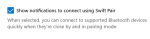
Seems like I'm always having to Bluetooth re-pair my phone with my desktop. I did so yesterday, but even tho the pairing is complete, I'm still regularly getting these notifications to pair my phone

If you click on the first image, it takes you to the Win 10 Bluetooth setting where it asks you if the 6 number code showing is the same as the one on your phone.. When you answer yes, it says "connection failed".

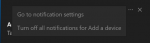
In the second image, you see what appears after you select the three dot drop down menu on the right upper portion of the first image, but nothing happen when you click on it to stop notifications.

Attachments

  • Screenshot_1.png
    Screenshot_1.png
    12 KB · Views: 249
  • Screenshot_3.png
    Screenshot_3.png
    7.2 KB · Views: 212

Apps Bluetooth Client vs Server

What model TV do you have? Some Smart TVs do include Bluetooth support but not all.

Also, is your TV remote using Bluetooth or infrared to connect to your TV? If it's IR that might making a Bluetooth app that can control your TV a problem.

I have a Roku smart TV. I actually am not sure if it connects via IR but I will check into it. I am like 85% sure it is bluetooth.

After various attempts I think it may have something to do with the socket. Going from the developer guide the examples use RFCOMM (SPP) socket. I see in the reference library there is also L2CAP and SCO. Hopefully after I read into it more I will figure out a solution. I will post my findings back on this thread.

Any other thoughts or suggestions is greatly appreciated.

Help Weather

yes please keep us posted.

I found the original weather app on my phone. I'm assuming it's the original because when you go to the app settings, it doesn't let you disable or delete it. And i had Iooked though my apps many times before looking for anything "weather" related. Found nothing. It seems this weather app appeared out of nowhere. And I haven't downloaded anything for a long time. It's completely different from the app I was using. I don't like it all. When you click on certain things, it takes you to the Accuweather website. I don't like that. My old app didn't do that. Maybe in the past, I downloaded a weather app, but I sure don't remember deleting a weather app. I've searched and searched for what I had with no luck. Maybe, Samsung Galaxy S7 changed the original app! Wish I knew what app I was using. I loved it. Google Play Store use to have an option to look at all your apps you've ever downloaded, but they no longer have that option. Unless I just cant find it.oh well. Thanks guys for all your feedback and help!!

Cheapest Android phone that can run 5ghz wifi?

Look in the WiFi settings - tap the 3 dot menu and tap Advanced WiFi. Is there an option for Dual Band WiFi, or something similar?

Does your router have a separate SSID for the 5Ghz channel?

Where do you see 5Ghz WiFi listed? LG spec pages don't mention it for either phone:
https://www.lg.com/us/cell-phones/lg-L211BL-tracfone-rebel-4-gsm
https://www.lg.com/us/cell-phones/lg-L212VL-tracfone-rebel-4
https://www.lg.com/us/cell-phones/lg-lgl322dlatrfbky-tracfone-journey-lte
https://www.lg.com/us/support/products/documents/Datasheet_LG_LG Journey LTE_Tracfone_0626.pdf

Rebel 4 specs say 802.11b/g/n which is 2.4Ghz.

Look for a phone that supports "WiFi 5" or "802.11 a/b/g/n/ac."

Help Interrupted the Factory Reset - Now Only Black Screen

Hey, I meant to send this ages ago. But thank you so much. Your link fixed everything. I needed to download further "flashing" software or something. I got it from like an Eastern European site. But it worked. And fixed everything. I got it going, but YouTube wouldn't update and I couldn't even find Evernote in the Google Play store. Which were my main two apps. But now for some reason, the thing won't even turn ON, nor even charge anymore. But your advice helped and I fixed it for a time. Thank you
hit the like button to show your appreciation. that is how most forums work. glad it all worked out for you.

Screen Black Voice says Screen off Ringer mute

Try a different charging cord.

Back to the assistance, you only have to qualify for assistance- not actually receive it.

A copy of a tax return will suffice.

So long as income is at or below ~130% of "poverty level" you will get a free phone and service.

Some of the companies differ, but generally the first phone is free.

The recent changes in the program means that at least for me the cellular service is not great (it used to be) but so long as I can find some Wi-Fi I do well.

Filter

Back
Top Bottom