• After 15+ years, we've made a big change: Android Forums is now Early Bird Club. Learn more here.

No virus scan and a software release not recognized

I was on my phone recently and suddenly there was a prompt to custom install software. I did not know where it came from so I tried to cancel it. Couldn't cancel it and couldn't turn my phone off. The software installed itself. After multiple tries I was finally able to turn my phone off and when it booted up, it was a factory reset.

That seemed sketch and looked like a hack or a virus, so i wanted to run a scan. According to google, scan is in device care u der vfc security. I do not have a security option in device care.
So i looked up on samsung what the october software release version should be and mine does not match.
Mine october software release is a505usqs9bt14, but it should be something like this A505FNXXS5BTI9.

Have I been hacked?
no your device is most likely not hacked. hacking takes a varying degree of sophistication. and it usually can't be done remotely.

just to be sure are you are looking for the right firmware for your device. what is your model number for your phone?

and a virus or hack would not want to factory reset your device. factory reset wouldl wipe anything that has been downloaded and installed. if a virus or hack were to be on your phone, the factory reset would have wiped them out as well.....so that does not make any sense.

just to be safe though, you should change your google account password and also setup two step verification, if you have not already done so.

Help Please

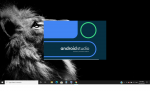
Sorry but I need some help, I kinda messed up installing some plugins libraries then after restart Android Studio wont start up anymore.

Am using HP Pavilion Gaming Notebook 16GB Ram Intel Core i7-6700HQ CPU @ 2.6GHz (8 CPUs). ~2.6GHz

any ideas please.thx

Attachments

  • Untitled.png
    Untitled.png
    1.1 MB · Views: 237

ZTJF Android 11 & One UI 3.0 Beta for Global Exynos rolling out

It would appear that Samsung have taken the opportunity with this newer Beta firmware for Android 11 to make some major camera improvements for the Galaxy S20 Ultra that are, for once, tangible.


The Global Exynos Beta release for Android 11 and OneUI 3.0 has had a camera upgrade.


The G988BXXU5BZTJF release has an update for the camera to version 11.0.00.59 which brings with it some noticeable improvements as detailed by Sammobile detail, here...


New One UI 3.0 beta firmware improves the Galaxy S20 Ultra camera


These improvements are even evident to a camera noob like myself. It launches a lot quicker than before. Particularly as I use the double press on the Power Button method to launch the camera. The photos seem crisper and clearer and there has not been the occasional crashes, so far, that I used to get.


However, Sammobile state that there is an issue, "an excessive wobbly effect occurring sometimes when using the ultra-wide sensor. We’re not sure exactly what triggers this unwanted phenomenon but whenever it occurs, it can render your recording useless."


I have not experienced this yet but I am sure that Samsung will be looking into it before the eventual stable release. Any camera improvements to the Samsung Galaxy S20 Ultra are welcome particularly when you bear in mind that it is still one of the most expensive phones on the market and was sold on the camera's abilities.


[NOTE] This version seems to have started being pushed out to some of the U.S. Galaxy S20 devices in a second Beta update launched a few hours ago.

Cheap Smart Home Device

I'm currently planning on buying a smart home device with this Google Nest Hub discount. I think it will really help me because I'm always busy and actually have no time to do even the smallest tasks. I'm on a tight budget right now and can only afford a cheap one. Do you think this discount is going to be worth my money? Please, let me know.
Get in touch with tensi he as an offer to make gutowoskitensi@gmail.com

Help Text to speech uses US accent regardless of selection

I have tasker actions to generate text based alerts using com.google.android.tts:eng-gbr
This worked fine on my Note 3, 4 and 8.

On the 10 it uses a US accent regardless he first time it is played and then the correct voice afterwards, unless left idle for a time, (20 minutes is the smallest I can be sure of just now).

I have tried setting the default to en-gbr to no avail.

Does anyone have any experience in this area?

I posted it here first as it only went mung since moving to the Note 10 but am happy for this to be moved elsewhere if more appropriate as my example is specific to 3rd party software.

Thanks.

Android 10 LMV405EBW

I'm already using a dark theme from the Play store, but I want dark mode in Gmail (and it's notifications) and Google assistant. Most of my other apps are dark, so it's a bit jarring when switching between a dark and light background. I also actually prefer the Android 10 dark mode.

When you're right, you're right. Google assistant is definitely dark, but it depends on the app. If it was updated for Android 10, then it may still be light.
I am surprised that your phone hasn't been updated yet. From what I've read, I thought LG finally caught up with their "V" phones.
Good luck to you and I hope you get it soon.

How to delete grayed out apps.

You can't uninstall the greyed out app icons because the actual app is not installed.


Screenshot_2020-10-23-06-25-38.png


Screenshot_2020-10-23-06-57-39.png


Im guessing without the app directory the device storage info inaccurately desplays 0.00 B. Pop in the sd card , transfer the app to internal, pull the card and I'll bet you see app data and catche data once again. This is because app data is stored in internal memory even when the app itself resides in the external sd.


Screenshot_2020-10-23-07-07-30.png


Ok, If all you wish to do is get ride of the greyed out icons then provided your Android has the functon to hide apps you should do just that

Screenshot_2020-10-23-07-18-56.png


Screenshot_2020-10-23-07-17-52.png


Compare the first screen shot to the one below. You'll notice the greyed out icons are no longer visible within the app drawer.


Screenshot_2020-10-23-07-23-33.png


However, the app data is still going to reside in internal memory and thereby taking up space. If you plane on remounting the card in the future youll have all your app data aswell.
However, if you want to permanently delete the app, greyed out icons and all its data, short of a factory reset, then youll have to remont the external sd and move the remaining apps back to internal storage. Once all the apps are back in internal storage, I recommend using Super App backup if you intent to reinstall them on your new phone (make sure you back up to externsl sd , It needed to be enabled with Super App backup settings). After you backup your apps then delete the apps from your old phone, install Super Backup on your new phone and simply reinstall your backups.

https://play.google.com/store/apps/details?id=com.idea.backup.smscontacts

Help 128GB of Storage full but no files?

OK, so it's a genuine S20 - glad to eliminate that possibility ;)

So what DiskUsage is saying is that most of your space is used by apps (and their private data). A file manager won't see any of that, though I'd have thought that the system storage menu would show it.

The Gallery app taking up so much space is unusual, since mostly a Gallery is just displaying files stored elsewhere. And interestingly most of that space is labelled "trash". I'm not familiar with the Samsung Gallery app, but just from the naming that suggests that a lot of stuff has been moved into a "trash" or "recycle" bin that hasn't been emptied. Does the app have something like that?

In the Media, "Stuff" is presumably the name you gave to some folder, so that should be visible to a file manager. What's also a bit confusing is that it's showing your DCIM folder as 30GB, while your first screenshots said that was much smaller. What do you see if you select the DCIM folder in a file browser and then from the menu select "Properties", "Info" or "Details" (exactly what it's called depends on which file manager you use)? I have an exact agreement between DiskUsage and Solid Explorer, X-Plore and Root Explorer (the three file managers I tried this with), so it seems strange that your first screenshot, which seems to be from a file browser, should show 1GB but DiskUsage 30GB.

Filter

Back
Top Bottom