I had the same problem as everyone else in this thread. My phone worked fine for two months. One day I was wearing a nasty imitation leather jacket and had the phone in my shirt pocket. It got kind of hot where I was and it got "steamy" inside that jacket before I took it off. The next time I looked at my phone it was doing the "USB Connected" dance. I tried power cycling and couldn't get the phone to power up, just got the grey battery symbol.
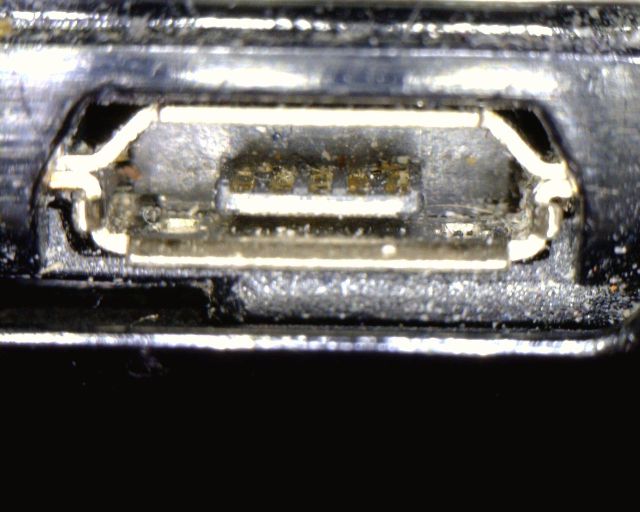
I tried a variety of things to fix this with marginal success. When I returned home I got the connector under a microscope and saw that there was some crud in the connector:
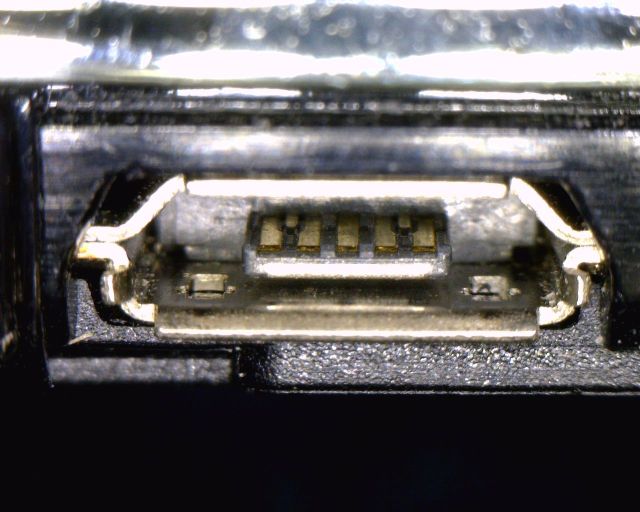
You really couldn't see it with the naked eye, you need at least 10 to 20X magnification and a good light source to see it. I turned off the phone, took out the battery, and squirted some canned air ("Dust Off") in the connector and blew a lot of that stuff out. However, there still was some dirt on the contacts. I took a small piece of coffee filter paper, wrapped it around the end of a small twist tie, soaked it in isopropyl alcohol, and swabbed out the connector. Here's the clean connector:
You need to be very careful about sticking things in the connector. The little tab that holds the contacts is fragile.
I powered the phone back up and it no longer displays the "USB Connected" message. It works correctly when I really do plug in a USB cable, too.
Why does this fix the problem? Well, I used to design cell phones, and I know a thing or two about the external connectors on phones. The phone has to have some way of detecting that something has been plugged into the connector. Micro USB connectors do not have a mechanical switch to detect the presence of a plug in the socket. If these connectors work the way USB OTG (On-The-Go) connectors work, there is a resistor in the cable between two of the pins. The phone attempts to pass a small amount of current through that resistor to detect the presence of the cable. When there is debris in the connector, like cotton fuzz from clothing, tiny bits of soap from washing, and tiny flakes of dead skin, and you add humidity from perspiration or rain, etc. you create little blobs of slightly conductive goo that can bridge the gap between the pins. That blob of goo looks just like a resistor to the electronics in the phone. So the phone thinks there's always something plugged into the connector. Why have some people been able to fix the problem with settings then? I suspect that they found settings that cause the phone to stop checking for a USB cable or to ignore the signal that tells the OS that something is plugged in.
I'd like to hear whether this solves the problem for others. While we're at it, does anyone know what those two extra contacts way at the back of the connector are for? Those aren't standard USB pins. I suspect they are used in manufacturing test.
Now if Verizon would only release Froyo for this phone...