• After 15+ years, we've made a big change: Android Forums is now Early Bird Club. Learn more here.

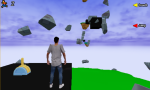
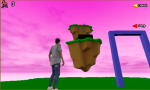
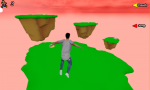
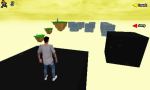
{FreeGame} Portal Run Puzzle

Portal Run Puzzle

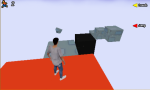
3d platform game where you will have to scramble puzzles to advance

A normal workday turns into an adventure where your ability to solve puzzles will be put to the test
+ More than 20 maps to test you
+ Physics, gravity, platforms, explosions

Overcome the challenge!

Link: https://play.google.com/store/apps/details?id=com.GamiantStudio.PortalRunPuzzle

Dev02.png Dev03.png Dev04.png Dev05.png Dev06.png

How to recover the Moto C plus in this case?

Hi, I have a moto c plus moto c plus xt1726.
His USB port is damaged and doesn't work, but I was still able to install roms through TWRP.

The problem: Yesterday I tried
Install a Custom Rom through TWRP, but something went wrong.
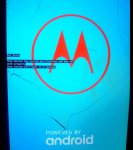
The smartphone doesn't leave the blue logo anymore:
1.jpg


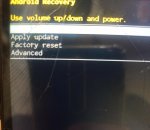
Then I accessed the recovery mode (Volume+ and Power). The installed rom seems to have modified the recovery interface, and now it looks like this:
2.jpg

The problem is I can't reinstall the rom.
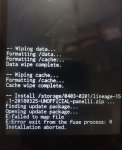
I accessed "Apply Uptade", selected the sd card, then the rom(zip), but I get the error message:
5.jpg

I can't recover the moto c plus because the usb port doesn't work, and I also don't have access to android anymore, and consequently I don't have the TWRP anymore.
Is there anything I can do yet?
Any way to install TWRP and recover the phone in this case?

How Do I turn off Automatic Google Downloading

I just got a new phone to use for traveling (T-Mobile does not have service in a bunch of places where I go). It's Tracfone Samsung Galaxy J2 which rides on the Verizon network, which does have service most everywhere. In setting up the phone, it would not let me get past the "Accept Google downloading" stuff whenever it wants to. The "advice" it gave is that after something is downloaded I can search for it and delete. That is completely un-acceptable. How do I disable this intrusive google annoyance (yes - I realize that "intrusive", google" "annoyance" are repetitive synonyms)

Parental controls?

Ok, parental controls on phones and tablets have become very frustrating. Finally, I thought I got parental controls working and where the kids can't bypass it. I use MM Guardian. All the sudden, I checked one of the kid's phones and Google Play uninstalled mm guardian due to security concerns. I tried to reinstall it and Google Play is restricting installing it. So, now I'm stuck using only Family Link to lock down the phones. Family link works great for controlling which apps the kids have on their phones, but it doesn't track phone calls or sms messages at all. Also, it won't allow me to monitor kids once they're older than like 12 or something... so I have to then create bogus Gmail accounts that say my 13 year old is only 5. I don't know why Google would think teenagers don't need to be monitored. Teenagers are the age when bad things happen when they start talking to strangers on the internet. When I was in high school, one of the kids in school with me met someone on the internet and she disappeared for months. She was on the news almost daily with people trying to find her. I think she made it to the side of a milk carton. She showed back up after a few months alive and fine. But, teenagers are the age when bad things happen. I don't know why Google would think teenagers don't need to be monitored.

  • Poll Poll
Help Partition Problem

I am new so just to ask Did i post my first post ok

  • Yes

  • No (please email me what i did wrong)

  • dont wish to awnser


Results are only viewable after voting.

Hey all im new to the site.

I can partition a HDD, SSD or SD Card 12 ways to Monday on a windows platform with my eyes closed while asleep.
But dont have access to a windows computer or a windows device. I have an SM-T860 running Android 11-R armarch-64bit Qualcom octi core, 6GB and 128 GB Internal Storage. The device is not rooted, if it were I could take care of this myself. I cant root without the backup and i cant backup without root (anyone seeing circles)

Anyway

I have a Micro SDXC 1TB card installed in the Tablet and the idea is to keep 512gb for backup, 128 for linux mint to emulate windows, 128 for linux (or other similer distro) to emulate a VLE of some sort and 256gb for storage.
Im hoping by running this of the sd card it will keep the android system isolated and protected if i muck things up to much.

I have an adaptor for the Micro sd card and a PS3, I am planning on putting home brew on the ps3 using the adaptor.
I know a PS3 can format an SD card but I dont know if it can partition an SD card.

I have no other game consoles or devices that might do the trick.

If anyone knows a way to partition the SD card that is similer to Storage Manager in windows 10 or maybe a live web vershion of a similer utility please post.
Thankyou.

Just to add the Micro SDXC 1TB card is a 128 bit/s A1 Sandisk card if that helps

BLE Scanning scan very few advertisements on one device versus others

Hi

I have built a BLE scanning application and on a Mecer tablet device running Android 7, the Scan Results has lots of advertisements as compared to a Webfleet PRO 8475 running android 9 which has very few advertisements scanned everry second. Any suggestions on what could be wrong, the Android 9 scan misses most of my BLE beacons but the Android 7 scans all beacons.

Videos not playing via YouTube smart tv app.

Hi guys,
Firstly I must emphasise that I’m a techno-idiot! I know 3yr olds with better technological skills. Hence this help post. So apologies in advance!

I have a android TV box (Droix X3) and I’ve always been using the pre-installed YouTube app with no issues. Unfortunately today the app just stopped working, and would not load at all. I deleted the app then reinstalled YouTube via Google play store. The app layout was nothing like the original app I used. So I did a bit of digging and found ‘Smart YouTube tv’ app and downloaded it through Troypoint. The app installed successfully and appeared to be the same as the original installed. I linked my Google account to it and everything seemed fine. All my history and subscriptions etc were showing up and also the thumbnails (think that’s the right terminology) to all the recommended videos etc. But when I click on a video they will not play. It just pops up as ‘Something went wrong’ message, and ‘Submit report message’. I’ve had a look through the setting on the app and tv box but just can’t get my grey matter around it. It may (hopefully) be something simple but as I said, I’m a bit of a techno-plonker so I’m hoping somebody maybe able to help out and happily have a laugh at my expense!

Thanks in advance and apologies if this has been posted in the wrong section

S21 Ultra send text over blue tooth

I have recently upgraded to a Samsung S21 Ultra from a Razor. I am connected to my 2017 GMC intellink via blue tooth. With my old Razor (do not remember witch version of Android) I was able to receive and make calls and receive and send texts. With my Samsung S21 I am able to receive and make calls, but only receive texts,
I am not able to send texts unless I plug in a USB cable. My Blue tooth settings on my S21 for my GMC intellink connection has calls, audio. contact access and message access all enabled.

Thanks
TonyD

Help It doesn't recognize any usb device

Hello, I have the Chromecast with Google TV, I connected a hub and it doesn't recognize any pendrive or hard disk. I don't understand why, it should be something simple. The hard disk and pendrives I tried have different file formats, but it doesn't recognize any of them, exFAT, Fat32, NTFS... Even I buy an app (JS USB OTG) and nothing. I use FX Explorer like File Explorer, I try with VLC Player, but there is no way, in System Storage doesn't appear any device. Maybe is the Hub? The brand is UGREEN, it's quite good, I mean is not the cheapest brand in Asia.

Here a picture to see how I connected the hub.

Help Unexplainable Storage

Hello everyone,
Ty for reading this. I'm kinda through most "normal" options. But my phone is full everytime while I don't use even a quarter of it myself.
I tried
- Factory Reset (a month ago when it happened as well)
- Deleting files via PC. (1.5gb)
- Clearing the cache of all apps (~2gb)
- And I uninstalled apps that I don't use, while first deleting cache and data for that app.

I don't have many apps and I use the phone for calling, social media, 2 step verification and one game. I'm so confused about this, any suggestions would be appreciated. I wouldnt want to reset every month...

Attachments

  • Screenshot_20210610-082912_Device maintenance.jpg
    Screenshot_20210610-082912_Device maintenance.jpg
    94.9 KB · Views: 209

Pin not working (Solved, kind of)

Hi,
My wife has been messing around with her Galaxy A40 settings and switched on accessibility now her phone narrates everything. She charged her phone and went straight to work. During her break she tried to use the phone, pressed the power button, the welcome screen appeared and after using two fingers to swipe she was at the pin screen. However it does not allow a single tap of the keypad, it states that you have to double tap. This she does until the pin is entered, but the screen does not unlock. I tried to switch off the phone as this cures a multitude of problems, but when you tap on either the power off or the restart button, it takes you back to the pin screen. As the phone is fully charged it will take weeks for it to run out of power and shut down. Anyone know how to get past this? Any help would be helpful.

Apps Getting Black application screen while connecting Bluetooth Dongle on Lenovo Tablet

I am trying to connect USB dongle to my Lenovo TB-X505F that time my application showing black screen and also observed that the MainActivity also getting restarted. I add possible configuration changes in the Android Manifest still getting the same problem.

<activity android:configChanges="orientation|uiMode|screenLayout|screenSize|smallestScreenSize|layoutDirection|locale|fontScale|keyboard|keyboardHidden|navigation|mcc|mnc|density"
android:name="org.qtproject.qt5.android.bindings.QtActivity"
android:label="calqlatr"
android:screenOrientation="unspecified"
android:launchMode="singleTop">
<intent-filter>
<action android:name="android.intent.action.MAIN"/>
<category android:name="android.intent.category.LAUNCHER"/>
</intent-filter>

need advice please!!

Alrighty so my S10 has been hacked and been put into developer mode , i know absolutely nothing bout tech shiit, excuse the french. im using my work phone atm which is an iphone , ill try cut this short otherwise id be here forever :/ now i have the biggest suspicion its my partner he keeps denying it, but i have seen stuff on the laptop that is on my phone , he has installed so many apps onto my phone , he is controlling it remotely , im sure theres also something to do with my sim card aswell, he changes keyboard settings hes downloaded bixby , and these ant radio services plus configuration apps plus hes downloaded a fake google play services app im sure i cant access my google account on there or my samsung account anymore , i dont wnt to reset it , im thinking of taking to a phone guy i know to get some help , i can put a list or pics up of the list of system apps he has put on my phone if needed .. just need my phone back :(

Help Storage permission is required

I used to be able to go to any folder with the My Files app and view images (with the Gallery app) on internal as well as the SD card storage. Yes, I am fully aware I can go directly to the Gallery and view them there.
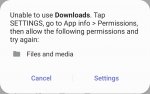
Recently when going to a folder and trying to view images I get the error message "Storage permission is required".
It's not a big deal but I'm curious as to why this is happening.
I have checked permissions of My Files and Gallery and they both have permissons to access storage.
Any ideas?
Thanks!

Filter

Back
Top Bottom