
Install the app
How to install the app on iOS
Follow along with the video below to see how to install our site as a web app on your home screen.
Note: This feature may not be available in some browsers.
-
After 15+ years, we've made a big change: Android Forums is now Early Bird Club. Learn more here.
You are using an out of date browser. It may not display this or other websites correctly.
You should upgrade or use an alternative browser.
You should upgrade or use an alternative browser.
***Droid X Software Update***
- Thread starter NKT
- Start date
-
- Tags
- motorola droid x
- Status
- Not open for further replies.
the battery level jumped up on mine as well.... i turned GPS on, but no GPS symbol on the notification bar unless i open the google maps app. was it like this before? i couldnt remember
Yeah, the GPS didn't used to show in the notification bar unless it was being used before either.
Just manually got the update in CA
I downloaded the update and chose to "Install Later" in the hopes of finding the update file, but I can't seem to find it. Nothing on my SD card.
Does anyone know the location the update file may have saved to?
Since it doesnt look like you got an answer yet, it's not on the sdcard. Look around in the internal storage it is a file roughly 18.5MB in size.

JA1234
Android Enthusiast
OK I need help...I downloaded the update. I clicked install later as I was finishing something up...I when back to about phone, check for update and clicked install...I got a blue screen that said select using camera button...now I have a black screen that says
Bootloader
29.01
err:a5,69,35,00,21
battery ok
ok to program,
connect usb
data cable
Help please
Bootloader
29.01
err:a5,69,35,00,21
battery ok
ok to program,
connect usb
data cable
Help please

paul89
Android Expert
lma you went into the bootloader, just pull the battery and reboot!OK I need help...I downloaded the update. I clicked install later as I was finishing something up...I when back to about phone, check for update and clicked install...I got a blue screen that said select using camera button...now I have a black screen that says
Bootloader
29.01
err:a5,69,35,00,21
battery ok
ok to program,
connect usb
data cable
Help please

Fabolous
Superuser
Got the update in Champaign, IL about an hour ago.
Tried to backtrace it to the source, but Motorola's got some sort of clever server going on where it's not just a static address.
Anyways, those of you wanting to root may want to hold off on the update until we know more about it. I already posted this in the other thread, but here it is again:
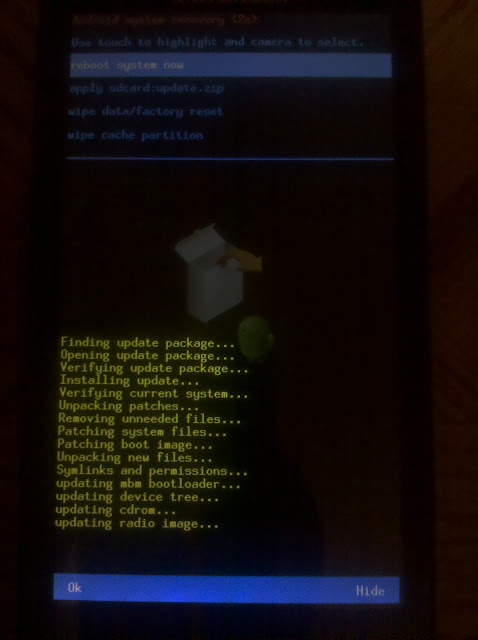
This shows that the bootloader has been updated, which could mean that potential security holes could have been patched.
On the other hand, looks like the kernel and baseband were updated too, which could be a good thing
Tried to backtrace it to the source, but Motorola's got some sort of clever server going on where it's not just a static address.
Anyways, those of you wanting to root may want to hold off on the update until we know more about it. I already posted this in the other thread, but here it is again:
This shows that the bootloader has been updated, which could mean that potential security holes could have been patched.
On the other hand, looks like the kernel and baseband were updated too, which could be a good thing
JA1234
Android Enthusiast
lma you went into the bootloader, just pull the battery and reboot!
pulled battery and tried but get the same page
JA1234
Android Enthusiast
Got the update in Champaign, IL about an hour ago.
Tried to backtrace it to the source, but Motorola's got some sort of clever server going on where it's not just a static address.
Anyways, those of you wanting to root may want to hold off on the update until we know more about it. I already posted this in the other thread, but here it is again:
This shows that the bootloader has been updated, which could mean that potential security holes could have been patched.
On the other hand, looks like the kernel and baseband were updated too, which could be a good thing
I got that page and hit the camera button and then got the page as I described above starting with bootloader...what did I do wrong??? anyone
yanezsosajavier831
Lurker
anyone know if using the 3g mobile hotspot on the android x is free or they charge extra?

ericnail
Android Enthusiast
anyone know if using the 3g mobile hotspot on the android x is free or they charge extra?
wrong place to post that...
but yah they do; $20 extra /mo
duffyanneal
Newbie
To my eyes it appears they tweaked the font smoothing. I can now read text fully zoomed out on web pages that were illegible prior to the update. Overall system appears to be a bit more snappy. I just happened to wipe my X earlier tonight so my system wasn't loaded down with too much junk and it definitely feels faster now.

Fabolous
Superuser
I got the update, however, still no battery charging indicator.. at least not via LED.
I think it comes on after you have the screen off for a couple of minutes. I'll attach a picture in a sec.
EDIT: nevermind, that was the low batt indicator (just disappeared after my charge went above 15%)
ericnail
Android Enthusiast
I think it comes on after you have the screen off for a couple of minutes. I'll attach a picture in a sec.
EDIT: nevermind, that was the low batt indicator (just disappeared after my charge went above 15%)
yah sadly, no such indicator yet

SFWB
Android Enthusiast
Just got the update after manually checking for updates under the settings menu. I never saw a prompt before that.
Forgot to mention, my X had been plugged for about 5 hours and was fully charged before the update. I did the update with it still plugged in. After the update and subsequent reboot, the battery then showed up as 80% charged.
Forgot to mention, my X had been plugged for about 5 hours and was fully charged before the update. I did the update with it still plugged in. After the update and subsequent reboot, the battery then showed up as 80% charged.


- Status
- Not open for further replies.