• After 15+ years, we've made a big change: Android Forums is now Early Bird Club. Learn more here.

Help HOW TO: Reverting Back to 2.1

I have flashed again with the same results. The only difference is that I didn't not get the continuous boot requiring removal of the battery.....I'm beginning to wonder if perhaps I got something wrong with the sbf file. Do you think it would behave this way if this file were not valid?
Thanks so much for all the help you've given me. I get obsessed by things that don't work and this is driving me nuts.
 
after you flash sbf when you go to reboot it you are using "home and power" buttons right? then "wipe data/factory reset" right? because if you dont do that right after flashing the sbf youll probiably get stuck like you are. Thats what happened to me on the second run. I forgot to wipe date/factory reset and it screwed everything up.
 
Yes, that's how I did it. I watched the video and went over each step before I did it, so I think I'm getting the steps correct. I'm thinking it's something with the files I was using, or maybe something odd about the phone.
 
Tonight I flashed using the sbf from the below site, but I'm having the same problem. Could you verify that I'm using the proper files? Thank you again!
[link deleted]
 
Tonight I flashed using the sbf from the below site, but I'm having the same problem. Could you verify that I'm using the proper files? Thank you again!

I'm not going to download it to see if its okay. Use the download i described on the Original Post. I can personally verify that one.

Also, please elaborate on "Same Problem"..
 
Warning: Do not downgrade to 2.1 sbf from the 2.2 ota, you will be bricked! Untill we get a 2.2 sbf leak
 
I downloaded the sbf shortly after this thread was begun in August, but decided
to wait until closer to the official release date to flash. I checked my downloaded files this morning and my original flash used the downgrade.zip. After being unsuccessful with my flash I decided last night I'd use the files from the site I posted....The "same problem" I mentioned refers to being unable to progress past the activation screen. In other words I get the screen "Welcome to DroidX" "Touch the android to begin". I activate and I receive the audible "Activation Sucessful" message, but clicking Next at that point takes me back to the activation screen. I can never progress past that point. Turning off and removing the battery have not effect. Thank you for your help.
 
I downloaded the sbf shortly after this thread was begun in August, but decided
to wait until closer to the official release date to flash. I checked my downloaded files this morning and my original flash used the downgrade.zip. After being unsuccessful with my flash I decided last night I'd use the files from the site I posted....The "same problem" I mentioned refers to being unable to progress past the activation screen. In other words I get the screen "Welcome to DroidX" "Touch the android to begin". I activate and I receive the audible "Activation Sucessful" message, but clicking Next at that point takes me back to the activation screen. I can never progress past that point. Turning off and removing the battery have not effect. Thank you for your help.

Well based on the size of the one you posted, it was about 150MB's too large. As far as your issue; Sounds like your phone isn't activating properly, this isn't an SBF issue. I would give VZW a call.
 
As you said, it seems like it must not be a sbf issue. I downloaded the downgrade.zip again and reflashed. Again everything appeared normal until I activated. Interestingly, now instead of getting the automated audible message indicating success, I get an automated message telling me that I've dialed a number that's not available in my calling area. I also have a blue triangle in the status bar that I don't remember seeing before....Seems odd.
 
As you said, it seems like it must not be a sbf issue. I downloaded the downgrade.zip again and reflashed. Again everything appeared normal until I activated. Interestingly, now instead of getting the automated audible message indicating success, I get an automated message telling me that I've dialed a number that's not available in my calling area. I also have a blue triangle in the status bar that I don't remember seeing before....Seems odd.

The blue triangle is normal, it's the Roaming icon and since you aren't activated, you are technically "Roaming" on VZW's network.
 
Erik I would like to just thank you for this thread. I understand it came about a good while back but since the new OTA I didn't need it until now. As soon as the first leak was out, I jumped right into it, wanted 2.2 so bad :rolleyes:. I'm still getting used to Android OS so I haven't rooted yet, taking baby steps. Well when I saw this thread I saved every original file that I needed to revert, instructions, the video, I even cached the site in case it disappeared.

Semi-long story short, I was on the first leak, used all my backed up files to revert using this method and am downloading 2.x OTA as I type this. I was being risky by working, doing several different things at once AND re-flashing my phone :rolleyes: but alls well, smooth as butter - Again thank you and any body over at xda that provided these instructions.

Side note: I still understand birdman retains the first leak, and maybe will have a new 2.3 zip soon but like I said, baby steps - I want to learn a lot about Android, but at the same time not constantly bricking my phone at the attempts :)
 
Eric, good man! I've read through this entire thread (and others) trying to figure out what I'm doing wrong.

Here's my situation:

Droid X running the 2.3.9 leak
Downloaded (from your Google hint) the Downgrade.zip files.

I initially tried this on my Win7 x64 machine, and after many failed attempts, redid everything on WinXP 32-bit. I used the appropriate divers on each system.

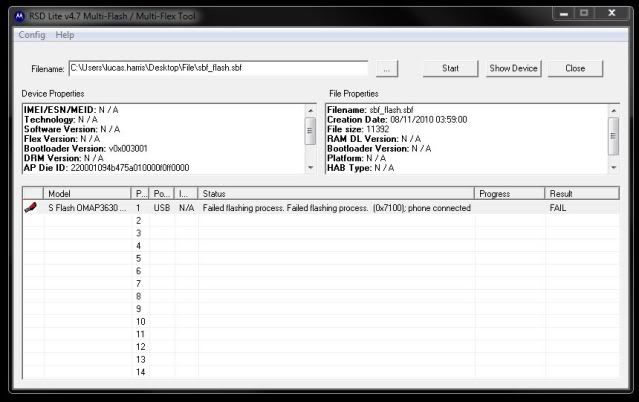
RSD Shows: (For file properties)
Filename: sbf_flash.sbf
Creation Date: 08/11/2010 03:59:00
File size: 11392
RAM DL Version: N / A
Bootloader Version: N / A
Platform: N / A
HAB Type: N / A

RSD Shows: (For device properties)
IMEI/ESN/MEID: N / A
Technology: N / A
Software Version: N / A
Flex Version: N / A
Bootloader Version: v0x003001
DRM Version: N / A
AP Die ID: 220001094b475a010000f0ff0000
BP Die ID: 0000000000000000d15432890485
AP Public ID: c7377a0b58613eda66040200ada2549c786c2cd3
BP Public ID: 040000000500000002000000ffff000049003289

When I click Start, I get:
Failed flashing process. Failed Flashing process. (0x7100); phone connected
FlashFail.jpg


Here's the error log:
16:45:18, September 22, 2010
Line: 898
ERROR: The file selected is an invalid superfile.
Please enter in a valid superfile.
File: D:\test_dev_usb\flash\code\flashdll\PST_FP_FlashFileIO.cpp
16:45:18, September 22, 2010
Line: 1761
ERROR: Error validating image files.
File: D:\test_dev_usb\flash\code\flashdll\PST_FP_Flash.cpp
Device ID: 0
16:50:25, September 22, 2010
Line: 898
ERROR: The file selected is an invalid superfile.
Please enter in a valid superfile.
File: D:\test_dev_usb\flash\code\flashdll\PST_FP_FlashFileIO.cpp
16:50:25, September 22, 2010
Line: 542
ERROR: The superfile specified does not exist
File: D:\test_dev_usb\flash\code\flashdll\FlashHdlr.cpp
Device ID: 0

Any advice you can offer would be greatly appreciated!

Thanks,
Lucas

 
find a different sbf file. your missing stuff on yours.... mine has info in the platform section and also in the HAB type. Also your file size isnt right... it should be a lot bigger. look for the droidX bomb it will have a good sbf in there (dont want to get eric in trouble incase he has it anywhere)
 
my file properties reads
File Name: VRZ_MB810_1.13.6.2_1FF_01.sbf
Creation Date: 8/13/2010 15:19:34
File Size: 460636669
Ram DL Version: N / A
Bootloader Version: N /A
Platform: 4G OMAP
HAB Type: Signed Production
 
So I Completely give up...HOW do you "how to unzip sbf_flash ?

On 2 diff computers, I follow the instructions...open RSDLite and then open the verizon file that was provided. In both situations, No device properties and / or file properties show up therefore can never click start....please helpppppp!
 
find a different sbf file. your missing stuff on yours.... mine has info in the platform section and also in the HAB type. Also your file size isnt right... it should be a lot bigger. look for the droidX bomb it will have a good sbf in there (dont want to get eric in trouble incase he has it anywhere)

Gracias! I kinda thought that an 11k file was WAY too small, but it's the same one that I've found in a few downloads. I'm downloading a couple more now, and I'll compare them to what others have posted here!

Thanks again,
Lucas
 
my file properties reads
File Name: VRZ_MB810_1.13.6.2_1FF_01.sbf
Creation Date: 8/13/2010 15:19:34
File Size: 460636669
Ram DL Version: N / A
Bootloader Version: N /A
Platform: 4G OMAP
HAB Type: Signed Production


Perfect! I downloaded a file with the SAME properties; it's flashing now!

EDIT: All done! Thanks for all of your help!!!
 
So I Completely give up...HOW do you "how to unzip sbf_flash ?

On 2 diff computers, I follow the instructions...open RSDLite and then open the verizon file that was provided. In both situations, No device properties and / or file properties show up therefore can never click start....please helpppppp!

You'll need to try on a different comp. That's the solution I have found to this error.
 
So I Completely give up...HOW do you "how to unzip sbf_flash ?

On 2 diff computers, I follow the instructions...open RSDLite and then open the verizon file that was provided. In both situations, No device properties and / or file properties show up therefore can never click start....please helpppppp!

did you unzip your VRZ file, either in the gift or rsdlite folder, I had to unzip that before it showed up on the rsd lite so I could of hit start...
 
Perfect! I downloaded a file with the SAME properties; it's flashing now!

EDIT: All done! Thanks for all of your help!!!

Glad it worked for you!
And honestly your screen shot and description is what saved you. Without those I'd have never picked up on the difference in SBF's so, nice trouble shooting post on your part!
 
Hey, trying to get this to work

After about 5 minutes through RSD the error comes up under the status bar that says: failed flashing process, phone is not compatible with multi interface super file

anyideas? I'm mostly positive i did everything else correctly. Help would be most appreciated
 
So I used another PC to flash it.
The flash completed and it says "Please manually power up this phone"
and I couldn't turn it off.
I pulled the battery and turned back on but stuck at the droid eye loop.
 
Back
Top Bottom