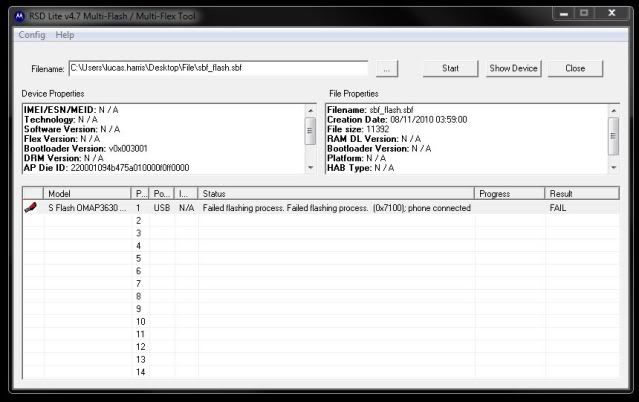
Eric, good man! I've read through this entire thread (and others) trying to figure out what I'm doing wrong.
Here's my situation:
Droid X running the 2.3.9 leak
Downloaded (from your Google hint) the Downgrade.zip files.
I initially tried this on my Win7 x64 machine, and after many failed attempts, redid everything on WinXP 32-bit. I used the appropriate divers on each system.
RSD Shows: (For file properties)
Filename: sbf_flash.sbf
Creation Date: 08/11/2010 03:59:00
File size: 11392
RAM DL Version: N / A
Bootloader Version: N / A
Platform: N / A
HAB Type: N / A
RSD Shows: (For device properties)
IMEI/ESN/MEID: N / A
Technology: N / A
Software Version: N / A
Flex Version: N / A
Bootloader Version: v0x003001
DRM Version: N / A
AP Die ID: 220001094b475a010000f0ff0000
BP Die ID: 0000000000000000d15432890485
AP Public ID: c7377a0b58613eda66040200ada2549c786c2cd3
BP Public ID: 040000000500000002000000ffff000049003289
When I click Start, I get:
Failed flashing process. Failed Flashing process. (0x7100); phone connected
Here's the error log:
16:45:18, September 22, 2010
Line: 898
ERROR: The file selected is an invalid superfile.
Please enter in a valid superfile.
File: D:\test_dev_usb\flash\code\flashdll\PST_FP_FlashFileIO.cpp
16:45:18, September 22, 2010
Line: 1761
ERROR: Error validating image files.
File: D:\test_dev_usb\flash\code\flashdll\PST_FP_Flash.cpp
Device ID: 0
16:50:25, September 22, 2010
Line: 898
ERROR: The file selected is an invalid superfile.
Please enter in a valid superfile.
File: D:\test_dev_usb\flash\code\flashdll\PST_FP_FlashFileIO.cpp
16:50:25, September 22, 2010
Line: 542
ERROR: The superfile specified does not exist
File: D:\test_dev_usb\flash\code\flashdll\FlashHdlr.cpp
Device ID: 0
Any advice you can offer would be greatly appreciated!
Thanks,
Lucas



 . I'm still getting used to Android OS so I haven't rooted yet, taking baby steps. Well when I saw this thread I saved every original file that I needed to revert, instructions, the video, I even cached the site in case it disappeared.