
Install the app
How to install the app on iOS
Follow along with the video below to see how to install our site as a web app on your home screen.
Note: This feature may not be available in some browsers.
-
After 15+ years, we've made a big change: Android Forums is now Early Bird Club. Learn more here.
You are using an out of date browser. It may not display this or other websites correctly.
You should upgrade or use an alternative browser.
You should upgrade or use an alternative browser.
Root [Kernel]OptimusM OC stock 2.2.1
- Thread starter reppard
- Start date
-
- Tags
- lg optimus m
Who said anything about me testing it, I am perfectly happy at 787 stable. Just joshing ill see how well mine does in the mid 800s with a little more juice
I'm willing to test a 50mv bump, if it looks positive maybe more. I've read about people going over 200mv on the epic. I wouldn't be willing to try that on this phone just yet, maybe once I get a more useable backup in case things go bad, lol.

guitarboy2129
Member
Hopefully you have custom recovery installed. If so:
Download the zip to your sdcard. r.O.C.K-v0.3-AnyROM.zip THIS IS FOR ANY ROM OTHER THAN CM7.
Reboot into recovery.
Wipe your cache and dalvik cache.
Flash and reboot.
You will need setcpu or a similar program to change frequencies. I have to configure the gbrom so the cmod7 settings will have that ability. Hit the thanks button if this helps and the donate link if it really really helps
I have it running on Sense and love it! No problems with WIFI or anything else for that matter. 729/248 MHz works real well for most, anything higher than 729 usually results in force closes of certain apps, like Market or Maps or can cause the phone to reboot randomly.
wiped cache and dalvik and tried to flash and it got to 'verifying update package...' then said -
E:No signature (11 files)
E:Verification failed
Installation aborted.
retried several times and same thing... what am i doing wrong?
sorry for asking if it has been answered but i read over 300 posts because i dont want to make someone repeat themselves and now my eyes hurt so im asking haha
Im running on joneidy's sense rom, installed it today...
btw are you supposed to use the system recovery flash zip to flash kernels??

teh_dude
Android Enthusiast
Before you can flash the zip, you have to disable signature verification. you must do this basically every single time you want to flash a rom, a kernel, a theme, anything in .zip format that you flash through recovery.
Go to "Flash zip menu", then choose Toggle Signature Verify:
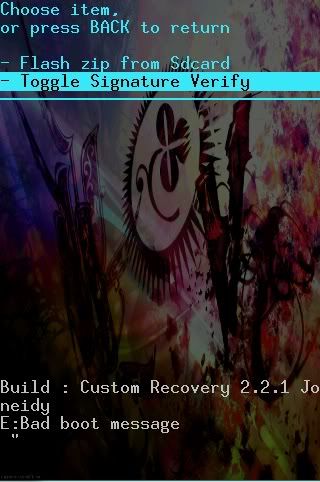
Selecting it will display a message saying "Signature verification disabled." At that point, THEN choose "Flash zip from Sdcard" and proceed as before.
yes.
Go to "Flash zip menu", then choose Toggle Signature Verify:
Selecting it will display a message saying "Signature verification disabled." At that point, THEN choose "Flash zip from Sdcard" and proceed as before.
btw are you supposed to use the system recovery flash zip to flash kernels??
yes.
guitarboy2129
Member
thank you so much for the help! worked like a charm! good info to have i didnt know you had to disable everytime now im messing with setcpu trying to get it to not crash.. if i move it past 787 it reboots  oh well lol thanks again!
oh well lol thanks again!
teh_dude
Android Enthusiast
sure thing. if it's rebooting, that means your phone can't take running that fast. your highest overclock should be when it doesn't freeze up and reboot on you anymore. also experiment with stress tests (it's an option in setcpu) and benchmarks--eventually you'll find the highest stable speed, and that's where you should stay at basically.
guitarboy2129
Member
sure thing. if it's rebooting, that means your phone can't take running that fast. your highest overclock should be when it doesn't freeze up and reboot on you anymore. also experiment with stress tests (it's an option in setcpu) and benchmarks--eventually you'll find the highest stable speed, and that's where you should stay at basically.
oh yeah i knew that i just read some other people getting 806 stable and im wondering how they did it... also what does it mean on the bench tests when it says lower is faster?
teh_dude
Android Enthusiast
806 vs 748 vs 787 vs whatever, the CPUs for these phones are constructed on a nano type level. that means essentially that all the little transistors inside the chip are on a microscopic level. What I read about explained it pretty much like this: None of these CPUs (and this applies to Intel and AMD chips that go into regular computers too) come out exactly the same. They'll all test at different top clock speeds despite the intended goal. Thing is, they have to have consistency in what they sell. Nobody would buy the phone if you go buy one that's rated at 787 MHz, but mine's only rated at 600, and someone else's is rated over 800. So they set the clock rate at something below all of the chips and set the spec at that. When you overclock, you're experimenting trying to figure out how much extra you can squeeze out of it, and it'll be different for everybody.
On the bench tests, when it says lower is faster, the number you get is a time. For example on the short bench tests, you might get a response that says "587 ms. (Lower is faster)". "ms" means milliseconds. Hence, the fewer milliseconds it took, the shorter amount of time it took, so the test went faster, and that's a good thing.
On the bench tests, when it says lower is faster, the number you get is a time. For example on the short bench tests, you might get a response that says "587 ms. (Lower is faster)". "ms" means milliseconds. Hence, the fewer milliseconds it took, the shorter amount of time it took, so the test went faster, and that's a good thing.
new optimus
Android Expert
Great explanation.

new optimus
Android Expert
yes, the any rom version does.Dont know if this ahs been asnwered.. but does this kernal work with the stock rom? I just got a Optimus M and removed the bloat.. thats it.. Wondering if this kernal and if DTsapp2sd work with the stock rom.. thanks in advance
guitarboy2129
Member
806 vs 748 vs 787 vs whatever, the CPUs for these phones are constructed on a nano type level. that means essentially that all the little transistors inside the chip are on a microscopic level. What I read about explained it pretty much like this: None of these CPUs (and this applies to Intel and AMD chips that go into regular computers too) come out exactly the same. They'll all test at different top clock speeds despite the intended goal. Thing is, they have to have consistency in what they sell. Nobody would buy the phone if you go buy one that's rated at 787 MHz, but mine's only rated at 600, and someone else's is rated over 800. So they set the clock rate at something below all of the chips and set the spec at that. When you overclock, you're experimenting trying to figure out how much extra you can squeeze out of it, and it'll be different for everybody.
On the bench tests, when it says lower is faster, the number you get is a time. For example on the short bench tests, you might get a response that says "587 ms. (Lower is faster)". "ms" means milliseconds. Hence, the fewer milliseconds it took, the shorter amount of time it took, so the test went faster, and that's a good thing.
THANK YOU! thank you very much for your time and effort that was a wonderful explanation! sorry it took me so long to get back I was out of town with no computer.. i was dying lol... seriously think i have a problem with this... i saw a few people say this was addicting but i had no idea.. ive already rooted and flashed custom roms on 5 of my friends phones and its pretty cool because each one is different so i get to learn new methods each time so it never gets boring lol... i have my phone where i want it really but now im itching to change it again but i keep telling myself not to! haha
teh_dude
Android Enthusiast
haha well have fun. I just thought of something that's widely noted but that I didn't mention up there. Everything I said applies unless there's someone more knowledgeable who wishes to correct me, but it's also worth mentioning that in figuring out how much you can "squeeze out" of your cpu, you have to remember that if the extra speed is causing you to reboot randomly (anymore than maybe you already did at stock if at all), have other behavior issues, run too hot, etc, then you should slow it back down. And that, ladies and gentlemen, is the run-on sentence of the day. 


sinister_drake
Well-Known Member
Ok so I decided to give this a go with my Optimus M with Sense Rom when I flashed the kernel, I did a nand backup but I didnt wipe my cache or dalvik cache. and my phone booted right up. it was stable at 748 but rebooted at 806. it runs pretty quick at 748mhz, I'm happy with it the way it is so 748mhz for me.
EDIT: I have noticed that the phone is more responsive, graphics are smoother and overall phone usage is alot smoother.
EDIT: I have noticed that the phone is more responsive, graphics are smoother and overall phone usage is alot smoother.
Ok I just flashed GB-CMOD7. Did everything I was supposed to do there, there i flashed the OC. And I am not sure if it was before or after flashing OC. If some1 has had the same issue could you plzzz help me???
EDIT: Now I am stuck at boot loop. lol. Guess it was the OC. Time to reFlash...
EDIT: Now I am stuck at boot loop. lol. Guess it was the OC. Time to reFlash...
sinister_drake
Well-Known Member
An update: I'm still toying around with setCPU and setting the cpu clock. but I've installed the Sense Rom and I gotta say that I like it better than the Ginger like one that Joneidy released. I like the look of it alot better. but as to overclocking, when running at 748 mhz this phone is a BEAST! overall its more responsive and the app drawer is alot smoother than before. Not to mention Angry Birds Rio runs flawlessly, no lag or anything.... now to test out my SNES emulator. ran great before, so should be awesomeness now. 
Just tried 806mhz. it rebooted.....
Just tried 806mhz. it rebooted.....
kris0933138
Well-Known Member
Thanks reppard!... OC at Max-748 Min-245 Running Great smooth and fast no lag or anything nice work!

det1726
Android Enthusiast
Okay I have succesfully rooted, created custom recovery, and flashed a rom to my 2.2.1 op. m, From what I hear overclocking is a huge advantage to rooting, and I want to get all i can out of this since I took the chance of losing my phone to make it better....my issue is that most posts seem to say that this OC Kernel is buggy for the 2.2.1 stock op. m, so can someone please explain to me what i will lose by flashing this Kernel over my rom and also if maybe I should wait for a more stable version...Thanks

Darnell0216
Android Expert
The kernel itself is fine. There are no issues with the current release. Most people's problems stem from overclocking too high or checking the "Set at Boot" option using too high a frequency setting.Okay I have succesfully rooted, created custom recovery, and flashed a rom to my 2.2.1 op. m, From what I hear overclocking is a huge advantage to rooting, and I want to get all i can out of this since I took the chance of losing my phone to make it better....my issue is that most posts seem to say that this OC Kernel is buggy for the 2.2.1 stock op. m, so can someone please explain to me what i will lose by flashing this Kernel over my rom and also if maybe I should wait for a more stable version...Thanks
Just trial and error your way through the speeds until you find one that your phone runs well at. Instead of using the in-app stress test, try really using your phone. See if you can launch the Market, web browser and something else simultaneously. If you live, you're good. If you reboot, bring it down a notch.
guitarboy2129
Member
Okay I have succesfully rooted, created custom recovery, and flashed a rom to my 2.2.1 op. m, From what I hear overclocking is a huge advantage to rooting, and I want to get all i can out of this since I took the chance of losing my phone to make it better....my issue is that most posts seem to say that this OC Kernel is buggy for the 2.2.1 stock op. m, so can someone please explain to me what i will lose by flashing this Kernel over my rom and also if maybe I should wait for a more stable version...Thanks
Yeah the kernel itself is absolutely fine it takes some playing with to find out where your phone is stable but once u get it there shouldnt be any problems i absolutely recommend flashing this kernel though... im running it on my girlfriends phone without any problems it sucks hers is one of the lower end ones that can only run stable at 729 though
oh well.. whatever the amount no matter how little helps! but again there is no need to wait for a stable version this one is absolutley fine.
det1726
Android Enthusiast
Thanks alot for the answers, and it's good to know that the kernel itself is fine, I completely understand trial and error, I just wish there was a set cpu to over clock to with no worries because I know nothing about over clocking or what damage can be done and I would hate to make the phone unusable trying to make it run smoother
new optimus
Android Expert
if you use setcpu it has a box you check mark to run at boot. DO NOT CHECK IT then if it is running too high it will simply reboot your phone, no harm no foul. You lower the setting and try again.Thanks alot for the answers, and it's good to know that the kernel itself is fine, I completely understand trial and error, I just wish there was a set cpu to over clock to with no worries because I know nothing about over clocking or what damage can be done and I would hate to make the phone unusable trying to make it run smoother
You can not hurt your phone this way. it will reboot not do damage.
AFTER you find the sweet spot, 768mhz seems to be it for the majority of phones you can check the box and everytime it reboots it will set to that spot and always run great.