
thanks borth its working goodNope, just go to the market and grab CPU master (free)
Install the app
How to install the app on iOS
Follow along with the video below to see how to install our site as a web app on your home screen.
Note: This feature may not be available in some browsers.
-
After 15+ years, we've made a big change: Android Forums is now Early Bird Club. Learn more here.
You are using an out of date browser. It may not display this or other websites correctly.
You should upgrade or use an alternative browser.
You should upgrade or use an alternative browser.
Root [Kernel]OptimusM OC stock 2.2.1
- Thread starter reppard
- Start date
-
- Tags
- lg optimus m

Android?What!?
Android Enthusiast
new optimus
Android Expert
MD5 is a way to verify your download did not get corrupted.I don't have an answer for your WiFi problems, but to your last questions, no you don't need to download the source code. Here's a link to tell you all about the GPL: The GNU General Public License v3.0 - GNU Project - Free Software Foundation (FSF) Basically he's complying with the license agreement by providing the source code for anyone who wants it--part of the whole free software thing.
As to MD5 checksums, here's a thread that ought to give you a general gist of things: http://androidforums.com/htc-droid-eris/138831-verify-your-files-md5-checksums.html
Basically, you can take the MD5 checksum (sum) he gives you, and find a way to verify it--this is supposed to tell you basically that he's giving you legit stuff/at least presenting it honestly to you, and not just offering malicious BS.
I take a file and run MD5 it gives me a number now every person that downloads that file better get the same number or the file was corrupted during download.
Before you can flash the zip, you have to disable signature verification. you must do this basically every single time you want to flash a rom, a kernel, a theme, anything in .zip format that you flash through recovery.
Go to "Flash zip menu", then choose Toggle Signature Verify:
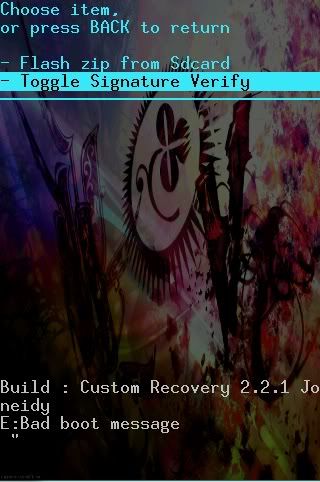
Selecting it will display a message saying "Signature verification disabled." At that point, THEN choose "Flash zip from Sdcard" and proceed as before.
yes.
When I try to click the files under r.0.C.K nothing happends. My phone is in recovery mode and I don't know if it's safe to reboot!
AndroidHogs
Android Enthusiast
I wish these rom's had market in them cause I can't signing my google

kingD313
Newbie
Well here is an overclockable kernel for the optimus m that came with 2.2.1 stock. This allows you to change your cpus speed and has the potential to damage your phone if not used with common sense. That said, I AM NOT RESPONSIBLE IF YOU F UP YOUR PHONE! Every CPU chip is different so stable speeds will vary from phone to phone. My phone isn't stable above 787 MHz. That doesn't mean yours can't go higher
Download the zip to your sdcard.
Reboot into recovery.
Wipe your cache and dalvik cache.
Flash and reboot.
You will need setcpu or a similar program to change frequencies. I have to configure the gbrom so the cmod7 settings will have that ability. Hit the thanks button if this helps and the donate link if it really really helps
Big thanks to asadullah for organizing our mob on LG and making the source code possible!
Enjoy!
UPDATE:
This version works with any rom and wifi modules were compiled separately so wifi works right out of the box.
Lower set CPU Max Version, people with boot loops test this update
Max set to 729600(i can go lower if needed) and default governor is ondemand.
r.O.C.K-v0.3-AnyROM.zip
MD5 Sum: e5e905eb5fcd6a9e93a180c7e25c2b3d
In compliance with GPL, here is the source:
r.O.C.K-v0.3-Source
Battery Calibration install this and let your battery fully charge. The run the app, unplug the charger and calibrate. This should be done after flashing a new rom or kernel.
Thanks for the overclockable kernel
Just flashed it to my optimus m along with joneidy sense rom. Im still new at this and very much appreciate all the work and help you and others provide thru this forum. How do you put the battery calibration apk file on the phone, as it does not show up on phone while in recovery mode? Thanks for your time and help with this.
I think I figured it out. I came out of recovery, booted the phone, and used root explorer to install said file. Thanks

PlayfulGod
Extreme Android User
install gapps!!I wish these rom's had market in them cause I can't signing my google

AndroidHogs
Android Enthusiast
Doing battery stats wipe cause my battery to get hot. And calibrating it before 100% bad for the battery?
PlayfulGod
Extreme Android User
will make it inaccurateDoing battery stats wipe cause my battery to get hot. And calibrating it before 100% bad for the battery?
AndroidHogs
Android Enthusiast
Could that cause my CPU to be so high as well?
AndroidHogs
Android Enthusiast
Overclocked now. 690 works good. Almost 710 overclock working
690 works good. Almost 710 overclock working AndroidHogs
Android Enthusiast
Erase that. I mean 672 works good trying to get it to 691 now.
AndroidHogs
Android Enthusiast
Overclocked to 768 and stable

DaniellieeE
Android Enthusiast
Overclocked to 768 and stable
Wow pretty good #s - are you using Playfulgod's CM7.2 rom?
AndroidHogs
Android Enthusiast
I'm using playfulgods all original stuff that came with his rom going to overclock again now that battery is full lol. the way I do it is set min CPU higher to. To not have it glitch.
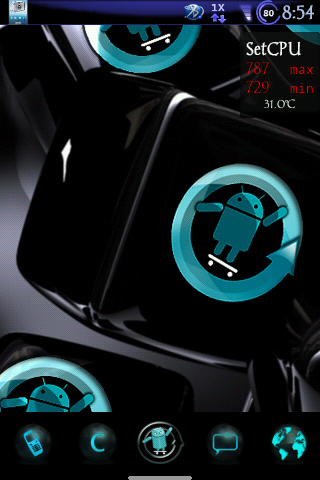 pic of it at 787.
going to overclock again now that battery is full lol. the way I do it is set min CPU higher to. To not have it glitch.

teh_dude
Android Enthusiast
ghost.rider, glad to see you're having fun! I would like to make a recommendation though that you can take or leave. If you have your minimum set to 729 MHz, the likelihood of any decent battery life is very very slim--in other words, your battery probably won't last long, and you'll be running for the charger before the day is out. In SetCPU, you can set profiles to where the CPU will slow down while the screen is off, and will pick back up when you wake it up. You can also set the minimum as low as say, 245, and you shouldn't experience too much jerkiness as long as you're running an "on demand" profile, because the speed will pick back up to your max at 787 while you're actively using it.
As I said, it's only a recommendation, but if you want to avoid living off the charger, it's worth considering.
As I said, it's only a recommendation, but if you want to avoid living off the charger, it's worth considering.
PlayfulGod
Extreme Android User
good point, by default the kernel scales the cpu speed down by default when the screen is off unless you set it like you have or anyone else for that matter.ghost.rider, glad to see you're having fun! I would like to make a recommendation though that you can take or leave. If you have your minimum set to 729 MHz, the likelihood of any decent battery life is very very slim--in other words, your battery probably won't last long, and you'll be running for the charger before the day is out. In SetCPU, you can set profiles to where the CPU will slow down while the screen is off, and will pick back up when you wake it up. You can also set the minimum as low as say, 245, and you shouldn't experience too much jerkiness as long as you're running an "on demand" profile, because the speed will pick back up to your max at 787 while you're actively using it.
As I said, it's only a recommendation, but if you want to avoid living off the charger, it's worth considering.
new optimus
Android Expert
I have run with just the r.O.C.K without running setcpu, which it defaults to 729 android has taken care of throttling down and up on it's own very well, I get up to 2 days on normal usage.I may have to experiment with that, watching CPU spy with that profile turned off. hmm...
AndroidHogs
Android Enthusiast
What are good system cleaning apps?
Worked great. Thanks. I seem to get it to about 768 MHz and anything higher it seems to reboot on me. I think I've got to about 780 something but it rebooted. I see all these 800+ people....what would they have that some don't? I am perfectly happy with the 768 I'm getting, as that's quite an improvement for a few minute procedure. Thanks for the post! +Thanks!
PlayfulGod
Extreme Android User
768 is the highest I can go too.Worked great. Thanks. I seem to get it to about 768 MHz and anything higher it seems to reboot on me. I think I've got to about 780 something but it rebooted. I see all these 800+ people....what would they have that some don't? I am perfectly happy with the 768 I'm getting, as that's quite an improvement for a few minute procedure. Thanks for the post! +Thanks!