
Yeah if I were a dev I would set the density to 185 stock, if the person didn't then they could change it but I hate booting up the first time and everything being jumbo sized, it is okay on my Cowon D3 to have the 240 because it has a smaller screen but there is no reason for the TB screen to be set that high.
Install the app
How to install the app on iOS
Follow along with the video below to see how to install our site as a web app on your home screen.
Note: This feature may not be available in some browsers.
-
After 15+ years, we've made a big change: Android Forums is now Early Bird Club. Learn more here.
You are using an out of date browser. It may not display this or other websites correctly.
You should upgrade or use an alternative browser.
You should upgrade or use an alternative browser.
Let's see your Thunderbolt screens.
- Thread starter gobluejd
- Start date
-
- Tags
- htc thunderbolt

McLabia
Android Expert
Yeah if I were a dev I would set the density to 185 stock, if the person didn't then they could change it but I hate booting up the first time and everything being jumbo sized, it is okay on my Cowon D3 to have the 240 because it has a smaller screen but there is no reason for the TB screen to be set that high.
Haha, thats the first thing I edit in my build.prop when I download a rom before I even flash. 240 is redic and I dont know why thats the standard. 185 is pure win.
On smaller screen devices the 240 looks okay. A friend of mine had a MyTouch 3g we compared my screen to his and the stock icon size on the bolt could fit 4 of his icons. My mp3 player has a 3.7 inch screen and is set to 240 and the GB keyboard is almost impossible to use because the keys are so small. I tried setting it lower and it made it impossible. Don't know why slight difference in size causes it to change so much but remember Android screens have grown since they first came around, until then everyone wanted the smallest phone now bigger is better if the trend keeps up I could see the stock density changing.

brizey
Android Enthusiast
I have to use reading glasses to use it for more than a few minutes at 240...and unless you can hack monovison correction or lens replacement becomes more commonplace, so will all of you some day.
I am creeping up on ten years post lasik...might have to get a test contact to see if I can do monovision correction.
In other words, not everyone that uses phones is under 40. I think pretty close to 100% of the population gets presbyopia, so...
I am creeping up on ten years post lasik...might have to get a test contact to see if I can do monovision correction.
In other words, not everyone that uses phones is under 40. I think pretty close to 100% of the population gets presbyopia, so...

brizey
Android Enthusiast
I like that wallpaper, yeahha. At first glance I thought it was a circuit board, then a satellite image, then I realized it is just good art...and a great backdrop because it is interesting without being overwhelming.
I am getting board with my monchrome/colorsplash look. Gonna spend some time on deviant and come up with a new idea.
I am getting board with my monchrome/colorsplash look. Gonna spend some time on deviant and come up with a new idea.
It is substrate live wallpaper

mrjinglesusa
Android Enthusiast
SPB weather widget included in SPB shell. It is running in tablet mode
Thanks for posting this!
I'd never heard of SPB Shell before your post and now that I'm running it, I could never go back to normal Sense. Absolutely beautiful and functional.


Thanks for posting this!
I'd never heard of SPB Shell before your post and now that I'm running it, I could never go back to normal Sense. Absolutely beautiful and functional.
No problem I love SPB, yes expensive but worth it IMO.

WormDoes
Android Expert
Worm, I think I may finally have a setup that you may even like!
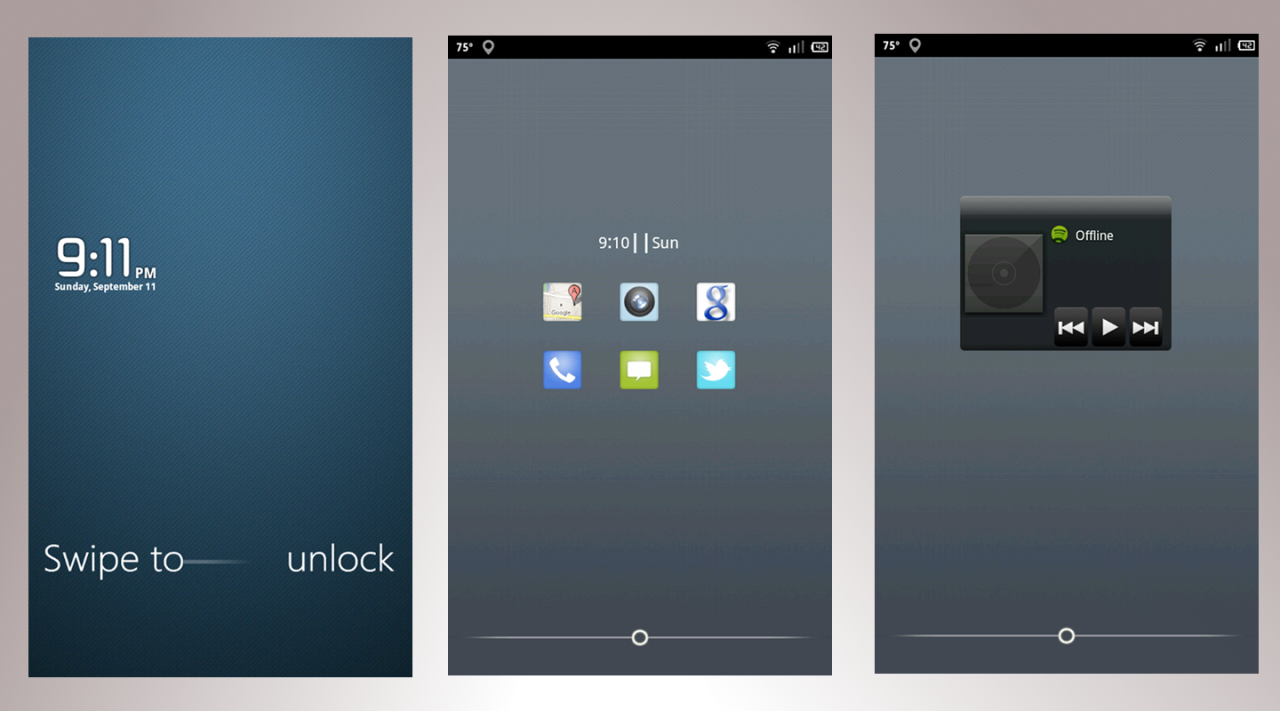
Using Widgetlocker
Missed it!
Desktop Visualiser
ShiftAOSP 1.2
Launcher Pro
Minimalist Text
Looks good young jedi lol
WormDoes
Android Expert
I don't see how you guys work with the minimalistic home screens. I love being able to access everything I can from my screens. Love my widgets too.
To each his own. Half the screens throughout this thread with shit everywhere gives me anxiety


Thats
That guy is This
I don't see how you guys work with the minimalistic home screens. I love being able to access everything I can from my screens. Love my widgets too.
I just love the clean and simple look.
@Worm, thanks

To each his own. Half the screens throughout this thread with shit everywhere gives me anxiety
With mine at least I know where everything is, in what folder...I don't like using the all apps button because it is just a big cluster eff of apps. But I've seen phones where people fill up 5 screens with icons and 2 more with widgets and I couldn't find anything or find any sense of logic of how they are set up so I can see your point. I am more of a widget person than the type of person with 40 icons on my home screen.
Thats
That guy is This
With mine at least I know where everything is, in what folder...I don't like using the all apps button because it is just a big cluster eff of apps. But I've seen phones where people fill up 5 screens with icons and 2 more with widgets and I couldn't find anything or find any sense of logic of how they are set up so I can see your point. I am more of a widget person than the type of person with 40 icons on my home screen.
I hide al non-essential apps in my App Drawer, so I know where everything is right away inside the drawer.

I open my app drawer and wonder why the hell do I have so many apps, why do so many do the exact same thing, oh yeah I need one to do a specific thing I do once every 2 weeks or so and all the other functions of the app are pointless. Maybe Ill make a minimalistic/tasker theme and post a SS from it.
delongedoug
Lurker
Wow, not enough posts to include an image of my screen? Cool. :/
McLabia
Android Expert
Wow, not enough posts to include an image of my screen? Cool. :/
lol. Yeah, they dont want people making accounts, posting crazy spam images and takin off. lol. Just go play some of the forum games and do an introduction. Youll be able to post soon.
lol. Yeah, they dont want people making accounts, posting crazy spam images and takin off. lol. Just go play some of the forum games and do an introduction. Youll be able to post soon.
Posts in the "Forum games" do not contribute to your post count

UBRocked
VZW Nexus Please!!!
Wow, not enough posts to include an image of my screen? Cool. :/
Yeah, sorry about that. We get a huge numbers of spammers and when we started getting a lot of porn pictures popping up we had to do something to ensure this remains a family place

Head over to the introduction forums and we'll strike up a quick conversation with you and get you going.
Welcome to the forums!

Danny_Boy82
Well-Known Member
Hey guys, love the thread, it has really sparked my interest in customizing my TB. Just got this bad boy a week ago (upgraded from the OG moto droid) so I am still new to the whole custom thing. I am currently on the fence about rooting, may do it after some more research though.
Anyways, what is a good app that will let you customize your folders? I saw a few pics of custom folders but didnt see an app listed. Since im new to the forums and can't post pics I will just say Yeahha posted some pics with custom folders I kinda liked.
Anyways, what is a good app that will let you customize your folders? I saw a few pics of custom folders but didnt see an app listed. Since im new to the forums and can't post pics I will just say Yeahha posted some pics with custom folders I kinda liked.