• After 15+ years, we've made a big change: Android Forums is now Early Bird Club. Learn more here.

Help Possible Battery Fix from HTC

Hello all! I'm new here and just wanted to join in on the battery madness. My EVO seems to drain battery just as fast while it is asleep as while it is awake. The cell standby just seems to take up tons of energy. Im new to Android so I am still learning how the OS works and all. I made sure that my network is switched to CDMA Auto instead of GSM (it by default was on CDMA Auto). I have deactivated Google Talk and other apps that use significant power. I did the charge till green while on then power down charge till green deal also. I mean I don't get terrible battery, but I definitely have to charge 1-2 times a day with pretty moderate use.

The one thing I mainly noticed that bothers me is that if I go to sleep at night (12-1 AM) and don't put my phone on the charger, it will indefinitely bead almost dead by 9am when I wake up. Is the cell standby really using every bit of my battery up while I (and the phone) sleep?
 
Would you all check to see if your phone is doing anything while in sleep/standby.
To check go to
menu>settings>about phone>battery... look at your up time and awake time.
note the awake time and then press the power button to put in sleep mode.In about five minutes wake the phone up which should take you back to battery screen and check your awake time. It should be right around the awake time noted before you put it to sleep.If its significantly higher then you know something's running in background.
 
So Far So good.
I tried the CDMA trick and Mine was already at CDMA.

9 Hr 34 m Up since Charging - 46% Battery left
-on Wifi
-BT off
-35+ texts
5 Calls (average total - 60mins)
Surf internet - 3G-253K / Wifi - 328MB downloaded
GTalk logged out
I have Touchdown for Exchange Email#2 / HTC Email for Exchange #1
HTC GMAIL
Shapewriter
Handcent

2 Monitors running for these tests -JuicePloter and SystemPanel
Also have Battery Status Pro

No FB,Fring or Quick (all sitting dormant / inactive)
GTalk signed out.
No Live Wall Paper

dolphin hd (updated today)

All I can say, is that the battery isnt bad at all for what i have running on it.
I have roughly 2.42 hours of talk left / 106 HRs standby. (accurate-Ill be testing)
Thats all the info I can write at the moment
Hope this helps some people.
 
Ok, I've read all the threads about the battery problems still to find out that i was only getting 5 hours max from all the tips/tricks. After my discovery i have been unplugged since 9am this morning with a 1 min charge from transferring files into my SD card from computer. I also had a random reset which lost my up and awake time. As of now its 5:52pm and I have 60% battery life left with up time (after reset) 3:40 and awake time of :47. Before reset it had 6:20 up time and 2:10 awake time. It has been almost 12 hours since i unplugged from wall and still above 50% battery.

Now what i have done. I went ahead and added ATK again, System Panel and CDMA trick (network app). I also did the charge battery full on, charge battery full off trick as well. The problem im 99% sure about that was killing my battery was the auto sync (facebook, gmail, stocks and news). I left weather on. What i did was go into menu>accounts and syncs>manage accounts. I have both Background data and Auto sync checked. I went into my account settings and unchecked them there. For instance under Facebook for HTC sense I went to data and snyc and unchecked both of those. I did this for all of the accounts except weather.

I have a gmail account but only used it for my contacts that i transferred from Windows Live. But so far this is what i have done and it has made my battery life a lot better than before. Hopefully this will not only help me but others. Please keep this up to date if this works for you. Specially those who have Facebook.

Also if someone can tell me the app to where i can screencap my phone. Please let me know. Ill upload a photo here.

870661bf.png
 
Also if someone can tell me the app to where i can screencap my phone. Please let me know. Ill upload a photo here.[/QUOTE]


Shootme
 
Would you all check to see if your phone is doing anything while in sleep/standby.
To check go to
menu>settings>about phone>battery... look at your up time and awake time.
note the awake time and then press the power button to put in sleep mode.In about five minutes wake the phone up which should take you back to battery screen and check your awake time. It should be right around the awake time noted before you put it to sleep.If its significantly higher then you know something's running in background.


Hey dlocks, I did what you said and it turns out the Awake counter is still counting after I sleep my phone. I noted it at 2:20:03 and hit put the phone to sleep. I woke it up a few minutes later to the same screen and the Awake time was 2:26:06. So the phone is definitely awake still while the screen is off. I know the phone is allowed to send/receive data with the screen off so it can notify you of things its synced with. But either way I think its a little ridiculous that my battery seems to be dying at a very fast rate when the phone is asleep on my coffee table. Interesting indeed...
 
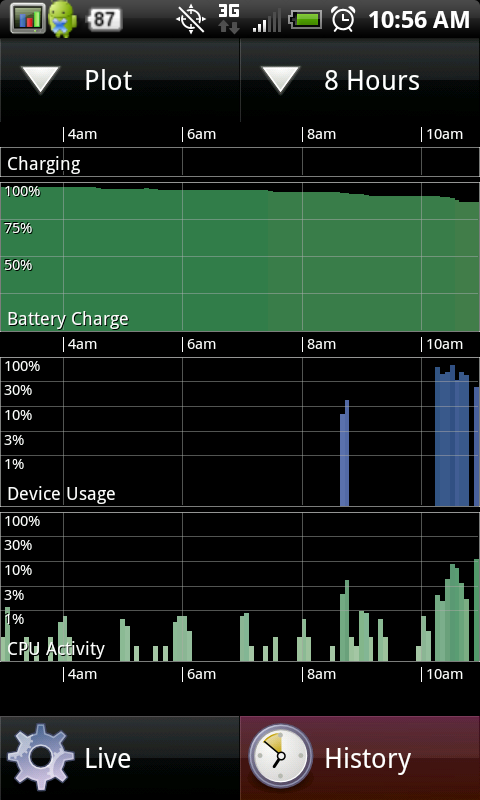
Following the suggestions in this thread my battery life has improved markedly
snap20100614_180132.png

DropBox

Zj0dpWWkhy6GLL7ufhYSV7LcxnZcZciV8-6bEVgzOpc
and a gotcha was that I had the 4G radio on until 7:30 am. All day is good enough for me.
Zj0dpWWkhy6GLL7ufhYSV7LcxnZcZciV8-6bEVgzOpc
 
Hey dlocks, I did what you said and it turns out the Awake counter is still counting after I sleep my phone. I noted it at 2:20:03 and hit put the phone to sleep. I woke it up a few minutes later to the same screen and the Awake time was 2:26:06. So the phone is definitely awake still while the screen is off. I know the phone is allowed to send/receive data with the screen off so it can notify you of things its synced with. But either way I think its a little ridiculous that my battery seems to be dying at a very fast rate when the phone is asleep on my coffee table. Interesting indeed...

You can figure out which applications are continuing to run in the background by using SystemPanel (free version), and looking at the ENTIRE process list (including the so-called inactive/cached, see below) and looking at the CPU times. Then hit power, wait a minute or so, then turn it back on and look at the CPU times again. Really you don't even have to power off, it's pretty apparent which apps are doing background work that should not be if you just watch it for a bit.

For those of you in the Washington DC metro area, the "MeetroDC" app is a huge offender. It uses about 6 seconds of CPU per minute in the background. The app offers no way to truly exit, the back button just backgrounds it. It will be listed in the Inactive/Cached section of SystemPanel, which according to the SystemPanel docs means it should not be using any CPU time at all, but it does.

I've read a bit of the android dev docs, and my guess is that it uses a service which it is running in the application's main process so its cpu is tallied under the MeetroDC entry in SystemPanel, making it look like an inactive process is actually active sometimes.

Another huge offender is the DailyDilbert widget. Not only does it wake up and burn CPU but it also saves a ton of copies of the SAME comic strip as different filenames in your Camera album on your SD card.

I love the openness of Android but I really wish apps were heavily scrutinized like Apple's app store, either by Google or by the community. The difference would be that you can still download apps that have not yet been reviewed, but at least for some apps you could have some confidence that it behaves well.
 
did not get much better battery improvement with the cdma thing, plus i have only seen the time without service line once and it was 0%, never saw it before or after so don't think its an issue for mine.

The on off thing does not seem to stick for me. After I do it I do notice that it takes much longer to go from 100% down to 99%, 12 mins the first time when i did it a bunch of times waiting for it to be instant green after i turned it off but never happened, but when i recharge at the end of the day and take it off to use it again it drops again quickly from 100 to 97 or lower in just a few minutes.
 
Hey thanks for the tips! I'll check out system panel tonight when I get this thing on a charger at home. My main problem is that most of these solutions for battery life mean that I have to turn off many features that I actually bought the phone to use. I do understand that the HTC sense UI has its own versions of android apps. Is there a possibility that Facebook and Facebook for HTC Sense are both running in the background. What about HTC Calender and Android Calender? I guess I still have some fundamentals to learn about my phone still before I really tackle how to reduce my battery drain. Either way, these are the technology problems I live for.
 
Hey thanks for the tips! I'll check out system panel tonight when I get this thing on a charger at home. My main problem is that most of these solutions for battery life mean that I have to turn off many features that I actually bought the phone to use. I do understand that the HTC sense UI has its own versions of android apps. Is there a possibility that Facebook and Facebook for HTC Sense are both running in the background. What about HTC Calender and Android Calender? I guess I still have some fundamentals to learn about my phone still before I really tackle how to reduce my battery drain. Either way, these are the technology problems I live for.

You'll see on System Panel that the apps that came with your phone are very well behaved. They sit in the background, never running, never using CPU, until they are supposed to (which for most things like mail, news, facebook, weather is determined by your update interval selection under each of those in Settings/Accounts & Sync.). Another nice feature is that if you're in the browser on a web page that is set to refresh itself, the auto-refresh will not occur in the background. But when the browser comes to the foreground again it will refresh immediately if it is past-due.

Just tried another DC metro app, "DC Metro Transit Info." Same bullshit. Once backgrounded, this one uses 3 seconds of CPU per minute. Has a popular paid version too, unfortunately. People are paying money and giving up 2% of their CPU to see some information that they probably look at twice a day. It's pretty sad simple info viewers like that use more background CPU than friendstream, which downloads a lot more information.

It also sucks that Google does not seem to be making it a priority to improve the market place, add more reviewing/rating options like categories, an amazon-style "this review was helpful / not helpful" tracker, and stats on how many people UNinstall each app would be nice too. It's ironic how weak the search function is given that it's coming from Google.
 
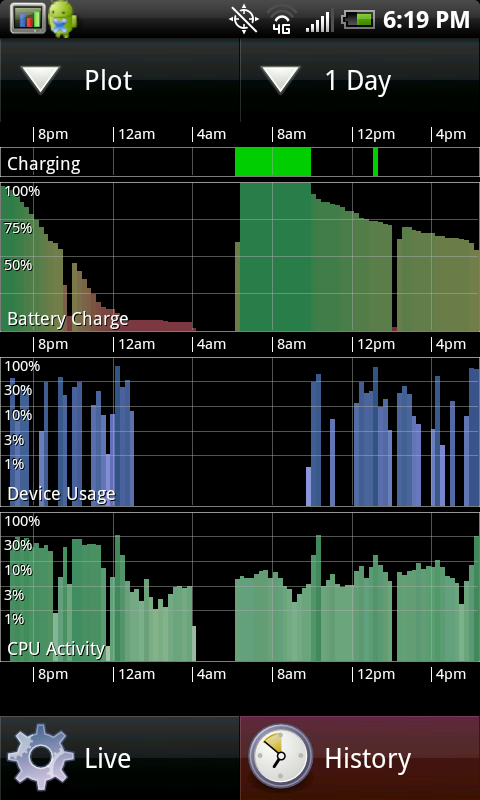
I've gone all day, since 6:45AM and am getting ready for bed now. 9% left. Survived the entire day. Moderate to heavy usage at times. I even put my Facebook Widget back on the home screen.
 

Attachments

  • snap20100614_224255.jpg
    snap20100614_224255.jpg
    112.8 KB · Views: 87
Hmmmm, everything seems to be running pretty stress free while I look at the System Panel app. Only two things that are showing any use at all is the System Panel itself and Voice mail uses like 1s of CPU. Today I got excruciating battery life. It was like 5 1/2 hours with very little use of the phone. I did turn 4g on for a bit cause it was on in Hollywood, but I didn't really use it.

Also, if the Facebook app doesn't instantly send your phone push notifications than what exactly does it do in the background? I have never once seen anything come through from Facebook, even when its sync is set to every thirty mins. I have to go into the app, and even then I have to REFRESH MANUALLY any notifications. Just curious what syncing Facebook actually does with my phone...(besides add 495 people into my Phone app.)
 
If application processes aren't using a lot of cpu then check your radio and other hardware device usages. You can find that under the 4636 menu or get the "phone info" app to make a shortcut to it.
 
I guess I dont really know how to interpret that information yet. I was looking under battery history at CPU usage. Not too sure what to make of it really. My phone definitely doesn't last long on a single charge, but half the fun for me is figuring out why.
 
OK i guess I didnt full understand the charge on /off fix and i turned my phone on and off about 6 times with the charger plugged in except for when i kept turning it off..my question is could i possibly have messed my phone up with turning it off an on so many times repeatedly???
 
OK i guess I didnt full understand the charge on /off fix and i turned my phone on and off about 6 times with the charger plugged in except for when i kept turning it off..my question is could i possibly have messed my phone up with turning it off an on so many times repeatedly???


Anything's possible (like being struck by lightning) but it's highly unlikely.
 
Took the phone off charge 40 minutes ago, listening to music only. Battery is at 74% Really??? I downloaded that "System" app but it looks like everything is set the way it's supposed to. I have disabled a lot of things on the phone. Not exactly sure what else I can do?
 
I have unchecked my google talk sign in but whenever i shut down my phone or change scenes and go back to my original screen and check the running services, it's back listed as a running service. i shut it down and the next time, it's back on. I also noticed Sprint Zone also comes back after I shut it down also. It says "started by service" in the "running services" program. My battery. I don't use Google Talk at all but I understand I can't uninstall it from the phone. How can I get it to quit coming back on?
BTW this thread is great, really helpful to us noobes:)
 
OK i guess I didnt full understand the charge on /off fix and i turned my phone on and off about 6 times with the charger plugged in except for when i kept turning it off..my question is could i possibly have messed my phone up with turning it off an on so many times repeatedly???

Very unlikely. It comes with the ON/OFF so they can be used. Most products have a life cycle of tens of thousands of button presses before issues of wear and tear should begin to appear.:)
 
I'm having a problem doing this charging method. My phone is getting stuck not charging or starting at step 3. I plug it in and the LED never turns on and I can't restart the phone. The only thing that works at this point is to pull the battery. What's wrong with my phone??

I have horrible battery life. If I'm using my phone for anything (gps, calls, browsing, etc) i get about 4-5 hours of life. I drop an average of 20% an hour! If I don't do anything and the phone is in standby most of the day, I can get 7-8 hours. I have checked that I'm on the right radio, I have turned off 4g, wifi, gps except when I'm using it and I have disabled google talk. Don't know what else to do :(
 
I'm having a problem doing this charging method. My phone is getting stuck not charging or starting at step 3. I plug it in and the LED never turns on and I can't restart the phone. The only thing that works at this point is to pull the battery. What's wrong with my phone??

I have horrible battery life. If I'm using my phone for anything (gps, calls, browsing, etc) i get about 4-5 hours of life. I drop an average of 20% an hour! If I don't do anything and the phone is in standby most of the day, I can get 7-8 hours. I have checked that I'm on the right radio, I have turned off 4g, wifi, gps except when I'm using it and I have disabled google talk. Don't know what else to do :(

I'm getting more battery life by setting the network for Sprint only. I'm in very good Sprint coverage area most of the time, and I only change the setting when I can't get solid Sprint 3G signal. Haven't had that happen yet in the NYC/NJ/Philly area.
 
I have horrible battery life. If I'm using my phone for anything (gps, calls, browsing, etc) i get about 4-5 hours of life. I drop an average of 20% an hour! If I don't do anything and the phone is in standby most of the day, I can get 7-8 hours. I have checked that I'm on the right radio, I have turned off 4g, wifi, gps except when I'm using it and I have disabled google talk. Don't know what else to do :(

I totally feel ya man! Last night I did some experimenting... and I truly do believe the 3G radio being on all the time drains the hell outta the phone awake or asleep. I connected to my wifi network at home for the whole night (with a full charge) till I woke up at 9am. I had 75% battery left over for my day and it is now 11:09am and I have 56% left. I'm on wifi at work as well. I have all my apps syncing whenever I want them too, Gtalk is running and signed in, and I lowered the screen brightness down to like 20% while I am indoors. I'm not getting excellent battery life still but it's much better then it was when no wifi was on.

Is there an app that assists with auto-connecting to known wifi networks automatically without having to have the radio on at all times? The stock android app connects automatically if I have the wifi radio on, but I feel like if I leave the wifi range it's going to keep seeking other networks thus draining my battery fast. Any input on this? This thread is amazing btw.
 
The CDMA fix has helped me even out battery usage even before that I was getting atleast 11+ hours, see my sig for my best battery usage day.

Right now im at 8 hours and I have 45% battery left and I have been using it all day.
 
This means you have a battery issue. I've been using my phone for the past 21 hours and have 49% left!

YOU DON'T NEED A HARD RESET EVEN. I CAN CONFIRM, ALL I DID WAS THIS:

press HOME, and bring up the dialer. Dial *#*#4636#*#* (Do not press "Call"). After a second, it should bring up the "Testing" menu.

Go into Phone Information, press MENU, and tap "select radio band." You should experience a Force Close, don't panic, this was supposed to happen. Scrolling down shows that the preferred network type is GSM auto (prl).

What this means is that even though you are connected to a CDMA network, your phone is trying to find a GSM network, preventing the radio from sleeping, and causing excessive battery drain.

Remedy this by tapping GSM auto (prl), and changing it to CDMA auto (prl).


Now your done, your TWS should drop dramatically, and you should experience much better battery life!

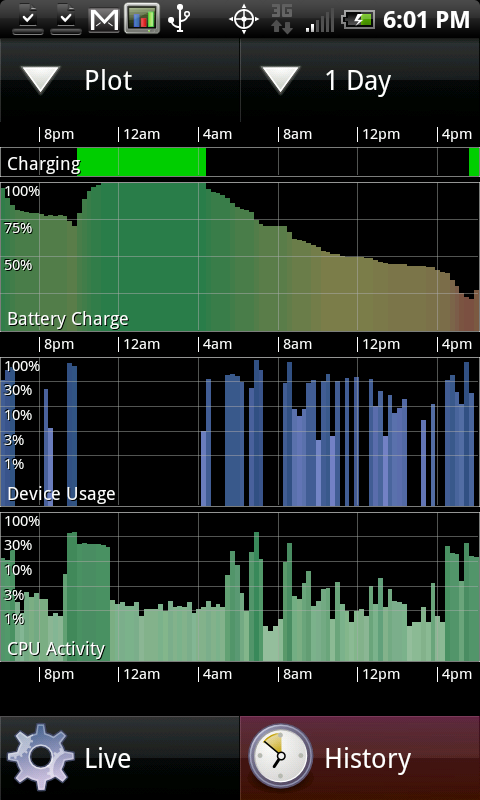
THE RESULTS SPEAK FOR ITSELF:
discharge.png


***NOW, WE JUST NEED TO GET THIS TO STICK AFTER A PHONE REBOOT!***

Mine did say gsm.... Hopefully this helps alot...
 
Back
Top Bottom