

Fabolous
Superuser
ApeX V2.0.0 Beta for Droid X
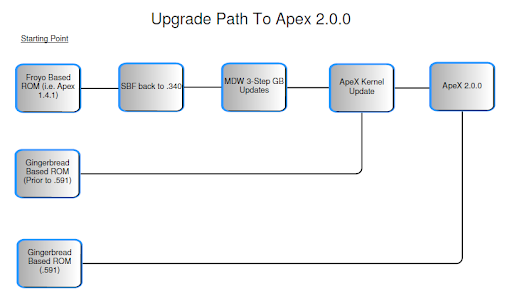
Requirements: Please follow the image below to find your upgrade path to ApeX 2.0.0. It goes from left to right.
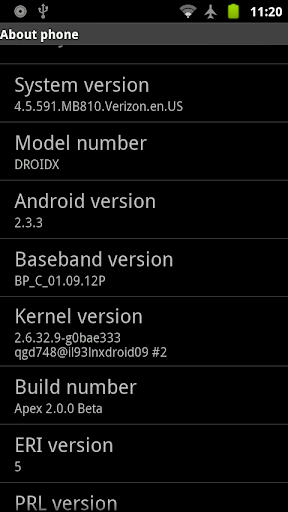
Another way to tell if you need the kernel update is to check if you have the following kernel version. If you don't, then you need to update.
2.6.32.9-g0bae333
qgd748@il93lnxdroid09 #2
Disclaimer
Additional Credits: I would like to especially thank kejar31 for teaching me his secret sauce technique for compiling AOSP apps for the Blur Framework. I'd like to thank jrummy16 and drod2169 for helping me on Gtalk and troubleshooting some issues, and _Mycahya_ for stepping up and undertaking the daunting task that is theming the Blur Dialer and Contacts!
Of course, credits to P3Droid, Team Black Hat, MyDroidWorld for the Gingerbread leaks, the CyanogenMod team for many of the apps, Google for many more apps, and all the nice brave people on Twitter for testing this for me, helping me squash bugs, and submitting beautiful wallpapers!
If I left anyone out, please let me know so I can properly credit you!
Features:
-Android 2.3.3 based on latest Gingerbread leak (4.5.591)
-Almost all apps replaced with AOSP/CM7 counterparts
-Stock Gingerbread Theme
-Bloat and Market apps removed
-Facebook for Android App syncs w/ Blur Contacts!
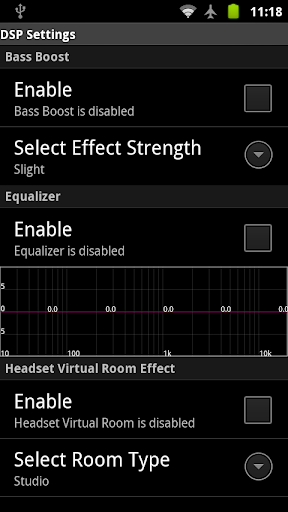
-DSP Manager (visual equalizer) for headphones, phone speaker, and BT
-MusicMod with gesture controls
-Dev Tools, Spare Parts, Terminal Emulator for fun tweakin'
-ApeX wallpaper gallery with user submitted wallpapers!
-Quadrant "Turbo" Mode for mad scores
-Blur mass restore script (if you must...)
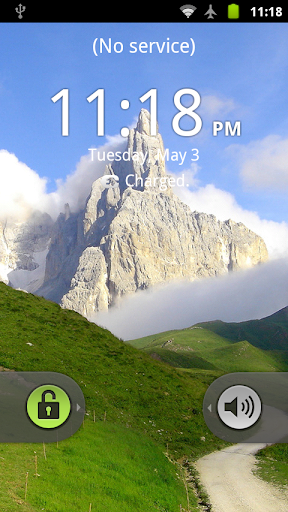
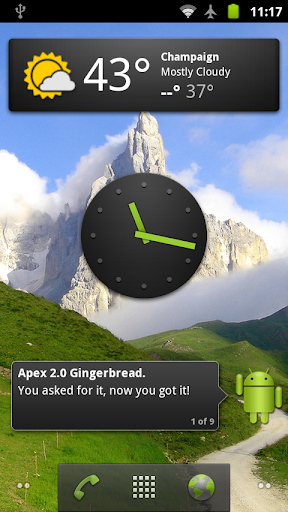
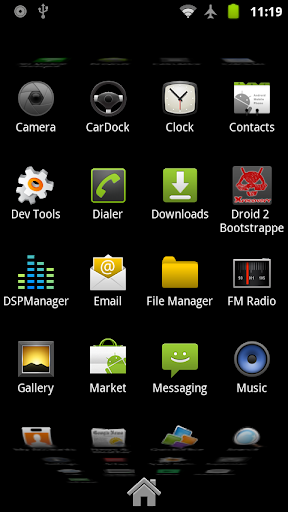
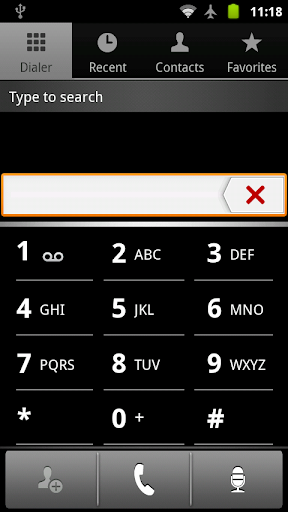
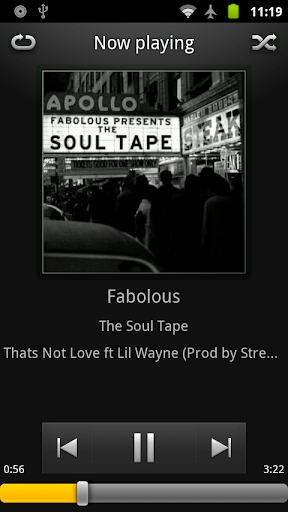
Screenshots:
Scripts:
poweroverwhelming : activate Quadrant "turbo" mode
restoreblur : Blur mass restore script -- run it for detailed instructions
sys : mount system r/w and r/o
Things to know:
-Nothing is broken functionality-wise if you don't flash part 2, but you will find many apps that aren't themed. This is done on purpose, because flashing the themed version on the initial boot causes major problems. Blame Motorola.
-Download Market apps yourself. Remember to go into account settings to enable Gmail sync
-If you ever do a factory reset, you must reinstall part 1 while still in recovery, or you will lose a lot of apps (including Settings!) DO NOT DO A FACTORY RESET WITHOUT REINSTALLING PART 1!
-On the first boot, choose Launcher and set it to default (don't click Setup)
-Don't add email accounts via 'My Accounts' ! Those links are left in there so the system does not break, but they don't work! Add accounts via the Email app directly!
-If you have a pattern unlock set up, it will bypass the slide unlock (no double unlocking). Please note that the default 'Security Lock Timer' is 20 mins, which IMO should be lowered (otherwise an unlock will go straight to the homescreen if it's within 20 mins of the last locking).
Installation Instructions:
WIPE DATA AND CACHE (unless you were an Alpha tester)
1. You must be on a Gingerbread based ROM. If not, see diagram above for the upgrade path from Froyo to Gingerbread.
2. If you are on .588 or below, install the kernel update while installing ApeX Part 1 (during the same Clockwork recovery session)
3. If you are on .591, install ApeX Part 1
4. After booting into ApeX once, you can install D2 Bootstrapper and install Part 2.
LINKS:
ApeX Kernel Updater : http://bit.ly/kZyW9G
ApeX V2.0.0 Part 1 : http://bit.ly/lg7IXs
ApeX V2.0.0 Part 2 : http://bit.ly/kzwq01
Removed Apps (this is not flashable) : http://bit.ly/iNRKTX
MD5 Sums:
754afa7f35ffa74117323f8e995883fe ApeX_kernel_update.zip
39eac14148cbdd91f5327890fdea48aa Fabolous_ApeX_2-0_Beta-Part1.zip
a898813eae6b1b0343d9494fe415bac1 Fabolous_ApeX_2-0_Beta-Part2.zip
BUGS:
-Battery History in Spare Parts causes it to FC (DX GB leak issue)
-Clicking on phone numbers in Maps or Browser does not copy them into Dialer
-MusicMod does not have lockscreen controls
-Email links in 'My Accounts' are broken, use the Email APP!
If you enjoy my work, consider buying me a beer
Donations FabDroid
Requirements: Please follow the image below to find your upgrade path to ApeX 2.0.0. It goes from left to right.
Another way to tell if you need the kernel update is to check if you have the following kernel version. If you don't, then you need to update.
2.6.32.9-g0bae333
qgd748@il93lnxdroid09 #2
Disclaimer
Code:
As always, you must take responsibility for what you do to your own phone.
I have created this ROM and tested it to the best of my ability.
The instructions are written to make sure that users have success installing and using the ROM.
However, if anything goes wrong and your phone is damaged or rendered useless, I do not take any responsibility.
Additional Credits: I would like to especially thank kejar31 for teaching me his secret sauce technique for compiling AOSP apps for the Blur Framework. I'd like to thank jrummy16 and drod2169 for helping me on Gtalk and troubleshooting some issues, and _Mycahya_ for stepping up and undertaking the daunting task that is theming the Blur Dialer and Contacts!
Of course, credits to P3Droid, Team Black Hat, MyDroidWorld for the Gingerbread leaks, the CyanogenMod team for many of the apps, Google for many more apps, and all the nice brave people on Twitter for testing this for me, helping me squash bugs, and submitting beautiful wallpapers!
If I left anyone out, please let me know so I can properly credit you!
Features:
-Android 2.3.3 based on latest Gingerbread leak (4.5.591)
-Almost all apps replaced with AOSP/CM7 counterparts
-Stock Gingerbread Theme
-Bloat and Market apps removed
-Facebook for Android App syncs w/ Blur Contacts!
-DSP Manager (visual equalizer) for headphones, phone speaker, and BT
-MusicMod with gesture controls
-Dev Tools, Spare Parts, Terminal Emulator for fun tweakin'
-ApeX wallpaper gallery with user submitted wallpapers!
-Quadrant "Turbo" Mode for mad scores
-Blur mass restore script (if you must...)
Screenshots:
Scripts:
poweroverwhelming : activate Quadrant "turbo" mode
restoreblur : Blur mass restore script -- run it for detailed instructions
sys : mount system r/w and r/o
Things to know:
-Nothing is broken functionality-wise if you don't flash part 2, but you will find many apps that aren't themed. This is done on purpose, because flashing the themed version on the initial boot causes major problems. Blame Motorola.
-Download Market apps yourself. Remember to go into account settings to enable Gmail sync
-If you ever do a factory reset, you must reinstall part 1 while still in recovery, or you will lose a lot of apps (including Settings!) DO NOT DO A FACTORY RESET WITHOUT REINSTALLING PART 1!
-On the first boot, choose Launcher and set it to default (don't click Setup)
-Don't add email accounts via 'My Accounts' ! Those links are left in there so the system does not break, but they don't work! Add accounts via the Email app directly!
-If you have a pattern unlock set up, it will bypass the slide unlock (no double unlocking). Please note that the default 'Security Lock Timer' is 20 mins, which IMO should be lowered (otherwise an unlock will go straight to the homescreen if it's within 20 mins of the last locking).
Installation Instructions:
WIPE DATA AND CACHE (unless you were an Alpha tester)
1. You must be on a Gingerbread based ROM. If not, see diagram above for the upgrade path from Froyo to Gingerbread.
2. If you are on .588 or below, install the kernel update while installing ApeX Part 1 (during the same Clockwork recovery session)
3. If you are on .591, install ApeX Part 1
4. After booting into ApeX once, you can install D2 Bootstrapper and install Part 2.
LINKS:
ApeX Kernel Updater : http://bit.ly/kZyW9G
ApeX V2.0.0 Part 1 : http://bit.ly/lg7IXs
ApeX V2.0.0 Part 2 : http://bit.ly/kzwq01
Removed Apps (this is not flashable) : http://bit.ly/iNRKTX
MD5 Sums:
754afa7f35ffa74117323f8e995883fe ApeX_kernel_update.zip
39eac14148cbdd91f5327890fdea48aa Fabolous_ApeX_2-0_Beta-Part1.zip
a898813eae6b1b0343d9494fe415bac1 Fabolous_ApeX_2-0_Beta-Part2.zip
BUGS:
-Battery History in Spare Parts causes it to FC (DX GB leak issue)
-Clicking on phone numbers in Maps or Browser does not copy them into Dialer
-MusicMod does not have lockscreen controls
-Email links in 'My Accounts' are broken, use the Email APP!
If you enjoy my work, consider buying me a beer
Donations FabDroid


