
Install the app
How to install the app on iOS
Follow along with the video below to see how to install our site as a web app on your home screen.
Note: This feature may not be available in some browsers.
-
After 15+ years, we've made a big change: Android Forums is now Early Bird Club. Learn more here.
You are using an out of date browser. It may not display this or other websites correctly.
You should upgrade or use an alternative browser.
You should upgrade or use an alternative browser.
Root [ROM] CTMod 3.80 (04/06/13)
- Thread starter Bloodawn
- Start date

Guspeed
Android Expert
How about these battery stats for CTMod 3.2 w/ KK 2.0 . Not bad at all . Little to no phone usage of course but GOOD none the less .

And how about these internal storage for CTMod 3.2 w/ KK 2.0 .
Not freaking bad at all, 197 apps installed.

Guspeed
Android Expert
This is with 100 apps installed . SWEET !!
Damnit man ! You are running a lot of apps ! lol
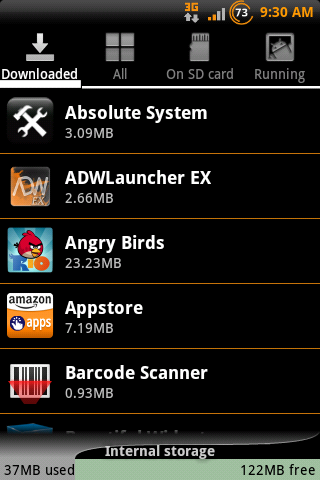
Who's worry about internal space these days anyway... LOL

Lordvincent 90
▓▓▓▓▓▓▓▓▓▓▓▓▓▓▓▓▓▓▓▓
As long as we are having a pissing contest 

I know i know... Not ctmod... But mines still bigger 
I know i know... Not ctmod... But mines still bigger
Guspeed
Android Expert
Not meeeeeeeeeeeeeeeeeeeeee ! Lmao :d
BTW, like the organge Harley theme color, Nice

need to learn how to cook my owns...
baby steps, baby steps...


Guspeed
Android Expert

VoltronMaximus
Android Enthusiast
Thats ok about waiting for 3.3. But am I correct in assuming from the text under the pics we will have a working WP7 theme for 3.2? Just curious so it can match my wallpaper.

Bloodawn
Android Expert
Thats ok about waiting for 3.3. But am I correct in assuming from the text under the pics we will have a working WP7 theme for 3.2? Just curious so it can match my wallpaper.
what text? are you talking about my sig? thats just a link to the thread, the theme hasn't been updated.

Caeadas
Well-Known Member
might be a little while before 3.3 is ready guys. I got most of the bugs fixed but a couple are being a pain in the ass.
I knew there was something I was forgetting to fix, now i know what lol
Don't forget the force close when updating contact info...again
Bloodawn
Android Expert
Don't forget the force close when updating contact info...again
yea, i already got that fixed =p
Bloodawn
Android Expert
Gotta question for ya Blood. When I download Maps from the market, it won't work. When I use the one from the removed apps, it work perfect. What would cause that. It asks me to create a google account and one is already activated. Ever heard of that happening?
is there a notification saying stuff is asking for permission? or permission was denied or something like that

wetbiker7
Extreme Android User
Yeah , I get 3 notifications in my status bar and it asks me to sign in or create a Google account . When I go to sign in , it says it's already activated but it still won't work . Do permission need to be set in system/apps ? I've never had this happen when installing straight from the market .
Bloodawn
Android Expert
Yeah , I get 3 notifications in my status bar and it asks me to sign in or create a Google account . When I go to sign in , it says it's already activated but it still won't work . Do permission need to be set in system/apps ? I've never had this happen when installing straight from the market .
maps is asking for permission to access your google account.
press on the notification and a window will pop up, press allow and do that for each of the notifications.
might need to press home and reopen maps but it will work then.
wetbiker7
Extreme Android User
Crap ! Well , I figured out what I was doing wrong .Thanks Blood . Three notifications were popping up when I installed Maps . Instead of opening the first one (like i should have), I was opening the last one(WRONG) . Come to find out , those notifications need to be opened in the order that they pop-up to allow permission for the app to run . DUH . It seems I had a total brain-fart moment AGAIN . Thanks for your help in getting me straightened out Bro .
Bloodawn
Android Expert
Crap ! Well , I figured out what I was doing wrong .Thanks Blood . Three notifications were popping up when I installed Maps . Instead of opening the first one (like i should have), I was opening the last one(WRONG) . Come to find out , those notifications need to be opened in the order that they pop-up to allow permission for the app to run . DUH . It seems I had a total brain-fart moment AGAIN . Thanks for your help in getting me straightened out Bro .
np man. I'm happy its working for you now.

Guspeed
Android Expert
how do you capture and post a screenshot
first get this screeshot app,
https://play.google.com/store/apps/...wsMSwyLDEsImNvbS5nZWVrc29mdC5zY3JlZW5zaG90Il0.
then create an account with photobucket.com and upload your pics to your new account.
after that, just insert pics to your comments using the link that photobucket gives to your shots.