• After 15+ years, we've made a big change: Android Forums is now Early Bird Club. Learn more here.

Sudden battery drain

Girevik

Android Enthusiast
I was getting pertty consitant batter life, but all of a sudden in the past week or so my batter has been getting sucked dry when in standby. I woke up this morning and my phone was totally dead and I know it had a decent charge when I went to bed.

I know AT&T recently enable 4G lte in my area, but I have JuiceDefender that shuts down my data and wi-fi then the screen is off. Does anyone have any suggestions on what might be causing my sudden battery drain?
 
have you tried going into your settings/battery to see what's been draining your battery so hard? maybe there's an app running in the background thats running it down pretty hard?

if juice defender disables your wifi, gps, data and all, i would look into the most recent installed apps.
 
JD doesn't disable3 GPS, but it never has. The battery screen shows most of the drain to "system standby", but I think that's a known bug with the Galaxy on this version of the OS. I did remove one recently installed ap, but its not one I would think would use a lot of battery.
 
What do apps like GSam Battery Monitor show to be using the most battery?

In GSam you can reset the statistics to zero by clicking the plus sign in the circle at the bottom of the main screen.

And you can click the blue right arrows to see more detail.
 

Attachments

  • 1353985262-picsay.jpg
    1353985262-picsay.jpg
    61 KB · Views: 79
  • 1353985314-picsay.jpg
    1353985314-picsay.jpg
    72.7 KB · Views: 108
  • 1353985368-picsay.jpg
    1353985368-picsay.jpg
    64.7 KB · Views: 83
What do apps like GSam Battery Monitor show to be using the most battery?

In GSam you can reset the statistics to zero by clicking the plus sign in the circle at the bottom of the main screen.

And you can click the blue right arrows to see more detail.

Wasn't aware of that ap. I'll give it a shot.
 
Of course once I downloaded GSam I quit having the issue. Until this weekend. When I work up yesterday my phone was dead, so I charged it up last night and then let it go over night. It drained about 25%, which didn't seem as bad as when it actually died on me but still an awfull lot overnight considering I'm running JuiceDefender.

When I looked at Gsam, what I saw was that aps had used almost 90% of the power, and of that "Kernal" was 52% and "Android System" was about 10%. Maps was also like 8%, which I thought was very high since I never opened it after I unplugged....I'm not sure what it might be doing in the background.

So...any suggestions on what might be causing my drain?
 
What does the Task Manager in the "System Tuner" app show for CPU% and Used CPU% if you turn on "System" and "Kernel" on the toolbar at the bottom of the screen?
 
I'm also having battery issues that started within the past week or two. Typically my battery usage was approximately 6% / hour. Recently it's increased to 20+% / hour. No new apps installed. No changes in usage or behavior.

It was recommended to me to clear the cache which I did, but that didn't make a difference. There weren't any obvious apps running in the background.

I did just install GSAM based on what Dieben wrote above, will update when I give it some time to collect data.

I did notice that the phone was warmer then usual on Saturday, but that doesn't seem to be an issue currently.
 
So After a week on 4.1.x stock rom on my S3 I was really getting annoyed about the battery. Given I have hardly any apps (clean install) and only 2 mails accounts, Facebook, and Google+ syncing.

Battery use didn't really show anything although I felt that the OS and standby were pretty high.

What I did? I turned off google now. It was the only thing I can think of that I actively changed since the patch... Instant change. I was dropping 10 - 20% in the first hour to hour and a half of discharge. Now I'm back to 2 - 4%... I have a fairly scheduled routine and so far so good....
 
So After a week on 4.1.x stock rom on my S3 I was really getting annoyed about the battery. Given I have hardly any apps (clean install) and only 2 mails accounts, Facebook, and Google+ syncing.

Battery use didn't really show anything although I felt that the OS and standby were pretty high.

What I did? I turned off google now. It was the only thing I can think of that I actively changed since the patch... Instant change. I was dropping 10 - 20% in the first hour to hour and a half of discharge. Now I'm back to 2 - 4%... I have a fairly scheduled routine and so far so good....

I'm thinking of doing this myself. Bu the first couple of times I noticed this occuring was before we got our Jellybean update.
 
What does the Task Manager in the "System Tuner" app show for CPU% and Used CPU% if you turn on "System" and "Kernel" on the toolbar at the bottom of the screen?

I see a CPU line, but i'm not seing a "Used CPU". My CPu seems to average around 20%, with occsional dips into single digits and spikes into the 40's
 
So After a week on 4.1.x stock rom on my S3 I was really getting annoyed about the battery. Given I have hardly any apps (clean install) and only 2 mails accounts, Facebook, and Google+ syncing.

Battery use didn't really show anything although I felt that the OS and standby were pretty high.

What I did? I turned off google now. It was the only thing I can think of that I actively changed since the patch... Instant change. I was dropping 10 - 20% in the first hour to hour and a half of discharge. Now I'm back to 2 - 4%... I have a fairly scheduled routine and so far so good....

Is Google Now an app? Or some other Google thing?
 
Is Google Now an app? Or some other Google thing?

google now is a feature part of 4.1.1 update. on the SGS3, hold down home button till your recent apps show up, then at the bottom, you'll notice three options instead of 2. the G (should be in the middle) is google now.
 
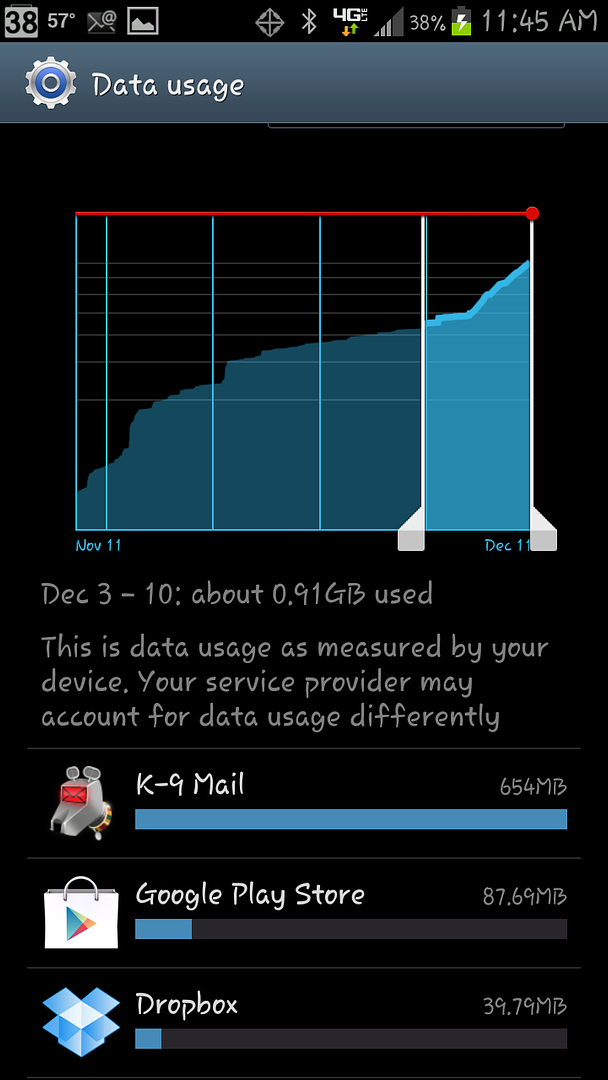
Looking through my data usage, my usage has also tripled, although I'm not doing anything differently. I usually average 100-300mb /wk. with DropBox as the majority usage. I'm currently showing about 700mb with K-9 mail being the primary culprit.
 
google now is a feature part of 4.1.1 update. on the SGS3, hold down home button till your recent apps show up, then at the bottom, you'll notice three options instead of 2. the G (should be in the middle) is google now.

thanks for the info. I'm running 4.0.4, so not an issue.
 
I was told by a verizon tech level 2 that when the battery gets hot from being in a pocket that it will use more battery power. Mine is getting bad also with no changes to phone at all. before I would come home from 8 hours of work and have 60% battery with little to no use and now I come home with 40% or less battery and not a phone call made emails not updating for 6 hours or more any more and a few text messages.
 
I was told by a verizon tech level 2 that when the battery gets hot from being in a pocket that it will use more battery power. Mine is getting bad also with no changes to phone at all. before I would come home from 8 hours of work and have 60% battery with little to no use and now I come home with 40% or less battery and not a phone call made emails not updating for 6 hours or more any more and a few text messages.

That makes sense, but in my case, I rarely have it in my pocket. It's usually sitting on my desk or in the cars cupholder.
 
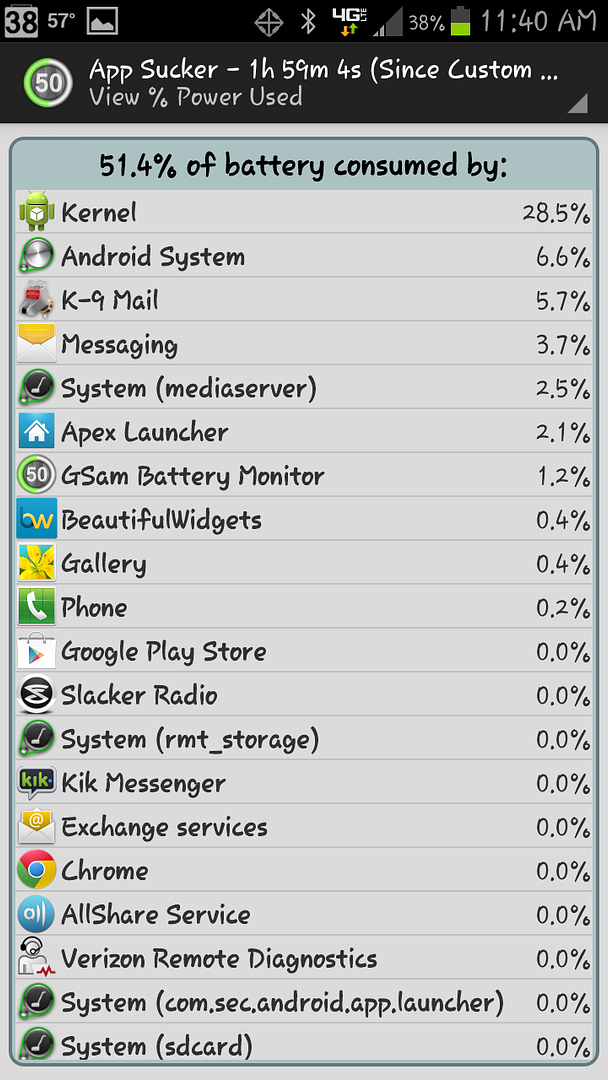
I turned off Google Now, but I still seem to be getting a lot of battery drain from Kernal, which I'm not quite sure what causes that, and Maps, which I haven't even used since I unplugged it.

Any suggestions?
 
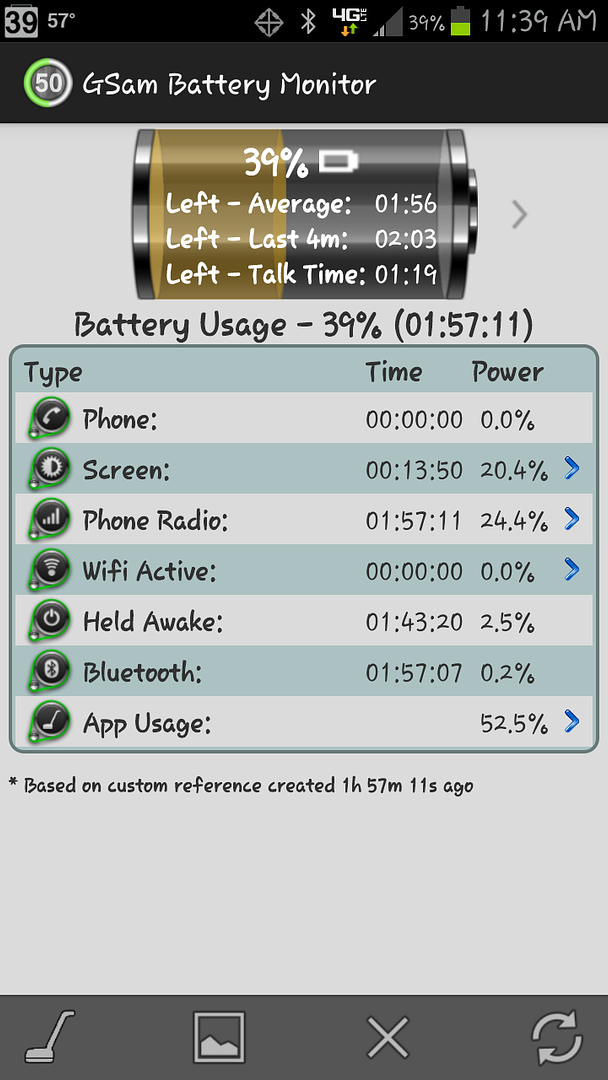
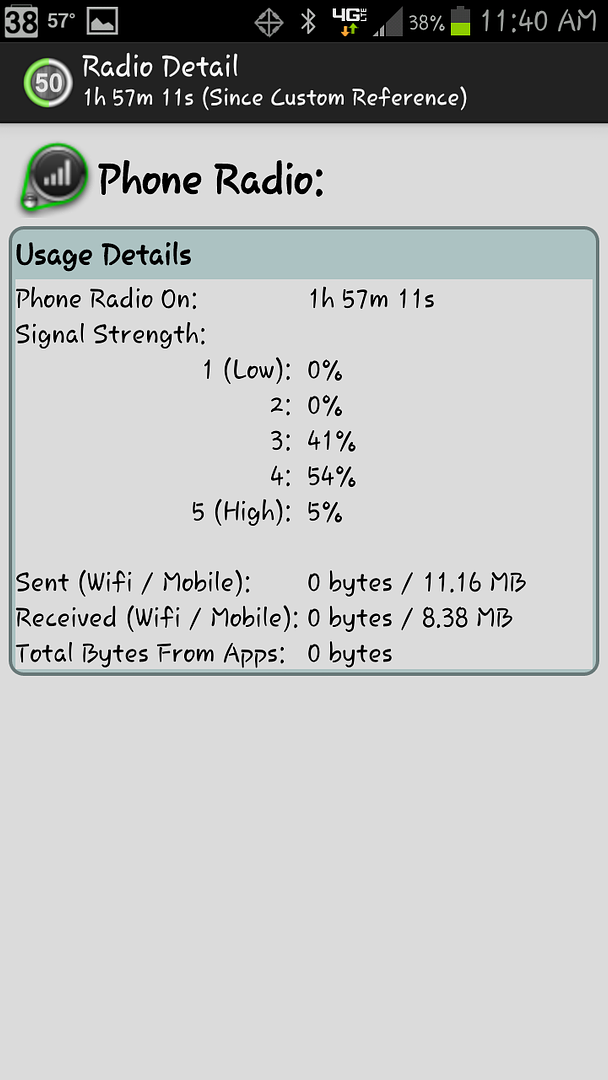
Thanks for the screen shots!

!!! The Phone Radio is on *continuously* !!!

And the phone is held awake almost continuously.

That could be the problem.

http://forum.xda-developers.com/wiki/Wakelocks


The question is:
WHY is the phone radio on continuously?

What happens to battery usage if you go into airplane mode?

In airplane mode the battery didn't drain at all. Then I disabled mobile data after turning everything back on and the battery drained at a more normal 6%/hour rate. I'll look at the link you posted.
 
Can i suggest the app "cpu spy"...
It wont tell you whats doin it but if you reset timers in cpu spy, turn your screen off and leave it say 10mins, turn on, open cpu spy, and restore timers.... if "deep sleep" isnt the biggest thing, you have a bad app.
Are u runnin Light Flow?
Juice Defender belongs in 2010 btw man soz ;)
 
Back
Top Bottom