• After 15+ years, we've made a big change: Android Forums is now Early Bird Club. Learn more here.

Root WARNING: before you flash your radios, read this thread!!!!

AndroidSPCS

Android Expert
I was unaware of the potential hazards of flashing radios on the Evo until I accidentally came across this thread: [Q] What Removes your RSA PRIVATE KEY - xda-developers

and this thread: STOP - Do not flash your Radio/WIMAX - xda-developers

and this thread: [Q] Amonra doesn't backup RSA keys afterall? - xda-developers

Be aware that there is a WIMAX partition on your Evo that could be corrupted / lost if you are unfortunate while flashing radios. This is not affected (usually) if you ROOT or install new ROMs.

Just to be safe, use Amon Ra recovery 1.8 or later (the current version is 2.3), and do a NAND back up of your Evo!!! Make sure you select WIMAX in the back up options!!!

Just to be safe, make 2 back ups, in case one back up may be corrupt. Store the back ups in your PC, in Drop Box, email, etc... make sure it is not lost!!!!

If your RSA keys / WIMAX partition is lost and you DO NOT have a back up, well you're pretty much hosed, and you may need to buy a new Evo or NEVER USE 4G again!!!!!

EDIT: it seems the newer versions of ClockworkMod also backs up the Wimax partition also. JUST TO BE SAFE - do a NAND back up in both CMD and Amon Ra, you can never have too many backups...
 
Should also note when cwm started backing up wimax. Research here but I think it was 2.5.0.7...? We always suggest 2.6.0.1 because it works with both script types as well as backs up wimax
 
Should also note when cwm started backing up wimax. Research here but I think it was 2.5.0.7...? We always suggest 2.6.0.1 because it works with both script types as well as backs up wimax
Can you post a link to confirm? I used CMD also but never saw an option to back up wimax.

A link to XDA threads confirming this would be nice.

Another thread I found: http://androidforums.com/evo-4g-all-things-root/248586-question-how-backup-wimax-rsa-keys.html

This is critical info because once you lose the RSA keys you will probably need to buy a new Evo if you want 4G working again.

To be ultra safe, do NAND backups in both CMD and Amon Ra, copy the back ups to your PC / email, etc. You will never reget taking care to back up this critical info.
 
Right right I'm saying I think he started backing up wimax at 2.5.0.7. Either way we suggest 2.6.0.1.
 
Can you post a link to confirm? I used CMD also but never saw an option to back up wimax.

A link to XDA threads confirming this would be nice.

Another thread I found: http://androidforums.com/evo-4g-all-things-root/248586-question-how-backup-wimax-rsa-keys.html

This is critical info because once you lose the RSA keys you will probably need to buy a new Evo if you want 4G working again.

To be ultra safe, do NAND backups in both CMD and Amon Ra, copy the back ups to your PC / email, etc. You will never reget taking care to back up this critical info.


Thats because cwm backs up everything by default, it has no options. In 2.5.0.7 it started backing up wimax by default also...
 
Thats because cwm backs up everything by default, it has no options. In 2.5.0.7 it started backing up wimax by default...
Good to know. I assumed that it would when I used it, but you know what they say when you assume....

BTW - I used ADB SHELL to check my Wimax partition and, whew, all is okay!! I did a back up via Amon Ra and CMD, so all is well.
 
Good to know. I assumed that it would when I used it, but you know what they say when you assume....

BTW - I used ADB SHELL to check my Wimax partition and, whew, all is okay!! I did a back up via Amon Ra and CMD, so all is well.


There is a wimax rsa key checker app for free from joey krim I believe that we suggest people use to check that can't adb well :)
 
There is a wimax rsa key checker app for free from joey krim I believe that we suggest people use to check that can't adb well :)
Really? That would be very nice. Can you post a link? I'll google it too.

It is a bit of a pain to use ADB SHELL. But I've learned to love it, since I'm an old DOS user from the old days... :D I'm still not an ADB expert though...

EDIT: here's the link: https://market.android.com/details?id=com.joeykrim.wimaxkeys I need to check to see how it works myself.
 
Yeah I've actually seen people lose their keys forever because they assumed but were using cwm 2.5.0.1 or ra 1.7 and didn't have a back up with wimax
 
Really? That would be very nice. Can you post a link? I'll google it too.

It is a bit of a pain to use ADB SHELL. But I've learned to love it, since I'm an old DOS user from the old days... :D I'm still not an ADB expert though...

EDIT: here's the link: https://market.android.com/details?id=com.joeykrim.wimaxkeys I need to check to see how it works myself.


Its in the market, called wimax key checker, made by joey krim. Just checked. Im on phandroid app so linking is well difficult :)


Edit, you got it

You click the button and grant it su when it asks then it checks for your keys much the way you would through a shell
 
Sweet, Wimax Key Checker also validates my Wimax partition. Thank God I came across the info accidentally...it is not sticked or mentioned in the XDA radio thread [ Radios ][ 6-3 ] All EVO Radio, WiMAX, PRI, NV & HBoot versions - xda-developers , and who has time to read 200+ pages to find out this risk?

I have a hate / love relationship with XDA. Lots of great info, but all buried, and critical info not always visible or stickied. That's why I love Android Forums, a great place to start research, before going to XDA.
 
Sweet, Wimax Key Checker also validates my Wimax partition. Thank God I came across the info accidentally...it is not sticked or mentioned in the XDA radio thread [ Radios ][ 6-3 ] All EVO Radio, WiMAX, PRI, NV & HBoot versions - xda-developers , and who has time to read 200+ pages to find out this risk?

I have a hate / love relationship with XDA. Lots of great info, but all buried, and critical info not always visible or stickied. That's why I love Android Forums, a great place to start research, before going to XDA.


Well you could have asked ;)
 
Well you could have asked ;)
LOL hard to ask when you don't know what you don't know.

I was unaware you could lose the Wimax partition / RSA keys...until I read about the possibility some where. :)

Hopefully this thread will help someone from making that mistake. Thanks again for your input and Frenchy's too.
 
LOL hard to ask when you don't know what you don't know.

I was unaware you could lose the Wimax partition / RSA keys...until I read about the possibility some where. :)

Hopefully this thread will help someone from making that mistake. Thanks again for your input and Frenchy's too.


Lol valid point. Thanks for the sticky.
 
I've been flashing wimax and radios since about day 1 without knowing or worrying about this issue.

And my CWM is from mid-June 2010.

If I update my CWM, will my previous nandroids still work?

Ignore rooting long enough and you too can get noobish! :D
 
I've been flashing wimax and radios since about day 1 without knowing or worrying about this issue.

And my CWM is from mid-June 2010.

If I update my CWM, will my previous nandroids still work?

Ignore rooting long enough and you too can get noobish! :D

This is an area where I also fell behind with the times because of being happy with my current setup. I've learned independently that if you go to CWM 3.x, you won't be able to flash a lot of old .zips. So I'm at 2.6.0.1, which happens to be what people these days are recommending. It's the last old version that supports the old format and new format .zips.

As long as you're on that version, everything should work the way you remember it.

I've also yet to have a bad flash, but I guess it happens. I used to have a setup where RA was my permanent recovery, but I had the cwm recovery as a .zip (instead of .img), so I could flash that with RA to instantly switch to CWM. But the flash is just for that session. On next reboot, RA is still there. Worked out nice for me because my nandroids are in cwm, but I prefer RA for most other things.

Best thing to do, Early, is to get ROM Manager, and it should allow you to pick any version of CWM you want as your recovery. Flash the 2.6.0.1 version and stick with it.
 
I've been flashing wimax and radios since about day 1 without knowing or worrying about this issue.

And my CWM is from mid-June 2010.

If I update my CWM, will my previous nandroids still work?

Ignore rooting long enough and you too can get noobish! :D


Also to add to novox, yes your cwm nandroids will work in newer cwm.
 
I currently use clockworkmod 2.6.0.1 to make backups and I remember seeing it backs up wimax RSA keys. If I were to flash new radios update (like the one for GB from xda) and I don't like it or things go bad, how would I go about restoring to the previous radios via clockworkmod? Do I just restore a previous nandroid backup and it fixes everything? Do I have to download a radios version of the one I had previously and flash it?

TIA

There are a few threads I could have posted these questions on but wasn't sure where.
 
I currently use clockworkmod 2.6.0.1 to make backups and I remember seeing it backs up wimax RSA keys. If I were to flash new radios update (like the one for GB from xda) and I don't like it or things go bad, how would I go about restoring to the previous radios via clockworkmod? Do I just restore a previous nandroid backup and it fixes everything? Do I have to download a radios version of the one I had previously and flash it?

TIA

There are a few threads I could have posted these questions on but wasn't sure where.

Since you are using cwm 2.6, your wimax keys are automatically saved along with your nandroid backups. i would make sure that you have at least one nandroid with you wimax keys saved on to your computer. if your radios go bad, you can just re-flash it. should not be an issue. just make sure to wipe dalvik cache and cache and make a nandroid and you should be good to go.
 
Since you are using cwm 2.6, your wimax keys are automatically saved along with your nandroid backups. i would make sure that you have at least one nandroid with you wimax keys saved on to your computer. if your radios go bad, you can just re-flash it. should not be an issue. just make sure to wipe dalvik cache and cache and make a nandroid and you should be good to go.


For some reason I always thought restoring nandroid backups would not affect the firmware (radio, wimax, pri, etc.). Good to know I can just restore to a good nandroid with wimax keys. Thanks.
 
For some reason I always thought restoring nandroid backups would not affect the firmware (radio, wimax, pri, etc.). Good to know I can just restore to a good nandroid with wimax keys. Thanks.


It doesn't, it only backs up your wimax partition that includes your KEYS. Your radios remain unchanged from a nandroid and must be flashed separate.
 
i keep an organized very easy to use folder on my desktop/laptop and also keep copy's of every back up i perform in an online vault on the internet.
u can never have enough back up.

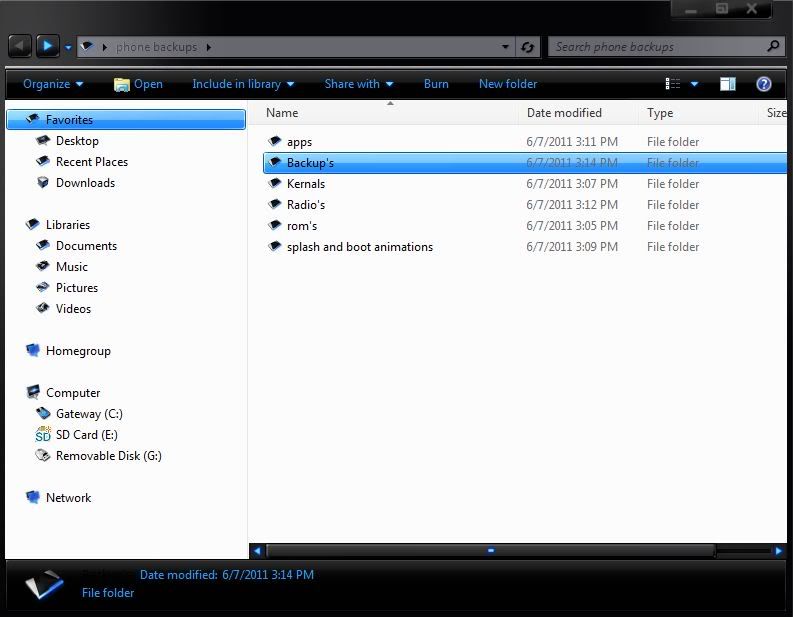
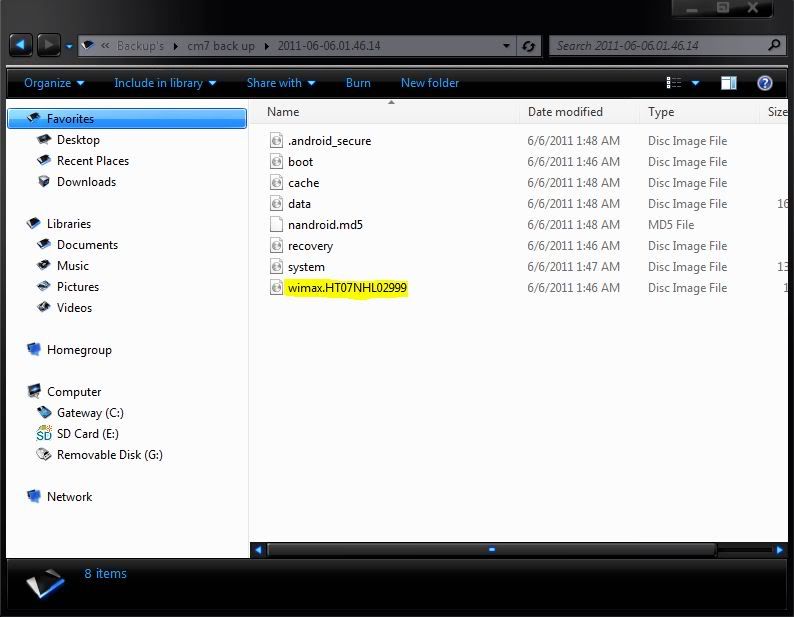
here are some images of how organized i keep things to make it simple and snappy if and when i ever have a problem. i hope this will help people get a better idea of what steps to take when rooting and installing radio's roms or flashing your favorite apps!
backupfolder.jpg

I'm using clockwork recovery and the back up should look like this!
wimax.jpg
 
i am so confused.. i dont know what to do..i got the new pc36img downloaded.. but dont want to flash it, as i dont know what will happen, i am slowly starting to figure out how to flash it.. but now yall say dont do it..
 
Back
Top Bottom