• After 15+ years, we've made a big change: Android Forums is now Early Bird Club. Learn more here.

Help X10 2.1 Update - Issues/Problems

My market downloads just stick at "starting download" since 2.1 upgrade and Titanium backup restore.

I've tried everything:-


  • deleting google mail account
  • taking out battery and sim
  • emptying caches and data
  • 3g and wireless
Any other tips before I smash my phone up?

yeah - just leave it - its not a 2.1 issue its a market issue in general

for your perusal a few threads from the last 10 days with the same issue - some of the fixes in there may help you - but like i said, the best thing to do is to just leave it as it will cure itself within 24 hours

http://androidforums.com/sony-ericsson-xperia-x10/208940-cant-download-any-apps.html
http://androidforums.com/sony-erics...d-market-download-unsuccessful-error-fix.html
http://androidforums.com/sony-ericsson-xperia-x10/208353-help-android-market.html
http://androidforums.com/sony-ericsson-xperia-x10/207938-market-not-working-once-again.html
http://androidforums.com/sony-ericsson-xperia-x10/204387-market-issue.html
 
Is this really true about the screen brightness? For God's sake, why can't they just leave well alone? What's wrong with letting us choose for ourselves? I don't like my screen to be below 100%!

I don't think I want this update anymore.
 
X10i 2.1 Nordic

I've not had a chance to check this more than once but my phone decided to switch off at 38% battery life today. It wouldn't switch back on until I connected it to the charger again. Any idea what might be causing this?

Thanks :)
 
yeah - just leave it - its not a 2.1 issue its a market issue in general

for your perusal a few threads from the last 10 days with the same issue - some of the fixes in there may help you - but like i said, the best thing to do is to just leave it as it will cure itself within 24 hours

http://androidforums.com/sony-ericsson-xperia-x10/208940-cant-download-any-apps.html
http://androidforums.com/sony-erics...d-market-download-unsuccessful-error-fix.html
http://androidforums.com/sony-ericsson-xperia-x10/208353-help-android-market.html
http://androidforums.com/sony-ericsson-xperia-x10/207938-market-not-working-once-again.html
http://androidforums.com/sony-ericsson-xperia-x10/204387-market-issue.html

Thanks. Tried all of these so hopefully will sort itself soon. Off to bed now, angry.
 
X10i 2.1 Nordic

I've not had a chance to check this more than once but my phone decided to switch off at 38% battery life today. It wouldn't switch back on until I connected it to the charger again. Any idea what might be causing this?

Thanks :)

Installed any battery apps or something similar?
 
Is this really true about the screen brightness? For God's sake, why can't they just leave well alone? What's wrong with letting us choose for ourselves? I don't like my screen to be below 100%!

I don't think I want this update anymore.

Bright enough for me at 100%.
 
Installed any battery apps or something similar?

Only advanced task killer, which has no setting for this, and never did this in the past. I also have a battery meter widget, but that's it. :( If it happens again, I will remove these apps and try again :)
 
is this really true about the screen brightness? For god's sake, why can't they just leave well alone? What's wrong with letting us choose for ourselves? I don't like my screen to be below 100%!

I don't think i want this update anymore.

have you even got the update yet ?????
 
I doubt it going by:

"is this really true about the screen brightness?"

But I kinda thought "FFS" but hey I'm still using the Samsung so no idea how bright the screen is on the X10 with 2.1...
 
well you know what they say

can't tell the chef his food is crap if you didn't eat it

i'm just thinking whatever will be will be
 
to me there is a certain brightness that you have to apply in order t make white look white! not gray or with a yellow tinge, that is impossible now as what used to be 60% on 1.6 is now 100% brightness on 2.1 so really SE are forcing us to 60% brightness in order to save battery because their "touch" on the 2.1 android screwed it that much more? why put a 4" screen then?

the whole phone seems dark now like just feels like it's not "alive" anymore to be honest i'm glad i got the iPhone4 specially as SE ****ed up with the fonts or aliasing that to me the the text is blurry, maybe it's just Moxier apps but in the normal email app still blurry

2.1 supports exchange but only email not calendar ... now why didn't we get that ? still have to use moxier to get email from exchange

back to the screen brightness ... i think SE is really insulting here
 
so really SE are forcing us to 60% brightness in order to save battery because their "touch" on the 2.1 android screwed it that much more? why put a 4" screen then?

No idea but HTC can rock a 4.3" screen on their HD so...

Why cant SE handle it?

I know that any other phone with 2.1 has a screen just as bright as the X10 on 1.6???

(all said without using an X10 with 2.1)
 
If you already know it's going to taste like shit then you can.

Does it matter that I haven't got the update yet? I'm entitled to state my opinion on the changes regardless, am I not?

Trouble is, YOU don't KNOW yet

did you complain about the screen brightness in the update videos - NO
did you voice any concern over the clarity and usability from them - NO

so as i said - until you physically sample the quality you can't make a statement like

Is this really true about the screen brightness? For God's sake, why can't they just leave well alone? What's wrong with letting us choose for ourselves? I don't like my screen to be below 100%!

I don't think I want this update anymore.

If however after seeing the update videos you'd made a post along lines of - "Hmmm that brightness doesn't look good, don't think its going to meet my needs"

then fair enough - but without having it or trying it - how can you say it doesn't suit your needs

**EDIT**

Sorry - as a further example, take my daughter when she was first presented with sweetcorn - never ate it before in her life - what did she say

Not eating that cos i don't like it - Now WTF!!! how can she know ??
 
Trouble is, YOU don't KNOW yet

did you complain about the screen brightness in the update videos - NO
did you voice any concern over the clarity and usability from them - NO

So I didn't complain about the videos. So what? I'm complaining now. Look, I don't need to watch the videos, ok? It has already been stated that the brightness is the equivalent of 50-60% of the brightness in 1.6. I don't need any more information than that.

Whilst it's not important to others, screen brightness is important to me and enough reason for me to complain, based on the information I've read. What I don't care about, is engaging you any further in a pointless conversation about it!
 
The 3G icon is changed. Now there's an H. What does H mean and is it the same as 3G?

The H stands for HSDPA which is a lot faster than 3g but is not available everywhere. I was getting HSDPA but moved house today and barely even get a signal at all so I shall be ringing t-mobile tomorrow, you may not see me online often for this reason
 
So I didn't complain about the videos. So what? I'm complaining now. Look, I don't need to watch the videos, ok? It has already been stated that the brightness is the equivalent of 50-60% of the brightness in 1.6. I don't need any more information than that.

Whilst it's not important to others, screen brightness is important to me and enough reason for me to complain, based on the information I've read. What I don't care about, is engaging you any further in a pointless conversation about it!

But what you have to take into account is that other users are GUESSING its about the equivalent of 50-60%

No disrespect to anyone that has commented but as a point of principle it is just somebodys opinion and not a statement of fact so when you upgrade to 2.1 you may well indeed find that the brightness is perfect for your needs

As for the original videos on the launch blog and personal demo's then the screen looks very vibrant - my point to you not commenting then is simple

That is an ACTUAL X10 with the update - which is a better indication of the brightness than somebody on the Forum saying something as truth, if you looked at them and didn't doubt the clarity, then there will be nothing wrong with the brightness for you

(i mean come on, how many people post out of date information or statements with inaccuracys)

You have to confirm personally before you can judge

here is an ACTUAL screenshot of X10 on 2.1 posted less than 48 hours ago - personally that looks way bright enough

Here's a screen shot from me. Can't wait to set up and play Angry Birds :p

21.jpg

http://www.youtube.com/watch?v=GlVBmJqwmP0&feature=player_embedded#!

http://www.youtube.com/watch?v=drZoWYwP560&feature=player_embedded
 
I hear what you're saying but the fact remains: They have needlessly reduced the screen brightness. One doesn't need to sample 2.1 to forge an opinion on this.

Yawn... I think we've done this one to death now! *logs off*
 
those videos are done in a poorly lit environment to enhance the visibility of the screen

I stand by my remarks about the brightness it's no more than 60% of what 100% was on the 1.6 version and YES I can see a difference! and a lot of the time i like to use full brightness if i'm outside
 
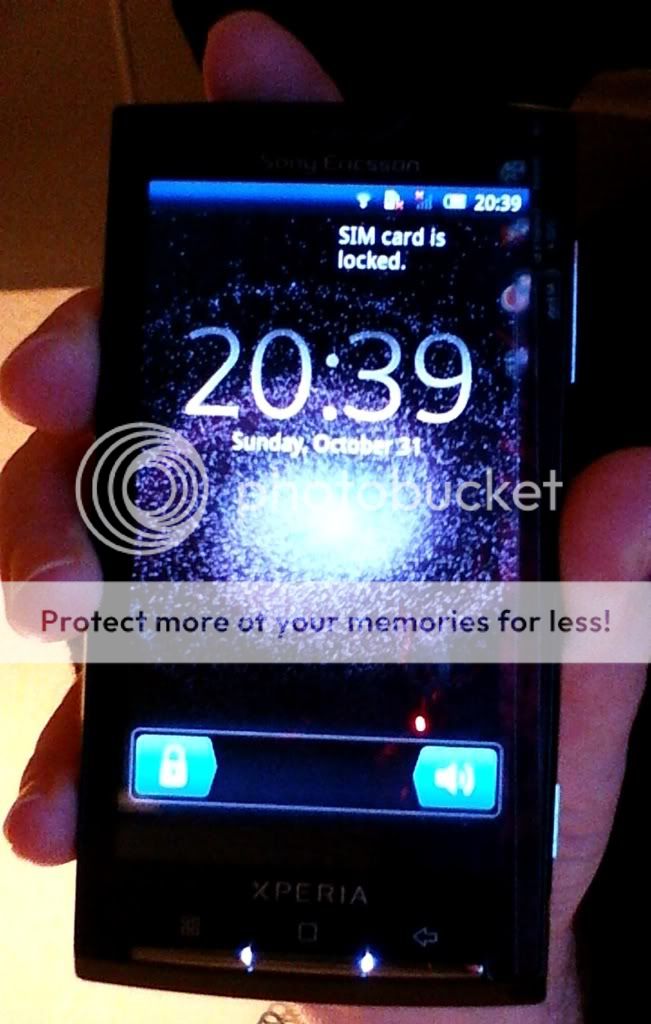
hey guys..just updated mi phone from 1.6 to 2.1. now its showing this unknown icon in status bar...its look like a sim card with a round thing on top of it.... looks like same as sim toolkit icon in menu???

any suggestions why its there? and how i can get rid of it.
 
hey guys..just updated mi phone from 1.6 to 2.1. now its showing this unknown icon in status bar...its look like a sim card with a round thing on top of it.... looks like same as sim toolkit icon in menu???

any suggestions why its there? and how i can get rid of it.

Hi.

Without a picture it's hard to say.
 
hey guys..just updated mi phone from 1.6 to 2.1. now its showing this unknown icon in status bar...its look like a sim card with a round thing on top of it.... looks like same as sim toolkit icon in menu???

any suggestions why its there? and how i can get rid of it.


Don't rule out a notification for sd card rather than sim. Sd card notifications appear on the left. Sim notifications appear on the right. I'd be surprised if theres not a hint when starting up the phone or something in the drop down menu
 
I've temporarily sticky this thread so that (new) members can see this and post all their issues/problems they are facing with 2.1 here instead of creating new threads. I've mearged a few 2.1 issues threads already. This will get unsticky once the 2.1 update craze dies down.

Cheers,
-Roze-
 
Hey no one got back at me... not sure how to proceed... My audio when playing music in the headphones jack is mono since the 2.1 upgrade, not stereo...Means I don't hear all the tracks in songs when they are recorded stereo. Anyone is having that issue? Pretty annoying since I was using it in car as player... Thanks!

EDIT: never mind... OMG it was just my song that was screwed. Played it on my computer and I have the same problem haha. I didn't even think to try another song *facepalm. Songs are working fine.
 
Back
Top Bottom