• After 15+ years, we've made a big change: Android Forums is now Early Bird Club. Learn more here.

Full screen background behind ProgressBar & maintain aspect ratio

Newbie question, I'm trying to work out how to have a full screen background behind ProgressBar, and need background image to keep its aspect ratio. As I understand it it might not be possible to maintain aspect ratio with background image?

in activity_main.xml I have

Code:
        <ProgressBar
            android:id="@+id/progressBar1"
            android:layout_width="match_parent"
            android:layout_height="match_parent"
            android:layout_gravity="center"
            android:background="@mipmap/splash"
            android:indeterminate="false"
            android:padding="120dp"
            android:textAlignment="center" />

in java/MainActivity show progressbar:

Code:
if (isNetworkStatusAvialable(getApplicationContext())) {
    mWebView.setWebViewClient(new com.myapp.webview.MyAppWebViewClient() {

        @Override
        public void onPageStarted(WebView view, String url, Bitmap favicon) {
            findViewById(R.id.progressBar1).setVisibility(View.VISIBLE);
        }

then hide when ready:

Code:
                @Override
                public void onPageFinished(WebView view, String url) {
                    //hide loading image
                    findViewById(R.id.progressBar1).setVisibility(View.GONE);
                    //show url in webview
                    findViewById(R.id.web_view).setVisibility(View.VISIBLE);
//Close loading
                    mySwipeRefreshLayout.setRefreshing(false);
                }
            });

It does the job except background image is just stretched to fit and doesn't always look great as it loses its aspect ratio.

Copyright issue

If the terms of the license to which you agreed when choosing to incorporate someone else's work into your own stipulate that attribution be made on the app description page, that's where you have to make the attribution. If you're not willing to do that then you'll need to find different assets with different licensing terms.

On the Github library question, again you're bound by the developer's chosen licensing terms. You can read the full text of the Apache License 2.0 here:
https://www.apache.org/licenses/LICENSE-2.0.html

This page provides an overview:
https://choosealicense.com/licenses/apache-2.0/

Basically you're free to use the code but must include the existing license and copyright notice, as well as clearly specify if you've changed any of the contents of the licensed work.

Many apps I use have a 'Third Party Licenses' section in the app's Settings or About screen where they provide the necessary documentation for anything they didn't create themselves. (But again, if flaticons requires attribution to be made 'on the description page on the app store' then you'll have to do that as well.)

Thank you so much bro I am pretty much clear now

Help Dual Sim: Only one Sim card working at a time

Hello,
I have a strange problem with my HTC Desire 12+ which I am using as a dual sim for several years now without any problems. I recently changed one of my service providers and consequentially got a new SIM card which I inserted in one of the two slots.
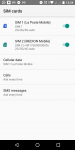
In contrast to my old SIM card, where the dual sim was working fine, I now can only use one SIM card at a time. More specifically, I am not connected to the mobile network of one of the two SIM cards even though both SIM cards are activated (see screenshot below). Consequentially, I cannot receive or make calls with the SIM card not connected. When I deactivate the SIM card which receives a signal, the other one connects to the network. But it automatically disconnects once I turn the first one on again.
I already tried to switch them in the slots, to disable automatic search for service provider and to force 2G for one of the SIM cards. None of this helped. Does somebody has an idea?
Thank you very much in advance!

Details of my device:
HTC Desire 12+
Not rooted
Android 8.0.0
Service providers: La Poste Mobile (France) & Aldi Talk (Germany)

Attachments

  • Screenshot_20210402-122434.png
    Screenshot_20210402-122434.png
    73.7 KB · Views: 461

S9 charging

S9 not charging from random cords
well do not use random cords.....use cords that you know personally:p

not sure what you want as far as an answer goes. if other cords do not work, then that would mean that something is wrong with your charge port......or your phone's battery is starting to go out. either way it is a hardware issue.

and like others have said you will most likely need to take it in to get it fixed or you can repair it yourself by going to ifixit.com.

here i did it for you. here are the guides that ifixit has for your phone:
https://www.ifixit.com/Device/Samsung_Galaxy_S9

they also sell the parts you will need as well as any tools needed to complete the repair.

Samsung Galaxy Note keeps dialing 911 !!!

Anytime Emergency Services are accidentally called definitely sucks. But here maybe some of you can get a laugh out of this one. I have a SM-G920P Nougat 7.0 Firmware that has been accidentally locked and FRP is on. I've been trying to bypass the FRP and reset it; first attempt was using a method I found on Youtube. The Youtube video is titled "Samsung Galaxy S6 frp Google gmail bypass New method %100 works". The method uses Emergency Call but dials out to 112. This allows the use of the more function to access and start Google Chrome to send a message through a WIFI connection. Thereby allowing access to the internet, so I tried it out. However, when I dialed 112 the phone called 911 instead. I figured that I screwed up somewhere along the way: so I tried it again and of course I got the same darn "bleeping" result: I had to apologize twice to the 911 operator. When my Mom messaged me today I told her about what happened and she replied back "Lol." Ha Ha Ha. So now I'm thinking that I will just try and Root the S6 using Odin3.

Filter

Back
Top Bottom