• After 15+ years, we've made a big change: Android Forums is now Early Bird Club. Learn more here.

Why Fastboot boot Twrprecovery.img hangs loads after 3-4 tries?

Question :- Why Fastboot boot Twrprecovery.img hangs loads after 3-4 tries?

I want original backup of Nandroid system userdata boot recovery partitions from twrp recovery from PC computers I load twrp recovery image in bootloader fastboot mode through command fastboot boot twrprexovery.img but as I run command the mobile white screen ( which came after adb boot bootloader) goes to blank black and in pc continuously prompts multiple drives a dialogue box to format multiple drives loaded created on twrp mtp (e,f,g,h,j,k) mounted after fastboot boot twrprecovery command. What I think happened twrp crating multiple mtp drives and closing I am have cancel multiple dialogue boxes in computer windows 10.

Other commands used in sequence


Code:
Adb devices
Adb reboot bootloader
Fastboot devices
Fastboot boot twrprecovery.img


But after rebooting reconnecting to different usb sockets mobile and trying 2-3 times this fastboot boot twrprecovery.img it finally display and load twrp image and display twrp menu.. and I took backup and recovery all went succesful....it means twrp image is right and not corrupted and working fine...and for same device


The problem is why it's loading after 2-3 attempt on same usb port same drivers same cable it happened many time not one time.


Now I am asking as I want to install flash twrprexovery.img to recovery partition and wooried that is it problem to image or any thing with it don't create problem after installing flashing .. how should I install twrp recovery which command is safe (fastboot flash recovery twrp.img)
Should I install as twrp recovery can be loaded and used with pc without installing but will not run through mobile.

Xz1 - will only boot up to the 3 dots then shuts down

What state is it in when you connect to the PC? File transfer via MTP requires that the Android operating system is running, so if it won't boot I'd not expect you to be able to see the filesystem.

I don't know what the procedure and tools for flashing a Sony are (each manufacturer has its own way of doing this), but I'd guess you would have to boot it into fastboot or download mode (some tools would connect to the phone when it is running Android and tell it to boot into the correct mode, but that sounds unlikely to work in this state). Which raises the question of whether the phone will boot into those modes, or recovery mode? If it is stable in one of those modes there's a chance something can be done.

If it was bootlooping (constantly restarts part way through the boot up) I'd suggest going into recovery mode and trying a factory reset, but this sounds a bit worse than that. You could still try, but I'm not optimistic (of course you'd lose any data that aren't backed up, so if there is anything important there I'd keep this as a last resort).
Ok thanks very much for your advice, cheers

National Suicide/Mental Health: Dial 988

Thank you for posting this, @rootabaga. It most definitely is a crisis, and getting this new number out there and known is very important, because no one knows when they may need it. We all need to commit it to memory, to know it by rote, teach it to our children, just like 911 for other emergencies.

Just to drive home what a crisis it is, both my brother and a dear friend killed themselves. They were both veterans, both had depression and substance abuse problems, and both gave up. I don't know whether this number could've helped versus the things that were tried, but I still wish it had existed then.

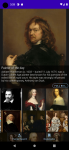
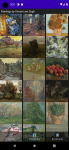
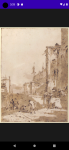
Paintarium: Discover Paintings of the Greatest Classic Artists

Hello,
I just wanted to introduce my new app that should be great for every art enthusiast. With Paintarium you can browse through about 500 classic painters, like Van Gogh, Monet, Cezanne etc. Browse the painting collections of the best classic artists with detailed biography and full gallery. You can set paintings as your smartphone wallpaper. Hope you will enjoy it.

Here is link to Google Play:
Paintarium: Discover Paintings of the Greatest Classic Artists

Screenshot_1632842906.png Screenshot_1632843079.png Screenshot_1632843182.png

Android 11 'couldn't connect to network' NPS with PEAP/MS-CHAPv2

Hi All,

I am trying to connect company-owned / unmanaged Android 11 devices to a Cisco WAP SSID using our public certificate wireless.fqdn

For my Galaxy A20 Android 11 phone , when connecting the SSID the phone returns:
'couldn't connect to network'
'couldn't authenticate connection'

On the NPS Server, the wireless.fqdn certificate is installed in the Certificates (Local Computer) Personal / Certificates container

We are using Windows NPS/PEAP/MS-CHAPv2 which I believe requires a certificate on the server-side only
I believe PEAP encapsulates the EAP type MS-CHAPv2 authentication in a secure TLS tunnel.

As a further configuration item, I installed the wwireless.fqdn certificate into the cert store on my Android device (User certificates, installed for WiFi)

NPS / RADIUS Server is Windows Server 2016 Datacenter
NPS Role installed with the following Windows NPS Policy

Connection Request Policy:
Wireless connections, NAS Port Type: wireless - other or wireless IEEE 802.11

Network Policy: Staff
CONDITIONS:
Wireless - Other OR Wireless IEEE 802.11
Windows Groups: ADDSGroup
Calling Station ID: ^[^:]+:SSID$

CONSTRAINTS:
EAP TypesMicrosoft: Protected EAP (PEAP)
Edit / certificate issued to: wireless.fqdn
Issuer: DigiCert TLS RSA SHA256 2020 CA1
Enable Fast Reconnect
EAP Type:
Seure password (EAP-MSCHAP v2)

Android 11:
I got into settings / biometrics and security
Other security settings
PFX user certificates: wireless.fqdn installed for WiFi (contains root/intermediate/cert chain)
View security certificates / system / CA root
No user certificates

Click the WiFI SSID / manage
EAP method: PEAP
Enter identity / password
CA certificate: Use system certificates (if I choose 'select certificate' there is nothing to select, android stated in a red color "CA certificate must be selected")
Online certificate status: don't validate
Domain: wireless.fqdn

When connecting to the SSID the phone returns:
'couldn't connect to network'
'couldn't authenticate connection'

MAC of Android phone not in NPS logs

Hope someone with more experience can assist.

Thanks!

Cannot sync Google contacts with PC

Try creating a temporary test contact entry either on your phone in the Contacts app or through your online Google account at
https://contacts.google.com
and then see if that test entry prompts the syncing process.
If you haven't actually done anything that involves the Contacts app or your Google account Contacts since April 16th, perhaps this is all just a matter where there was nothing to actually be synced that time. And if that is the case, don't forget to delete that test contact entry.

Android 8 features

My lg with androud 7 oreo can save a memo for each picture in my gallery.

Now gone in v 9,10

Double tap on- off is great. Gone in 9,10. Why

These features are definitely on the phones I've got, with Android 10(Huawei Mate10) and 11(Samsung Note20 Ultra). I guess removal was something LG has done on their particular devices.

Every version going backwards ! Keyboard word correction. Is as smart now as the democrats!

No idea what that's about.

Effects of factory reset of a rooted device

Well if you read the posts....... it will depend on how you rooted will determine if you have to re- root the phone, after doing the factory reset. And yes a factory reset will erase the malware, if that is what you have.
@ocnbrze bro yes I know magisk root by writing in boot partition and super user and other method write on system partition and twrp on recovery partition ...but kingoroot iroot one click write a bulk of files garbage files....but super user user writes minimum files ....but I foud magisk procedure little complicated it patches the boot.img and that boot image it patch is provided from 3rd party can we patch our original adb pull .../mmcblck0p24/ boot.img file self copied by. I doubt the 3rd party boot.img may not be modified so is did not used it

@ocnbrze bro thanx for telling factory reset will erase malware spyware virus but what about after factory reset new fresh os loaded files installed will have super user booted files as super user was installed in system partition...or is should factory reset after unistalling unrooting super user...and reinstall re-root after factory reset..
Or first recover twrp backup the nandroid backup which way should I go...

Filter

Back
Top Bottom