• After 15+ years, we've made a big change: Android Forums is now Early Bird Club. Learn more here.

Why do pictures get saved in one folder vs another?

It is possible that some app you are using is making copies of your photos.

A more common possibility is that there is a '.thumbnails' folder that is full of low resolution copies of your pictures.

Use your file manager to locate these folders, and then use the 'show hidden files' function.

Look for this .thumbnails (the dot in front is important).
Many crappy (ie. stock) gallery and video apps require these little pictures of your pictures in order for you to see the little versions when you search through your media.

They are not really needed, take up space, and cause confusion.

A great gallery that does not require them at all?

Simple Gallery Pro
https://f-droid.org/en/packages/com.simplemobiletools.gallery.pro/

To eliminate the .thumbnails folder and keep it from recurring, you must first delete it and then replace it with an empty file called .thumbnails.

It is imperitive that you remember to delete the FOLDER and replace it with a FILE.

Android will not allow two items with the same name to exist in the same location.
If you delete the folder, then create another folder with the same name, then the folder will just do what it did before.

So replace the folder with a file.
That way, when the pesky app tries to make a .thumbnail folder there is already a file there with that name.
So it cannot make the folder.

Also, keep in mind that apps like to save pictures and videos wherever THEY want, which is often not where we think they should be.

Apps make their own folders, sometimes with names that seem to have nothing to do with whatever app is using them.
(So frustrating!)

Best free wifi calling app (NOT Talkatone)

My main problem is getting a not connected to server message sometimes. Why isn't it connected? Suppose it had been an emergency. There have been times when it is on their main page (I guess) and it says sign in or sign up, but that hasn't happened lately, thank goodness.


Wow.
Yes, I agree that this type of service is not for emergencies.

However, any Android device with/without a provider/SIM card can still call 911 if it can reach a tower.

That is required by law.

In fact, if you find someone else's locked phone, you can call 911 with it even while it is locked.

As far as the 'not connected' issue, I have come across that.
What I believe happens is two-fold:
The app is battery optimized, and so the system shuts it down after a period of non-use.
Secondly, the app barely runs in the background, spending a large amount of time cached.
So when you are in a hurry and turn the app on, it is groggy from sleep.

A couple of things that could help is keeping the app in your recents when you suppose you will use it most often, and turning off battery optimization.
Personally, I found that keeping a solid Wi-Fi connection at all times helps the most. (I have a few devices that are Wi-Fi only, and use Dingtone on them.)

S21 sensors (e.g. barometer) draining battery

The biggest battery drain recently has been incessant mobile network selection activity. Obviously selecting a mobile network every 10 milliseconds all day long is not useful. However I live in a dead zone and that particular battery drain problem may be unique.

I make wifi calls and having wifi and wifi calling turned on (although not making or receiving any calls) may drain battery. I partly solved the problem by selecting 3G only under connections -> mobile networks. I still see sporadic battery use with no phone phone use (or any other use. I have all apps except calendar set to deep sleep (app "will only work when you open them")

I just downloaded the March 1 update. Hoping it will help.

AUB6 USA carrier unlocked update, March security patch

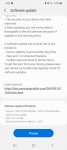
Thanks, downloading it now...swupdate.jpg
Done and installed. The serial connection shows a little less spurious activity, but unplugging it is the only way to check the battery life since it is also a charging cable. My ONLY reason to download any update is battery life. Nothing else matters whatsoever. So I am hoping for the best and expecting to be somewhat disappointed.

Help Security on Pixel 2XL now updates ended

You don't need antivirus apps on Android - and, for the most part, those that are available don't actually work due to the way Android runs each app in a "sandbox". One app can't peak inside another app to see its code or what it's doing. They can see the package names of other app, but most malicious apps would pretend to be a legitimate app (with a legitimate package name) and thus wouldn't necessarily get detected. Security apps may provide other useful features like permission monitoring or location tracking of a lost phone, but the antivirus portion isn't realistically be of much use.

Even after the phone no longer receives operating system updates, it still receives security updates through Google Play Services, and Play Protect still functions to protect you from known malicious apps. Don't install apps from outside of the Play Store and you'll be just fine.

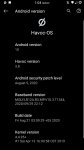
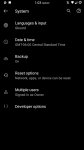
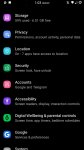
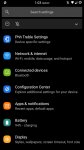
Unoffical/HavocOS Alcatel Tetra 5041C and Offcial TWRP

Custom recovery flashable zip of HavocOS based on Android 10 and modded to fully function on Alcatel Tetra.

First if you haven't already installed a custom recovery (we at A-Team have compiled a total of 8 different custom recoveries), then go here and you will find all you need to install TWRP.

HavocOS based on Android 10 for Alcatel Tetra


Based on the official gsi from HavocOS, but modified to function on the Tetra


A-Team Digital Solutions

Your warranty is now void. Please do some research if you have
any concerns about features included in this ROM before flashing it!WE ARE NOT RESPONSIBLE
IN ANYWAY FOR ANYTHING, IDEA, DISASTER, COSMIC EVENT, OR ANY OTHER NEGATIVE RESULT ENCOUNTERED
DUE TO YOUR DECISION TO MAKE USE OF THE SOFTWARE!!!
IN SHORT, IT IS A DECISION YOU ALONE MUST MAKE.


That being said, this product is still a work in progress. However, great effort
has been exerted to test this product. The developers have worked many hours to make this possible
and do this work as a hobby. For this reason, the software is available at no cost, so please keep
this in mind when you comment on their work. Credits, further contact resources, and donation links will
be made available at the end. There is no requirement to checkout the available links, or to donate.
These are only available if you chose to explore them. If you enjoy this product, find it helpful,
love it, or hate it; let us know. If you see fit, buy these developers a drink to show them some love.
Enough with the soap box, let get to the reason you searched and found yourself her!


REQUIREMENTS

Custom recovery and a little time.

INSTALLATION

Do a backup
Do a factory reset
Wipe cache
Wipe dalvik cache
Flash rom of your choice
Flash gapps
Reboot
Enjoy!!
If you have any issues with apps, try to your wipe dalvik cache / cache and fixing permissions

Features

-What's working
As of the writting of this post, everything should be working, I will address any issues if they arise.

-What's not

Download Links

Androidfilehost:
HavocOS based on Android 10 for Alcatel Tetra

A-Team Home Page:
Check us out.

CREDITS

Everyone at A-Team, HavocOS Team, PHH for his work with gsi's, and xEugW for most of the work that made this possible with his official gsi.
Screenshot_20210307-130435.jpg Screenshot_20210307-130424.jpg Screenshot_20210307-130415.jpg Screenshot_20210307-130405.jpg Screenshot_20210307-130340.jpg

Attachments

  • Screenshot_20210307-130325.jpg
    Screenshot_20210307-130325.jpg
    96.2 KB · Views: 805
  • Screenshot_20210307-130321.jpg
    Screenshot_20210307-130321.jpg
    92.7 KB · Views: 638

Image not found in viber

can you click on the links and have the pictures download? it could be something wrong on viber's end. you may want to contact them for more troubleshooting.

I can click on the links but the option are the following .I heard that the should be thumbnail or hidden files .I aleeady contact viber with no success

Attachments

  • Screenshot_20210306-193350_Viber.jpg
    Screenshot_20210306-193350_Viber.jpg
    48.6 KB · Views: 284

Formats, formats, formats

I now have 4 readers: Nook (my "favorite" at this point), Moon+Reader, PocketBook, and Readler. I hope I can post these 2 screenshots of how many different formats. Is that enough for ya? STILL there are some it cannot handle. It gets tiresome. Besides whining, I wanted to ask how/if I can convert some of the weirder formats to the normal stuff, i. e. pdf or epub, how to import covers (if, again), and how to make them all open east west, that is, horizontally. Vertically is probably better than nothing, but I definitely prefer the other.
Screenshot_20210306-064414.png
Screenshot_20210306-064409.png

Alcatel Idol 5 Secret Codes

So here are a couple of dialer codes for the 6060C.

Engineering Mode: *#*#825364#*#*
[GALLERY=media, 1120]Engineering menu 1 by lehmancurtis147 posted Mar 6, 2021 at 6:50 AM[/GALLERY][GALLERY=media, 1119]Engineering menu 2 by lehmancurtis147 posted Mar 6, 2021 at 6:50 AM[/GALLERY][GALLERY=media, 1118]Engineering menu 3 by lehmancurtis147 posted Mar 6, 2021 at 6:50 AM[/GALLERY][GALLERY=media, 1117]Engineering menu 4 by lehmancurtis147 posted Mar 6, 2021 at 6:50 AM[/GALLERY][GALLERY=media, 1116]Engineering menu 5 by lehmancurtis147 posted Mar 6, 2021 at 6:50 AM[/GALLERY]


Advanced Logging Options Menu: *#*#82533284#*#*
[GALLERY=media, 1121]Debug Logging by lehmancurtis147 posted Mar 6, 2021 at 7:00 AM[/GALLERY]

No circle app icon shapes on Android 10

Yeah, but that image I've posted, that's the default icons right? I say this because every image of Android 10 I see has circled icons.

FWIW I've got two devices here running Android 10, Huawei Mate 10 phone and a T95 Android box, and neither of which is showing circled icons by default. Although the Huawei phone has some icon themes with circled icons, that can be installed if I wanted from the Huawei "Theme Store" app.

This is apparently the stock icon set for a Google Pixel device with Android 10. Some apps are circle like icons, but not all, like Amazon. This is what comes from Google of course, and not some other manufacturer that might apply their own customizations.
Download-Android-10-Launcher.jpg

Filter

Back
Top Bottom