
Install the app
How to install the app on iOS
Follow along with the video below to see how to install our site as a web app on your home screen.
Note: This feature may not be available in some browsers.
-
After 15+ years, we've made a big change: Android Forums is now Early Bird Club. Learn more here.
You are using an out of date browser. It may not display this or other websites correctly.
You should upgrade or use an alternative browser.
You should upgrade or use an alternative browser.
Filters
Show only:

Extend wallpaper into notification area

- By thaKing
- Smartphones
- 2 Replies
Thank you!!! Was driving me nuts.
Keypad change
- By Alan Hand
- Smartphones
- 5 Replies
Hi guys, thanks for your help but non of the above worked nor did I want to install another app when the phone already had the key board I wanted.
The problem is that the technical guys are just too technical, they don't know how to talk layman terms.
We're not all that well versed in the terminology that is not standard even between the tech guys.
As Dannydet above calls the keypad I wanted a dialer key pad, I call it Phone pad, or T9 predictive, some call it the old Nokia keypad.
God knows how many other names are given to it, but Samsung as on my S8 plus call it a 3x4 .
What chance do we mere mortals have.
I finally found a automated Youtube video of how to change the standard qwerty board, pad, keyboard, (how many more names are there) to the 3x4 that I wanted but it takes 9 separate presses of different menus to get it to change.
Just toooooooooo much jargon, tooooooooo much technical stuff and no one that knows how to talk laymans language.
Only had this phone for 36 hours, thats 34 hours I will never get back and it should only have taken an hour at most.
The problem is that the technical guys are just too technical, they don't know how to talk layman terms.
We're not all that well versed in the terminology that is not standard even between the tech guys.
As Dannydet above calls the keypad I wanted a dialer key pad, I call it Phone pad, or T9 predictive, some call it the old Nokia keypad.
God knows how many other names are given to it, but Samsung as on my S8 plus call it a 3x4 .
What chance do we mere mortals have.
I finally found a automated Youtube video of how to change the standard qwerty board, pad, keyboard, (how many more names are there) to the 3x4 that I wanted but it takes 9 separate presses of different menus to get it to change.
Just toooooooooo much jargon, tooooooooo much technical stuff and no one that knows how to talk laymans language.
Only had this phone for 36 hours, thats 34 hours I will never get back and it should only have taken an hour at most.

[SOLVED] Created new board, but...

- By MoodyBlues
- Suggestion Box & Feedback
- 8 Replies
You're kidding! I thought you'd done it as a direct result of this thread!I hadn't seen this. Sometimes its better to be lucky than good.

Android Phone To PC Without USB Cable
- By MoodyBlues
- VIP Lounge
- 14 Replies
You might want to take a look at Airdroid. As long as your phone and computer are on the same Wi-Fi network, you can use it the way you want. It lets you view your phone from a web browser on your computer; you can transfer files in both directions.
But for heavy-duty file management, using an Android file manager is much easier and more powerful. I see that several have been suggested, and they're all good, but my personal favorite is MiXplorer Silver. I use it day in and day out to manage files on my Linux network, transfer files from and to my Android devices and computers, as well as do file management tasks.
For example, I use it to mass rename hundreds of files on my PCs; its features include things like replacing one character string with another. So say there are 500 files on an external drive named:
DCP_XXXX_four_PeacockChicks.JPG
and I want all of them renamed:
dcp_XXXX_4_female_peachicks_052716.jpg
it takes about 5 seconds to accomplish that.
But for heavy-duty file management, using an Android file manager is much easier and more powerful. I see that several have been suggested, and they're all good, but my personal favorite is MiXplorer Silver. I use it day in and day out to manage files on my Linux network, transfer files from and to my Android devices and computers, as well as do file management tasks.
For example, I use it to mass rename hundreds of files on my PCs; its features include things like replacing one character string with another. So say there are 500 files on an external drive named:
DCP_XXXX_four_PeacockChicks.JPG
and I want all of them renamed:
dcp_XXXX_4_female_peachicks_052716.jpg
it takes about 5 seconds to accomplish that.
TG4 Global update rolling out

- By ironass
- Smartphones
- 1 Replies
Samsung TG4 changelog

Due to its lack of any tangible improvements, this just appears to be a, "makeweight", release.
Due to its lack of any tangible improvements, this just appears to be a, "makeweight", release.
Oneplus 6 Battery life

- By dan55
- Smartphones
- 4 Replies
hi guys - just thinking about getting a used oneplus 6 ...... but the battery life seems a bit low to me :/ ..... my s9 easily does over a day of light use
Help Roadrover car multimedia - can't update and install apps
- By oy87
- Smartphones
- 5 Replies
Thank you
Get Real Path for Android 10
- By Astha Gupta
- Android Development
- 0 Replies
I'm using this code to get the real path for Android 10, but it always returns null. Can anyone please provide a solution for it?
import android.annotation.SuppressLint;
import android.content.ContentUris;
import android.content.Context;
import android.database.Cursor;
import android.net.Uri;
import android.os.Build;
import android.os.Environment;
import android.provider.DocumentsContract;
import android.provider.MediaStore;
import android.provider.OpenableColumns;
import android.text.TextUtils;
import android.util.Log;
import android.widget.Toast;
import androidx.loader.content.CursorLoader;
import java.io.IOException;
import static androidx.constraintlayout.widget.Constraints.TAG;
public class RealPath {
public static String getRealPath(Context context, Uri fileUri) {
String realPath;
// SDK < API11
try {
if (Build.VERSION.SDK_INT < 11)
realPath = getRealPathFromURI_BelowAPI11(context, fileUri);
// SDK >= 11 && SDK < 19
else if (Build.VERSION.SDK_INT < 19)
realPath = getRealPathFromURI_API11to18(context, fileUri);
// SDK > 19 (Android 4.4)
else
realPath = getRealPathFromURI_API19(context, fileUri);
return realPath;
} catch (Exception e) {
// Toast.makeText(context, "Exception in getRealPath: " + e, Toast.LENGTH_SHORT).show();
throw e;
}
}
@SuppressLint("NewApi")
public static String getRealPathFromURI_API11to18(Context context, Uri contentUri) {
String[] proj = {MediaStore.Images.Media._ID};
String result = null;
CursorLoader cursorLoader = new CursorLoader(context, contentUri, proj, null, null, null);
Cursor cursor = cursorLoader.loadInBackground();
if (cursor != null) {
int column_index = cursor.getColumnIndexOrThrow(MediaStore.Images.Media._ID);
cursor.moveToFirst();
result = cursor.getString(column_index);
if (cursor != null) {
cursor.close();
}
}
return result;
}
public static String getRealPathFromURI_BelowAPI11(Context context, Uri contentUri) {
String[] proj = {MediaStore.Images.Media._ID};
Cursor cursor = context.getContentResolver().query(contentUri, proj, null, null, null);
int column_index = 0;
String result = "";
if (cursor != null) {
column_index = cursor.getColumnIndexOrThrow(MediaStore.Images.Media._ID);
cursor.moveToFirst();
result = cursor.getString(column_index);
if (cursor != null) {
cursor.close();
}
return result;
}
return result;
}
private static String getRealPathFromURI_API19(final Context context, final Uri uri) {
final boolean isKitKat = Build.VERSION.SDK_INT >= Build.VERSION_CODES.KITKAT;
if (isKitKat && DocumentsContract.isDocumentUri(context, uri)) {
if (isExternalStorageDocument(uri)) {
final String docId = DocumentsContract.getDocumentId(uri);
final String[] split = docId.split(":");
final String type = split[0];
if ("primary".equalsIgnoreCase(type)) {
return Environment.getExternalStorageDirectory() + "/" + split[1];
}
} else if (isDownloadsDocument(uri)) {
final String id = DocumentsContract.getDocumentId(uri);
String fileName = getFilePath(context, uri);
if (fileName != null) {
return Environment.getExternalStorageDirectory().toString() + "/Download/" + fileName;
}
try {
final Uri contentUri = ContentUris.withAppendedId(Uri.parse("content://downloads/public_downloads"), Long.valueOf(id));
return getDataColumn(context, contentUri, null, null);
} catch (NumberFormatException e) {
e.printStackTrace();
return null;
}
} else if (isMediaDocument(uri)) {
final String docId = DocumentsContract.getDocumentId(uri);
final String[] split = docId.split(":");
final String type = split[0];
Uri contentUri = null;
if ("image".equals(type)) {
contentUri = MediaStore.Images.Media.EXTERNAL_CONTENT_URI;
} else if ("video".equals(type)) {
contentUri = MediaStore.Video.Media.EXTERNAL_CONTENT_URI;
} else if ("audio".equals(type)) {
contentUri = MediaStore.Audio.Media.EXTERNAL_CONTENT_URI;
}
final String selection = "_id=?";
final String[] selectionArgs = new String[]{
split[1]
};
return getDataColumn(context, contentUri, selection, selectionArgs);
}
} else if ("content".equalsIgnoreCase(uri.getScheme())) {
try {
if (isGooglePhotosUri(uri))
return uri.getLastPathSegment();
return getDataColumn(context, uri, null, null);
} catch (Exception e) {
}
} else if ("file".equalsIgnoreCase(uri.getScheme())) {
try {
return uri.getPath();
} catch (Exception e) {
}
}
return null;
}
private static String getDataColumn(Context context, Uri uri, String selection, String[] selectionArgs) {
Cursor cursor = null;
final String column = "_data";
final String[] projection = {
column
};
try {
cursor = context.getContentResolver().query(uri, projection, selection, selectionArgs,
null);
if (cursor != null && cursor.moveToFirst()) {
final int index = cursor.getColumnIndexOrThrow(column);
return cursor.getString(index);
}
} catch (Exception e) {
e.printStackTrace();
} finally {
if (cursor == null) {
cursor.close();
}
}
return null;
}
public static String getFilePath(Context context, Uri uri) {
Cursor cursor = null;
final String[] projection = {
MediaStore.MediaColumns.DISPLAY_NAME
};
try {
cursor = context.getContentResolver().query(uri, projection, null, null,
null);
if (cursor != null && cursor.moveToFirst()) {
final int index = cursor.getColumnIndexOrThrow(MediaStore.MediaColumns.DISPLAY_NAME);
return cursor.getString(index);
}
} finally {
if (cursor != null)
if (cursor != null) {
cursor.close();
}
}
return null;
}
/**
* @param uri The Uri to check.
* @return Whether the Uri authority is ExternalStorageProvider.
*/
public static boolean isExternalStorageDocument(Uri uri) {
return "com.android.externalstorage.documents".equals(uri.getAuthority());
}
/**
* @param uri The Uri to check.
* @return Whether the Uri authority is DownloadsProvider.
*/
public static boolean isDownloadsDocument(Uri uri) {
return "com.android.providers.downloads.documents".equals(uri.getAuthority());
}
/**
* @param uri The Uri to check.
* @return Whether the Uri authority is MediaProvider.
*/
public static boolean isMediaDocument(Uri uri) {
return "com.android.providers.media.documents".equals(uri.getAuthority());
}
/**
* @param uri The Uri to check.
* @return Whether the Uri authority is Google Photos.
*/
public static boolean isGooglePhotosUri(Uri uri) {
return "com.google.android.apps.photos.content".equals(uri.getAuthority());
}
}
import android.annotation.SuppressLint;
import android.content.ContentUris;
import android.content.Context;
import android.database.Cursor;
import android.net.Uri;
import android.os.Build;
import android.os.Environment;
import android.provider.DocumentsContract;
import android.provider.MediaStore;
import android.provider.OpenableColumns;
import android.text.TextUtils;
import android.util.Log;
import android.widget.Toast;
import androidx.loader.content.CursorLoader;
import java.io.IOException;
import static androidx.constraintlayout.widget.Constraints.TAG;
public class RealPath {
public static String getRealPath(Context context, Uri fileUri) {
String realPath;
// SDK < API11
try {
if (Build.VERSION.SDK_INT < 11)
realPath = getRealPathFromURI_BelowAPI11(context, fileUri);
// SDK >= 11 && SDK < 19
else if (Build.VERSION.SDK_INT < 19)
realPath = getRealPathFromURI_API11to18(context, fileUri);
// SDK > 19 (Android 4.4)
else
realPath = getRealPathFromURI_API19(context, fileUri);
return realPath;
} catch (Exception e) {
// Toast.makeText(context, "Exception in getRealPath: " + e, Toast.LENGTH_SHORT).show();
throw e;
}
}
@SuppressLint("NewApi")
public static String getRealPathFromURI_API11to18(Context context, Uri contentUri) {
String[] proj = {MediaStore.Images.Media._ID};
String result = null;
CursorLoader cursorLoader = new CursorLoader(context, contentUri, proj, null, null, null);
Cursor cursor = cursorLoader.loadInBackground();
if (cursor != null) {
int column_index = cursor.getColumnIndexOrThrow(MediaStore.Images.Media._ID);
cursor.moveToFirst();
result = cursor.getString(column_index);
if (cursor != null) {
cursor.close();
}
}
return result;
}
public static String getRealPathFromURI_BelowAPI11(Context context, Uri contentUri) {
String[] proj = {MediaStore.Images.Media._ID};
Cursor cursor = context.getContentResolver().query(contentUri, proj, null, null, null);
int column_index = 0;
String result = "";
if (cursor != null) {
column_index = cursor.getColumnIndexOrThrow(MediaStore.Images.Media._ID);
cursor.moveToFirst();
result = cursor.getString(column_index);
if (cursor != null) {
cursor.close();
}
return result;
}
return result;
}
private static String getRealPathFromURI_API19(final Context context, final Uri uri) {
final boolean isKitKat = Build.VERSION.SDK_INT >= Build.VERSION_CODES.KITKAT;
if (isKitKat && DocumentsContract.isDocumentUri(context, uri)) {
if (isExternalStorageDocument(uri)) {
final String docId = DocumentsContract.getDocumentId(uri);
final String[] split = docId.split(":");
final String type = split[0];
if ("primary".equalsIgnoreCase(type)) {
return Environment.getExternalStorageDirectory() + "/" + split[1];
}
} else if (isDownloadsDocument(uri)) {
final String id = DocumentsContract.getDocumentId(uri);
String fileName = getFilePath(context, uri);
if (fileName != null) {
return Environment.getExternalStorageDirectory().toString() + "/Download/" + fileName;
}
try {
final Uri contentUri = ContentUris.withAppendedId(Uri.parse("content://downloads/public_downloads"), Long.valueOf(id));
return getDataColumn(context, contentUri, null, null);
} catch (NumberFormatException e) {
e.printStackTrace();
return null;
}
} else if (isMediaDocument(uri)) {
final String docId = DocumentsContract.getDocumentId(uri);
final String[] split = docId.split(":");
final String type = split[0];
Uri contentUri = null;
if ("image".equals(type)) {
contentUri = MediaStore.Images.Media.EXTERNAL_CONTENT_URI;
} else if ("video".equals(type)) {
contentUri = MediaStore.Video.Media.EXTERNAL_CONTENT_URI;
} else if ("audio".equals(type)) {
contentUri = MediaStore.Audio.Media.EXTERNAL_CONTENT_URI;
}
final String selection = "_id=?";
final String[] selectionArgs = new String[]{
split[1]
};
return getDataColumn(context, contentUri, selection, selectionArgs);
}
} else if ("content".equalsIgnoreCase(uri.getScheme())) {
try {
if (isGooglePhotosUri(uri))
return uri.getLastPathSegment();
return getDataColumn(context, uri, null, null);
} catch (Exception e) {
}
} else if ("file".equalsIgnoreCase(uri.getScheme())) {
try {
return uri.getPath();
} catch (Exception e) {
}
}
return null;
}
private static String getDataColumn(Context context, Uri uri, String selection, String[] selectionArgs) {
Cursor cursor = null;
final String column = "_data";
final String[] projection = {
column
};
try {
cursor = context.getContentResolver().query(uri, projection, selection, selectionArgs,
null);
if (cursor != null && cursor.moveToFirst()) {
final int index = cursor.getColumnIndexOrThrow(column);
return cursor.getString(index);
}
} catch (Exception e) {
e.printStackTrace();
} finally {
if (cursor == null) {
cursor.close();
}
}
return null;
}
public static String getFilePath(Context context, Uri uri) {
Cursor cursor = null;
final String[] projection = {
MediaStore.MediaColumns.DISPLAY_NAME
};
try {
cursor = context.getContentResolver().query(uri, projection, null, null,
null);
if (cursor != null && cursor.moveToFirst()) {
final int index = cursor.getColumnIndexOrThrow(MediaStore.MediaColumns.DISPLAY_NAME);
return cursor.getString(index);
}
} finally {
if (cursor != null)
if (cursor != null) {
cursor.close();
}
}
return null;
}
/**
* @param uri The Uri to check.
* @return Whether the Uri authority is ExternalStorageProvider.
*/
public static boolean isExternalStorageDocument(Uri uri) {
return "com.android.externalstorage.documents".equals(uri.getAuthority());
}
/**
* @param uri The Uri to check.
* @return Whether the Uri authority is DownloadsProvider.
*/
public static boolean isDownloadsDocument(Uri uri) {
return "com.android.providers.downloads.documents".equals(uri.getAuthority());
}
/**
* @param uri The Uri to check.
* @return Whether the Uri authority is MediaProvider.
*/
public static boolean isMediaDocument(Uri uri) {
return "com.android.providers.media.documents".equals(uri.getAuthority());
}
/**
* @param uri The Uri to check.
* @return Whether the Uri authority is Google Photos.
*/
public static boolean isGooglePhotosUri(Uri uri) {
return "com.google.android.apps.photos.content".equals(uri.getAuthority());
}
}
Help Samsung Note 3 Stuck on Samsung Logo on Booting

- By MrJavi
- Ask a question
- 3 Replies
Did you have usb debugging enabled in developer options?
Even without usb debugging enabled, it's my understanding there is a way to flash the official factory while retaining user data. After downloading your firmware you'll need to extract the .tar file into separate parts BL, AP, CP, CSC, Home CSC. Then place BL, AP, CP but put Home CSC in the Odin appropriate slots. Do not place CSC in the Odin CSC slot or you will definitely wipe data, instead place Home CSC in Odin CSC slot.
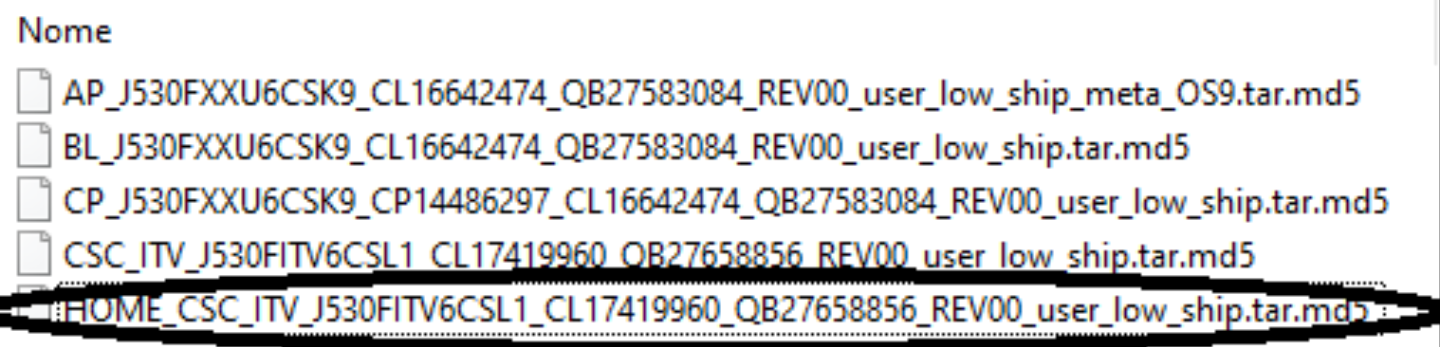
If you're unable to extract the Home CSC from your .tar firmware leave the CSC Odin slot empty.
Even without usb debugging enabled, it's my understanding there is a way to flash the official factory while retaining user data. After downloading your firmware you'll need to extract the .tar file into separate parts BL, AP, CP, CSC, Home CSC. Then place BL, AP, CP but put Home CSC in the Odin appropriate slots. Do not place CSC in the Odin CSC slot or you will definitely wipe data, instead place Home CSC in Odin CSC slot.
If you're unable to extract the Home CSC from your .tar firmware leave the CSC Odin slot empty.
Attachments

New Game: Score! Hero (Version 2.51)
- By App Update
- Apps & Games
- 0 Replies
EXTRA INFO
- Rating: 4.2
- Installs: 100,000,000+
- Download Size: 97M
- Version: 2.51
How do I force android to uninstall unnecessary system apps

- By puppykickr
- VIP Lounge
- 9 Replies
@svim
But many devices are not rootable, and many bloatware apps are set to start on boot and/or are not able to be disabled.
My devices fall into both categories.
And the guy in the video did say that it is a good idea to make copies of all the apks of any app that you do this to.
Sure, I wanted to quit watching right when you did (damn Pootube clickbait title!), but because the video was short and from XDA I did watch the whole thing.
I did point out all the flaws to my European friend, I just didn't get back here to point it all out- as all of this is mentioned in the video.
As far as Youtube videos go, it is fast moving, gets right to the point, as is only as long as it needs to be.
This is a great exception to the rule, as the vast majority of Youtube videos leave me shaking my fist and screaming "Get on with it already!" less than halfway through.
So, in short, if I had a computer, I would definitely give this method a shot.
But many devices are not rootable, and many bloatware apps are set to start on boot and/or are not able to be disabled.
My devices fall into both categories.
And the guy in the video did say that it is a good idea to make copies of all the apks of any app that you do this to.
Sure, I wanted to quit watching right when you did (damn Pootube clickbait title!), but because the video was short and from XDA I did watch the whole thing.
I did point out all the flaws to my European friend, I just didn't get back here to point it all out- as all of this is mentioned in the video.
As far as Youtube videos go, it is fast moving, gets right to the point, as is only as long as it needs to be.
This is a great exception to the rule, as the vast majority of Youtube videos leave me shaking my fist and screaming "Get on with it already!" less than halfway through.
So, in short, if I had a computer, I would definitely give this method a shot.
Storage Issues with LG Fiesta
- By tamelamoreno
- VIP Lounge
- 0 Replies
After getting low storage space warnings, I finally got an SD card. I moved the apps I could and over 800 photos to it, adding about 8 GB to portable storage, yet my internal storage only dropped about 1 GB. I went from very close to 16 GB down to 14.88, and looking at it right now I am back up to 15.45 GB.
Can someone please explain this to me, as it makes no sense to my brain.
Thank you in advance!
Can someone please explain this to me, as it makes no sense to my brain.
Thank you in advance!
The UK MOD Spying on my phone
- VIP Lounge
- 7 Replies
I honestly don't know. How ever I belive the individual name it those screen shots is a friend of my ex's dad. I don't think the queens services care about me.
Help Upgrading from 2016 Moto Z and away from OLED?
- By puppykickr
- Smartphones
- 5 Replies
This is from an old device, but I have one that does as you described, and the options are similar.
Load more