• After 15+ years, we've made a big change: Android Forums is now Early Bird Club. Learn more here.

Do most OLED screen on Samsung smartphones like the Galaxy A20 get the screen burn in problems?

That's a severe case! But as you say, showroom demo model, sits in the shop for months with the screen permanently on at full brightness and mostly showing the same demo screen - it could scarcely be better designed to produce burn-in, but it's nothing like most people's real usage.

The closest to that I can think of that might happen in real life would be someone who drives for many hours every day using the phone for navigation in bright daylight (so high screen brightness). The map itself would move, so would not be a high risk, but parts of the display that always showed the same object would be vulnerable. So if you do that for a living and insist on using the phone that way then maybe I'd be wary of AMOLED - though if that is your life you could just buy a satnav and then you don't have to worry. Otherwise though it isn't a big concern in my experience.

Looking for a guest sign in app

If it would export to excel and not PDF it would work, prefer if I needed need events as well but I can manage that. I have discovered a better term to search for is Attendance Register", but same problems with not been able to export to excel, or cant pre-enter visiters to the app for quick select, others are all around school classes and workers salaries.

I got in touch with Wix and they said there is no way to export to excel.

This has become extremely frustrating. To the point I'm going to look how difficult it is to make an app lol...

Help Battery (Erroneously?) "Runs Down" when Not In Safe Mode

Try enabling your Developer Options menu and use the Running Services option. It doesn't require installing any third-party app and is more extensive than just looking in your Settings >> Battery menu.
https://www.digitaltrends.com/mobile/android-apps-background-kill/
Of course just identifying what app/service is draining your battery is the first step. Since this same problem is happening on two different phones that would indicate either there's an app installed on both that's the source of the problem, or a similar configuration option that's not occurring while in Safe Mode.

Just got V60 on Verizon

Im currently going to switch from At&t to Verizon and I was thinking getting this phone over the Swing s20plus because that phone is a little pricy at $1200. I was looking at the specs and the only difference i see is the s20 has 120 refresh rate and a higher screen PPI. Do you guys think those 2 things are worth it over getting the V60 with similar hardware?

The right screen brightness for both battery life/health and eye health, and question sim slot mech

Personally I tend to set brightness to auto and if the phone allows, I set the brightness level to about 75% because the automatic brightness is sometimes too dark for me.

Unfortunately, from what I have read, and in my experience, using the Auto feature for screen brightness uses more battery power.

This is because the lux sensor and whatever that needs to work is always running, and then there is the screen that is constantly adjusting briteness as a result.

Even with my bad vision, my devices tend to be both visible and not too hard on the eyes at 25%.
I have one device that is nice at 13% while indoors at night.

Of course, those are not enough when outdoors in bright sun.

At those times, 100% is barely enough, and I rely upon a short screen on time for battery savings.

Tablet Skin not showing up in Android Studio’s ‘Create Virtual Device’

Hi
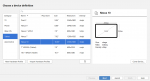
In trying to create an emulator of a Samsung tablet (Tab A 9.7 for example), I start with "New Hardware Profile" which goes to "Choose a device definition"

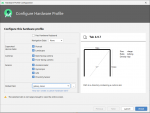
I'm not sure if it's suppose to, but the Galaxy_Tab_A_9.7 does not show up, so I chose the Nexus 10.
![Configure Hardware Profile|661x500](upload://d1ukYtaZ9vb7WKfYw1zRdMI3CnF.png)

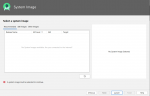
As you can see, that is not a good selection (not big enough). So if I go back to the "Choose a device definition" and click "Next", on the next screen which is
"Select a system image", there is nothing there to select from.![Select a system image|690x445](upload://8j3GXrFpUPpD2oWCI43VLOjwRjL.png)

Any idea of what I'm doing wrong would be greatly appreciated.

Thanks...

Attachments

  • Choose a device definition small.png
    Choose a device definition small.png
    36.3 KB · Views: 538
  • Configure Hardware Profile small.png
    Configure Hardware Profile small.png
    50.7 KB · Views: 513
  • Select a system image small.png
    Select a system image small.png
    28 KB · Views: 500

Help Cannot Answer Phone without Unlocking It-Android9

If you love something, set it free. If it doesn’t come back to you, then it wasn’t meant to be...

If you’re dealing with anything past Oreo, you’re in a pinch.

I had an Oreo phone that literally made me an angry man. To answer, I disabled the lock screen. Not great for security, but hey - as I progressed w/friends helping me to root my phone, I learned that everything from Oreo-forward leans heavily upon the cloud where it resides.

With slower CPUs, it makes life crawl. Answering the phone, w/new ROMs (of course, I only use one at a time) became a nightmare. I had to disable the lock screen, easily done within Settings - but then, the phone would not go to the Phone app UNLESS I hit the phone icon, which made the phone app work (finally).

Most times, the call would go to voicemail before I could answer it. Hence my being angry; I had changed my apps to F-Droid, linked my phone to sync with one of the many servers available for developers, and hoped for the best.

Not long after, my Chinese-made phone gave up the ghost, as it were. I still have an unlocked Alcatel/ZTE to play with, as I love old-school AOSP... but my privacy concerns have sent me over to the other side...

Apple.

And yes, jail breaking will be my game. I love Android, but they have replaced Microsoft for being top dog when it comes to data mining. Go look at Google’s ratings for their services:

D - D +

I am not one entity in a herd of stupid US sheep. I really pity the rest. It’s time for everyone to start paying attention. I was a Google fan, but they changed their TOS - so goodbye, data privacy. From them, 3rd-party devs, & THEIR ADVERTISERS - which, are no more than data vacuum cleaners... but I digress.

No matter where you are in the world -

Protect your privacy. Stateside, the Privacy Act of 1974 still applies; all one has to do is look at California, and soon, Colorado and myriad others... get smart, & remember that all smartphone users have inalienable rights; though corporate has gone NUTS Stateside since the 2000 election (read your history), you STILL HAVE RIGHTS.

Wouldn’t it be nice if all phone users had better privacy, instead of having to change sync, servers, and apps?

Think about it. I love Android; but now, it’s a Microsoft repeat. Tell all of the dev buddies you know about this. Maybe, just maybe, privacy will once again reign supreme. And don’t give me the business about making money, honey. There are more equitable ways to do that.

It’s the baldfaced truth. No joke. I hope that this will be read. No offense, Google, but I’m only steps away from deleting my Google account. It’s just like the rest of the greed Meisters who only care about the bottom line.

Why worry about your government, when corporate is already going into your data?

My two cents. You can love me, or hate me.

LW


I haven't had any of thoughs issues with my rooted Samsung Galaxy Note 4 running 6.0.1 MM. In fact, I answer call from the lock screen all the time. One thig I hated was every time I booted the phone, even with fingerprint unlock, I had to first time in the pass word. Luckily, there's and Xposed module that lets me boot-up and unlock with just a finger swipe.

PS: I'm no fan of Google.

T-Mobile (USA) June security patch update

There is a new roll-out of an update for the T-Mobile (USA) carrier minority variant of the OnePlus 6T. This time for the June 2020 Android security patch.

The build date of this release is showing as the 5th June 2020

Download size = 137 MB

Changelog


    • Android Security patch update to June 2020
EIpf7Xmh.jpg


Camera version = 3.8.93 (TBC)

This is the 14th T-Mobile (USA) update in 616 days. Roughly 1 update every 44 days

(N.B. This update is only for the T-Mobile (USA) minority carrier variant and NOT the global OnePlus 6T model)

See, also...

Software updates: OnePlus 6T T-Mobile (USA) official carrier forum

T-Mobile 6T to Global model Conversion (WITHOUT unlocked bootloader/SIM unlock!)

Filter

Back
Top Bottom