• After 15+ years, we've made a big change: Android Forums is now Early Bird Club. Learn more here.

Need help 8 ball pool app

Neeed help I have my main miniclip account with lots coins level 27 but my problem is I deleted my Facebook linked to because I like my photo wen i play my issue I deleted Facebook waited 30 days it's deleted for sure I thought I could make new Facebook account and just link it to my old miniclip account but not working its telling me to logg out of existence facebook account wich I f deleted pNeeed help I have my main miniclip account with lots coins level 27 but my problem is I deleted my Facebook linked to because I like my photo wen i play my issue I deleted Facebook waited 30 days it's deleted for sure I thought I could make new Facebook account and just link it to my old miniclip account but not working its telling me to logg out of existence facebook account wich I f deleted

Moto One stopped reading all SD Cards

My Moto One has suddenly stopped reading it's SD card - I've taken the card out (all files were recorded on this card via the phone); it's contents are still there and being read and played on my PC. I've taken a different card, also playing in windows, that has been read on this phone before - No Joy. I've taken a different blank SD card that Android was telling me was corrupted, and formatted it on the phone - still not being read. The only thing I haven't tried is the nuclear option of doing a factory reset (which I'm loth to do as this phone has been updated from Android 9 to 10, and I'm not sure if it will be reset to 9 [and not 10]) Any help that can be given to get my phone reading a card would be much appreciated - I'm missing my music!

Help Android mt65xx - s13

I installed on android mt65xx who edited it for the Android s13 root version. And then I edited build.prop to sdk 24 instead of 19 and after booting all the apps did not boot.
I tried via sdb to replace a repaired build.prop file and it does not upload to me and shows me an error:
"adb: error: failed to copy 'build.prop' to '/system/build.prop': remote Read-only file system"
I tried to open it for writing and editing with a lot of commands that came up on the subject and nothing was able to open the writing and editing system.
The system does not even allow to use the root I installed on it because it does not fit the version.
I also tried through the file manager + re-edit from the device but it does not let open the app because it also does not fit the version.
If anyone has a solution please send it to me it is urgent to me
Thanks

Accessories Wireless Adapter for Android Auto!

If you're like me, you get tired of plugging your phone into your car via USB cable to use Android Auto. Google hasn't abandoned the platform, not by a long shot... and has licensed it to a Motorola subsidiary to sell Bluetooth adapters for Android Auto! Just plug it into your car, pair your phone to it, and enjoy Android Auto wirelessly!

https://www.phonearena.com/news/goo...atures-motorola-ma1-wireless-adapter_id137627

Shall I go for Android 11 and 12 updates for my Samsung Galaxy Tab S7?

Please let me know your opinion about updating Samsung Galaxy Tab S7 to Android 11 and 12.

Have you experienced any performance issue with the new system like battery drain after the update?

Did you experience anything really bad that made you wish you hadn't carried out the update? Because I'm thinking of doing Android 11 (and 12 when available) update and seeking any advice that suggests avoiding the update.

Help Android tablet showing sdcard missing on startup

I am running a Meberry tablet with Android 10.

When I boot up I receive 'Sandisk sdcard is missing', then the message 'phone is starting up' then in the desktop the sdcard functions normally without any errors.

I have tried another sdcard with the same result, I then reformatted the card and received the ame sdcard missing message.

If I format the sdcard as a portable storage rather than extended memory, I do not receive the sdcard missing message.

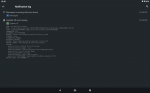
Attached is the log entry for the error

Attachments

  • sdcard_error.png
    sdcard_error.png
    62.6 KB · Views: 254

Samsung XCover2 weird problem

Anyone knows this problem?
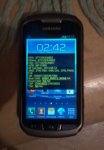
Phone has worked flawlessly before. After recharging & startup shows this (see pic) seems factory reseted, everything wiped, asks for software update, weird tech spec reading comes up. No Internet connection (although SIM card OK and I also got a new one to be sure), but I can connect to a network so phone seems to work. Tried also factory reset, no difference, same startup.
In factory reset, it says:
E: failed to mount /efs (invalid argument)
Also noted: SAMSUNG-logo stays much longer

Attachments

  • Pic.jpg
    Pic.jpg
    149 KB · Views: 202

[06/JAN/22] BULF JANUARY 2022 update

The updates just keep coming!

Only 13 days after their latest December update, BULC, Samsung has begun rolling out their 6th Android 12 release for the S21 series of international devices with the January 2022 Android Security patch and bugfixes.

Initially, as always, this is a staged rollout to the non-carrier branded, stock Samsung CSC codes first.

The Galaxy S21 international devices that will receive this update are...
  • S21 5G model SM-G991B
  • S21+ 5G model SM-G996B
  • S21 Ultra 5G model SM-G998B
This latest release replaces the previous G99*BXXU3BULC December build on the international devices.

Changelog
  • Device security improved
  • Camera updated
  • Bugfixes
  • App update information.
  • The apps below may be updated to the latest version after the software update
  • Samsung Kids
  • Galaxy Wearable
  • PENUP
  • Samsung Internet
  • Samsung Health
  • Smart Things
  • Samsung Members
  • Samsung Pay
  • Calculator
  • Smart Switch
  • Voice Recorder

It is a FOTA, (Firmware Over The Air), update and you can check... Settings > Software update... to see if it is available for you. Alternatively, you can connect to the Samsung PC suite, Smart Switch and check via that.

Update information

ucQS0Trl.jpg


The update = G99*BXXU4BULF

Download = 514.32MB

Build date = 23 December 2021

Release date = 06 January 2022

Camera version = 12.0.01.23

One UI version = 4.0

Android Security patch = 01 January 2022

This is the 25th stable update for the Exynos model in 342 days. Average = 1 update every 14 days.

TOP TIP: Wipe the phone's cache partition and use the Galaxy App Booster after updating.


(N.B. This post will be updated as more information becomes available)

[06/JAN/22] BULF JANUARY 2022 update

The updates just keep coming!

Only 13 days after their latest December update, BULC, Samsung has begun rolling out their 6th Android 12 release for the S21 series of international devices with the January 2022 Android Security patch and bugfixes.

Initially, as always, this is a staged rollout to the non-carrier branded, stock Samsung CSC codes first.

The Galaxy S21 international devices that will receive this update are...
  • S21 5G model SM-G991B
  • S21+ 5G model SM-G996B
  • S21 Ultra 5G model SM-G998B
This latest release replaces the previous G99*BXXU3BULC December build on the international devices.

Changelog
  • Device security improved
  • Camera updated
  • Bugfixes
  • App update information.
  • The apps below may be updated to the latest version after the software update
  • Samsung Kids
  • Galaxy Wearable
  • PENUP
  • Samsung Internet
  • Samsung Health
  • Smart Things
  • Samsung Members
  • Samsung Pay
  • Calculator
  • Smart Switch
  • Voice Recorder

It is a FOTA, (Firmware Over The Air), update and you can check... Settings > Software update... to see if it is available for you. Alternatively, you can connect to the Samsung PC suite, Smart Switch and check via that.

Update information

ucQS0Trl.jpg


The update = G99*BXXU4BULF

Download = 514.32MB

Build date = 23 December 2021

Release date = 06 January 2022

Camera version = 12.0.01.23

One UI version = 4.0

Android Security patch = 01 January 2022

This is the 25th stable update for the Exynos model in 342 days. Average = 1 update every 14 days.

TOP TIP: Wipe the phone's cache partition and use the Galaxy App Booster after updating.


(N.B. This post will be updated as more information becomes available)

[06/JAN/22] BULF JANUARY 2022 update

The updates just keep coming!

Only 13 days after their latest December update, BULC, Samsung has begun rolling out their 6th Android 12 release for the S21 series of international devices with the January 2022 Android Security patch and bugfixes.

Initially, as always, this is a staged rollout to the non-carrier branded, stock Samsung CSC codes first.

The Galaxy S21 international devices that will receive this update are...
  • S21 5G model SM-G991B
  • S21+ 5G model SM-G996B
  • S21 Ultra 5G model SM-G998B
This latest release replaces the previous G99*BXXU3BULC December build on the international devices.

Changelog
  • Device security improved
  • Camera updated
  • Bugfixes
  • App update information.
  • The apps below may be updated to the latest version after the software update
  • Samsung Kids
  • Galaxy Wearable
  • PENUP
  • Samsung Internet
  • Samsung Health
  • Smart Things
  • Samsung Members
  • Samsung Pay
  • Calculator
  • Smart Switch
  • Voice Recorder

It is a FOTA, (Firmware Over The Air), update and you can check... Settings > Software update... to see if it is available for you. Alternatively, you can connect to the Samsung PC suite, Smart Switch and check via that.

Update information

ucQS0Trl.jpg


The update = G99*BXXU4BULF

Download = 514.32MB

Build date = 23 December 2021

Release date = 06 January 2022

Camera version = 12.0.01.23

One UI version = 4.0

Android Security patch = 01 January 2022

This is the 25th stable update for the Exynos model in 342 days. Average = 1 update every 14 days.

TOP TIP: Wipe the phone's cache partition and use the Galaxy App Booster after updating.


(N.B. This post will be updated as more information becomes available)

Notebook - Best notes app for you

Notepad remembers all your notes ideas.

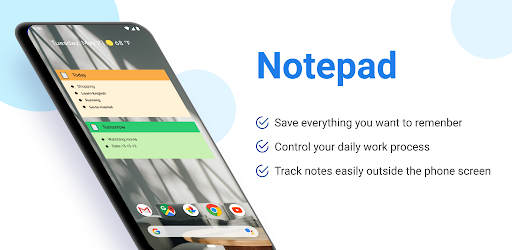
Notes is a note app that makes it possible to write down all your important things and remind you in the right place at the right time. You will no longer have to worry about missing important events if you use the Notepad & Note app of Eco Mobile VN.

Download app now: https://play.google.com/store/apps/details?id=com.eco.note

Features of the application Notepad:
✔️ Create notes with notebook.
✔️ Checklist and to do list.
✔️ Notes reminder.
✔️ Sticky Notes.
✔️ Note widget easy free
✔️ Backup and restore notes using Google Drive.
✔️ Customize notes with diverse themes.

Zwmps3GkIbt8WZrnL_I_IX6lhqm-axW718WcAEr5gRvE8jEz3orKXWxBSVFYf_VszI0

Notebook is designed by the whole enthusiasm of Eco Mobile VN team. With all the best, we strive to bring you a Note app with a simple, convenient interface that is easy to use but extremely refined and clean.

Notes will remind you of important events in the right place at the right time with note reminders. Your life will become easier and more scientific with the Note app, there will be no more missed events, no more overlapping tasks that mess you up. Instead, it will be a light life, remembering all events, work is managed and scientifically arranged.

Notepad is a note app where you are free to customize almost anything. You can customize the application's Backgroud, the main color of the notes application. Style your own with a variety of note screen and checklist themes. Customize viewing notes as a list or grid with the Notebook.

Notes is an application that can bring notes to the home screen of your phone with the Note widget feature. You can customize the note widget size to fit your needs. Easily keep track of your daily tasks on your phone's home screen. Your various work threads are created and moved with ease. From now on, everything can become a lot more convenient with the Note app.

Notepad can help you sync your notes, backup and restore your notes via Google Drive. You can also sign in to different devices and not lose your notes. Eliminate worry about losing note data when changing phones. Easy to use with just 1 sync to Google Drive with Notebook

Notes is a note app that is in the process of product development and improvement. Eco Mobile VN always listens and appreciates all your contributions. We will try our best to bring you a really useful Notebook app and have the best experience. Thank you very much!

Kyocera Duraforce Pro 2 Update Issues

Just had to update my phone and now I can't change the alarm or notification sounds. It just says "there was a problem changing the sound" or something. I already reset app preferences and still doesn't work. For reference, I use the app Zedge for notification sounds. I've had the same notification sound for years on my different phones and don't want another one. Any ideas besides a factory reset or anything drastic?

Help Default apps

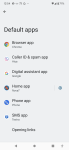
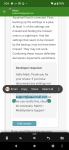
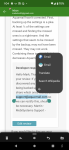
Sorry to be a pest but I cannot find how to configure the default email app. I'm using Aquamail and that doesn't have that setting. In the settings, it has listing for other areas but not email. When I highlight an email address it never asked me. It just opens Gmail. I turned off open supported links in Gmail but the pop-up still has Gmail as default and Aquamail is a selection when tapping on the 3 dots. I'd prefer not to uninstall Gmail but I will if I have to.
Thanks in advance, Screenshot_20220105-125401.png
Screenshot_20220105-130456.pngScreenshot_20220105-130442.png

Filter

Back
Top Bottom