
Install the app
How to install the app on iOS
Follow along with the video below to see how to install our site as a web app on your home screen.
Note: This feature may not be available in some browsers.
-
After 15+ years, we've made a big change: Android Forums is now Early Bird Club. Learn more here.
You are using an out of date browser. It may not display this or other websites correctly.
You should upgrade or use an alternative browser.
You should upgrade or use an alternative browser.
Root [Theme] NexTheme for Droid X Froyo 2.2 (8/26/2010)
- Thread starter Fabolous
- Start date
-
- Tags
- motorola droid x
whytecountry
Member
I'm trying to download the nextheme zip on a friends x, we just rooted and deodexed, and it keeps saying download failed.could that be a problem with the phone our the files? Any ideas?
Will this work on the new 2.3.13 Froyo?
Yes, I just tried it and it worked with no problems.

Phantom_DroidX
Newbie
Yes, I just tried it and it worked with no problems.
I can confirm as well it works just fine running it now
I really like like checking out the themes on here. Do you have to uninstall one theme to try another??? Like if I were going from the nextheme to revo one, I would have to uninstall the nex first??? And if I do, all I have to do is use the Fab theme killer right? Just apply it to sd card and use recovery???? Im running the 2.3.13 Froyo.

Fabolous
Superuser
I really like like checking out the themes on here. Do you have to uninstall one theme to try another??? Like if I were going from the nextheme to revo one, I would have to uninstall the nex first??? And if I do, all I have to do is use the Fab theme killer right? Just apply it to sd card and use recovery???? Im running the 2.3.13 Froyo.
Don't use the theme killer, it's not for 2.2
I haven't made a 2.2 one yet since there are a lot of ROMs floating around, but I will get to it this weekend. It will be for the 2.3.13 OTA/leak.
You can just install a new theme over the old one. If there are apps that don't overlap though, they will retain the old theme.

ECFfighter7232
Android Expert
Hey Fab, just curious if you know if this will work on the OTA 2.2 yet or not? Not trying to rush you by any means. Just wondering if youve tested it or not
Fabolous
Superuser
Hey Fab, just curious if you know if this will work on the OTA 2.2 yet or not? Not trying to rush you by any means. Just wondering if youve tested it or not
It won't work on the OTA, as it is not deodexed.
ECFfighter7232
Android Expert
can it be deodexed like the 2.3.9 leak could or do we not know yet?

kramerica
Android Enthusiast
I have applied the man's theme to a deodexed OTA 2.2. I used instructions from Droid Forums for installation (credit to specmac) and it looks as awesome as it did the first time I installed on 2.1. However, I have an issue with the clock in the notification bar as it is in black font when utilizing the nextheme fonts and stock fonts. So it is obviously not showing in the notification bar.
I posted over there to see if the instruction poster had or has similar issues.
FYI, here is the post from there:
[Theme] NexTheme for Droid X Froyo 2.2 - Page 4 - Droid Forum - Verizon Droid & the Motorola Droid Forum
I posted over there to see if the instruction poster had or has similar issues.
FYI, here is the post from there:
[Theme] NexTheme for Droid X Froyo 2.2 - Page 4 - Droid Forum - Verizon Droid & the Motorola Droid Forum
ECFfighter7232
Android Expert
I have applied the man's theme to a deodexed OTA 2.2. I used instructions from Droid Forums for installation (credit to specmac) and it looks as awesome as it did the first time I installed on 2.1. However, I have an issue with the clock in the notification bar as it is in black font when utilizing the nextheme fonts and stock fonts. So it is obviously not showing in the notification bar.
I posted over there to see if the instruction poster had or has similar issues.
FYI, here is the post from there:
[Theme] NexTheme for Droid X Froyo 2.2 - Page 4 - Droid Forum - Verizon Droid & the Motorola Droid Forum
can you do me a favor and link the instrustions you used to deodex the OTA 2.2? thanks in advance
With a little "kick" from Fab, all works like a charm!!! (exc %, but i dont care anywayThis is a port of Manup456's NexTheme for the Motorola Droid X. It is meant to be run on deodexed Froyo 2.2
If you are running Froyo, but not deodexed, consult these threads:
[HOW-TO] Manually deodex your phone. - Droid X Releases - AllDroid Public Board - [HOW-TO] Manually deodex your phone. - Droid X Releases - AllDroid Public Board - AllDroid.org > Home
Droid-X Clockwork Recovery image. Deodexed Rooted, Froyo'd - Droid X Releases - AllDroid Public Board - Droid-X Clockwork Recovery image. Deodexed Rooted, Froyo'd - Droid X Releases - AllDroid Public Board - AllDroid.org > Home
DISCLAIMER: I am not responsible for anything that may go wrong in this process - Though with the SBF file now, it is almost impossible to brick a Droid X.
Includes
-Themed Framework and some apps
-Custom NexTheme Font (removable)
-Themed MotoTorch and Ringer widgets
Downloads
NexTheme: Fabolous_NexTheme_Froyo_DX.zip
Default Fonts: Stock_Fonts_Froyo_DX.zip
Battery % in notification bar: Battery_Percentage_Froyo_DX.zip
Installation
Requirements: Rooted, Deodexed Froyo, Koush's Droid X Bootstrapper
1. Download file(s) and place the .zip files on the root of your sd card
2. Reboot into Clockwork recovery
3. Install .zip from sdcard, choose zip from sdcard
4. Install NexTheme (and customizations if you wish).
Note: If installing default font or battery %, install NexTheme first, then apply patches.
5. Enjoy your new theme!
Outdated - For Android 2.1 Only
Changelog
V2.1: Fixed the horizontal progress bars (the weird behavior before a download, etc.)
V2: Fixed the pull down buttons so now you can read the white text. Themed MotoTorch and Ringer Control Widgets now included! Optional wallpapers can be found here:
nexpapers.zip
Instructions
1. Download 'MetaMorph' from the market. Run it once and grant it root permissions.
2. Download the following file:
NexTheme_V2-1.zip
3. Extract the file. Make a folder on your sdcard called nextheme. Extract the contents of the 'framework' and 'apps' folder into sdcard/nextheme. Extract the contents of the 'metamorph' folder into sdcard/AndroidThemes
4. We will first need to push framework-res.apk and services.jar to the system. Open up your terminal emulator or adb (preferably) and type:
Code:su mount -o rw,remount -t ext3 /dev/block/mmcblk1p21 /system cp /sdcard/nextheme/framework-res.apk /system/framework/ reboot
after this reboot, you should notice a different status bar, but the clock and time will still be black.
open up terminal emulator (or adb) again and this time we'll push services.jar
Code:su mount -o rw,remount -t ext3 /dev/block/mmcblk1p21 /system cp /sdcard/nextheme/services.jar /system/framework/ reboot
the following reboot will take between 3-5 minutes!
Now the clock and time, etc. will be white.
5. Now, fire up MetaMorph and choose unzip/extract new theme, select nextheme, and let it do it's thing extracting. Once it's done extracting, you can apply all the themes (for the apps), or apply only the ones you want.
6. Using the 'Files' app that comes with the Droid X, you can navigate to sdcard/nextheme and install the widgets if you'd like. You can see what they look like in the screenshots section.
7. Enjoy your new theme
Screenshots
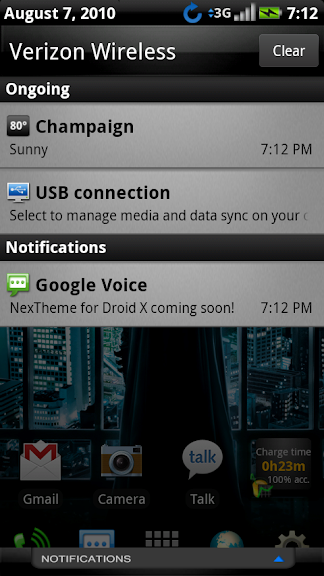
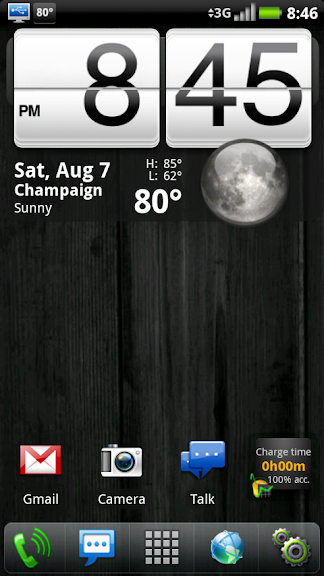
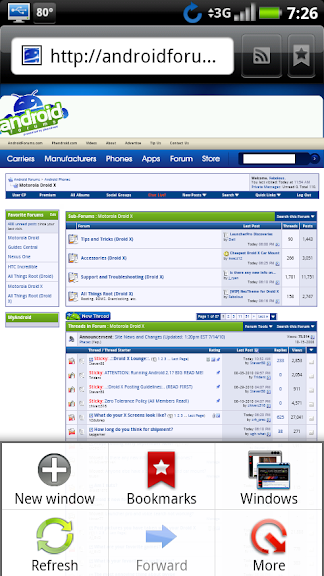
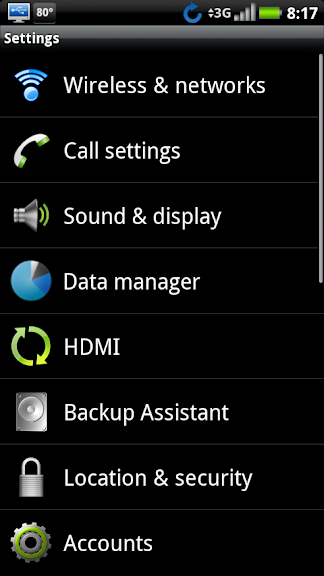
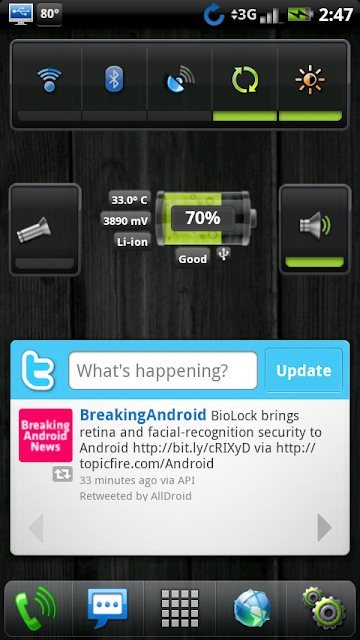
For even more screenshots, check out the original NexTheme thread here:
[THEME] NexTHEME-v2.0r2-Enom_1.9.2/CM_5.0.7.1 Back In the Kitchen! =) - Nexus Nation Forum
 ) SWEET!!!! Ty, FAb.
My Dx looks like my old N1............ but better.

Just get it deodexed. It is easy.Hey Fab, just curious if you know if this will work on the OTA 2.2 yet or not? Not trying to rush you by any means. Just wondering if youve tested it or not
I just did it few minutes ago, it took me like 15-20 minutes. 
rohitece06
Lurker
Just a quick note. I tried this on froyo 2.2 official ota -> rooted -> 2.3.15 deodexed -> tranquility 2.3.5rc and works great except the " battery percentage " patch. The recovery console just hangs on "updating ... ". A battery pull is required but everything else works great. Can you please look into that? And seriously I tried several themes but this is one I used on my droidx 2.1 and this is the one I am gonna use on my droidx 2.2 period.
kramerica
Android Enthusiast
can you do me a favor and link the instrustions you used to deodex the OTA 2.2? thanks in advance
Get xUltimate here (Thank you xeudoxus!) and download xUltimate Main v2.2.2 :
[Release] xUltimate - Droid Forum - Verizon Droid & the Motorola Droid Forum
You can move the files manually on your phone, but I did it the pc way (Windows 7 - right click and chose run as administrator), but it should work on XP or Vista (does not appear to have a mac version). Actually seemed easier for me, but to each his own. Besides, I'm not sure where you would move the files to on your phone and I didn't feel comfortable with it.
In PC Mode:
1. Download to your pc (desktop, documents, wherever).
2. Extract files to the same folder (I had a problem with my virus scan as it kept thinking a .exe was a virus, but I was able to manually move it from the zip file to the extracted folder). You might want to temporarily disable your virus scan as moving it for me did not work as well as I thought it did.
3. Plug in your phone (Change USB settings to PC Mode with USB Debugging active (settings - applications - development).
4. You will have 2 .exe files in that folder (main and test). I went straight for main and double clicked.
5. There are about 8 or 9 options that will pop up in a command window. I chose option 5 to deodex all. It will pull your phone files, backup and then deodex them all. It takes a while. A good 10-15 minutes depending on how much crap you have on your phone.
6. IMPORTANT. Let it run it's course. Be patient. When it's finished, make sure you hit "press any key to continue". DON'T just close the command window. Press any key and it will take you back to the main menu where you can chose, I believe, option 7 to exit.
7. Once you exit, you are deodexed!
UPDATE: I am including another link to Droid Forums where another user posted some instructions he had because of his trouble. I did not have to go in to terminal mode like he did. I just did the xUltimate run.
http://www.droidforums.net/forum/xeudoxus/47283-release-xultimate-19.html#post810913
Great stuff from xeudoxus!
kramerica
Android Enthusiast
Just get it deodexed. It is easy.
Were all the colored icons available on your phone (i.e. in gmail, messaging, settings?). Also, are you able to see the clock in the notification bar?
Frankly, i did not notice thatWere all the colored icons available on your phone (i.e. in gmail, messaging, settings?). Also, are you able to see the clock in the notification bar?
 , bc right after i just installed Nextheme. And ( i don't want to be braggadocio
  ) my phone looks just marvellously!!
kramerica
Android Enthusiast
I reinstalled the theme following the instructions from the Droid Forums adb commands and dang if that clock will not change.
That's what I get for not being patient for Fab's update. Let that be a lesson to all you impatient kids out there!
UPDATE: I just found an option in xUltimate (under Advanced option) for the clock to change the color in the advanced menu of xUltimate. You can change it to white or black or preference. This did not work for me (I originally was not fully deodexed, but was able to properly get it done) and I still have a black clock. Son of a ......
Maybe I should leave the smart stuff to the smart people.
That's what I get for not being patient for Fab's update. Let that be a lesson to all you impatient kids out there!
UPDATE: I just found an option in xUltimate (under Advanced option) for the clock to change the color in the advanced menu of xUltimate. You can change it to white or black or preference. This did not work for me (I originally was not fully deodexed, but was able to properly get it done) and I still have a black clock. Son of a ......
Maybe I should leave the smart stuff to the smart people.
Nope, but since i have an extended one, i don't really care....anybody get the battery percents to work???