
Install the app
How to install the app on iOS
Follow along with the video below to see how to install our site as a web app on your home screen.
Note: This feature may not be available in some browsers.
-
After 15+ years, we've made a big change: Android Forums is now Early Bird Club. Learn more here.
You are using an out of date browser. It may not display this or other websites correctly.
You should upgrade or use an alternative browser.
You should upgrade or use an alternative browser.
Root ZTE ZMAX Pro (Z981) root discussion
- Thread starter Masterchief87
- Start date
-
- Tags
- zte zmax pro
- Status
- Not open for further replies.


Probably just installed a virus on my computer and phone lol
Nah, lots of root exploits get flagged by anti-virus scans...just be sure you get your utilities from reputable / well-known sources...

Powduh
Well-Known Member
I got the file from SRS root websiteThey are saying someone has copied the srsroot and it's going by srs-root. So be weary .
I just tried on b08. it goes through the process then reboots the phone but does not root although says root successful. Does anyone know if they're on xda like the kingroot team. I'd like to contact them and let them know it's not working and see what they say. I know it's a long shot but still think it's worth trying.
Powduh
Well-Known Member
I tweeted @ them. But no responseI just tried on b08. it goes through the process then reboots the phone but does not root although says root successful. Does anyone know if they're on xda like the kingroot team. I'd like to contact them and let them know it's not working and see what they say. I know it's a long shot but still think it's worth trying.

lambo352
Well-Known Member
It was one of many things I tried. I had the same result. They said on Twitter they can root this phone since day 1.. but I did read somewhere that the whole site and everything they say is a scam cause they claim to root phone as soon as the phone comes out but other users keep getting the same results.. I personally think the key is in spoofing the OTA. I extracted the SuperSU folder and things got a bit confusing. I also agree that the OTA is not that unique. If that was the cast, why would ZTE or metro add the install update from Sd in settings..I just tried on b08. it goes through the process then reboots the phone but does not root although says root successful. Does anyone know if they're on xda like the kingroot team. I'd like to contact them and let them know it's not working and see what they say. I know it's a long shot but still think it's worth trying.
You may be right. after going through their tweets I found some phones that to my knowledge are still not rooted. Sorry guys. I should have looked into them more before posting. I don't think they're a complete scam because their software is free and worked on my old phone but I'm no longer convinced that they are completely legitimate either. Guess that's a no go. I'll edit or delete my old post. Still, I think it's a good thing to try every avenue available. At the very least we will have a very long list of things that don't work. That's better than nothing imo.It was one of many things I tried. I had the same result. They said on Twitter they can root this phone since day 1.. but I did read somewhere that the whole site and everything they say is a scam cause they claim to root phone as soon as the phone comes out but other users keep getting the same results.. I personally think the key is in spoofing the OTA. I extracted the SuperSU folder and things got a bit confusing. I also agree that the OTA is not that unique. If that was the cast, why would ZTE or metro add the install update from Sd in settings..

LeGiT_dIaMoNd
Well-Known Member
I used to have an lg volt. SRS root claimed that it can root it. But upon downloading the software and such. It didn't work. I don't trust SRS root they lie to much. Plus in order to root the volt we used geohots univeral root tool. I've been reading a lot about systemless root but i haven't been home to try it or test things. My cars fuel line snapped and left me stranded. But all's good I should be home tonight to try some of my knowledge

lambo352
Well-Known Member
I'm actually glad SRS root came up.. we sometimes forget to update the community on what has been tried. I also tried something I think is called Baidu root and pingpong root to no success.. keep exploring..You may be right. after going through their tweets I found some phones that to my knowledge are still not rooted. Sorry guys. I should have looked into them more before posting. I don't think they're a complete scam because their software is free and worked on my old phone but I'm no longer convinced that they are completely legitimate either. Guess that's a no go. I'll edit or delete my old post. Still, I think it's a good thing to try every avenue available. At the very least we will have a very long list of things that don't work. That's better than nothing imo.

cyanidekid
Android Enthusiast
Seams to be just like the original zmax. Jcase may be able to point us in the right direction. The exploit prob needs tweaked/written to work around system write protect. Am I making sense?

RAIDER W
Well-Known Member
The Asianrocker says Ya'll Won't Give Him No Love...Is the mbn file something you can use to root? I saw it. ITs saying it contains files in what I believe is what you need to root...
http://forum.xda-developers.com/showthread.php?t=2799160
I don't know why you are ignoring this idea coz I know I am on the right track. Look what I found:
http://forum.xda-developers.com/showthread.php?t=2641245
IT works come on now, will post this on xda. Maybe someone will be interested there since you all are ignoring me.

I was posting my opinions on this subject at a different site.. and the Rocker claimed he was "in"..

I've asked him to post a step by step for me.. since he says he knows the way in.. but, doesn't want root for himself because he wants to be ready for the Android N update.. I'll be sure to post my success should I make it to the *other side*


JIMMYHENDRIX
Well-Known Member
MaybeThe Asianrocker says Ya'll Won't Give Him No Love...
I was posting my opinions on this subject at a different site.. and the Rocker claimed he was "in"..
I've asked him to post a step by step for me.. since he says he knows the way in.. but, doesn't want root for himself because he wants to be ready for the Android N update.. I'll be sure to post my success should I make it to the *other side*
asianrocker
Android Enthusiast
The Asianrocker says Ya'll Won't Give Him No Love...
I was posting my opinions on this subject at a different site.. and the Rocker claimed he was "in"..
I've asked him to post a step by step for me.. since he says he knows the way in.. but, doesn't want root for himself because he wants to be ready for the Android N update.. I'll be sure to post my success should I make it to the *other side*
I did not say I am in. I was merely suggesting the mbn route. Which the zte person just confirmed is used to update firmware. I mean if none of the usual root they tried didn't work, the most sensical thing to do is try other way.
And I think mbn route is the way. I just don't know how to. LOL. So I am suggesting it to them even giving them the links to give them an idea to explore it because, I don't know android or linux.

str8upx
Newbie
Systemless root is a dead end in just about every possible way. I realize people
are just trying to help but if you spent 2 seconds looking at what your suggesting,
you would (should) see why it won't work.
Correct me if i'm wrong, mbn would'nt be possible without fastboot right?
are just trying to help but if you spent 2 seconds looking at what your suggesting,
you would (should) see why it won't work.
Correct me if i'm wrong, mbn would'nt be possible without fastboot right?
Last edited:

wwwFrAnKwww
Lurker
Hey, just came up with a crazy idea... But it needs a lot of us to do it.
Continuously, download the KingRoot app on a Z981, make a request to root, then uninstall the app, then download it again and so on.
If about 20 of us do it 10 times a day, we should hit top 50 in less than 2 weeks...
But again it's just an idea although I'm already doing this 20 times a day
Continuously, download the KingRoot app on a Z981, make a request to root, then uninstall the app, then download it again and so on.
If about 20 of us do it 10 times a day, we should hit top 50 in less than 2 weeks...
But again it's just an idea although I'm already doing this 20 times a day
str8upx
Newbie
Been using dirtycow and attempting to flash twrp using the method here:
http://forum.xda-developers.com/showpost.php?p=69312919&postcount=148
The exploit does work but the stock recovery remains.
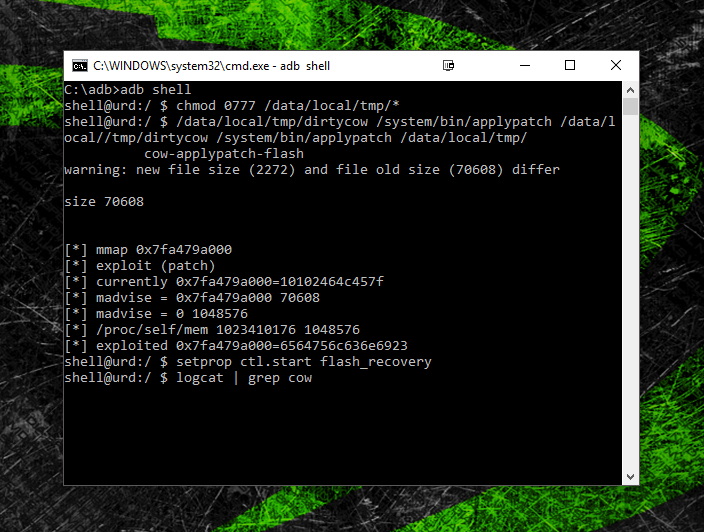
I've tried everything I could think of but I'm burnt out & done for today.
Maybe you guys (possibly who OTA'd?) will have better luck.
Here's a zip with: dirtycow, cow-applypatch-flash, & Messi"s extracted twrp.img
Edit: removed for now, will update.
Here's the commands from the link:
Its worth mentioning that this will only work with an unlocked boot-loader. Lets hope
that's not the problem here.
Edit: I know why this didn't work. I'm working on it now.
http://forum.xda-developers.com/showpost.php?p=69312919&postcount=148
The exploit does work but the stock recovery remains.
I've tried everything I could think of but I'm burnt out & done for today.
Maybe you guys (possibly who OTA'd?) will have better luck.
Here's a zip with: dirtycow, cow-applypatch-flash, & Messi"s extracted twrp.img
Edit: removed for now, will update.
Here's the commands from the link:
- adb push twrp.img /sdcard/recovery.img
- adb push dirtycow /data/local/tmp
- adb push cow-applypatch-flash /data/local/tmp
- adb shell
- $ chmod 0777 /data/local/tmp/*
- $ /data/local/tmp/dirtycow /system/bin/applypatch /data/local/tmp/cow-applypatch-flash
- $ setprop ctl.start flash_recovery
- $ logcat | grep cow (you can see flash progress or failure with this)
- wait ~60 seconds
- TWRP is installed!
Its worth mentioning that this will only work with an unlocked boot-loader. Lets hope
that's not the problem here.
Edit: I know why this didn't work. I'm working on it now.
Last edited:
str8upx
Newbie
I had the original ZTE ZMAX. We had a ZTEROOT and some switchers. We were in about the same situation as this. That ZTEROOT wouldn't work for this phone?
dude all that old basic shit has been tried since day 1.
edit: sorry for being harsh.. Im working on that.
Last edited:
Figured as much, my bad.dude all that old basic shit has been tried since day 1.
All good bro. I have thick skin lol I don't take the interwebz to heart. Hopefully we so get root for this phone because it's pretty badass. Has anyone reached out to hroark? He has been exceptional on alot of devices I've owned.
Last edited:
Been using dirtycow and attempting to flash twrp using the method here:
http://forum.xda-developers.com/showpost.php?p=69312919&postcount=148
The exploit does work:
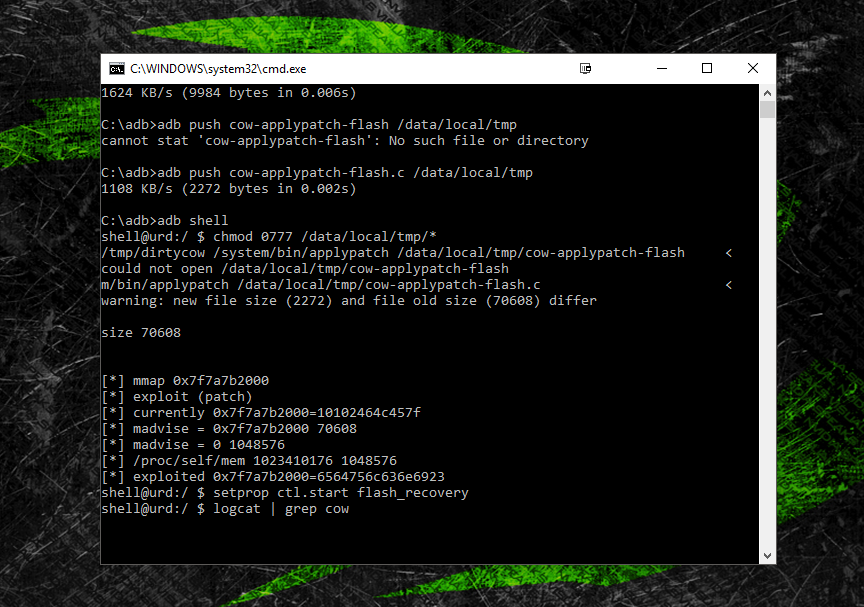
I've tried everything I could think of but I'm burnt out & done for today.
Maybe you guys (possibly who OTA'd?) will have better luck.
Here's a zip with: dirtycow, cow-applypatch-flash, & Messi"s extracted twrp.img
https://goo.gl/ZzSf72
Here's the commands from the link:
Everything seems to work fine except, adb reboot recovery, boots the stock recovery.
- adb push twrp.img /sdcard/recovery.img
- adb push dirtycow /data/local/tmp
- adb push cow-applypatch-flash /data/local/tmp
- adb shell
- $ chmod 0777 /data/local/tmp/*
- $ /data/local/tmp/dirtycow /system/bin/applypatch /data/local/tmp/cow-applypatch-flash
- $ setprop ctl.start flash_recovery
- $ logcat | grep cow (you can see flash progress or failure with this)
- wait ~60 seconds
- TWRP is installed!
Its worth mentioning that this will only work with an unlocked boot-loader. Lets hope
that's not the problem here.
Shouldn't twrp.img be recovery.img?Been using dirtycow and attempting to flash twrp using the method here:
http://forum.xda-developers.com/showpost.php?p=69312919&postcount=148
The exploit does work:
I've tried everything I could think of but I'm burnt out & done for today.
Maybe you guys (possibly who OTA'd?) will have better luck.
Here's a zip with: dirtycow, cow-applypatch-flash, & Messi"s extracted twrp.img
https://goo.gl/ZzSf72
Here's the commands from the link:
Everything seems to work fine except, adb reboot recovery, boots the stock recovery.
- adb push twrp.img /sdcard/recovery.img
- adb push dirtycow /data/local/tmp
- adb push cow-applypatch-flash /data/local/tmp
- adb shell
- $ chmod 0777 /data/local/tmp/*
- $ /data/local/tmp/dirtycow /system/bin/applypatch /data/local/tmp/cow-applypatch-flash
- $ setprop ctl.start flash_recovery
- $ logcat | grep cow (you can see flash progress or failure with this)
- wait ~60 seconds
- TWRP is installed!
Its worth mentioning that this will only work with an unlocked boot-loader. Lets hope
that's not the problem here.
Irregardless, still didn't work. Tried both ways
str8upx
Newbie
Shouldn't twrp.img be recovery.img?
Irregardless, still didn't work. Tried both ways
Yes I tried that as well. Did you take the system update?
The reason I ask is I thought I remembered people saying it added the option to update from sd card. (however I have that option in the stock recovery not updated)
- Status
- Not open for further replies.