
• After 15+ years, we've made a big change: Android Forums is now Early Bird Club. Learn more here.

Galaxy Nexus Battery Life

^
That's strange, but then again I havent let my phone idle without use for so long. How long does it actually last until the phone shuts itself off?

My first full run down of the extended battery i got the other day (still going):
Screenshot_2011-12-25-22-14-23.png


Screenshot_2011-12-25-22-14-18.png


i was concerned at first since i was using it quite a bit to look up bible stuff (NIV req. cellular data) and browse the the forum while in church.. It dropped down to 70 before noon. also used yelp a bit and messaged a ton, and played with the volume+ app.

I havent deleted the battery data from the lower capacity, so it's reading the % wrong for sure. It's been hanging at 4% for at least the past half hour.
 
I posted this a while ago in the lounge (likely place ehh :p), but try something. When you get done with a fresh charge, unplug, open up the camera app, then close it. That is all :)

My battery life markedly increased the last 2 days due to Franco's discovery (kernel dev for the GN & I'm not clear if it was solely him that found this out) about the camera and Google talk. The sleep time states are the improvement here and they're fairly substantial.

This is about 2 hours surfing on both 4G and Wifi. Wifi on about 65% of the time. 4G the rest. 15 min of phone calls. Wifi tether (on 4G) for 20 minutes. Emails 3 and texting 20. Screen brightness set to auto (I'm using a auto brightness mod that makes it brighter) and on ARHD Revolution ROM stock kernel.

I've noticed the phone eats battery fairly normally for a 4G monstor during heavy use on both wifi and 4G, it's a super smartphone it is what it is. But on my tests at night (more easily controlled) the sleep states are awful on both .2 and .3 type roms. However, a quick open and close of my camera app has allowed for much better sleep states and better battery life over the past 2 days. ymmv

67670d1a.png


4e0593e9.png


a9f997f2.png
 
I havent deleted the battery data from the lower capacity, so it's reading the % wrong for sure. It's been hanging at 4% for at least the past half hour.

Wait till it his 2%. Getting this phone to die (whilst idling) is the most frustrating thing I've done with it yet. It starts going back up to 3% after a while.
 
I'm at 63% with limited use, but an uptime of over 18 hours (18h 17m 5s). My top 5 usage is: Screen (33%), Phone idle (23%), Cell Standby (18%), Android OS (17%), Phone (3%). I'm been mostly on 4G and spent some time yesterday showing off the phone. I wowed everyone with how fast the camera snapped pics. Texted back and forth with one of my cousins, fielding World of Warcraft questions. I wasn't on WiFi at all, since the phone has been unplugged. I actually forgot to put it on the charger last night when I went to bed, so about 7 hours of that time on it is me sleeping.

If I left my Thunderbolt off the charger while I slept, it might not have a charge when I got up... even on WiFi.
 
Can I return my extended battery to the store even though I ordered online?

I notice no increase from standard 1850 battery.
 
I just do not understand the battery complaints. You're either not turning anything off that you're not using or you are using it like a laptop (screen always on, constantly working on it) instead of using it like a phone.

Many other phones do better for the same types of tasks (lasting twice as long, in some cases). It's a trade off for the larger and higher resolution screen, being an early adopter of ICS (which might need more power management tuning), and LTE (as already stated, it's inefficient).
 
I'm seeing sudden and unexplained power drain on my phone. With the extended battery, I am usually able to get a full day (18hrs) of on/off use out of it in 4g area.

Today, I unplugged the phone with a 100% charge, and within 2 hours of idle (never touched it during that time) I got the 4% low battery warning. Turned it on and noticed Android OS keep awake was the culprit.

Rebooted the phone, charged it to 100%, unplugged it, and it did the same thing again, 2 hours and the battery was nearly dead.

I haven't installed any new apps since a week ago so not sure why suddenly it started to drain so fast.

Any suggestions on what to do other than a complete factory reset?

It is running factory 4.0.2 rom, rooted.

Thanks
 
I have used the phone gingerly. Haven't fooled with it a whole bunch, but I've played on the internet, made a couple calls, done some texting and looked over some RSS feeds. No WiFi. Auto Brightness. Normal settings.

ss1.png

ss2.png
 
How did you get this good of battery life? Please tell me what you settings are that you got a whole day out of your phone with the 4g on.

Look at his graph...that's pretty strong LTE signal throughout the day so there's not as much LTE to 3g dropdown or LTE search going on, which in my experience is a huge battery drainer.
 
Just another take here, I've been using JuiceDefender for about a day now and I've gotten a 2x increase in my battery. I keep my phone on 3g usually because there's no need for LTE unless I'm watching Netflix or doing a big upload/download. (Wish we had an easier toggle already for the mobile networks!!)

Realized my car charger is like .5 amps which is why it charges to painfully slow. I'm going to pick up another dual charger today (I had the Griffin PowerJolt Duo but an older lesser amp one) and see if that improves.

nWOo0.png


6LAsE.png
 
My phone charges all day at my desk because I listen to Pandora on it. I traveled with it and I got through 16 hours but I didn't use it much. Just seems that when I use it, I am charging it while I am using it heavily. I will push more use off the charger to see what I get, but I can only assume that others are using it the same way I am. In which case, I have no complaints about the battery. :)
 
I had been having large keep awake times during the night that were draining my battery. Last night i read about killing the camera so i charged up the phone, turned it on, killed all data, and force closed the camera. It looks like it worked as keep awake just came on for a tiny bit by itself.


EDIT: never mind. Did the same thing again last night but had a huge awake time. Ugh!
 
I have had fantastic battery life with the extended battery. I have never gotten my Eris or Incredible to perform this way, my Incredible did have an extended battery.

I use my phone. Meaning, I do not let my phone sit idle afraid to use it. I send text, take pictures, internet, email, phone calls, Netflix, YouTube.

-3G only
-minimal or no gps
-minimal or no blue tooth (unless noted)
-screen set to 50%

Dec 25th: I took about 30 minutes of video this day (Christmas). A ton of video, showed family members the awesomeness of the Nexus display and ICS.
Screenshot_2011-12-25-23-02-14.pngScreenshot_2011-12-25-23-02-47.pngScreenshot_2011-12-25-23-24-08.png

Dec 26th: Most of the same as above, less video.
Screenshot_2011-12-26-21-28-34.pngScreenshot_2011-12-26-22-08-50.png

Dec 27th: A normal day of use. I had blue tooth on all day, 11 hours on.
Screenshot_2011-12-27-17-51-30.pngScreenshot_2011-12-27-17-51-36.png
 
I had been having large keep awake times during the night that were draining my battery. Last night i read about killing the camera so i charged up the phone, turned it on, killed all data, and force closed the camera. It looks like it worked as keep awake just came on for a tiny bit by itself.

How does one "Kill" the camera?

I've been getting a full day out of my extended battery until about 3 days ago. Now it doesn't even last 4 hours on 3G standby. Android OS keep awake seems to be the culprit.
 
How does one "Kill" the camera?
I believe the post above yours mentioned going into running apps and force closing the camera app, but an earlier thread about this topic claimed that you just needed to open the camera app manually and then close it. Supposedly at bootup the app is defined as "on" which causes keep awake errors.
 
Screenshot_2011-12-27-14-23-33.png


Screenshot_2011-12-27-14-23-43-2.png


I added notes to that second picture.

The first day I was letting it idle on my desk, using it to check the time every once and a while.

The second day (after the sleep, where you can see the battery almost leveled out...) I held a texting conversation. I was trying to not touch my phone much.

And yet, the battery still takes a dive. I wonder if the phone being bounced / moved around in my pocket is kicking on some sensors? WHY does it drop so fast? I'm a mechanic so my battery life always drops this fast. The fact I left it on my desk was because it was a weekend and I had skyrim to play :P

any insight would be helpful...
 
any insight would be helpful...
The only thing I do different is that I only enable bluetooth when I need it (commute). Also, if you are in a 3G-only area, I would change your phone's settings to be a CDMA only phone to avoid continually searching for a signal that isn't there.

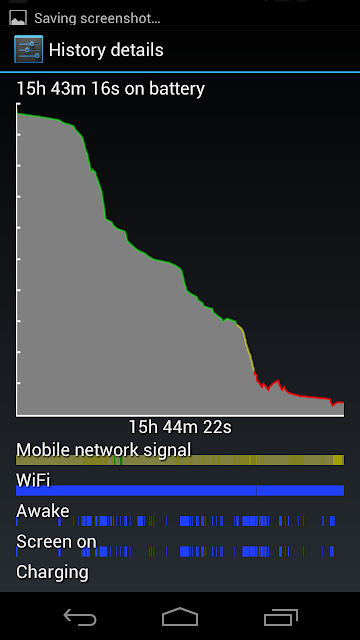
However, I'm not sure what your complaint is? You had your phone on without a charge for almost 30 hours! That's fantastic battery life in my opinion. I ALWAYS charge before I go to bed whether my phone is at 5% or 75% so in your situation I would be VERY content.
 
my complaint is that my battery life is NORMALLY like it is during the last third of the graph when its almost on a 55 degree slant. My battery life is normally 5/6 hours.

The ONLY reason it was so long is because i didnt touch it for a good 20 hours. All of the first day and the part in the middle where I was sleeping.

Of course a phone will last 30 hours if left to idle the entire time. The point i'm trying to make is that once I touch the damned thing I scare the juice right out of the battery. I mean, cmon, that part where I was playing a 3D game right before bed? My phone dropped TWENTY percrent. From 60% to 40%. For playing with the phone for 10 minutes. Do the math, that means If I had started to play with it at 100% that means It would have lasted an hour or so.

It's scary how much battery this phone saps when actually computing anything. I thought dual cores were supposed to make the battery last longer? My Droid X would play games for hours and not drop dead.
 
My Droid X would play games for hours and not drop dead.
Me too, however the games I was playing on my Droid X were nowhere near as complex as some of the games available now. ;)

The screen is a battery hog. It's larger and has more pixels than our Droid X did. If you use the screen continuously, it will suck down the battery.

When it comes to battery, I like to compare the phone to a laptop. Given that my Nexus has more pixels than my 15" laptop with a battery less than half as strong, I would say the phone gets *relatively* great battery life...
 
We were skyping the daughter yesterday. Spent an hour on skype.

I didn't realize you have to "hang up" from skype.

Looked at the battery mid afternoon, and battery was almost done.

I had to hit the 3 options buttons, and end the call. it was gobbling up my battery.
 
I believe the post above yours mentioned going into running apps and force closing the camera app, but an earlier thread about this topic claimed that you just needed to open the camera app manually and then close it. Supposedly at bootup the app is defined as "on" which causes keep awake errors.

Saw those posts but I don't see any camera app listed under running apps.
That's why I asked if there was anyother way to kill it.

I tested last night running in airplane mode, and still only got about 4 hours of standby time.

Something is causing the cpu to stay awake constantly and burning up power.

it's strange, phone worked fine for about a week, would get me through a full day on a charge, then suddenly started to drain a full charge within 4 hours of standby on Christmas day, and hasn't gone back to normal since then.
 
Saw those posts but I don't see any camera app listed under running apps.
That's why I asked if there was anyother way to kill it.

I tested last night running in airplane mode, and still only got about 4 hours of standby time.

Something is causing the cpu to stay awake constantly and burning up power.

it's strange, phone worked fine for about a week, would get me through a full day on a charge, then suddenly started to drain a full charge within 4 hours of standby on Christmas day, and hasn't gone back to normal since then.

Look under the ALL tab in the Apps menu in settings. Scroll down to the Camera app and click on it, you should be able to force close it from there.
 
So, can we pretty much put the 'bad battery life' thing to rest? Everyone who has the phone for a week and let the battery settle in reports they are getting way better battery life now.
 
Not sure I can put the bad battery life thing to rest. I've had mine since launch day in the U.S. and I'm still getting horrible battery life. All I do is checking my phone for the time and respond to text messages throughout the day. 7AM-4PM and it's dead. I haven't even reached 10 hours of battery life.. Not sure how others are getting 18 or even 20 hours of life out of this thing. They need to release the freakin' multimedia dock so I can dock my phone during the day at my desk and I wouldn't have to worry about it.
 
Back
Top Bottom