
Install the app
How to install the app on iOS
Follow along with the video below to see how to install our site as a web app on your home screen.
Note: This feature may not be available in some browsers.
-
After 15+ years, we've made a big change: Android Forums is now Early Bird Club. Learn more here.
You are using an out of date browser. It may not display this or other websites correctly.
You should upgrade or use an alternative browser.
You should upgrade or use an alternative browser.
Root [ROM] Mikfroyo - ALL Versions
- Thread starter JB in AZ
- Start date
-
- Tags
- htc evo 4g
Is it me or does the market take forever to open and load? I can use AppBrain with no problems.
It works fine for me. Define forever. If it's really longer than usual, clear cache in manage applications. That might help.
ooooohhhhh burn! lmao suppose it can't be better at everything.It takes longer than it did in Myns. I clear the cache and see if that helps.
Like I tell me boss all the time, Since I am so good looking and so damn good at my job, if I was on time as well it just wouldnt be fair

on a side note I was looking for the clear cache option in manage applications and didnt see it...
ooooohhhhh burn! lmao suppose it can't be better at everything.
Like I tell me boss all the time, Since I am so good looking and so damn good at my job, if I was on time as well it just wouldnt be fair
on a side note I was looking for the clear cache option in manage applications and didnt see it...
Menu->Settings->Applications->Manage Applications->All
Normally it's market, but it's been renamed MikMarket for this ROM (I keep reading it as McMarket...). Tap that, and you will be able to clear cache.

stevcha
Android Expert
Found an additional solution to the slow MikMarket:
xda-developers - View Single Post - [ROM] - [01/08/2011] - MikFroYo v4.3 - ReEngineered Sense - Simply Fast.
xda-developers - View Single Post - [ROM] - [01/08/2011] - MikFroYo v4.3 - ReEngineered Sense - Simply Fast.
jeremyhood
Newbie
Okay I have a noob question, I am running Mikfroyo 4. 4 and love it, but I am wanting to know about Setcpu, I have it installed and wanting to know what I should set it on to get the best performance, just want it to run a little faster nothing major. Hope this question is not too simple, but since I have rooted my EVO and installed the custom ROM I can't stop obsesing over my EVO
Okay I have a noob question, I am running Mikfroyo 4. 4 and love it, but I am wanting to know about Setcpu, I have it installed and wanting to know what I should set it on to get the best performance, just want it to run a little faster nothing major. Hope this question is not too simple, but since I have rooted my EVO and installed the custom ROM I can't stop obsesing over my EVO
did you flash a seperate kernel or are you using the kernel that came with the rom? If your using the kernel that came with, then your probly not gunna get it to run any faster "on demand" scaling would be your best bet for performance, but the battery will suffer a little versus conservative or smartass.
You can flash a seperate kernel like netarchy and then you can overclock your processor for some more speed
 and then underclock with the screen off to save some battery
jeremyhood
Newbie
I flashed "Toastmod - 4.3-bfs-havs-more-sbc" not for sure ifbthis is the best kernel, but I am new and still learning. I am able to pick up pretty quick. Is this Kernel good? What's the difference between SBC and no SBC? When I look at setpcu its not that difficult but just need instructed as to what to set it too, performance etc. How high to set it and how to underclock it. Thanks a million for your help.
SBC is superior battery charging, there is currently alot of controvrsey regarding that kernel, with regards to whether or not the "overcharging" is bad for the batteries, I run the kernel seen in my signature. Anyways overclock to open up setcpu and press menu-device selection, then "auto detect" then set your min/max to 1152/245 if you want to overclock , for governors most find that conservative scaling is best on the battery, but you need to set up some profiles, here are mine
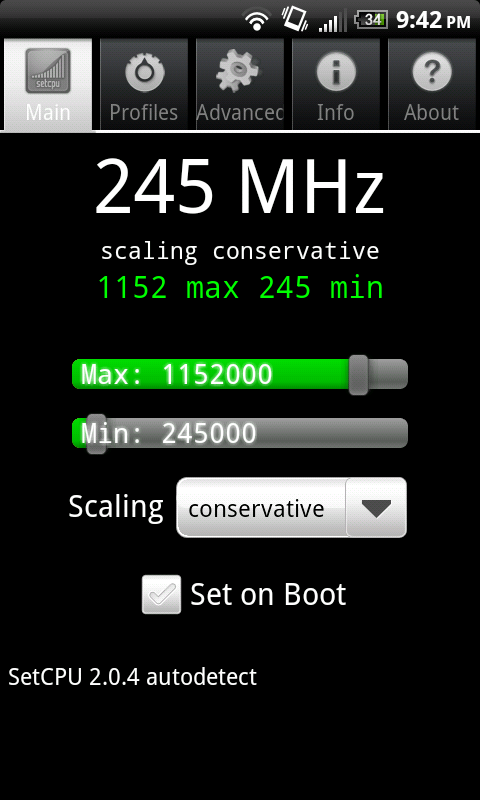
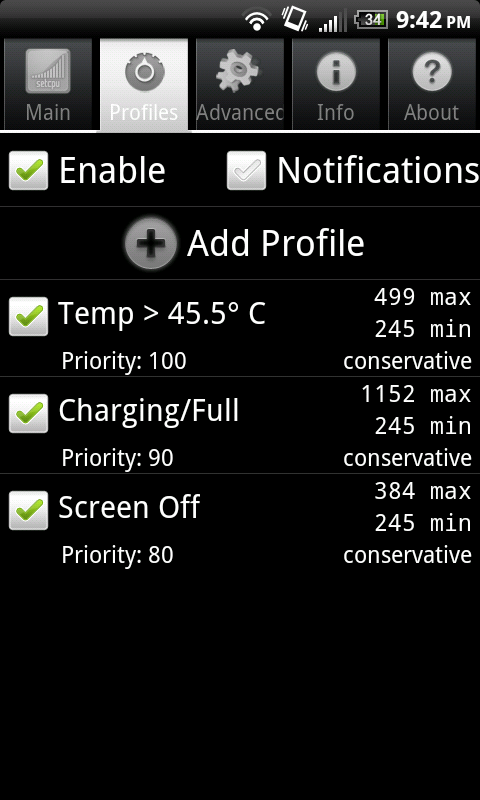
smartass works too, with smartass you dont want to run profiles cuz they are built in, but I found that smartass would drain the battery quickly while the screen was on. "on demand" works too and you would want to use your profiles, you will get a little faster performance from on demand, but less battery life than conservative.
I stick with conservative unless I really need speed or am trying to show my phone off to friends, then I would use ondemand, or even the "performance" scaling, which just pegs it at the max 1152 and keeps it there, needless to say you dont want to leave it on that setting for longer than need be
smartass works too, with smartass you dont want to run profiles cuz they are built in, but I found that smartass would drain the battery quickly while the screen was on. "on demand" works too and you would want to use your profiles, you will get a little faster performance from on demand, but less battery life than conservative.
I stick with conservative unless I really need speed or am trying to show my phone off to friends, then I would use ondemand, or even the "performance" scaling, which just pegs it at the max 1152 and keeps it there, needless to say you dont want to leave it on that setting for longer than need be
jeremyhood
Newbie
Thanks for your help! I set my profile up to match yours, the only thing different is your said charging/full mine says charging. Maybe your is fully charged. So will setpcu set these automatically when I reboot, or do I need to open the app when I reboot. Thanks a million for your help. I need to read up more about setcpu so I can understand what all the settings mean. So did this profile also underclock it? Can't thank you enough for taking time to help me. The screenshots rocked. How do you get those?
Thanks for your help! I set my profile up to match yours, the only thing different is your said charging/full mine says charging. Maybe your is fully charged. So will setpcu set these automatically when I reboot, or do I need to open the app when I reboot. Thanks a million for your help. I need to read up more about setcpu so I can understand what all the settings mean. So did this profile also underclock it? Can't thank you enough for taking time to help me. The screenshots rocked. How do you get those?
no prob man, just paying it forward. You can download screenshot from the market it's a free app.
It will automatically set everything on reboot EXCEPT for your max, so when you reboot, open setcpu (I keep a widget on my homescreen) and toggle the max bar off of 1152 and then back to 1152 and it will be good to go. Note even if after reboot your max bar is set on 1152, your cpu still wont go pass 998 until you move the bar
You are not underclocking as 245 is the stock min setting, most people find that underclocking makes their phone unstable, you should get good battery life with that setup, and if it's not snappy enough, try smartass (but turn your profiles off) or "on demand" and leave the profiles on.
jeremyhood
Newbie
Thanks on paying it forward, its working great, I set the widget up., and once I get this down I will pay it forward also, I am sure I will have more questions soon. Have a great night, God Bless.

Mikey P
Well-Known Member
I have switched over from Myn's to this rom and once again am having no luck with the hotspot tether. I'm guessing maybe it's my laptop or something since supposedly it is supposed to be hacked on both roms but I haven't been able to get it to work. When I turn it on and try to connect on my laptop is says "acquiring address" and sits for about 30 seconds then goes to limited or no connectivity. I can use the wifi tether app, but as it has been stated, the hotspot is supposed to be better. Any suggestions?

evoX2
Well-Known Member
I have switched over from Myn's to this rom and once again am having no luck with the hotspot tether. I'm guessing maybe it's my laptop or something since supposedly it is supposed to be hacked on both roms but I haven't been able to get it to work. When I turn it on and try to connect on my laptop is says "acquiring address" and sits for about 30 seconds then goes to limited or no connectivity. I can use the wifi tether app, but as it has been stated, the hotspot is supposed to be better. Any suggestions?
When you open up sprint hotspot> menu>advanced>LAN settings and if DHCP isn't checked then check that and try it out. I know i have to make sure that's checked when i tether my iPad and that's with this hack and also when i was paying for it through sprint.
Mikey P
Well-Known Member
well that got me connected to the phone, but for some reason the internet is not coming up. I will keep playing with it and see if something will work. just frustrating as I really want this to work. thanks for the help, you are the first to figure this out. woooo hoooo. now come on internet
jeremyhood
Newbie
I have another question, whenever you guys get a chance. I have the Mikfroyo 4.4 ROM and Toastmod - 4.3-bfs-havs-more-sbc Kernel, I seem to be experiencing lag, when switching Home screen to Home Screen, it seems to do great when downloading, surfing the internet playing music etc. It's just scrolling through Apps and Also Home Screens, it drives me nuts, I have reflashed the Kernel, also making sure to clear cache, delvic cache, Any Ideas for me? I have SetCpu running, with the profile pictured above in the thread.
Thanks for your time again guys.
evoX2
Well-Known Member
well that got me connected to the phone, but for some reason the internet is not coming up. I will keep playing with it and see if something will work. just frustrating as I really want this to work. thanks for the help, you are the first to figure this out. woooo hoooo. now come on internet
What security are you using? I use WPA2 (AES) and it connects just fine.