• After 15+ years, we've made a big change: Android Forums is now Early Bird Club. Learn more here.

Root Sd card class question?

An UrgeTo Dance

The Hero of the Winds
Hey everyone I am looking at buying a 16gb sd card for my phone (I wantz the higher GBs) and was wondering what class everyone would recommend. I don't know that much about SD card classes so I figured I would ask here. I am guessing class 10 is the best but why? Also if I get a class ten will it still be compatible with my phone?

Thanks,
Urge
 
class 10 is what i have. i just bought a patriot 16g class card from newegg. and i love it. class 10 is all about transfer speed. i believe it is 10mb/s. so far no problem with my card and my phone.
 
I dont know about new egg but i ordered my 16gb class 10 patriot from amazon for 40 bucks on a friday and it showed up on monday! been enjoying it for 4 days now. partitioned it, flashed KU R3, flashed a2sd and have 402 mb free memory out of the 448 it comes with after installing everything.
 
Sorry I cant say yet, Ive only really utilized it with KU R3 so far. I have too many variables in my equation right now; new ROM, new card, read ahead fix, dark tremors A2SD, its impossible to narrow it down till i try a bunch if different combinations. Either way the combo of KU R3, A2SD, class 10 card, is certainly fast and snappy.
 
The "speed" or "class" of SD cards is the write speed. All of them have about the same read speeds as that's mostly dependent on the hardware you're installing them in. Even if you're planning on shooting a lot of photos or videos on your Evo, a Class 4 will do just fine. I have a Kingston 16gb Class 4 ($19 with free shipping) in my Evo right now and never had a problem or delay or stutter when shooting video or doing anything else that writes a lot to the card. I also watch a lot of movies on my Evo that I encoded on my PC and then copy to the SD card using the Evo & USB cable as the card reader. The copy times are like a few minutes for close to a 1gb movie file.

I have a 10 megapixel digital SLR camera that records video in 720p, and I have never had a problem using Class 4 SD card in it. I also have a Class 6 card for that camera but notice zero difference in performance from my two Class 4 cards. All three cards are the same namebrand.

This "150x" and "Class 10", etc., stuff is and always has been 95% hype, and the 5% that is factual doesn't apply to most electronic devices because they weren't designed to take advantage of anything faster than Class 4 specs (or even Class 2 for that matter). Also keep in mind that this is only write speeds and that this whole new "Class" rating system is very loose/vague just like the speed X ratings in place before the Class thing.

I would just get a Class 4. They're dirt cheap now, and your wallet is the only place you'll notice a difference between a Class 4 and a Class 10 at 3-4x the price.
 
Can you tell a big difference in speed?

There are, of course, qualitative differences between brands, but the class of the sd card does directly refer to the Mbps (megabits per second) transfer rate for both read and write speeds, which in turn will dramaticall affect how quickly your device will access yer stuff the card.
 
it seems as though internet pilot and youdoofus are in a disagreement, im not sure whether the 10 class actually refers to read, if that is the case yes it will improve the "speed" of your evo because it will read your sd files faster, however, if it is only write then no you wont notice much difference. If it helps at all the card packaging only mentioned it was supposed to write at 10mbps didnt mention reading. Hopefully someone has some sort of facts or links to clear this up.
 
See THIS POST in another thread here -- I completely agree with what Ringmaster replies. I don't think the Evo hardware ever gets out of the Class 2 or Class 4 (at the most) speed when writing or reading, which explains why I don't have any performance related issues using a Class 4 with my Evo.
 
do you use A2SD without issue? I have seen people say you need a class 6 or higher but if the evo doesnt r/w that quickly then it wont matter.
 
on a side note, 40 bucks for the class 10 doesnt bother me, seemed cheap to me, also it can travel on into the future with me as phones get better lol
 
I think the real point in the class 10 16g for me was that i wanted to use a2sd and free up almost all of my internal memory and it was suggested 6 or higher, 10 was cheap and will be relevant for a while. My goal was achieved, memory is almost entirely free thanks to apps and dalvik being moved via A2SD, and im happy with my apparently over the top card.
 
it seems as though internet pilot and youdoofus are in a disagreement, im not sure whether the 10 class actually refers to read, if that is the case yes it will improve the "speed" of your evo because it will read your sd files faster, however, if it is only write then no you wont notice much difference. If it helps at all the card packaging only mentioned it was supposed to write at 10mbps didnt mention reading. Hopefully someone has some sort of facts or links to clear this up.

It is both a read and write rating, but the actual results are SOOOOOO highly dependent on the hardware using the card. Basically, by the time most hardware is capable of Class 10 write AND read speeds, there will already be a Class 20 or 30 card out. The hardware is always behind -- sometimes because that's the nature of the beast and sometimes that's on purpose because the hardware in question doesn't need to read data that fast or there are other limiting factors like the central processor can't process the data any faster than Class 2 or 4 speeds or it's not battery/power efficient to do so. The latter is true of most digital cameras (and I would imagine phones, too), which have a design focus on the fastest write speeds, likely at the sacrifice of slower read speeds because it's not as important to the consumer.

No hardware manufacturer is going to tell you in the manual, "No, our hardware can't read faster than Class 2." That makes it look like they're selling you old technology. So it can be kind of difficult to find out what speed the hardware is limited to. You have to get someone to buy the most expensive and fastest card available and then test it in your particular device to know.

There's a free app on the Market called SD Tools that will benchmark read and write speeds. Would be interesting for Class 10, 6, and 4 owners to run this in their Evos and compare the results. I'm willing to post my Class 4 results and even eat crow if it shows a full Class 10 benefit to buying and using a Class 10 card. I'm betting it's not, but....you never know.
 
on a side note, 40 bucks for the class 10 doesnt bother me, seemed cheap to me, also it can travel on into the future with me as phones get better lol

This is what justified my purchase. At the rate technology improves, I figured why not? My phones get upgraded yearly and don't see technology rolling backwards anytime soon. My phone runs perfect using A2SD and seems pretty snappy with this card. Does the phone react better than it would with a class 4 or 6? Couldn't tell you. But it works perfect for me.
 
do you use A2SD without issue? I have seen people say you need a class 6 or higher but if the evo doesnt r/w that quickly then it wont matter.

I don't specifically use A2SD to do it, but I do have most of my apps moved to my SD card just via the Froyo feature. I would have to rate my Evo's performance as relatively instantaneous...I don't think it could get any faster and have me be able to keep up with it.

on a side note, 40 bucks for the class 10 doesnt bother me, seemed cheap to me, also it can travel on into the future with me as phones get better lol

I think the real point in the class 10 16g for me was that i wanted to use a2sd and free up almost all of my internal memory and it was suggested 6 or higher, 10 was cheap and will be relevant for a while. My goal was achieved, memory is almost entirely free thanks to apps and dalvik being moved via A2SD, and im happy with my apparently over the top card.

$40 is an "ouch" for me, personally. I've been buying memory cards for various electronics for like a dozen years now, and it's been a very long time since I paid $40 for a memory card (they were VERY expensive when they first came out -- I think I paid $30 for a 32MB -- yes megabyte, not gigabyte -- SD card). Lately I insist that the price be at around $1/GB, but that can be difficult with MicroSD cards since they're typically more pricey for longer.

It sounds like you made a wise decision and for good reasons. You definitely have a more future-proof 16GB card than I do, and I'm sure there will be more electronic devices in the immediate future that can take full advantage of Class 10 speeds, so you'll be loving life and I'll be hating it. Haha. Actually, I'll be buying a Class 10 16GB card for $16 by then, and looking at the price of the Class 20 and 30 cards for $80 and thinking, "OUCH!" Hahaha. Of course, then there will be no hardware to take advantage of Class 20 and 30 card speeds, but....I'm getting dizzy at this obvious circular pattern. :confused:
 
OK so i ran 4 tests with SD tools got an average write speed of 8.6 MB/s with a st dev of .7 and an average read speed of 14.5 MB/s with a st dev of 1.6. It should be noted i removed the first test which was the lowest and also a bit of an anomoly, yeah its probably statistically incorrect but oh well, kind of like the first quad bench is always lower than usual.
 
INTERESTING!

SD Tools reports the following about my Kingston 16GB Class 4 MicroSDHC card:

Writing Speed: 5.4 MB/s, 7.7 MB/s, 7.9 MB/s, 7.5 MB/s
Reading Speed: 15.2 MB/s, 15.0 MB/s, 15.2 MB/s, 15.0 MB/s

It will be interesting to see if the Class 10 cards show a writing speed of or greater than 10 MB/s. I find the read speed to be very interesting, but I think that might be card dependent. Class ratings are MINIMUM speed ratings, so it's not crazy that the read speed is so much faster than the 4 MB/s, but I wonder if a lesser namebrand card would able to produce the same read speeds. Given the high read speeds of my lowly Class 4 card, if the Evo cannot write at speeds at 6 MB/s or 10 MB/s, then it wouldn't be beneficial to buy those higher Class cards thinking you'll get faster write and read speeds.

All I can say (with at least half a crow in my mouth) is way to go, Evo! Clearly the hardware is fast. Typically, the bottleneck is the reading speed of the card slot. That is not the case with the Evo!

I hope the rest of you will post your speed test results when you get time. I would find it interesting to know.

EDIT: Added more test run results on the same card.
 
I don't specifically use A2SD to do it, but I do have most of my apps moved to my SD card just via the Froyo feature. I would have to rate my Evo's performance as relatively instantaneous...I don't think it could get any faster and have me be able to keep up with it.


$40 is an "ouch" for me, personally. I've been buying memory cards for various electronics for like a dozen years now, and it's been a very long time since I paid $40 for a memory card (they were VERY expensive when they first came out -- I think I paid $30 for a 32MB -- yes megabyte, not gigabyte -- SD card). Lately I insist that the price be at around $1/GB, but that can be difficult with MicroSD cards since they're typically more pricey for longer.

It sounds like you made a wise decision and for good reasons. You definitely have a more future-proof 16GB card than I do, and I'm sure there will be more electronic devices in the immediate future that can take full advantage of Class 10 speeds, so you'll be loving life and I'll be hating it. Haha. Actually, I'll be buying a Class 10 16GB card for $16 by then, and looking at the price of the Class 20 and 30 cards for $80 and thinking, "OUCH!" Hahaha. Of course, then there will be no hardware to take advantage of Class 20 and 30 card speeds, but....I'm getting dizzy at this obvious circular pattern. :confused:

LOL yeah but i remember when computers came with less than a gig and were soo expensive, having them slap 16gb on a card the size of my fingernail is worth 40 bucks to me haha.

Also with apps2sd you cant move apps that have widgets, and some of the memory of moved apps is still retained on the internal so it can access them. A2sd uses symlinks blah blah, you probably know all this. Plus almost all apps can move via A2SD, not the case with apps2sd.
 
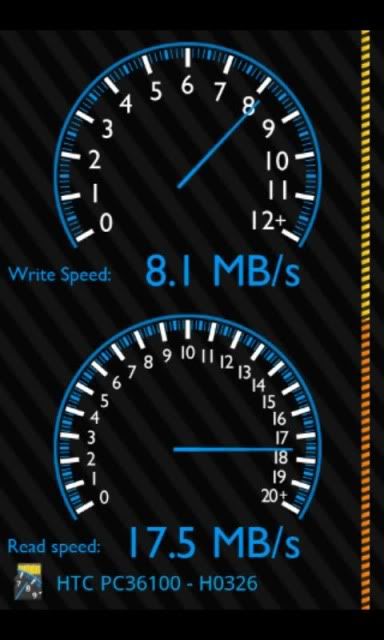
Just for fun I downloaded SD tools and figured I'd post a screen shot. Not to argue or anything, just think it would be interesting to see the different results. Here's my results from the 4th or 5th try using the Patriot 16GB class 10.

edit: seems I was beat posting the 1st results lol

sdtools.jpg
 
INTERESTING!

SD Tools reports the following about my Kingston 16GB Class 4 MicroSDHC card:

Writing Speed: 5.4 MB/s
Reading Speed: 15.2 MB/s

It will be interesting to see if the Class 10 cards show a writing speed of or greater than 10 MB/s. I find the read speed to be very interesting, but I think that might be card dependent. Class ratings are MINIMUM speed ratings, so it's not crazy that the read speed is so much faster than the 4 MB/s, but I wonder if a lesser namebrand card would able to produce the same read speeds. Given the high read speeds of my lowly Class 4 card, if the Evo cannot write at speeds at 6 MB/s or 10 MB/s, then it wouldn't be beneficial to buy those higher Class cards thinking you'll get faster write and read speeds.

All I can say (with at least half a crow in my mouth) is way to go, Evo! Clearly the hardware is fast. Typically, the bottleneck is the reading speed of the card slot. That is not the case with the Evo!

I hope the rest of you will post your speed test results when you get time. I would find it interesting to know.

Was that an average speed over a series of tests? My class 10 did read at over 15, 15.7 i believe was my max but as you can see during my 4 tests it had a st dev of 1.6, it wasnt nearly as stable as write speeds.

It didnt seem to be able to handle sustained writing over 10mb/s though it did at time run over 10 mb/s just not for the life of the test.

It actually read like in the 40's on occasion lol. BTW my card is a patriot
 
Just for fun I downloaded SD tools and figured I'd post a screen shot. Not to argue or anything, just think it would be interesting to see the different results. Here's my results from the 4th or 5th try using the Patriot 16GB class 10.

edit: seems I was beat posting the 1st results lol

sdtools.jpg

LOL yeah but you had a fancy screenshot and all i did was some statistics crunching :).
 
Back
Top Bottom