
For me it seems it force closes right after I reboot/start up the phone but when I go to check it again later on the battery info shows up it's just the initial check after a reboot that gives me the force close now.Aww crap, now I'm getting the Force Close issue with the battery info as well. I rebooted my phone earlier and I think that's when it started doing it. On my first boot after upgrading to 2.2, it was working just fine. Now the battery info and spare parts are not working right.
Install the app
How to install the app on iOS
Follow along with the video below to see how to install our site as a web app on your home screen.
Note: This feature may not be available in some browsers.
-
After 15+ years, we've made a big change: Android Forums is now Early Bird Club. Learn more here.
You are using an out of date browser. It may not display this or other websites correctly.
You should upgrade or use an alternative browser.
You should upgrade or use an alternative browser.
Root [Release] Android 2.2 Froyo for the Droid X
- Thread starter D13
- Start date
-
- Tags
- motorola droid x
Pointguard1122
Well-Known Member
Installing via bootstrap from SD card now. FINGERS ARE CROSSED!! I really hope this works or I will be asking WAY more questions. 
Thanks for everyone's help so far.
Thanks for everyone's help so far.
Aww crap, now I'm getting the Force Close issue with the battery info as well. I rebooted my phone earlier and I think that's when it started doing it. On my first boot after upgrading to 2.2, it was working just fine. Now the battery info and spare parts are not working right.
Hmmm, I take it back.... now it's working again and I haven't done anything! Well, the only thing I did was open up Spare Parts again and use the back button to back to the main menu of that program. Then I clicked on Battery History and it was working. Went back to the Battery icon in settings and now it's working too.
So I'm wondering if there's an issue with Spare Parts and the battery icon info under settings? Are all of you guys who have gotten the "Force Close" issue using Spare Parts too?
For me it seems it force closes right after I reboot/start up the phone but when I go to check it again later on the battery info shows up it's just the initial check after a reboot that gives me the force close now.
Ah, that must be it because now it's working again for me as well. I thought it might have something to do with Spare Parts because I was looking around in there before I tried again.
Pointguard1122
Well-Known Member
It says Install from sdcard complete, but I do not see any reboot now option. What do I do next?
EDIT: nevermind, I forgot to hit the power button to go back. rebooting NOW
EDIT: nevermind, I forgot to hit the power button to go back. rebooting NOW
Uhh.... I just tried to enable Stagefright, and now my phone is stuck in a boot loop, I think. It'll get to the Droid eye, but instead of just spinning forever while it loads, it just keeps stopping suddenly and looping back to the word 'Droid', and so on again and again.
And that's IF it gets past the Motorola logo. sometimes it does, sometimes not.
I guess i'll have to unbrick it, but... how do I do that with 2.2? Is there a way to fix it without losing everything I have?
And that's IF it gets past the Motorola logo. sometimes it does, sometimes not.
I guess i'll have to unbrick it, but... how do I do that with 2.2? Is there a way to fix it without losing everything I have?

D13
Android Expert
Ok i have to say, the original post is a bit of a mess. and the instructions more than a tad confusing. (sigh).
My method so far has been to try bootstrap and the Rom manager and to use them both to apply the update, so far all I'm getting is a Failed, Error Code 7 installation aborted like many who have tried the manual methods.
I edited it let me know if there is anything else you would like to see in the OP

bosox2k1
Android Enthusiast
Ah, that must be it because now it's working again for me as well. I thought it might have something to do with Spare Parts because I was looking around in there before I tried again.
This issue has been bothering me, do you mind listing in detail what you did to fix it? Cause it looks like you think you found the issue...
This issue has been bothering me, do you mind listing in detail what you did to fix it? Cause it looks like you think you found the issue...
I don't think I fixed it. Rather, I think it's like the others have been saying: when you first reboot, it seems to cause the error but after a while it seems to work again.
But just in case it does have something to do with Spare Parts, this is exactly the situation I encountered:
1) Upgraded to 2.2 and upon first boot, the battery info was working fine. I used the phone for several hours and was able to check the battery info every time.
2) Rebooted the phone later on and ended up using Spare Parts to check for the GPS bug (where it would show 100% after GPS was enabled). Seemed fine.
3) Went into Battery Manager and clicked on the Battery icon to see the stats, but got the "Force Close" issue. Tried opening it several times with the same issue.
4) Went back into Spart Parts and it was still on the screen that shows battery history, but it was different (showed 100% for everything). So I backed out of that screen with the back button and then went back into it. Now everything showed up just fine again (different percentages, etc).
5) Exited from Spare Parts and fired up Battery Manager and was able to see the stats again with no problem. Has been working fine every since.
Frankly, I don't think it has anything to do with Spare Parts now. Like the others have mentioned, it seems to cause the error when you first boot but ends up working after a while. I have no idea why this would be the case? Perhaps there's some app or setting that we are switching on/off that is causing it to work or stop working?
Obviously I'll lose everything but technically I could can try to boot into recovery.
Wipe data/cache.
back to 2.1.
re-root.
move su to /xbin/ with root explorer.
then update.
Right?
Yes I actually had to so this when the old version of Koush's recovery boot looped my phone.
Now I win


How did you get it so high? did yo edit that file bird was talking about?
You are the man, man!!! Now that I can update, do I have to reinstall all the stocks apps I removed??? or do i have to do the SBF file thing? I dont remember what apps I deleted.
Since you don't remember I'd do the sbf thing first. If you need the sbf pm me or go to koushs site and follow the link there

Airmaxx23
Android Expert
How did you get it so high? did yo edit that file bird was talking about?
Here's my best so far:
See post 395 in this thread for how to increase the quadrant score.

D13
Android Expert
How did you get it so high? did yo edit that file bird was talking about?
yep thats it
Here's my best so far:
See post 395 in this thread for how to increase the quadrant score.
Other than getting a higher score in Quadrant, is there any other real world benefit to editing the file to enable Stage Fright? I mean, does it make anything else faster (like the UI, for example)?
D13
Android Expert
Other than getting a higher score in Quadrant, is there any other real world benefit to editing the file to enable Stage Fright? I mean, does it make anything else faster (like the UI, for example)?
nope you can just impress your friends with android phones more
nope you can just impress your friends with android phones more
rofl, im waiting for my phone to charge up at work before i can mess with it some more /cry battery went dead trying to reinstall 2.2 lol
Nice, I just got a 2224 on Quadrant.
DAMN YOU! I only got 2131
MUST BEAT AIRMAXX MUST BEAt...

D13
Android Expert
DAMN YOU! I only got 2131
MUST BEAT AIRMAXX MUST BEAt...
I just keep pressing full benchmark over and over and over
Can anyone help revert me back to 2.1?
I just got mine back up and running with 2.1...used info from a post from humungus (thanks!)
Heres how I did it
1. Flashed the SBF using RSDlite using this guide
Droid X SBF .604 available thanks to Phoxus - Droid X Rooting - AllDroid Public Board - Droid X SBF .604 available thanks to Phoxus - Droid X Rooting - AllDroid Public Board - AllDroid.org > Home
(Note you will have to get the SBF from one of the 'other' sources)
2. Then you will get a bootloop
3. Go to recovery (power off, hold home, press power still hold home. When droid with ! shows, release power and home, press search button)
4. Wipe the cache using menu option
5. Wipe data using menu option
6. Reboot
*you should now be back to bone stock*
If you have a boostrap recovery like I did...
7. Re-root using any method you want
8. Install and run bootstrap like you did you make the recovery
9. Restore the recovery
*now you are up to date as far as your bootstrap recovery*
Hopefully this helps anyone who wants to revert.
D13
Android Expert
I just got mine back up and running with 2.1...used info from a post from humungus (thanks!)
Heres how I did it
1. Flashed the SBF using RSDlite using this guide
Droid X SBF .604 available thanks to Phoxus - Droid X Rooting - AllDroid Public Board - Droid X SBF .604 available thanks to Phoxus - Droid X Rooting - AllDroid Public Board - AllDroid.org > Home
(Note you will have to get the SBF from one of the 'other' sources)
2. Then you will get a bootloop
3. Go to recovery (power off, hold home, press power still hold home. When droid with ! shows, release power and home, press search button)
4. Wipe the cache using menu option
5. Wipe data using menu option
6. Reboot
*you should now be back to bone stock*
If you have a boostrap recovery like I did...
7. Re-root using any method you want
8. Install and run bootstrap like you did you make the recovery
9. Restore the recovery
*now you are up to date as far as your bootstrap recovery*
Hopefully this helps anyone who wants to revert.
Just wipe before you flash the sbf
Here's my best so far:
See post 395 in this thread for how to increase the quadrant score.
You and your silly LITTLE scores I'm about to make you my bitch
Beat this
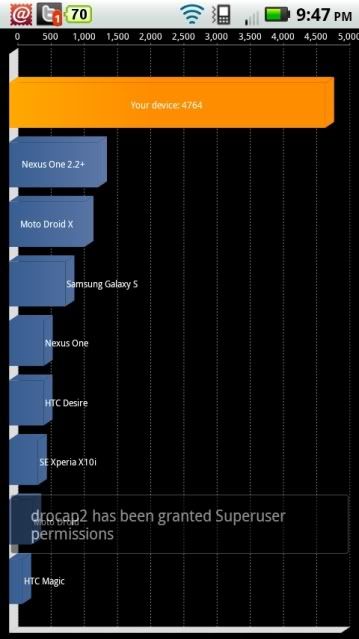
No it is not doctored, it's real .
D13
Android Expert
You and your silly LITTLE scores I'm about to make you my bitch
Beat this
No that is not doctored it freaked me out also.
see if you press it enough times...
hahahahaha
no really how'd ya do it